
Save 8 to 12 hours a month on invoicing. Automate reminders, track unpaid invoices, and get paid faster.

Choosing the best invoicing software for freelancers comes down to one question: how much time do you currently spend chasing payments each month? Add it up honestly. Creating the invoice. Sending it. The follow-up three days late. The second follow-up two weeks later. Checking your bank account. Writing yet another polite email you do not want to write.
Most freelancers I work with clock 8 to 12 hours a month on this. A full workday. Every month. Time spent on admin instead of billable work. At $50 an hour, that’s $400 to $600 in lost earning time. Over a year, $5,000 to $7,000. Money you’ve already earned but can’t bill more time to recover.
This guide covers the seven invoicing tools freelancers actually use in 2026. Real prices. Honest limitations. The actual time-to-pay math. By the end, you’ll know which one to pick and how to set it up so the next billing cycle handles itself. If you also want help tracking business expenses or smoothing irregular cash flow, the guides on those cover the wider system.
The hidden cost of doing this manually
Before we get to the tools, the math matters. Most freelancers underestimate it.
Creating an invoice from scratch takes about 10 minutes. Following up after 15 days of silence: another 10. A second follow-up: 10 more. Checking whether the email got opened. Wondering whether to call. Feeling awkward about it. Multiply that across multiple clients each month and you hit 8 to 12 hours fast.
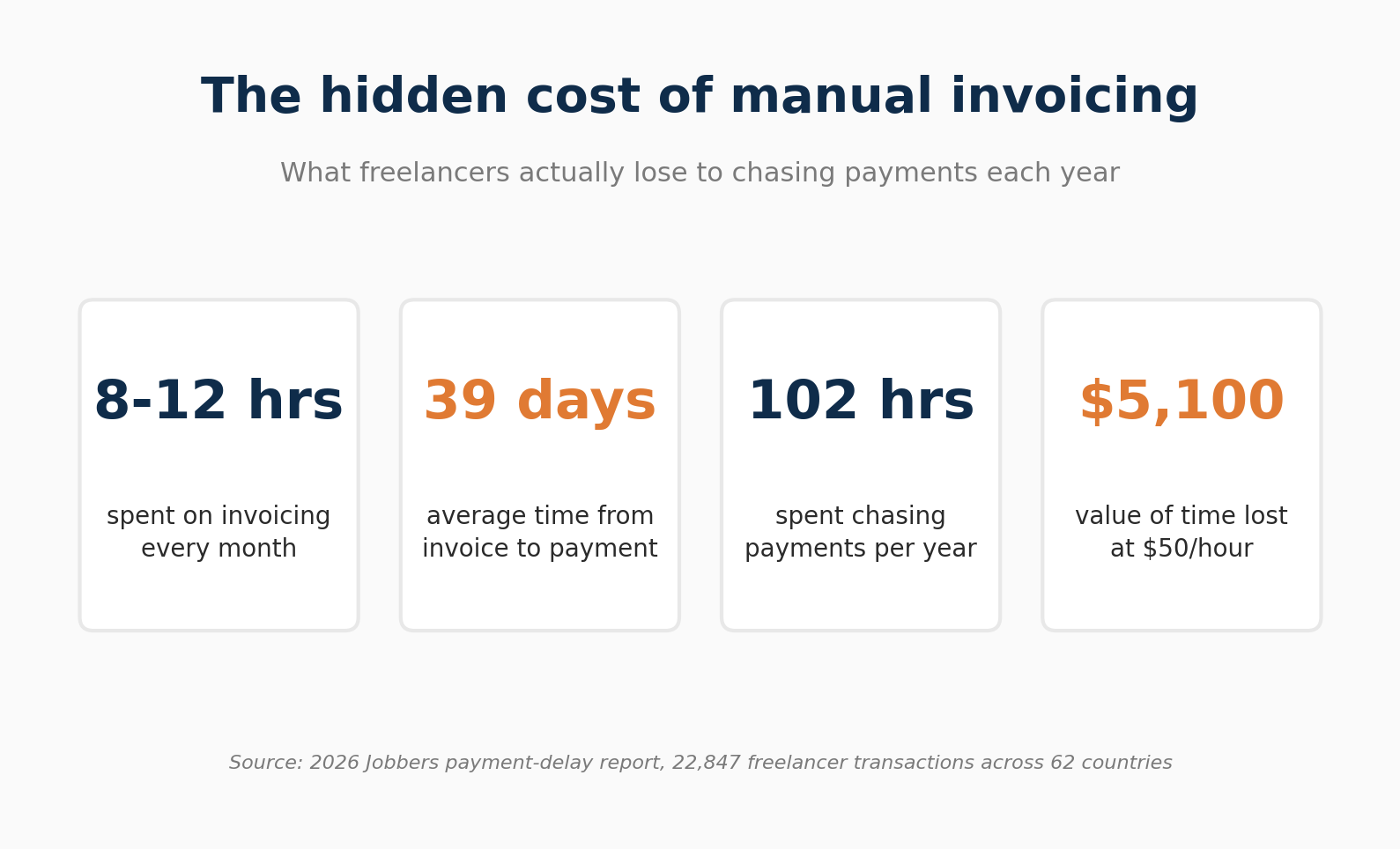
Switching to dedicated software changes two things. First, it cuts the per-invoice creation time. Second, it sends the reminders for you, on a schedule you set once. The reminder goes out three days before the due date, the day it’s due, and at intervals afterwards. You do nothing. Xero’s published data shows median payment times improve when invoices include a payment service and are sent via SMS, compared to email-only invoices without a payment link [source: xero.com/us/pricing-plans].
Then there’s the money you absorb directly because of late payments. Industry surveys consistently put the average freelance payment cycle well past 30 days, and a meaningful share of freelancers report at least one late or missing payment every year. The hidden costs add up fast: credit card interest and overdraft fees on the months you’re waiting, plus the hours each week spent on follow-up emails and awkward check-in calls. None of that time is billable, but it still comes out of your earnings.
Stress is harder to quantify, but it’s real. Not knowing whether an invoice was received. Wondering if the follow-up email sounded too aggressive. Avoiding a client conversation because you don’t want to seem like you’re only after the money. That overhead disappears when the software handles the reminders. The cadence stays professional, consistent, and off your plate.
What to check before you commit to a tool
The features that matter most depend on how you work. Here’s what to look at.
- Automatic payment reminders. The single feature with the biggest impact on payment speed. The good tools let you set a sequence: a reminder three days before the due date, another the day it’s due, and escalating reminders after that. Set it once. Leave it.
- Online payment acceptance. An invoice with a Pay Now button that takes cards, ACH, or Apple Pay gets paid faster than one that requires the client to log into their banking portal and initiate a wire. Less friction, fewer delays.
- Recurring invoices. If you have retainer clients, monthly subscriptions, or any work you bill on a regular schedule, automating invoice creation saves you from missing a billing cycle. One forgotten invoice per quarter is $3,000 to $5,000 you had to chase that you could have collected automatically.
- Time tracking integration. If you bill by the hour, this is non-negotiable. A tool that tracks your hours and converts them to invoice line items removes manual calculation and catches billable time you’d otherwise miss.
- An invoice status dashboard. At any moment, you should be able to see which invoices are paid, which are outstanding, which are overdue and by how many days, and the total value across each category. An aging report (0 to 30 days, 30 to 60, 60 to 90, 90+) tells you where to focus without reviewing each invoice one by one.
- Mobile access. Sending invoices the moment you submit deliverables, rather than when you get back to your desk, shortens your average days-to-pay across the year. A working mobile app matters.
- Processing fees. Most tools that accept online payments charge 1% to 3.5% of the invoice value, depending on the payment method. If you invoice $10,000 a month and accept credit cards, 2.9% is $290 in fees. Worth factoring in. Rarely worth avoiding entirely, since faster payment usually offsets the cost.
The tools: an honest comparison
FreshBooks
Best for: Freelancers who bill by time or project and want invoicing, expense tracking, and accounting in a single tool.
FreshBooks started as an invoicing tool and grew into a full accounting platform. Invoicing is still what it does best. Clean invoice builder with drag-and-drop line items, your logo, and customisable templates. Time tracking is built in and converts to invoices automatically. The mobile app is rated highly across G2 and Capterra reviews.
The client portal is one of the more useful features in the category. Clients view invoices, make payments, and see project progress through a branded portal, which cuts back-and-forth that causes payment delays. Payment acceptance covers credit and debit cards, ACH, Apple Pay, and Google Pay. You can apply late payment fees to overdue invoices automatically.
The Lite plan caps you at five billable clients. Fine for starting out, restricting once you grow. Multiple G2 and Capterra reviewers say they outgrew Lite within two months and had to upgrade. The Plus plan removes the client cap and is where most active freelancers land.
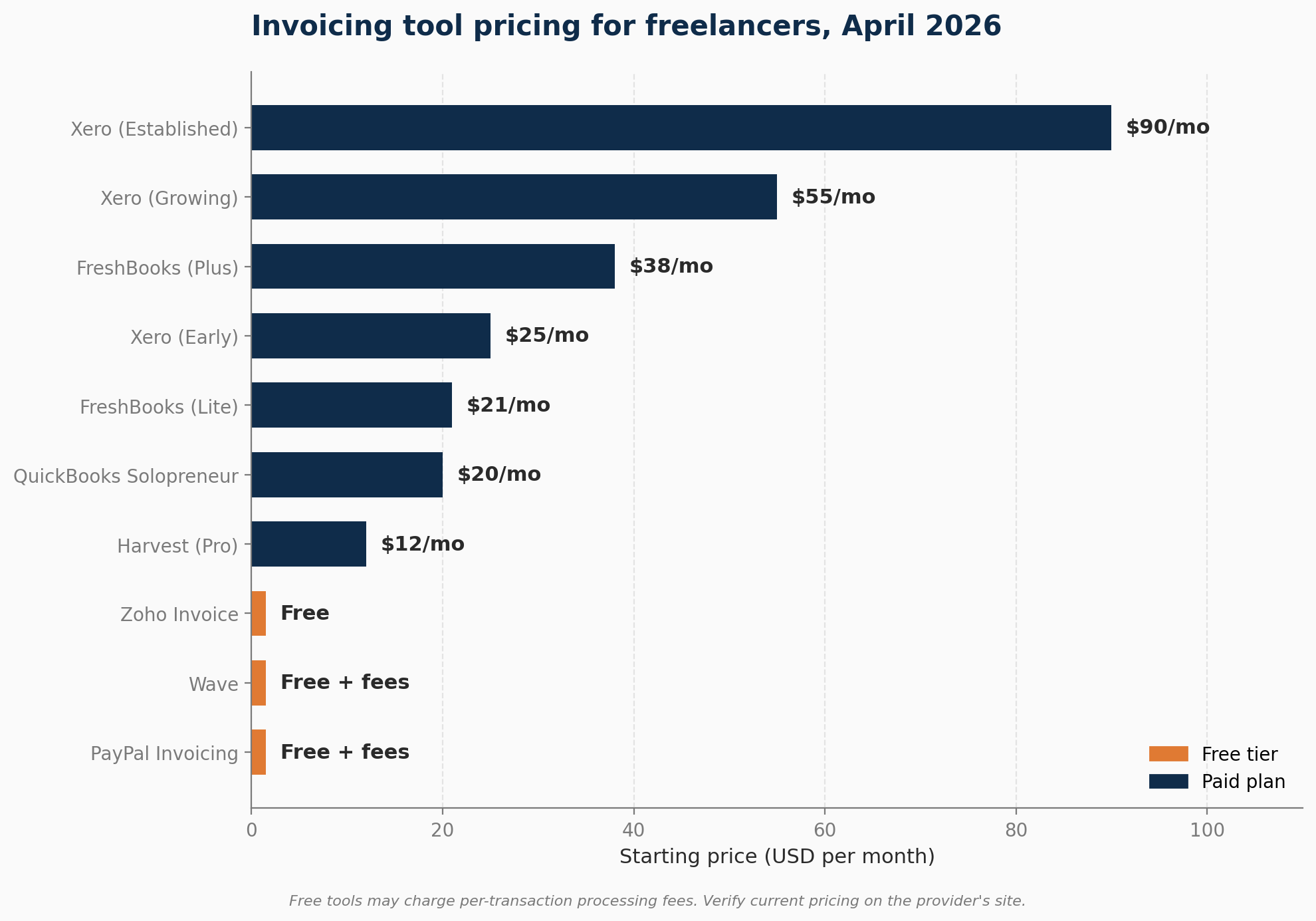
Pricing (verified April 2026): Lite roughly $21 per month, Plus roughly $38 per month, Premium roughly $65 per month. FreshBooks raised prices in early 2026 and runs frequent introductory discounts (60% to 90% off for the first 3 to 4 months). Pricing also varies between paid-monthly and paid-annually billing. Always check the live pricing page at freshbooks.com/pricing before committing. 30-day free trial available.
Honest limitation: More expensive than invoicing-only tools. Reviewers also flag that you lose access to old invoices and customer data when you cancel, so if you ever leave, export everything first. Some Stripe-based payment processing delays have been reported in NerdWallet’s review and on G2.
Wave
Best for: New freelancers who want professional invoicing at no monthly cost, or anyone testing their business model before committing to a paid tool.
Wave’s core invoicing features are free. Unlimited invoices, basic accounting, expense tracking, receipt scanning. Revenue comes from payment processing: 2.9% + $0.60 per credit card transaction (3.4% + $0.60 for Amex), and 1% (minimum $1) for ACH bank transfers.
Wave introduced a paid Pro plan in January 2024, which moved automatic bank transaction imports behind a paywall. Pro costs $16 per month billed annually or $19 per month billed monthly. If the free tier feels stripped down compared to what you saw two years ago, that’s why.
The bigger concern with Wave is service reliability around payments. Trustpilot and the Better Business Bureau both carry recurring complaints from Wave users about extended payment holds with limited communication. Some reviewers report losing payment-routing access despite prior approval, with little recourse when accounts get flagged. Read the recent complaints yourself on bbb.org and trustpilot.com/review/waveapps.com before routing significant client payments through the platform.
Wave has no built-in time tracking. If you bill by the hour, you’ll need a separate tool like Harvest or Toggl and enter hours manually.
Pricing: Free for core features. Pro at $16 to $19 per month. Payment processing fees apply per transaction. Source: waveapps.com/pricing.
Honest limitation: Works fine for simple invoicing of low volume. The payment-hold complaints and lack of live support on the free plan are reasons to keep client payments diversified across providers.
Xero
Best for: Freelancers who work internationally, collaborate with a bookkeeper or accountant, or want professional-grade reporting alongside invoicing.
Xero is what accountants tend to recommend because it’s built around their workflow. Unlimited users on every plan means your accountant or bookkeeper can access the account at no extra cost, and the platform connects to over 1,000 third-party apps. Automatic bank reconciliation, recurring invoices, multi-currency billing, and payment reminders are all included.
For freelancers doing international work, Xero’s multi-currency support is the clearest differentiator (available on the Established plan only). You invoice in your client’s currency, receive payment, and the conversion is tracked automatically in your home currency for tax and reporting purposes.
Pricing (verified April 2026): Early plan $25 per month (capped at 20 invoices and 5 bills per month). Growing plan $55 per month (unlimited invoices and bills). Established plan $90 per month (adds multi-currency, project tracking, expense claims, and 180-day cash flow forecasting). 30-day free trial. 80% off the first 3 months for new US customers as of April 2026. Source: xero.com/us/pricing-plans.
Honest limitation: The Early plan is too restrictive to be a long-term option for most freelancers. The 20-invoice cap also counts quotes you send. Most freelancers hit the ceiling within 3 to 6 months and move to Growing at $55 per month. Budget for the higher tier from day one. Payroll is not built in, so US users add Gusto separately at $40+ per month if they need it.
Zoho Invoice
Best for: Freelancers who want a fully-featured invoicing tool at no cost, or those already using other Zoho products.
Zoho Invoice’s free plan covers online and offline payment acceptance, automated payment reminders, time tracking, project management, receipt scanning, expense tracking, and real-time reporting, with no time limit. That’s a stronger free offering than Wave, without the payment-hold complaints.
The time tracking and project management features built into the free plan make it more capable than Wave for hourly freelancers. You can also invoice in multiple currencies and multiple languages, which matters if you work with international clients regularly.
Pricing: Zoho Invoice itself is free for most freelancers. The paid product (Zoho Books) starts around $15 to $20 per month for the Standard plan if you outgrow the free tier or need full accounting. Source: zoho.com/invoice.
Honest limitation: Integrations outside Zoho’s own products are limited. If you’re not already using Zoho CRM or other Zoho tools, some workflow connections will need workarounds. The interface also feels older than FreshBooks and Xero.
Harvest
Best for: Freelancers who bill primarily by the hour and want time-to-invoice conversion that doesn’t require manual data entry.
Harvest is built specifically for time-tracking and invoicing for freelancers, agencies, and professional services firms. You track time on a project, hit a button, and Harvest builds the invoice from your logged hours. For hourly freelancers (designers, developers, consultants), this workflow is faster than any other tool covered here.
The project dashboard shows hours worked against your budget on each client, which lets you catch scope creep before it becomes an awkward conversation.
Pricing: Free plan limited to one user and two active projects. Pro plan at $12 per month per user with a 30-day free trial. Harvest is not a full accounting platform. It connects to Xero or QuickBooks Online for that side. Source: getharvest.com/pricing.
Honest limitation: Works best when paired with Xero or QuickBooks for reporting and tax preparation. If you want one tool for everything, FreshBooks does the same job in a single subscription.
PayPal Invoicing
Best for: Side-hustlers and freelancers with occasional one-off clients who already use PayPal.
PayPal Invoicing is free to create and send. No monthly subscription. You log in to your PayPal business account, build the invoice, send it, and your client pays via PayPal balance, credit card, or debit card. Most clients already have a PayPal account, which removes the “how do I pay this?” friction step that delays payment on lesser-known platforms. International payments work without additional setup.
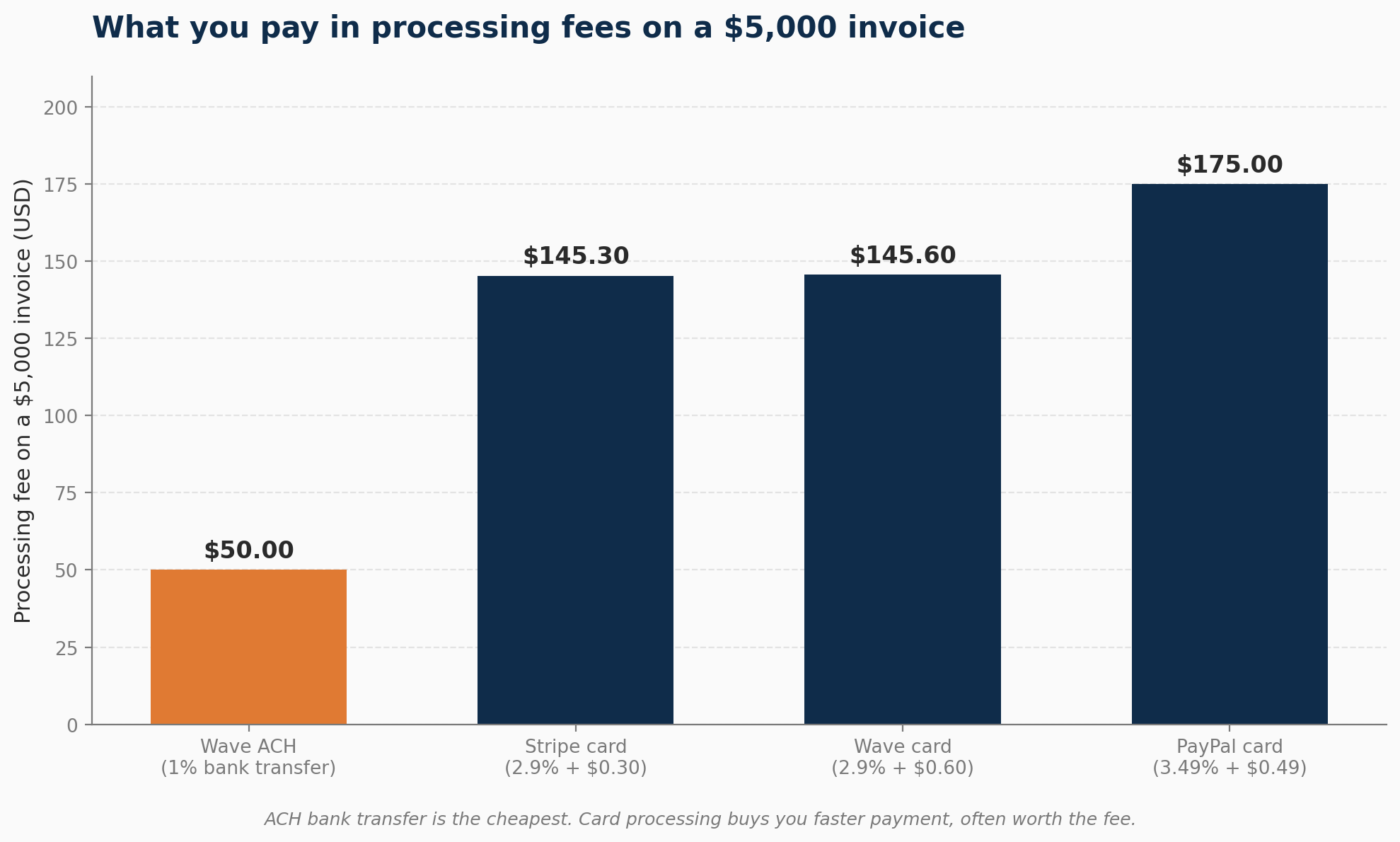
The fee structure is the catch. Standard US merchant rate runs around 3.49% + $0.49 per card transaction, which is meaningfully higher than Wave (2.9% + $0.60) or Stripe (2.9% + $0.30). On a $5,000 invoice, that’s roughly $175 in processing fees, against $145 with Wave or $145 with Stripe. For occasional one-off jobs, the math works fine. For consistent monthly billing of multiple retainers, the cumulative fee gap matters [source: paypal.com/us/business/paypal-business-fees].
What you don’t get: time tracking, escalating automatic reminders (PayPal sends one polite nudge), recurring billing for retainers, or any accounting integration. The dashboard doesn’t give you a clean accounts-receivable view.
Honest limitation: PayPal account holds happen, and the dispute process favours buyers in many cases. Treat PayPal as a starting point or a secondary option, not your primary billing system once you’re past five clients.
QuickBooks Solopreneur
Best for: Solo freelancers who were on QuickBooks Self-Employed before Intuit sunset it, and freelancers who want bookkeeping plus tax-time integration with TurboTax in one subscription.
QuickBooks Solopreneur replaced QuickBooks Self-Employed (QBSE) in 2024. If you’re an ex-QBSE user, Intuit can migrate your data and subscription automatically. Starting fresh, Solopreneur gives you mileage tracking via GPS, automatic transaction categorisation between business and personal, basic invoicing, an estimated quarterly tax calculator, and a clean handoff to TurboTax at year end. The TurboTax integration is the cleanest in the category, which matters if you file your own taxes.
Invoicing inside Solopreneur is functional rather than polished. You can create branded invoices, accept ACH (no fee on direct ACH from clients), and accept cards (standard QuickBooks Payments fees apply). Recurring invoices are supported. Estimates can convert to invoices.
Pricing: $20 per month or $215 per year. 30-day free trial. Frequent 50% off promotions on the first three months. Source: quickbooks.intuit.com/solopreneur.
Honest limitation: No payroll, no multi-user access, no inventory tracking. If you grow into those needs, you migrate up to QuickBooks Online (starting around $38 per month). Capterra reviewers flag a buggy mobile app and slow customer support. The mileage tracker is convenient but less accurate than a dedicated app like MileIQ for high-mileage drivers.
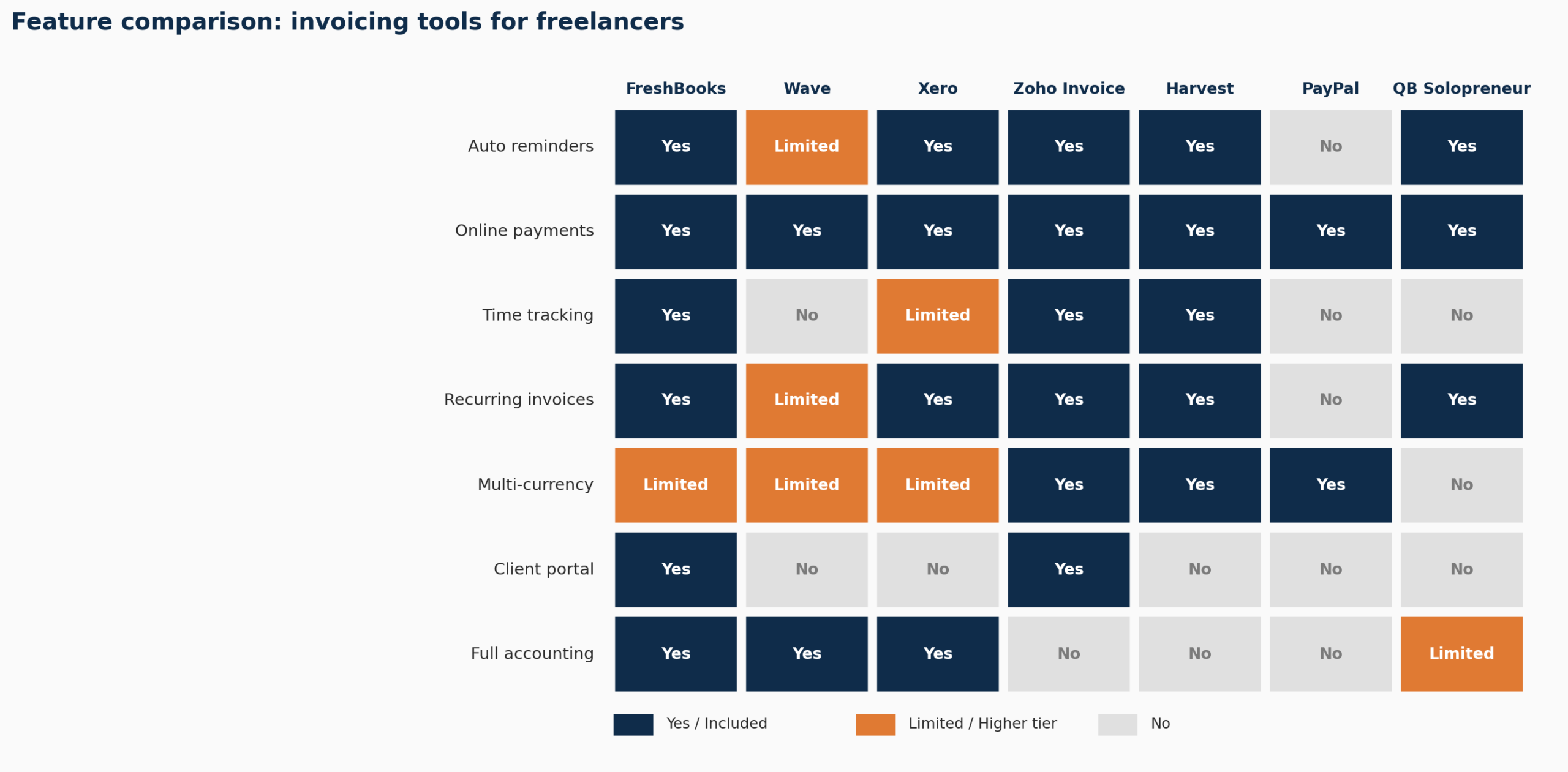
Feature comparison table
| Feature | FreshBooks | Wave | Xero | Zoho Invoice | Harvest | PayPal | QB Solopreneur |
|---|---|---|---|---|---|---|---|
| Auto reminders | Yes | Pro plan only | Yes | Yes | Yes | Limited | Yes |
| Online payments | Yes | Yes (fees) | Yes | Yes | Stripe / PayPal | Yes | Yes |
| Time tracking | Yes | No | Established only | Yes | Yes (core) | No | No |
| Expense tracking | Yes | Yes | Yes | Yes | Basic | No | Yes |
| Full accounting | Yes | Yes | Yes | No | No | No | Light |
| Multi-currency | Yes | Limited | Established only | Yes | Yes | Yes | Limited |
| Mobile app | Excellent | Good | Good | Good | Good | Good | Good |
| Client portal | Yes | No | No | Yes | No | No | No |
| Starting price (USD/mo) | ~$21 | Free | $25 | Free | Free ($12 Pro) | Free + fees | $20 |
A 5-minute decision framework
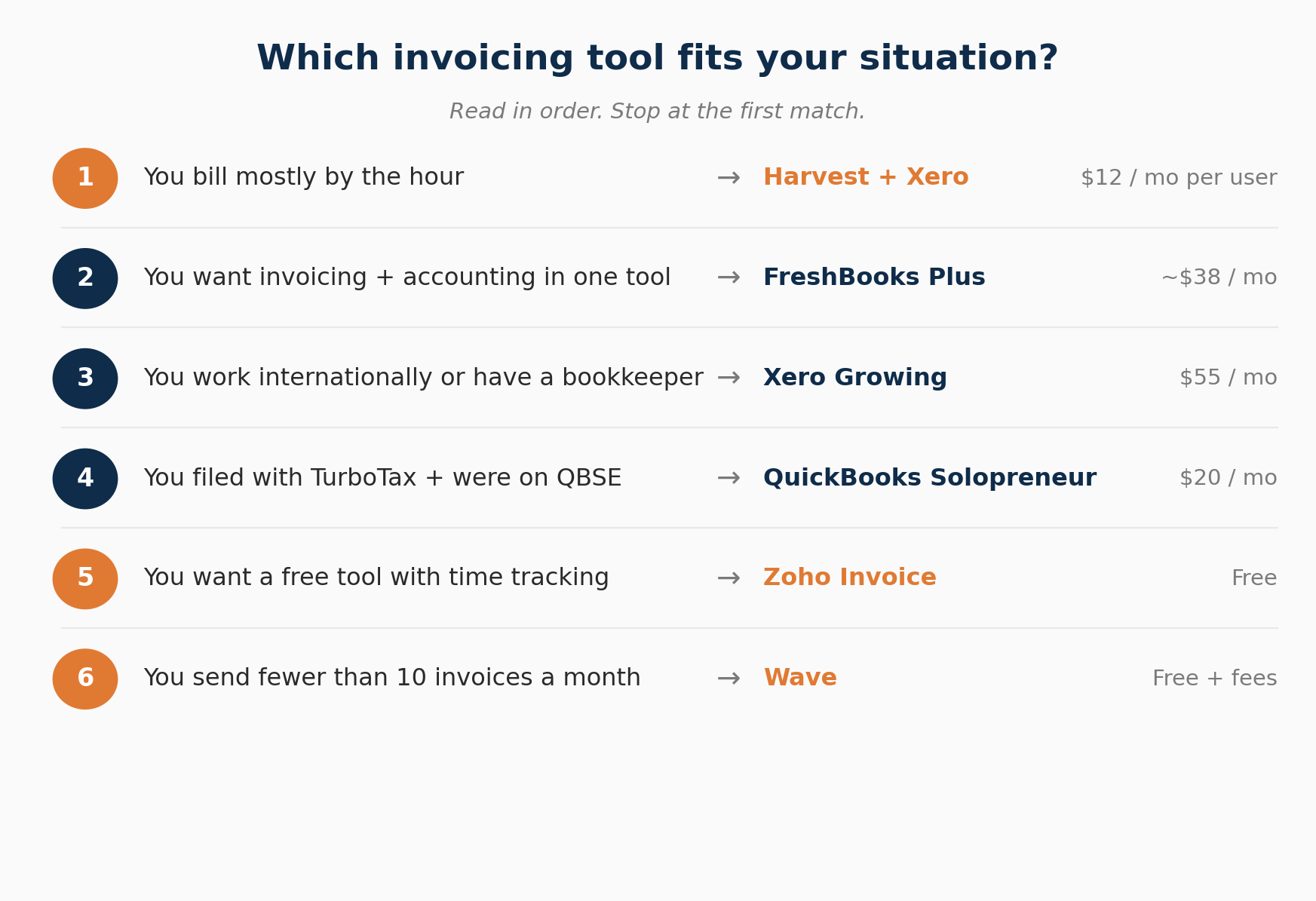
Read these in order. Stop at the first one that fits.
- You bill exclusively by the hour and want the fastest hours-to-invoice workflow available. Pick Harvest ($12 per user per month) and pair it with Xero or QuickBooks Online for accounting at tax time.
- You bill mostly by project, want invoicing plus expense tracking plus accounting in one tool, and value a polished client portal. Pick FreshBooks Plus (around $38 per month).
- You work with international clients in multiple currencies, you have or plan to have a bookkeeper, or you earn above $100,000. Pick Xero Growing at $55 per month, or Established at $90 if you need multi-currency from day one. Budget for it from the start. Skip Early.
- You were a QuickBooks Self-Employed user, you file your own taxes through TurboTax, and you want the cleanest tax-time handoff. Pick QuickBooks Solopreneur ($20 per month).
- You want a free tool that goes further than Wave, you track time, and you may need project management. Pick Zoho Invoice (free).
- You send fewer than ten invoices a month, you want zero monthly cost, and you’re willing to keep an eye on settlement reliability. Pick Wave (free) or fall back to PayPal Invoicing (free + per-transaction fees) for occasional one-offs.
Five invoicing practices that get you paid faster
The right tool helps. Good practices on top compound the effect. These five habits, paired with the automation, cut payment delays significantly.
1. Invoice immediately
The moment you submit a deliverable, send the invoice. Every day you wait adds a day to your payment timeline. If your terms are Net 14 and you wait three days to invoice, you’ve already extended the payment window to 17 days without realising it.
2. Put the actual due date on every invoice
Write “Due: April 24, 2026” rather than “Net 14 days.” Clients process specific dates faster than they calculate relative ones. Ambiguity buys you nothing and costs you time.
3. Accept online payments
Clients prefer to pay by card or bank transfer rather than initiating a manual wire from their own banking portal. An invoice with a Pay Now button removes the friction that causes passive delays. The processing fee is almost always worth the faster cycle. The exception: high-value B2B work with corporate AP departments that pay by ACH on Net 30, where the discount you’d offer for early ACH usually beats the card-fee math.
4. Set up a late payment fee clause
Include in your contracts and on your invoices that payments more than 14 days overdue accrue a 1.5% to 2% monthly late fee. The clause shifts client behaviour more than any reminder email does. Clients rarely pay the fee. The existence of the clause turns the payment from a suggestion into a deadline.
5. Use recurring invoices for retainer clients
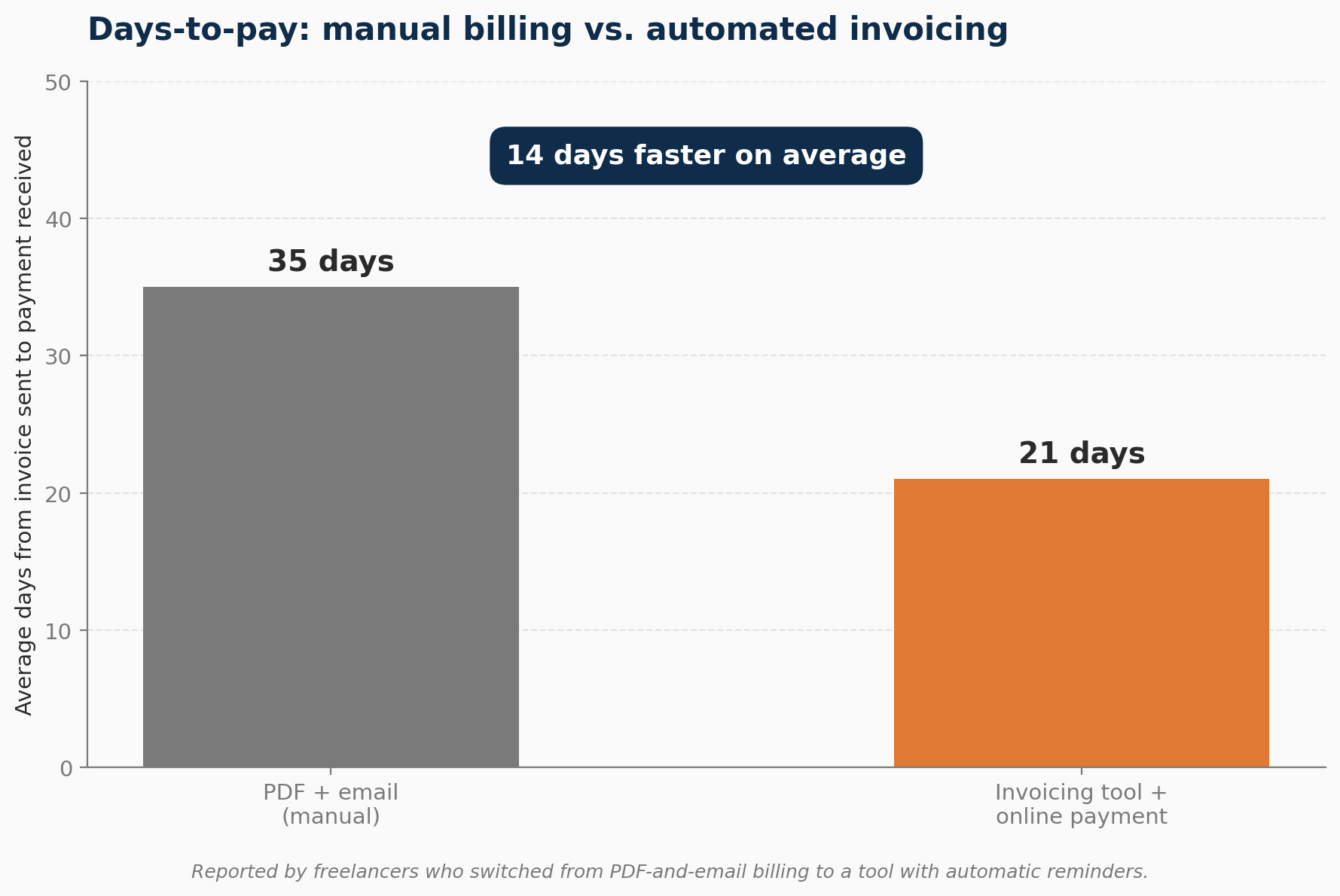
I’ve spoken with freelancers who started using a tool with automatic recurring invoices and reminders after years of PDF-and-email billing. Their average days-to-pay dropped from around 35 days to around 21. For someone billing $8,000 a month, that pulls roughly four weeks of float forward in the first cycle and keeps the rest of the year more predictable. The combination of the right tool and consistent practices is where the change actually happens, not in any single feature.
What to include on every invoice
Missing information causes payment delays. When a client’s accounts payable team can’t match an invoice to a purchase order or project, it sits in a queue until someone figures it out.
Every invoice you send should include:
- Your name and contact information
- The client’s business name and billing contact
- A unique invoice number
- The invoice date and the exact due date
- A description of the services delivered
- The total amount due
- Accepted payment methods and payment details
- Any applicable tax or VAT information
Add a notes section with a line like “Please include the invoice number when sending payment.” Reduces processing confusion and speeds up reconciliation on the client’s end.
If you’re invoicing a larger company, ask for their purchase order number before you start work and put it on the invoice. Many corporate AP systems won’t process an invoice without a matching PO number, and the invoice will sit in a queue for weeks before anyone tells you.
International invoicing: what changes
Currency. Invoice in your client’s local currency where possible. It removes the conversion calculation from their side and reduces disputes over exchange rate differences. Xero and Zoho Invoice handle multi-currency cleanly. FreshBooks supports it on higher plans.
VAT and sales tax. Depending on where your client is based, you may need VAT, GST, or other tax information on the invoice. EU-based clients often require your VAT registration number and a reverse-charge note where applicable. Get clarity on this before you send your first invoice to a new country.
Payment processing time. International ACH and wire transfers take longer than domestic ones, typically three to five business days [source: Federal Reserve, frbservices.org]. Factor that into your payment terms for international clients. Some freelancers route international payments through Wise or Stripe to reduce transfer times and currency conversion fees.
If you have multi-state clients or clients across borders, the wider tax picture (sales tax nexus, foreign-source income, treaty-based withholding) matters too. The tax liability guide covers what to watch for.
The misconception about processing fees
Most freelancers see the 2.9% credit card processing fee and treat it as pure waste. It isn’t. The fee buys you a faster payment cycle and removes a friction step on the client’s side.
Run the math on a $5,000 invoice. Card processing at 2.9% + $0.30 = $145.30 in fees. If accepting cards moves your average payment from 35 days to 21 days, you’ve got 14 days of cash float earlier on a $5,000 invoice. At a 6% annual cost of capital, that float is worth about $11.50 by itself, which understates the value, because most freelancers aren’t borrowing at 6%. They’re running on irregular cash flow with overdraft fees and missed bills as the alternative.
The fee is the price of getting paid sooner. Build it into your pricing.
Get your free Payment Reduction Guide

I’ve put together a free Payment Reduction Guide covering the invoice practices, reminder templates, and payment term clauses that cut average payment delays by 30 to 50%. Inside: a three-email reminder sequence you can paste into your invoicing tool, an early payment incentive template, a late fee clause you can drop into your contract, and a payment tracking checklist.
Frequently Asked Questions
Do I need paid invoicing software, or is free good enough?
Depends on your volume and what you need the tool to do. If you send fewer than ten invoices a month, flat-rate invoices, no time tracking, and you’re comfortable monitoring payment settlements yourself, Wave or Zoho Invoice’s free plan covers you. Once you’re invoicing regularly, billing by the hour, or want professional reporting, the paid tools pay for themselves through time saved and faster payment cycles.
Why is the Xero Early plan so restrictive?
The Early plan caps you at 20 approved or sent invoices per month and 5 entered bills. Quotes count toward the invoice limit. App-partner transactions can also push you over. Most active freelancers hit the ceiling within 3 to 6 months and have to upgrade to Growing at $55 per month. Xero markets Early as a starter tier. Treat it as a free trial that bills you. Plan for Growing from the start.
Do I have to accept online payments?
You don’t have to. It reduces payment delays noticeably. Removing the step where a client has to log into their own bank and initiate a transfer means more clients pay the moment they open the invoice. The processing fee of 1% to 3% is usually worth the speed.
Can I use invoicing software and accounting software separately?
Yes. Some freelancers do. Harvest plus Xero is a common combination: Harvest handles time tracking and invoicing, Xero handles the books. The downside is managing two subscriptions and keeping the integration synced. If you want one tool, FreshBooks or Xero alone covers both functions reasonably well. The accounting software guide covers full-suite options if that’s your direction.
What if I only send two or three invoices a month?
Wave, Zoho Invoice, or PayPal Invoicing. All free at that volume. You don’t need to pay $33 a month for invoicing software if you’re billing two clients.
Should I offer early payment discounts?
For clients who regularly pay late, yes. A 2% discount for payment within seven days (the “2/10 net 30” arrangement) often shifts behaviour. On a $5,000 invoice, you give up $100 to collect $4,900 reliably rather than chasing $5,000 for 40 days. Run the math for your situation. The arithmetic usually favours the discount when you factor in the time saved.
What if a client disputes an invoice?
Address it directly and quickly. Ask them to specify what they’re disputing, in writing. Most invoice disputes come down to scope misalignment or a missing deliverable detail. A clear scope of work agreed before the project starts eliminates most of them. For genuine disputes after the work is done, offer to discuss and document the resolution in writing before adjusting the invoice amount.
Should I move off QuickBooks Self-Employed now that Intuit sunset it?
If you’re still on QBSE, Intuit will migrate you to QuickBooks Solopreneur automatically, including your data and subscription. If you’d rather move to a different tool entirely, the timing is good. FreshBooks, Xero, and Zoho all import QBSE data via CSV. Solopreneur is the path of least resistance if you file with TurboTax. The other three are better if you’ve outgrown the solo-only feature set.
Start here
Pick one tool. Set it up today. Send your next invoice through it. The best invoicing software for freelancers is the one you actually use every week — don’t migrate your entire billing history or try to configure everything perfectly on day one.
- Bill by the hour or by project, want one tool for everything: start with FreshBooks.
- Testing the waters or keeping costs at zero: start with Zoho Invoice (preferred) or Wave.
- Working internationally or want a tool your accountant can use too: start with Xero (Growing plan).
- Coming from QuickBooks Self-Employed and filing with TurboTax: start with QuickBooks Solopreneur.
- Bill exclusively by the hour: start with Harvest, pair with Xero.
The point is to stop doing this manually this week. Whichever tool you pick, the automation alone is worth the switch. Once the invoicing system runs itself, look at the wider picture: tracking business expenses cleanly, smoothing irregular cash flow, and claiming the deductions you’re entitled to.
Pricing and features reflect publicly available information as of April 2026. Verify current pricing directly with each provider before subscribing, as plans and rates change. This article is informational and is not tax or legal advice. For tax-specific questions, consult a qualified CPA or tax professional, and check current IRS guidance at irs.gov.
About the author
Gareth is an entrepreneur based in Dubai and the founder of AI Finance Tools for Freelancers. He’s not a CPA or a bookkeeper. He built this site because he couldn’t find honest, thorough reviews of AI finance tools written for freelancers. Every guide is researched from real user reviews, official documentation, and expert sources.