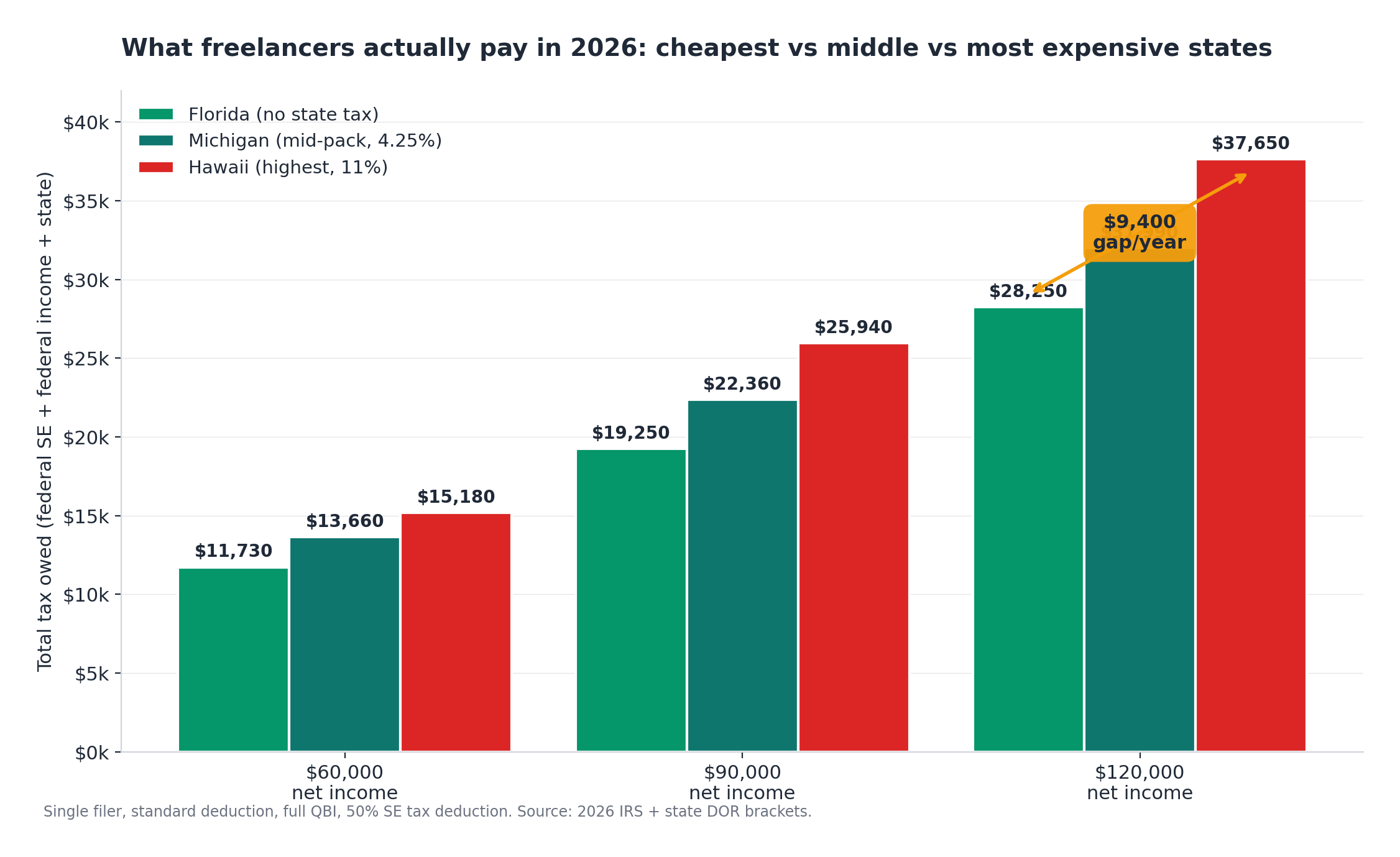
This FlyFin vs Keeper Tax comparison starts with a real story. A freelance illustrator in Austin pulled in about $72,000 in 1099 income last year. She finished her return on April 14 and owed $6,412 she hadn’t budgeted for — the kind of tax liability shock most new freelancers hit once before they fix their system. The next morning, she spent 90 minutes comparing FlyFin and Keeper so next year wouldn’t hurt the same way. Inside that 90 minutes, both platforms pitched themselves as the same thing: AI finds your write-offs, a tax pro handles the filing, you pay once a year. They are not the same thing.
She’s not the only one. Check r/freelance on any Sunday night and you’ll see the same thing over and over. A camera roll full of receipt photos. A nagging feeling about deductions being missed. No actual system.
Here’s what she wishes someone had told her before she hit the signup button. Real 2026 pricing. How the auto-charge flow actually works. What their CPAs can and can’t do for you. Whether either tool catches the 47 tax deductions most freelancers miss. And when neither tool is the right answer for your income level. Every claim below has a source. Every number got verified against the live site as of April 2026.
The quick verdict
Here’s the FlyFin vs Keeper Tax bottom line. If you file once a year, want text-based tax pro support, and don’t have S-Corp income, go with Keeper. If you carry heavy year-round expenses, want a named CPA preparing your return (rather than reviewing an AI draft), and you’re willing to pay more for that, go with FlyFin. Both platforms bill annually despite advertising monthly prices. Both have documented cases of users getting charged within an hour of signup.
Earning under $60,000 in 1099 income? Skip both tools. TaxSlayer Self-Employed at $74.99 plus $47.99 per state does the job cheaper. FreeTaxUSA at $0 federal plus $15.99 state does it cheaper still.
The next seven sections show you the data behind this verdict so you can decide for yourself.
Pricing in 2026: what you actually pay
Both tools advertise monthly prices and bill annually. Here’s the real cost by scenario. We’ll cover each tool’s plan structure first, then a side-by-side table that compares them on a same-income, same-deduction basis.
FlyFin’s three plans
FlyFin’s Basic plan runs $7 per month, billed annually at $84 per year. You get AI deduction tracking and unlimited CPA advice, but no tax filing. The Standard plan is $16 per month, billed annually at $192, which adds full federal and state filing plus audit insurance. The Premium plan costs $29 per month, billed annually at $348, and throws in S-Corp and K-1 coverage along with Zoom calls with a named CPA.
All plans start with a 7-day free trial. FlyFin’s fair usage policy caps refunds at $50 once a CPA has started preparing your return. Refunds disappear after 30 days from purchase or after filing. FlyFin’s Terms of Service also cap total FlyFin liability at $50. Worth knowing before you commit.
Keeper’s four plans
Keeper has four options. Only Deductions runs $20 per month, billed monthly, and handles expense tracking but not filing. Just Filing costs $49 to $99 per year and covers basic W-2 and 1099 returns. This plan got added in 2024 as part of the rebrand from Keeper Tax to Keeper. Filing + Deductions is $199 per year and covers year-round tracking, federal filing, up to two state returns, and a tax pro final review. Premium runs $399 per year and adds quarterly tax help, up to three amendments, prior-year returns (2022 through 2024 included; older years cost extra), audit resolution support, and one 1:1 quarterly call with a tax pro.
What sets Keeper apart day to day is the text-message-style tracking. After a transaction posts, the app sends you one question (“Was the $54 Shell charge for work?”) and you reply yes or no. That single design choice is why several Trustpilot reviewers describe Keeper as the first expense tracker they actually keep using. One college student with under $10,000 in contract income said Keeper’s deduction tracking dropped their federal tax bill from $1,200 to $400 in the first year they used it, then to $0 the year after.
Keeper’s current help center lists a 14-day trial, though some of their landing pages still show 7 days. Expect 14 if you sign up from the main site. The trial doesn’t let you actually file a return. If you submit filing information during the trial, Keeper treats the trial as used and triggers the annual charge.
Same freelancer, same income, same deductions: what each tool actually costs
This is the table most top-10 comparisons skip. Four scenarios, same freelancer profile adjusted for entity and income, showing what each tool actually costs and what each plan leaves out.
At middle-income sole prop rates, the two tools sit within $7 of each other. At the S-Corp level, FlyFin comes out cheaper because its Premium plan bundles S-Corp filing (Form 1120-S and K-1 handling). Keeper charges S-Corp filing as an add-on because Keeper’s own help center states the Premium plan does not include S-Corp or partnership returns.
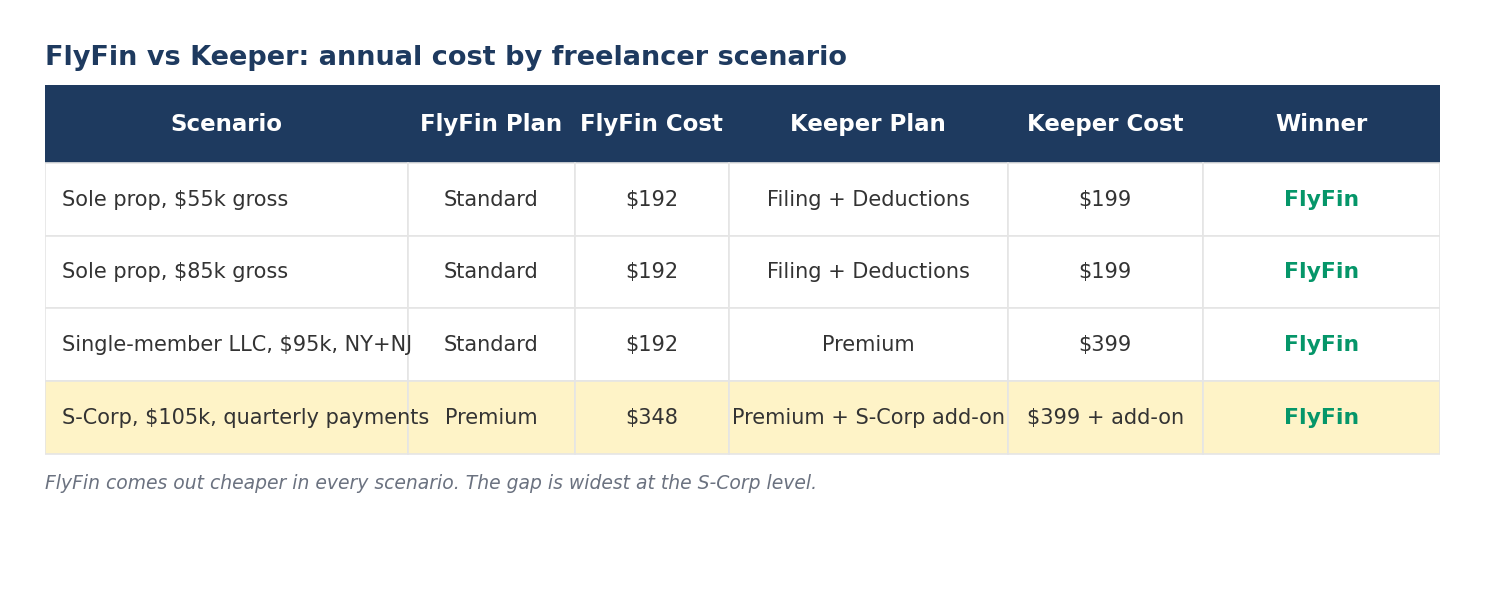
A few things neither plan includes at these prices: mileage tracking on both, quarterly planning (requires Premium on both), and Keeper’s Premium plan explicitly excludes S-Corp filing. That last one is why the S-Corp row above shows Keeper as “Premium + S-Corp add-on” rather than a clean Premium line. If you need quarterly planning built in, both tools push you up a tier to get it.
The auto-charge trap
This is the single most common complaint about both tools. The FlyFin vs Keeper Tax auto-charge flow works very differently across the two tools. It shows up across Trustpilot, BBB, Google Play, and the App Store. This is textbook negative option marketing: the marketing prices say “per month.” The actual charge is the full year’s cost, taken in one pull after a short trial that converts automatically if you don’t cancel correctly.
What triggers the FlyFin charge
The 7-day trial auto-converts if you don’t cancel inside the app. One Google Play reviewer wrote about signing up for a free trial and getting charged $200 less than an hour later. Another user pointed out that the payment plans advertise monthly but charge for a full year on conversion.
FlyFin’s refund policy works in three tiers. Full refund if you cancel within 30 days and no CPA has started preparation work. A $50 refund if preparation has already begun. Nothing once the return is filed or after 30 days from purchase. To cancel, you email support@flyfin.org. There’s no phone number.
What triggers the Keeper charge
The 14-day trial is longer, but there’s a loophole. If you submit tax filing information during the trial, Keeper treats the trial as used and charges the annual fee. One BBB complainant got charged $192 on March 1 after receiving a cancellation confirmation on the same day, because they had submitted a return during the trial period. When they asked for a refund, Keeper declined on the grounds that the trial was voided by tax prep use.
Keeper’s BBB profile has several complaints following this exact pattern. The company’s BBB response template offers refunds and compensation on request, but only after the complaint gets filed.
How to cancel before the clock runs out
Four steps that work on both platforms. Cancel inside the app (FlyFin under subscription settings; Keeper under Settings, then Manage Subscription) at least one day before the trial ends. Don’t submit tax filing information during either trial unless you’re ready to pay. Screenshot the cancellation confirmation screen and save the confirmation email. If the charge goes through anyway, email support with your cancellation timestamp and ask for a refund under their documented policy.
BBB complaints show that users who document their cancellation clearly usually get refunds, even when the first support response is a denial.
Are the CPAs real? And can you actually talk to them?
This question shows up across r/tax, r/freelance, and Google’s People Also Ask for both brand names. The answer is different for each tool and depends on which plan you’re on.
FlyFin’s dedicated CPA model
FlyFin gives you a named CPA when you upgrade to Standard ($192) or Premium ($348). Your CPA prepares your federal and state returns start to finish, including any S-Corp filings on the Premium plan. In-app chat is the default support channel on Standard. Zoom calls with your designated CPA require the Premium plan.
FlyFin’s marketing talks up CPAs and IRS-enrolled agents with combined experience measured in the hundreds of years. The CPAs are real. Response times are where users push back. Trustpilot and App Store reviewers report 1 to 2 day gaps per message during tax season. One AppSumo reviewer noted that the Zoom calls advertised with Premium sometimes go unanswered when scheduled.
One practical limit to know before you commit: FlyFin is mobile-only. There’s no desktop interface, so uploads of bank statements, 1099 forms, and receipts all happen from your phone. If you prefer reviewing your numbers on a laptop, that alone is a dealbreaker. Several BBB reviewers have also flagged trouble closing their FlyFin account or removing their data after signup, so read the cancellation flow before you add a payment method.
Keeper’s tax pro review model
Keeper works a different way. The AI prepares your return, and an in-house tax professional reviews and signs it before filing. You don’t have a single named CPA preparing your return from scratch. You can chat with tax pros via in-app messaging 24/7, with AI assistant responses first and human escalation when needed. Premium subscribers ($399) get one free 1:1 consultation call every quarter.
Keeper publicly states its AI base model is GPT-4, fine-tuned on tax legislation. The company claims a 96% accuracy rate for the AI compared to a 94% rate it attributes to human accountants, and tax professionals still review every return before filing.
What response times actually look like
FlyFin users report 1 to 2 day response times per CPA message during tax season. That matters a lot when you’re four days from a deadline. Keeper users report AI responses in minutes and human tax pro responses within an hour during business hours. Neither tool offers phone support. If real-time phone contact matters to you, both are the wrong choice. TurboTax Expert Assist, or a local CPA at $800 to $2,000 per return, gives you that.
What users actually say
Both tools have plenty of public reviews, and the gap between them is wider than you might guess. FlyFin sits at 2.8/5 on Trustpilot, but only 4 reviews back that score. The sample is too small to take seriously. Its BBB profile is messier, with several complaints about account access after signup. Keeper averages 4.8/5 on Trustpilot from more than 310 reviews and holds an A+ BBB rating. As covered earlier, that A+ reflects how fast the company responds to complaints, not how satisfied the customers actually are. Keeper’s own BBB customer review average sits at 1.8/5.
What FlyFin users praise: the AI deduction engine does real work. One App Store reviewer set aside 15 minutes once a week to approve AI-sorted transactions in bulk and said the system caught write-offs they would have missed on their own. Several reviewers named the CPA they worked with directly. One specifically mentioned a CPA named Varsha and said their return was filed ahead of the deadline.
What FlyFin users complain about most: the trial-to-charge speed covered above, and the fact that FlyFin has no desktop interface. Everything runs through the phone app, which several BBB users flagged as a problem when they tried to close their account later. More than one reviewer said there’s no clear way to remove account access or delete their data after signup.
The free trial has a loophole that costs users $192 or $199
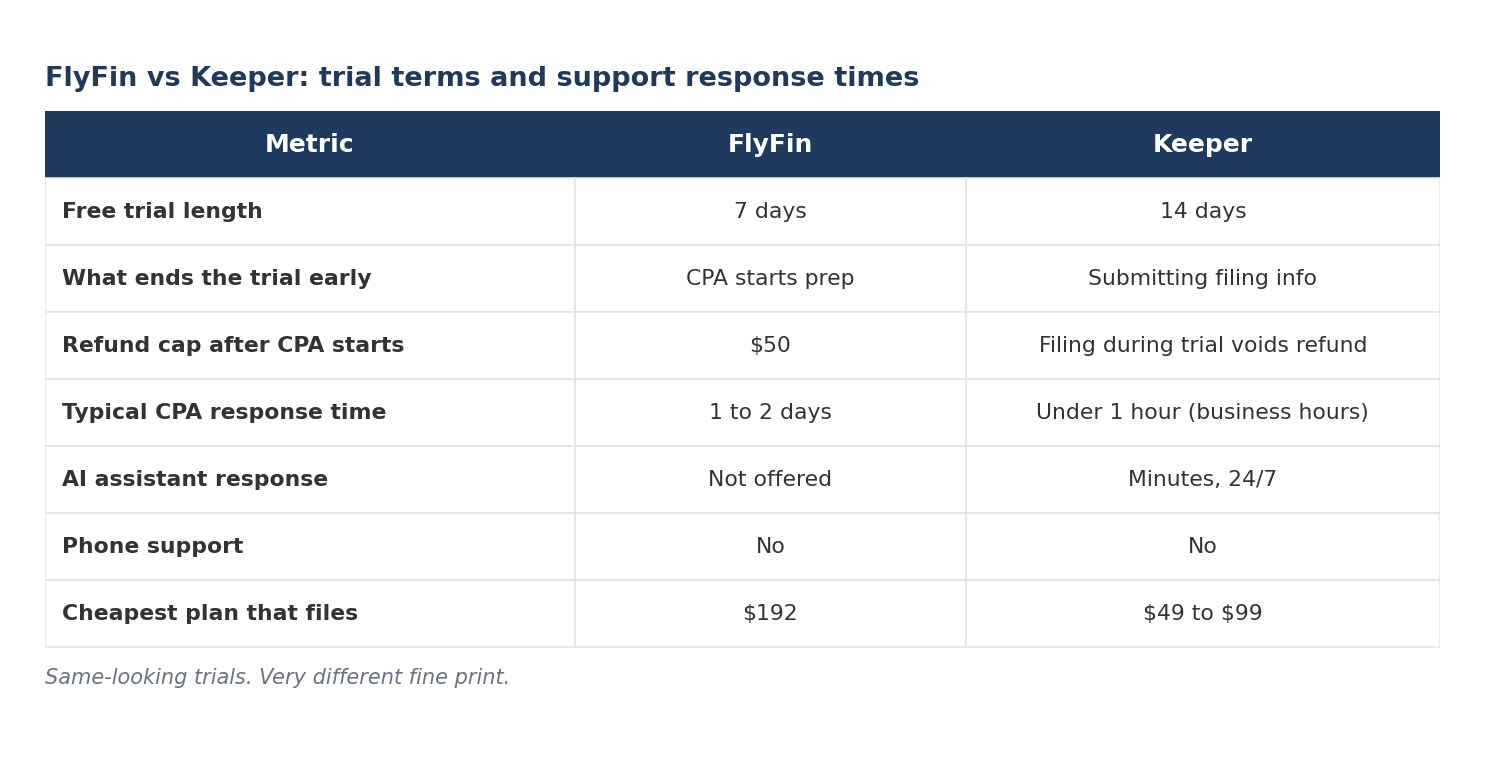
Most reviews describe the trial as a simple try-before-you-buy. The reality on both platforms is different. Specific user actions during the trial trigger the annual charge automatically.
For FlyFin, the charge can hit within hours. One Google Play user documented being charged $200 less than an hour after signup. The pattern isn’t well documented by FlyFin itself, but support did return the $200 after a 7-day delay in the case that reviewer reported.
For Keeper, the loophole is documented in BBB complaint responses from Keeper itself. If you use the tax filing feature during the trial (entering your tax profile, uploading forms, submitting filing information), Keeper treats the trial as used and charges the annual fee, even if you cancel inside the 14-day window.
The practical rule on both platforms: if you want to evaluate either tool, don’t enter real tax data during the trial. Connect Plaid, let the AI categorize a few months of transactions, test the interface, then cancel. You can always resubscribe later when you’re ready to commit real money to one or the other.
FlyFin vs Keeper Tax: who each tool is actually built for
The “best for freelancers” framing in most competitor articles is too broad. Here’s the breakdown by your specific scenario.
Sole prop earning under $60,000 with simple 1099 income
Neither tool is likely worth it. TaxSlayer Self-Employed at $74.99 federal plus $47.99 state gives you guided prep for self-employment income. FreeTaxUSA runs $0 federal plus $15.99 state with manual deduction entry. Keeper’s Just Filing plan at $49 to $99 is the closest either brand comes to competing at this level, but it strips out the year-round expense tracking that makes Keeper worth paying for.
Reddit threads on r/taxhelp and r/tax regularly surface first-year situations exactly like this. A 1099-K from Venmo and PayPal. A first-time 1099-NEC from one client. No idea self-employment tax was 15.3%. No cash reserved. That person shouldn’t be paying $199 for Keeper or FlyFin. That person should use FreeTaxUSA, open a separate business bank account, and set aside 30% of every future invoice for taxes. Pay attention to Schedule SE (that’s where your self-employment tax actually gets calculated) and Form 1040-ES for quarterly payments.
Sole prop earning $60,000 to $100,000, primarily 1099 income
Here’s where Keeper and FlyFin earn their price. Year-round expense tracking plus filing for $192 to $199 is a fair deal if you have 100 or more business transactions per year to categorize. Pick Keeper if you want faster message responses and a stronger web dashboard. Pick FlyFin if you want a named CPA preparing your return rather than reviewing an AI draft. Either tool can handle a home office deduction (Form 8829) when you walk through the questionnaire, though you’ll want to verify the square-footage numbers yourself before filing.
W-2 day job plus 1099 side income
Keeper Filing + Deductions at $199 handles combined W-2 and 1099 income cleanly and covers dual-state filings. FlyFin works too, but it was built for pure 1099 workflows. If your 1099 portion is under $15,000, TurboTax Premium (formerly Self-Employed) or H&R Block Self-Employed, with state fees around $37 to $39 per state, is usually a better fit. Check both vendors’ pricing pages the week you file, since they surge-price closer to April 15.
Electing S-Corp this year (Form 1120-S and K-1)
FlyFin Premium at $348 per year includes S-Corp filing inside the plan. Keeper charges S-Corp preparation as an add-on on top of the $399 Premium fee, with variable pricing depending on complexity. FlyFin is the cheaper choice at this level. S-Corps are one of the few scenarios where FlyFin clearly wins on price.
Deduction tracking only, filing with your own CPA
Keeper’s Only Deductions plan at $20 per month (about $240 per year) was built for this use case. FlyFin’s Basic plan at $84 per year is cheaper, but the CPA-ready export workflow is less documented. If you’re handing data to your own CPA, Keeper’s structured output organized by Schedule C category is the cleaner choice. (If you’re still mapping expenses to lines, our Schedule C guide for freelancers shows where each common cost belongs.)
What happens if the tool files your return wrong?
Both tools advertise a 100% accuracy guarantee. Both have documented cases in BBB and Trustpilot of returns filed incorrectly. It happens. What matters is what recourse you have when it does.
Reddit threads on r/taxhelp and r/tax regularly surface cases where AI-extracted numbers from PDFs don’t match manually-entered figures. Sometimes by hundreds of dollars. Sometimes by thousands. The typical pattern: the freelancer has two W-2s and three 1099s across multiple states, both tools use the standard deduction, and the AI auto-extraction from a W-2 or 1099-NEC PDF pulls at least one number differently from a clean manual entry. IRS-enrolled agents in those threads consistently point to PDF extraction errors as the likely cause.
Takeaway: if you let AI extract numbers from PDFs, verify every extracted number against the source form before filing. Same rule applies to FlyFin, which uses similar PDF extraction for 1099 forms.
FlyFin’s 100% Money Back Guarantee, in full
If you’re dissatisfied and don’t want the CPAs to prepare your return, you get a full refund, provided the cancellation is inside 30 days of purchase and no CPA has begun work. Once a CPA has started preparing your return, the refund cap drops to $50. After 30 days from purchase or after the return is filed, refunds are off the table.
Trustpilot reviewers in 2026 also describe missed deadlines and IRS penalties they had to pay themselves because of slow CPA communication. FlyFin’s refund policy does not cover IRS penalties triggered by delays on the FlyFin side.
Keeper’s accuracy guarantee, in full
Keeper offers a Maximum Refund Guarantee. If you file elsewhere and get a bigger refund (or a smaller tax liability), Keeper refunds your subscription fee. The guarantee excludes errors caused by incomplete, inaccurate, or inconsistent information the user supplied.
BBB records document several cases of returns filed incorrectly, including one case of a wrong state filing with poor follow-up communication, and one extreme case involving a forged signature on an IRS refund check. Keeper’s A+ BBB rating reflects its response rate, not its customer ratings. Customer ratings on the BBB average 1.8 out of 5 stars based on 5 customer reviews. Trustpilot tells a different story with much higher ratings, so the picture depends on where you look.
The real takeaway
Neither tool gives you the audit representation or error-correction guarantee a traditional CPA or an Enrolled Agent would. If you’re in a high-risk situation (multiple 1099s plus rental plus crypto plus S-Corp), the $800 to $2,000 for a human CPA is often better insurance than a $199 to $399 subscription with a $50 refund cap.
Is your bank data actually safe?
Both tools use Plaid for bank connections, the same infrastructure Venmo, Chime, and Robinhood use. Plaid stores encrypted tokens, not your banking credentials. Both companies have California Consumer Privacy Act compliance. FlyFin markets bank-level security through Mastercard and Plaid on its own homepage.
Data ownership is a separate question from data security. FlyFin’s BBB page has complaints describing no way to access your data or close your account after signup. Keeper retains tax filing data in line with IRS retention rules, which generally require three years of records. That’s standard across the industry.
If total data removal matters to you (some freelancers care about this, most don’t), read both privacy policies before signup. The standard policy on both: your bank connection can be revoked anytime, but tax filing data stays for the IRS-required retention period.
The 5-minute decision framework
Answer these five questions to settle the FlyFin vs Keeper Tax choice in your specific situation. Answer these five questions in order. The answers point to your tool.
Question 1: What’s your entity?
- Sole prop or single-member LLC: either tool works.
- S-Corp election: FlyFin Premium ($348) because S-Corp is bundled.
- Partnership: neither tool. Hire a CPA for Form 1065.
Question 2: Do you have W-2 income too?
- Yes, W-2 is primary, 1099 is secondary: Keeper Filing + Deductions ($199) or TurboTax Premium.
- No, 1099 only: either tool works.
Question 3: How many business transactions per year?
- Under 100: neither tool is likely worth $199. Use FreeTaxUSA plus a spreadsheet.
- 100 to 500: either tool works.
- Over 500: Keeper’s text-based categorization workflow is usually faster than FlyFin’s swipe interface.
If your income comes from multiple W-2s and 1099s across different states, both tools’ PDF extraction becomes more error-prone. Verify every number the AI pulled, or consider a CPA.
Question 4: Do you want a named CPA or a tax pro reviewer?
- Named CPA preparing your return: FlyFin (Premium for Zoom access).
- AI prepares, human reviews: Keeper.
Question 5: What’s your budget ceiling?
- Under $100: Keeper Just Filing or FreeTaxUSA plus TaxSlayer.
- Under $200: Keeper Filing + Deductions or FlyFin Standard.
- Under $400: any plan from either tool.
For the most common case (sole prop, $60,000 to $95,000, 1099 only, no S-Corp), either tool will do the job. They cost about the same. Pick Keeper for faster message responses. Pick FlyFin for a named CPA who prepares the return rather than reviews it.
Before you pay $199, here’s the free version
Experienced freelancers on r/freelance circle back to this advice all the time. The expense-tracking work Keeper and FlyFin charge $199 per year to automate? You can do it yourself in about 2 hours per month if your inputs are clean. One commenter in a 2024 r/freelance thread put it simply: fancy apps are overkill unless you’re huge.
Five steps:
- Open a separate business checking account at a no-fee bank. Novo, Found, Bluevine, and most traditional banks now offer free business checking for sole props and single-member LLCs.
- Get a dedicated business debit or credit card. Put every business expense on it. Put nothing personal on it.
- Download your statements monthly as CSV. Most banks let you export in two clicks.
- Paste each month into a spreadsheet with Schedule C category columns: Advertising, Car, Commissions, Contract labor, Depreciation, Insurance, Legal, Office, Rent, Repairs, Supplies, Travel, Meals, Utilities, Wages, Other expenses.
- At year-end, total each column. That’s your Schedule C draft.
This gets you 80% of what the paid tools give you, for $0 plus your time. If you have over 500 business transactions a year or you mix personal and business on the same card, the paid tool pays for itself in hours saved. Under that threshold, the math doesn’t work. One more thing: while you’re building this system, note that QuickBooks Self-Employed has been on the sunset path since Intuit started pushing users toward QuickBooks Solopreneur. If you’re still on QBSE, plan your migration now rather than in March.
If neither fits, here’s what to look at instead
For year-round bookkeeping that feeds into whichever tax tool you pick, see our best accounting software for freelancers guide — it covers the tools built for categorizing expenses continuously, which is what makes any tax filing easier in April.
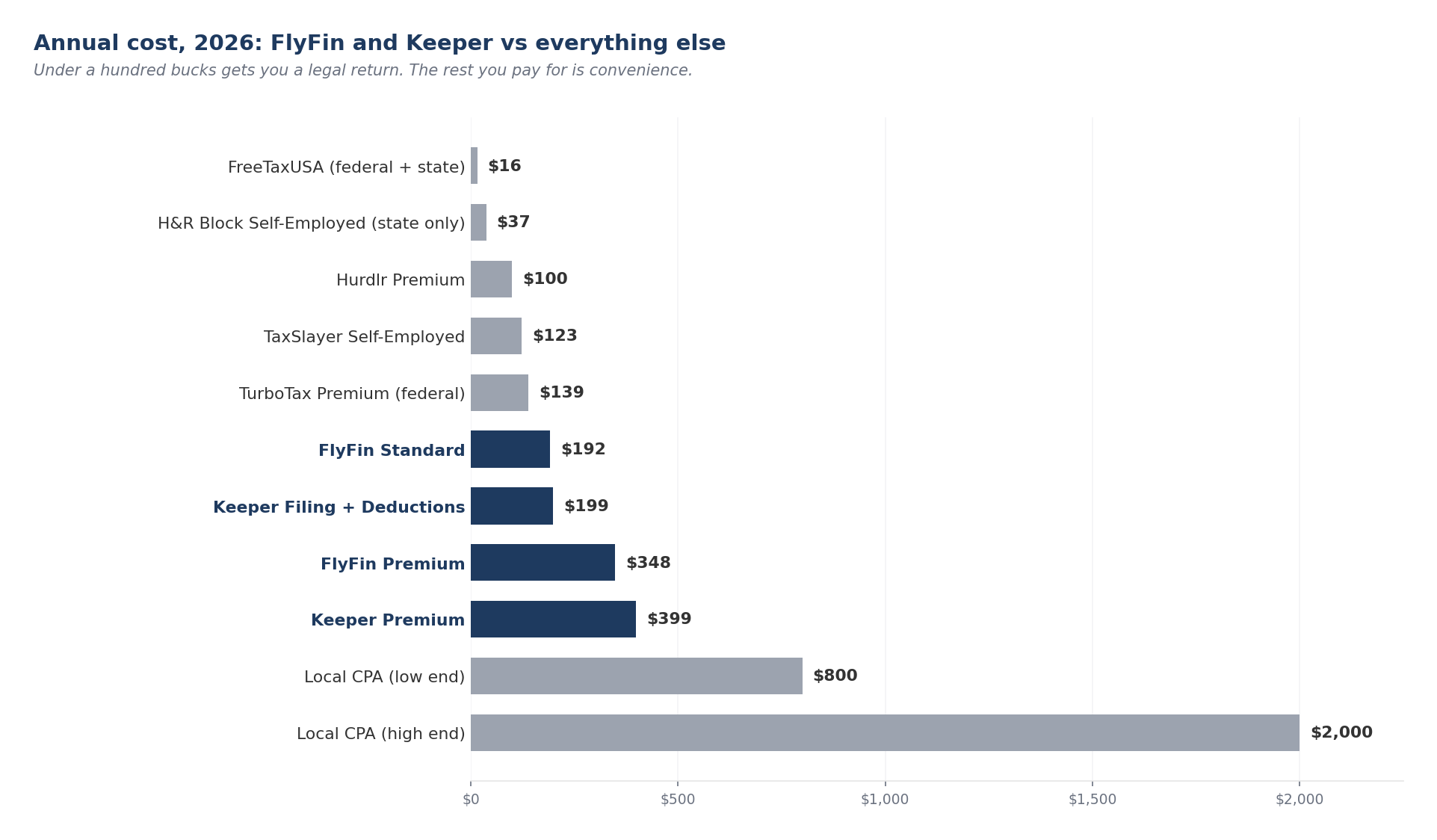
- TaxSlayer Self-Employed: $74.99 federal plus $47.99 per state. Best for simple 1099 returns.
- FreeTaxUSA: $0 federal, $15.99 state. Best for budget-conscious filers with clean records.
- TurboTax Premium (formerly Self-Employed): around $139 federal plus a variable state fee. Best for TurboTax loyalists with heavy 1099 income.
- H&R Block Self-Employed: pricing varies during the season, with state returns around $37 per state. Best if you want the option of walking into a physical office.
- Hurdlr: free tier, then about $8.33 per month billed annually ($99.99/year) or $16.67 per month for Pro. Best for mileage-heavy freelancers like rideshare drivers and real estate agents.
- Local CPA: $800 to $2,000 per return. Best if you have multi-state, rental, crypto, or S-Corp complexity.
My honest take after reviewing hundreds of user reports
Full disclosure: I haven’t filed with either tool myself. What follows comes from hundreds of reviews across Trustpilot, the App Store, BBB, and Reddit, plus long freelancer threads about each one. Both tools produce accurate returns for most people. Both catch write-offs that self-filers on FreeTaxUSA or TurboTax would miss. Neither is a disaster. The experiences users describe, though, are very different from each other, and that difference matters more than the price gap.
Keeper is really an expense tracker with tax filing tacked on at the end. Reviewers praise the app itself over and over. The AI catches write-offs people had genuinely forgotten about. Once the tax pro does the final review, most people say their return was filed in under an hour. What you don’t read in any of those reviews is a sense of a relationship. Almost no one reports speaking to the same person twice.
FlyFin is slower and heavier. But the users who stuck with it describe a named CPA who looks at the whole return, not just a pile of 1099 forms. One Reddit user asked a follow-up about quarterly estimates for the next year, and the answer came back from the same CPA who remembered their last filing.
So the honest FlyFin vs Keeper Tax answer depends on what you actually want. Speed and a strong deduction engine? Keeper. A CPA who knows your name and remembers your situation? FlyFin. That’s the part no comparison table can show you.
FAQ

Is FlyFin legit?
Yes. FlyFin is a real company with a BBB file opened in March 2023 and an A+ BBB rating (it is not BBB accredited, but the A+ rating stands on its own). FlyFin uses bank-level security through Mastercard and Plaid and complies with the California Consumer Privacy Act. The complaints are about UX, billing flow, and response times. They aren’t about the company being a scam.
Is Keeper Tax worth it?
Worth $199 per year if you have 100 or more business transactions annually and want year-round tracking plus filing in a single tool. Not worth it if you have fewer than 100 business transactions. Use FreeTaxUSA or TaxSlayer Self-Employed in that case.
What’s the difference between FlyFin and Keeper?
FlyFin gives you a named CPA who prepares your return start to finish. Keeper’s AI prepares the return and a tax pro reviews it. FlyFin is mobile-first with a swipe-based categorization interface. Keeper is text-based with a stronger web dashboard.
Does FlyFin have real CPAs?
Yes. CPAs are assigned per account on Standard and Premium plans. Zoom access requires Premium ($348 per year). Response times average 1 to 2 days per message during tax season.
Can I cancel Keeper before getting charged?
Yes, if you cancel in the Manage Subscription section of the app before the 14-day trial ends and before you submit any tax filing information. Submitting filing information during the trial voids it and triggers the annual charge.
How much does Keeper cost after the free trial?
$199 per year for Filing + Deductions. $399 per year for Premium (which adds quarterly help, amendments, prior-year filings, and one quarterly 1:1 call). $20 per month for Only Deductions. $49 to $99 per year for Just Filing.
Which is better for S-Corps?
FlyFin Premium at $348 per year includes S-Corp filing (Form 1120-S and K-1 handling) inside the plan. Keeper’s own help center states the Premium plan does not include S-Corp or partnership filings; those are add-on services with variable pricing. FlyFin is the cheaper choice at the S-Corp level.
Is Keeper Tax still called Keeper Tax?
The consumer product rebranded to just “Keeper” in 2023. The URL is still keepertax.com. Most freelancers still call it Keeper Tax. A separate accountant-facing tool called Keeper rebranded to Double on October 23, 2025; that’s a different company and product entirely.
I just got my first 1099 this year. Do I need a tax app?
No, not for your first return. File with FreeTaxUSA (free federal, $15.99 state) or IRS Free File if your AGI qualifies. What you actually need for your first freelance year: a separate business bank account, a dedicated business card, and the habit of setting aside 30% of every invoice for taxes using Form 1040-ES for quarterly payments. Come back to FlyFin or Keeper in year two if your transaction volume justifies it.
Can I trust the numbers Keeper or FlyFin auto-extracts from my PDFs?
Verify them. Both tools extract numbers from uploaded W-2 and 1099-NEC forms, and both tools occasionally misread values. Reddit threads on r/taxhelp regularly describe gaps of hundreds or thousands of dollars between auto-extracted numbers and the same return done manually elsewhere. Before submitting any return either tool prepared, open every form the AI extracted from and check each figure line by line.

One thing to do this week
Before you sign up for either tool, export last year’s transactions from your primary business bank and credit card as a CSV. Most banks let you do this in two clicks. Count the business-related transactions. That discipline matters more than the FlyFin vs Keeper Tax decision itself.
Under 100 transactions? Save the $199 and file with TaxSlayer Self-Employed or FreeTaxUSA. Spend 30 minutes manually categorizing. Over 100? Start the FlyFin or Keeper trial this week. Don’t wait until March. Use the trial to test the Plaid connection and the AI’s first-pass categorization. Don’t enter filing data during the trial. That’s the step that triggers the annual charge.
This week is a better time to test than late March. By late March, support response times on both platforms degrade, the CPAs are at capacity, and you’ll be making a rushed decision at the moment you can least afford a billing surprise.