

This FlyFin review covers what it actually costs ($192 to $348 a year), how it runs almost everything through your phone, and why it gets equal amounts of love and rage in user reviews. Here is what the marketing pages skip over.

One thing first. I am not a US freelancer filing a 1099 this year, so I did not run a full return through FlyFin from start to finish. Pretending otherwise would be a lie. What you are reading is built from FlyFin’s own pricing pages, the company’s app store listings, The College Investor’s hands-on 2026 review, and around 200 actual user reviews on Trustpilot, the Better Business Bureau, the Apple App Store, and Google Play. If you came looking for “I filed with it and got my refund back in five days,” this is not that article. If you want to know what real users say after they sign up, what FlyFin actually costs, and who should walk away, you are in the right place.
FlyFin sells itself as the world’s number one AI tax service for freelancers. The pitch makes sense on paper. The AI scans your linked bank and card accounts, flags possible write-offs, and a CPA files your federal and state return. Pricing looks reasonable next to TurboTax Premium or a local accountant. The trouble is, the negative reviews are unusually specific and unusually consistent. You should know about them before you hand over your card.
What FlyFin actually is
FlyFin is a tax filing service for self-employed people who file Schedule C. You connect your bank accounts and credit cards through Plaid. The AI sorts your transactions, flags expenses it thinks are deductible, and you swipe yes or no on each one. When tax season comes around, a CPA on FlyFin’s team prepares your federal and state returns, you review and e-sign, and the return goes to the IRS.
Almost everything happens on the iOS and Android apps. There is a web version, but most users do the bulk of the work on their phone. CPA communication is in-app messages. Real-time phone calls are not part of the standard plan.
FlyFin says it has helped over 250,000 users and that they save an average of $7,800 in deductions. That number comes from FlyFin’s own marketing. I could not find any third-party verification.
FlyFin pricing in 2026: what it actually costs
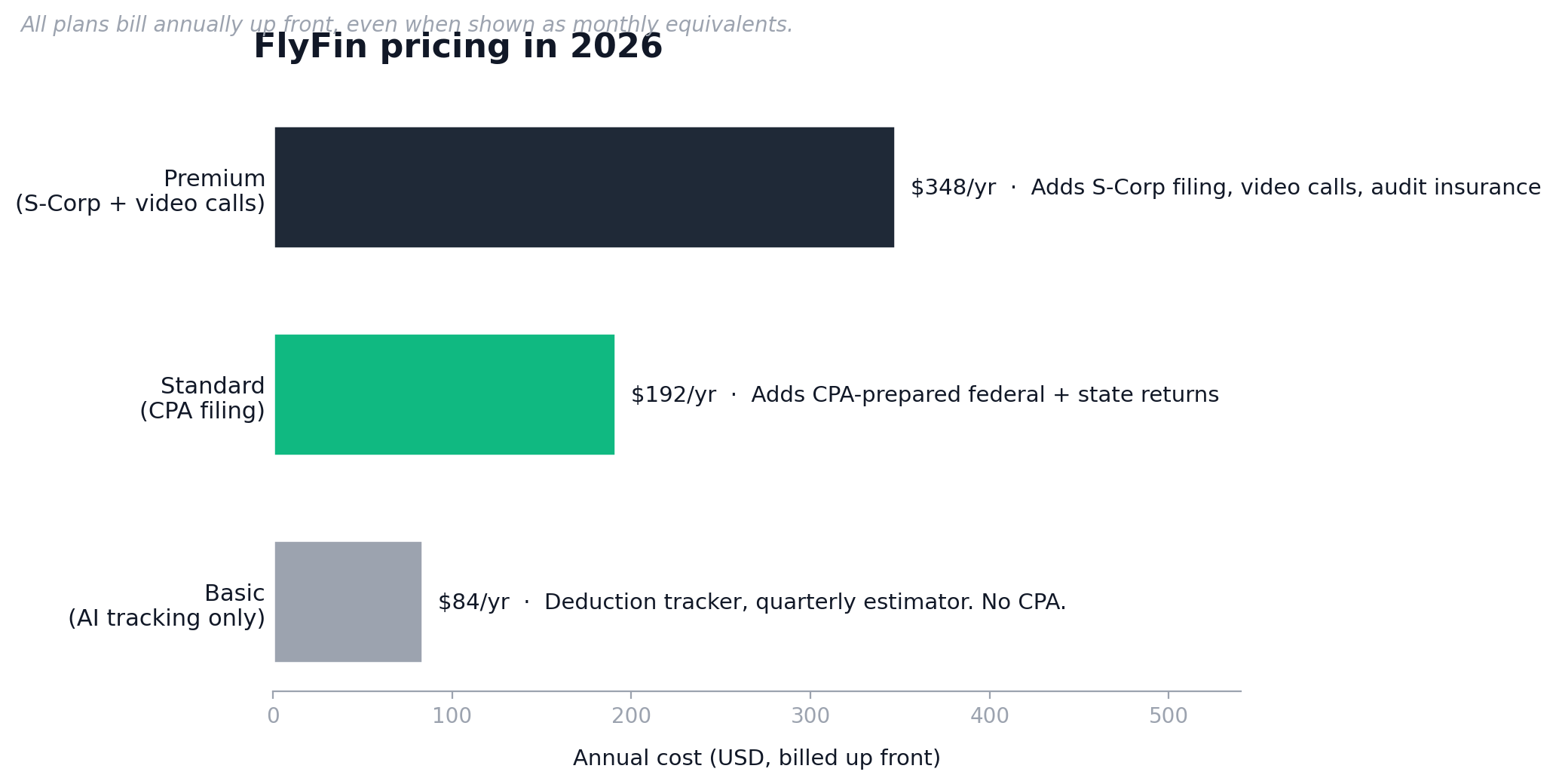
Here is where the first complaint pattern starts. FlyFin shows monthly pricing on its app store listings ($7 a month at the entry tier, $29 a month at the top), but your card gets billed for the full year up front. Reviewers on Google Play and the Apple App Store have been flagging this for months.
According to The College Investor’s December 2025 review, here is what you actually pay:
- Basic plan. Around $7 a month billed annually. AI deduction tracking and a quarterly tax estimator. No CPA filing.
- Standard plan. $192 a year. Adds a dedicated CPA who prepares and files your federal and state returns. Sole proprietors and single-member LLCs only.
- Premium plan. $348 a year. Adds S-Corp filing, video calls with your CPA, and audit insurance.
You also get a 7-day free trial, which is the source of the second pricing complaint. One Google Play reviewer signed up for the trial after seeing the AI work, then got charged $200 less than an hour later. Support refunded them, but the money took seven days to land back in the account. Another BBB reviewer wrote that there is no clear way to cancel inside the app.
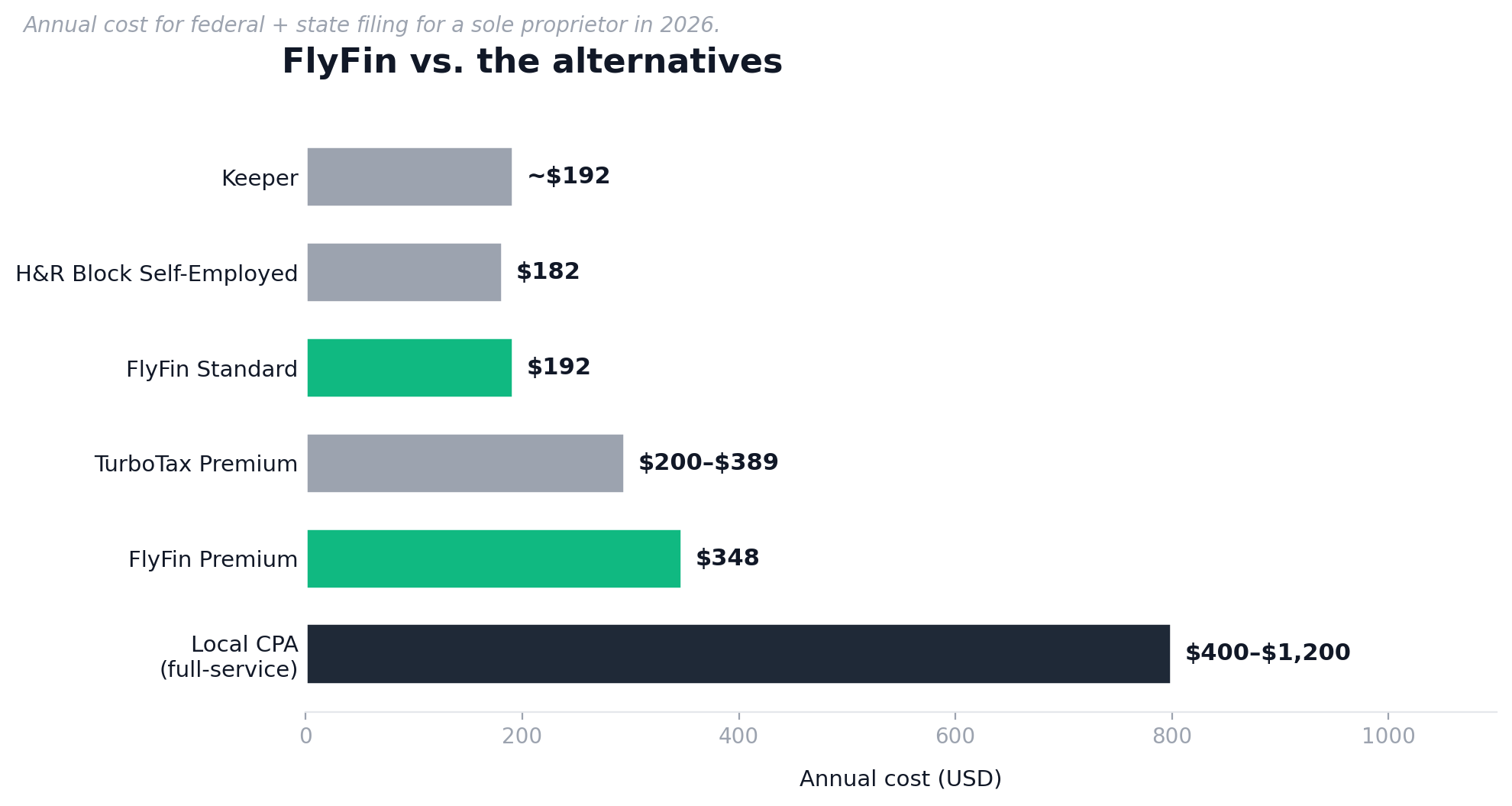
Quick comparison against the other tools a freelancer making $45,000 to $110,000 might look at.
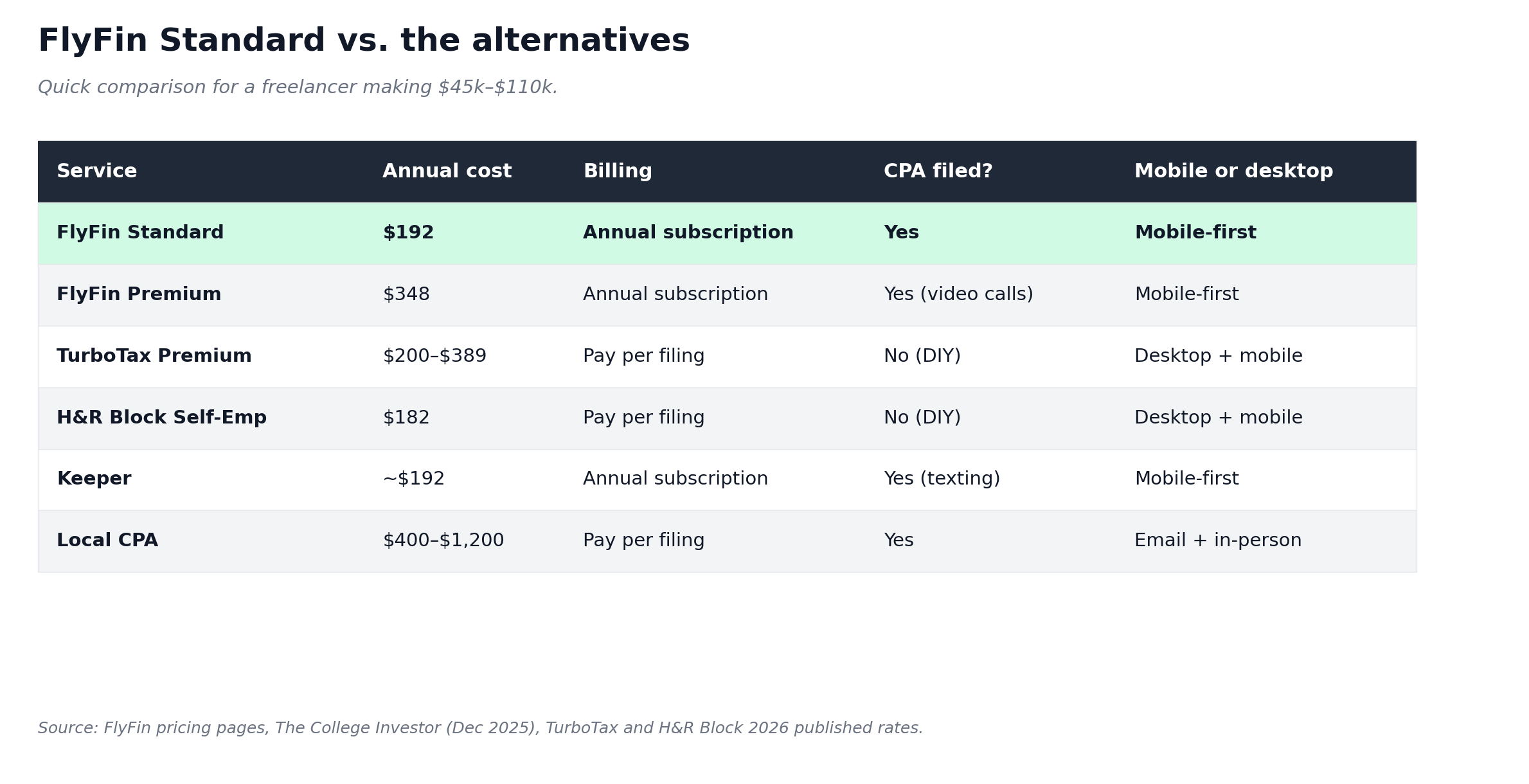
The honest read on price. FlyFin’s Standard at $192 is fair if you actually use the AI deduction tracker year-round and the CPA filing comes through clean. If you only show up at tax time, you are paying $192 to file what TurboTax could file for you for around $200, and you skip the AI bookkeeping you paid for.
What FlyFin does well
The deduction discovery is the actual product
The AI scanning your accounts and finding deductions is the thing positive reviewers keep coming back to on Trustpilot and the App Store. Users on the 4 and 5 star reviews mention the app caught deductions they had been missing for years. A blogger on the App Store said the AI picked up transactions from the card she used for blogging payments, without her doing anything. A musician said it found “offbeat tax deductions” that saved real money.
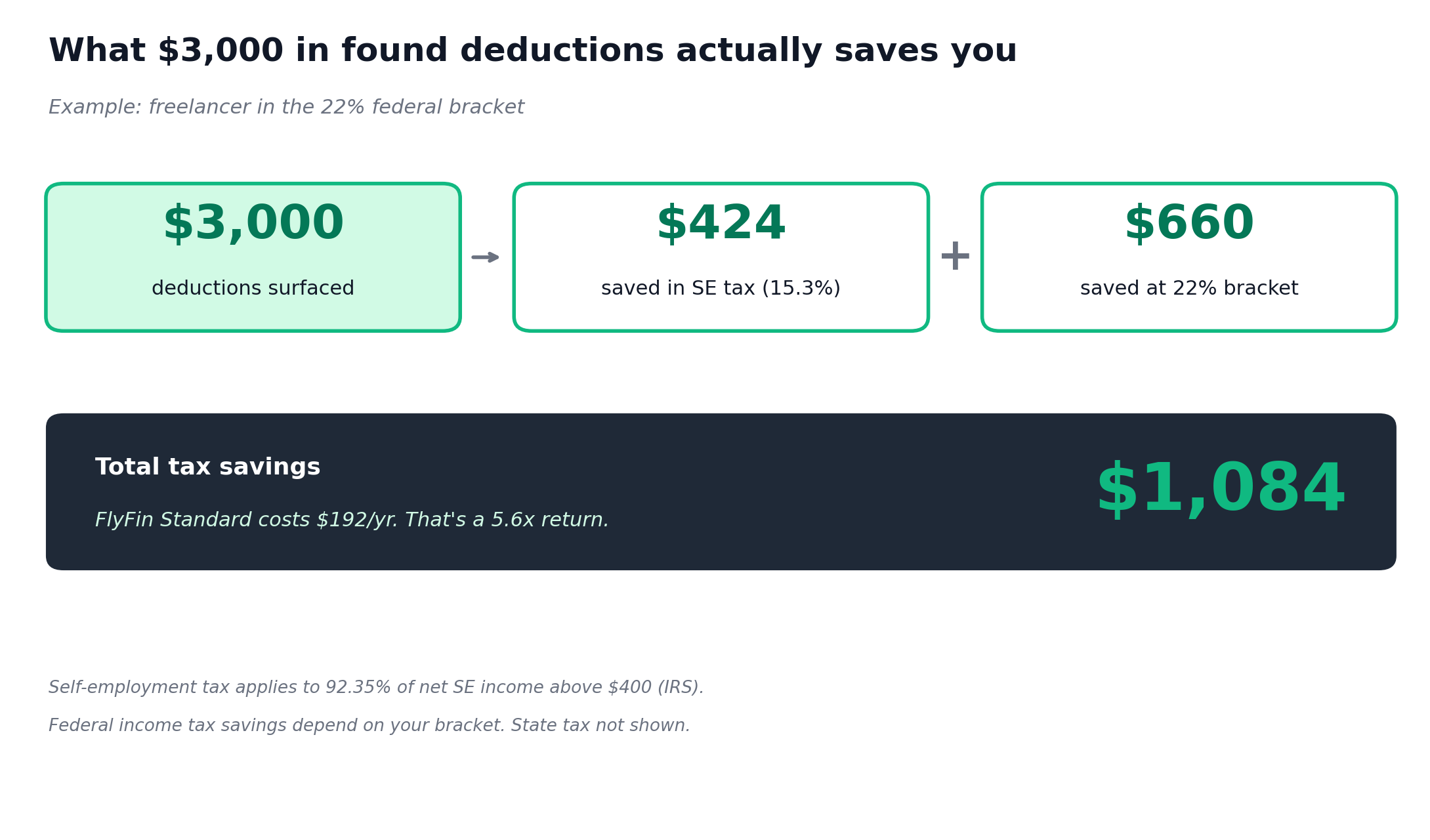
Self-employment tax of 15.3 percent applies to 92.35 percent of your net SE income above $400, per IRS guidance. So every legitimate deduction you find shaves real money off your tax bill. If FlyFin’s AI surfaces $3,000 in deductions you would have missed, that is roughly $424 less in self-employment tax alone, plus whatever your federal income tax bracket adds on top. The math holds up if it works for your specific situation. For more on what counts, see our guide on tax deductions for freelancers.
Quarterly estimated tax calculations are built in
Every plan includes a quarterly tax estimator. Quarterlies matter because if you expect to owe more than $1,000 in federal tax this year, the IRS requires them. The 2026 due dates are April 15, June 15, September 15, and January 15, 2027. Miss one and you eat penalties and interest. Most freelancers get this wrong in their first or second year, and the penalty letter from the IRS hits the chest harder than the actual amount suggests.
FlyFin’s calculator pulls from your tracked income and expenses inside the app, so the estimate updates as the year moves along. That is more accurate than guessing 25 percent and hoping. If quarterlies are the thing that wakes you up on Sunday night, this is a real selling point. We cover the bigger picture in our guide on how to avoid tax liability shock.
Audit insurance is included on Standard and Premium
If the IRS audits your return, FlyFin’s CPAs will represent you. This comes included on the Standard tier and above. TurboTax charges around $60 extra for the equivalent. Real audit risk for a freelancer making $45,000 to $110,000 is low, well under 1 percent for non-EITC returns. But if it helps you sleep, here it is.
What FlyFin does badly (the part affiliate reviews leave out)

CPA response times stretch to one or two days
This is the loudest complaint across Trustpilot and the BBB. A March 2026 Trustpilot reviewer who paid for the most expensive package described waiting one to two days for answers about errors on their tax form. They were trying to get a deduction question sorted in real time and never got a clear reply. Another wrote that the CPA “decided to pass the burden to me” when an IRS phone call needed to be made.
If you file in late March or early April, that one to two day delay matters a lot. It can be the difference between filing on time and asking for an extension. If you file in February with weeks of buffer, you probably will not feel it.
It is mobile-first to a fault
One Trustpilot reviewer said it bluntly. Doing everything through a phone app, including uploading bank statements, is “insanely inconvenient.” Some people want to upload PDFs and read their return on a 27-inch monitor. FlyFin pushes you to the app for almost everything. There is a web app, but it is not the same experience.
If you are the kind of freelancer who lives in spreadsheets and wants to see every line of your return at one glance, this will frustrate you in the first hour.
The “what’s covered” boundaries are not clear up front
An App Store reviewer said the standard paid account does not include partnership-type LLCs, and that fact was not obvious before they signed up. They got billed for an extra fee they were not expecting. If you are a multi-member LLC, an S-Corp, or you have unusual income (foreign-earned, K-1 from a partnership, NIL income), check what plan you actually need before you pay.
The Standard plan at $192 covers sole proprietors and single-member LLCs. S-Corp owners need Premium at $348. Multi-member LLCs may have extra fees on top of that.
Cancellation and account deletion are not obvious
Several BBB complaints say the same thing. Users feel they cannot easily cancel or delete their data after signing up. One BBB reviewer wrote there is no way to access your data or close your account. Another said FlyFin does not give any way to delete their access after sign-up.
FlyFin does respond to these complaints. Their support email is support@flyfin.org and they generally do refund. But the friction is real. If you sign up, save the support email and screenshot your subscription confirmation. If you decide to cancel, do it before the 7-day trial ends.
Surprise annual billing during the “free trial”
This is the biggest red flag in the negative reviews. The free trial requires a credit card up front. Several App Store and Google Play users report being charged the full annual amount inside the trial window, sometimes within the first hour, before they had a chance to evaluate anything.
FlyFin’s support team appears to refund when asked, but the work is on you. You have to notice the charge, contact support, and wait up to a week for the money to come back. If you want to test the AI without that risk, link a virtual card with a low limit instead of your main one, and set a calendar reminder to cancel on day six.
Who should actually use FlyFin
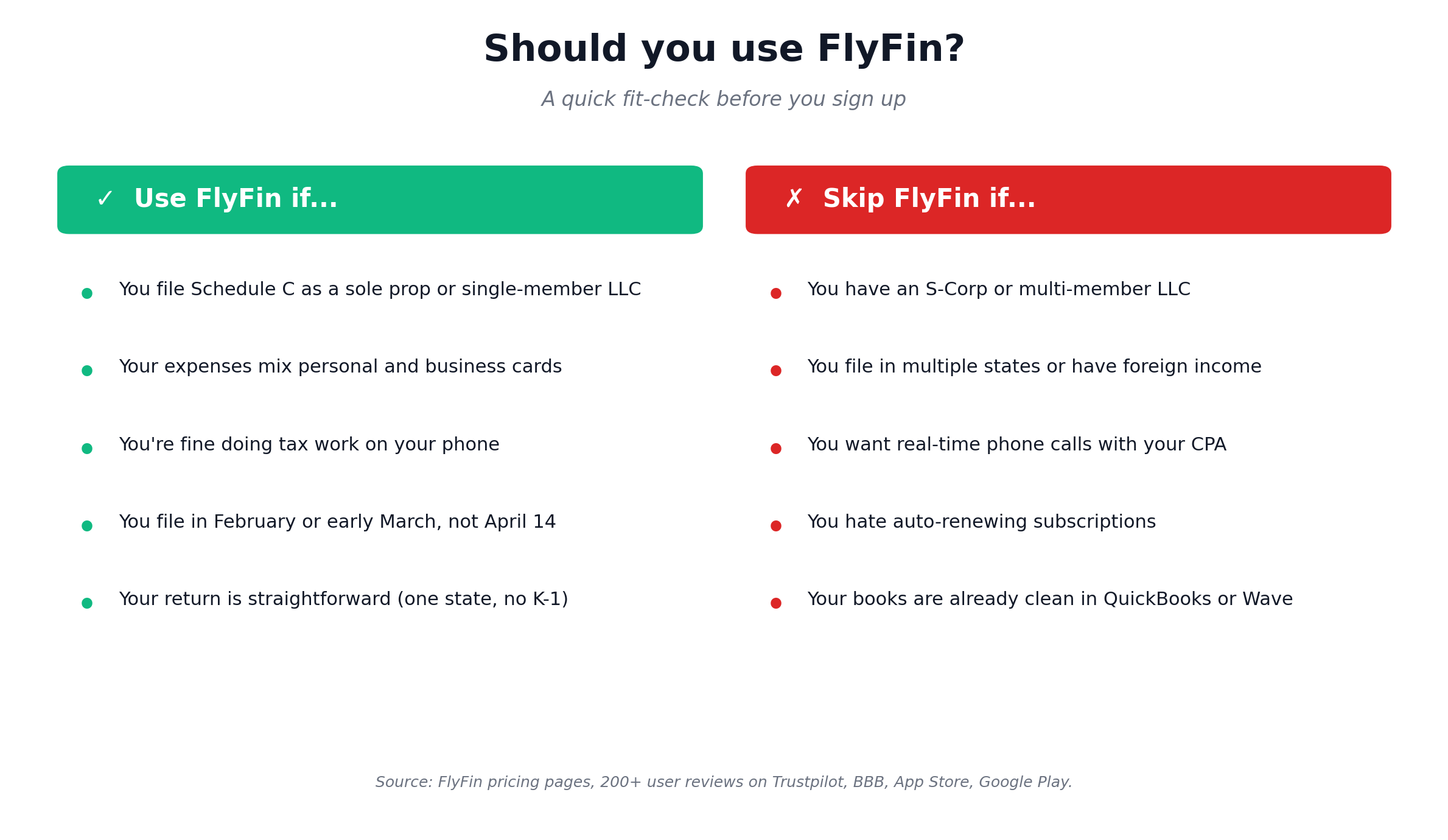
Use FlyFin if all of these are true for you.
- You file Schedule C as a sole proprietor or single-member LLC. This is FlyFin’s core use case.
- Your expenses are mixed across personal and business cards. The AI sorting earns its keep here.
- You are fine doing tax work on your phone. If that sentence made you wince, stop reading.
- You file in February or early March, not April 14th at 11pm. The one to two day CPA reply window assumes you have buffer.
- Your return is straightforward. One state, no foreign income, no partnership K-1s, no S-Corp.
Who should skip FlyFin
- You have an S-Corp or multi-member LLC. The Premium plan at $348 may technically cover you, but a local CPA who knows your structure is worth the difference.
- You file in multiple states or you have international income. Reviewers report mixed CPA quality on edge cases.
- You want real-time conversations with your accountant. Standard plan support is in-app messages, asynchronous. Video calls are Premium only.
- You hate auto-renewing subscriptions and surprise annual charges. The pricing model will frustrate you no matter how good the AI is.
- Your books are already clean. If your bookkeeping is sorted in QuickBooks or Wave, you are paying for an AI feature you do not need. Use TurboTax Premium and keep the subscription money.
A 5-minute decision framework
Run this before you sign up.
- Open your bank account right now. Look at last month’s transactions. If you can immediately tell which are business and which are personal, you do not need FlyFin’s AI. If you cannot, the deduction tracker is worth a test.
- Check what entity you file as. Sole prop or single-member LLC, the $192 Standard plan covers you. S-Corp, you need $348 Premium. Anything else, get a quote from a local CPA first.
- Pick your filing month. If you plan to file in February or early March, FlyFin works. If you file in April, the slow CPA replies will hurt.
- Set a calendar reminder for day six of the trial. Decide before the auto-charge hits, not after.
- Compare against TurboTax Premium. If your books are already clean and your return is simple, TurboTax is cheaper and the desktop UX is better.
FlyFin vs the obvious alternatives
FlyFin vs Keeper
Keeper is FlyFin’s closest competitor. Both are mobile-first, both are AI-driven, both target self-employed filers. The interface is where they split. Keeper talks to you through a text-message style chat, which works well for gig workers like Uber, DoorDash, and Instacart drivers. FlyFin’s swipe-to-confirm interface is faster if you have hundreds of transactions a month, which is normal for freelancers and consultants. Pricing is similar at the comparable tier.
FlyFin vs TurboTax Premium
TurboTax Premium (formerly TurboTax Self-Employed) costs around $200 to $389 per filing depending on how much help you want, and it has the desktop experience FlyFin lacks. The trade is that TurboTax does not give you a dedicated CPA on the standard tier. You do the work yourself, the software walks you through it. If you are confident on Schedule C and you just want clean software to file with, TurboTax wins. If you want a human to file for you and you like AI bookkeeping, FlyFin wins.
FlyFin vs a local CPA
A full-service local CPA charges $400 to $1,200 for a freelancer’s return, depending on complexity and your city. You get someone you can pick up the phone and call. You get someone who knows your business after a year or two. You get someone who can advise on entity choice, retirement contributions, and quarterly planning. You also pay 2 to 5 times what FlyFin costs.
Honest answer. Once you cross around $80,000 in net self-employment income, the math on a real CPA usually wins, especially if you are thinking about an S-Corp election. Below that, FlyFin’s price-to-value can make sense.
Get the freelancer tax-prep checklist

Before you decide on FlyFin or any other tax tool, get the prep work done first. The checklist walks you through every document, deduction category, and IRS form you need to file as a freelancer in 2026. Built for sole proprietors and single-member LLCs filing Schedule C. Free, no card required.
Frequently Asked Questions
Is this FlyFin review saying it’s legit, or a scam?
FlyFin is a real, registered company headquartered in San Jose, California, with an A+ rating on the Better Business Bureau and over 250,000 reported users. The complaints on Trustpilot and BBB are about service quality, slow CPA responses, and surprise billing. They are not about fraud. The CPAs filing your return are real, US-licensed accountants. You will get a tax return filed. The question is whether the experience matches the marketing, and the user reviews suggest it sometimes does not.
How much does FlyFin actually cost in 2026?
FlyFin charges around $7 a month billed annually for the Basic plan (AI deduction tracking only, no CPA filing), $192 a year for Standard (adds CPA-prepared federal and state returns for sole props and single-member LLCs), and $348 a year for Premium (adds S-Corp filing, video calls with your CPA, and audit insurance). All plans bill annually up front, even when the marketing shows monthly equivalents like $7 a month or $29 a month. There is a 7-day free trial that requires a credit card.
Can FlyFin file my taxes for me?
Yes, on the Standard ($192) and Premium ($348) plans. A dedicated CPA prepares your federal and state returns, you review and e-sign in the app, and the CPA e-files for you. The Basic plan does not include CPA filing. It only gives you the AI deduction tracker and the quarterly estimator. You would still need to file separately, possibly with TurboTax or another service, and the AI bookkeeping data exports work for that.
Is FlyFin worth it for a freelancer making $60,000 a year?
Probably yes if your books are messy and you mix personal and business expenses on the same cards. The AI deduction tracker can find real money, and $192 for a CPA-filed return is competitive at that income level. Probably no if your bookkeeping is already clean in another tool, your return is simple, and you can handle TurboTax Premium yourself. We cover this decision in our guide on the best accounting software for freelancers.
How do I cancel FlyFin?
Email support@flyfin.org and ask for cancellation and a refund. According to user reviews, the support team does process refunds, but the money can take up to seven days to land back in your account. Cancel before your 7-day free trial ends to avoid the annual charge. There is no obvious one-click cancel button inside the app, which is a documented complaint on the Better Business Bureau profile.
Does FlyFin handle quarterly estimated taxes?
Yes. Every plan includes a quarterly tax estimator that pulls from your tracked income and expenses. The 2026 quarterly deadlines are April 15, June 15, September 15, and January 15, 2027. If you expect to owe more than $1,000 in federal tax for the year, the IRS requires you to pay these to avoid penalties. FlyFin’s calculator updates throughout the year as your numbers move, which is more reliable than the standard “set aside 25 percent” guess. For deeper context on the rules, our guide on avoiding tax liability shock walks through the math.
What’s the difference between FlyFin and Keeper Tax?
Both are mobile-first AI tax services for self-employed filers. Keeper talks to you through a text-message style chat and tends to suit gig workers (rideshare, delivery) better. FlyFin uses a swipe-to-confirm interface that handles high-transaction-volume freelancers more efficiently. Pricing is similar at comparable tiers. The CPA filing model is similar. The biggest difference: Keeper feels like texting a friend, FlyFin feels like a structured tax app.
Do I still need a separate bookkeeping tool with FlyFin?
For most freelancers, no. The AI deduction tracker doubles as a year-round bookkeeping system. It pulls in transactions from your linked accounts, sorts them, and stores them for tax time. Where it falls short is invoicing (FlyFin does not do this), accounts receivable, and full profit-and-loss reporting beyond what your tax filing requires. If you need to send invoices and chase late payers, you will want a dedicated invoicing tool. See our guide on the best invoicing software for freelancers for options.
My honest FlyFin Review verdict
FlyFin is a legitimate product. The AI deduction tracker is genuinely useful, the Standard plan is fairly priced, and you get a CPA-filed return at the end. The negative reviews are real and they are consistent. They centre on three things: surprise annual billing during the trial, slow CPA response times, and a mobile-only experience that frustrates anyone who wants a desktop view.
If you are a sole prop with messy books, you file your taxes by mid-March, and you live on your phone anyway, FlyFin at $192 is worth a test. If you have an S-Corp, you file in April, or you want a real human you can call, look elsewhere. Whatever you decide, set a calendar reminder for day six of the free trial.
Start Your Free Trial with FlyFin
One more thing you can do this week. Pull up your 2025 bank statements and total your business expenses by category. If that takes you more than 30 minutes, the AI deduction tracker in any of these tools (FlyFin, Keeper, or QuickBooks Solopreneur) will save you real time next year. If it takes you 5 minutes, your books are already clean and the AI is a feature you do not need to pay for. You can find more on this in our piece on tracking business expenses as a freelancer.
This article is informational only and not tax or legal advice. Tax laws and software pricing change. Verify current rates and IRS thresholds at IRS.gov, and talk to a CPA or enrolled agent for advice specific to your situation. Pricing in this review is based on FlyFin’s published rates and third-party reviews as of April 2026.
About the author
Gareth is an entrepreneur based in Dubai and the founder of AI Finance Tools for Freelancers. He is not a CPA and he is not a bookkeeper. He built this site because he could not find honest, thorough reviews of AI finance tools written for freelancers. Every guide is researched from real user reviews, official documentation, and expert sources.