
Keeper sits at 4.8 stars on Trustpilot and 1.8 stars on the BBB. Same product. Two very different stories. Here’s what the app gets right, where it falls apart, and how to tell which side of that line you sit on before you spend a dollar.

This Keeper Tax review breaks down the price, the user complaints, and who it actually fits in 2026. 11pm on a Sunday in early April. Eight days until the filing deadline. You’ve got a shoebox of Stripe payouts, a Chase business card with 412 transactions on it, and a half-finished Schedule C in TurboTax asking you a question you can’t answer. (Need a refresher first? Our Schedule C line-by-line guide for freelancers walks through every line with a worked example.) Then an ad pops up. Some app that scans your bank account, finds every deduction, files your taxes for you. The reviews look decent. The price isn’t crazy. You sign up.
That’s the moment Keeper was built for. And for plenty of freelancers, it actually delivers. For others, it spits out a return they later have to amend, a $192 charge they didn’t see coming, or both. This review is for the second group as much as the first. I pulled from the Apple App Store, Google Play, the BBB complaint file, Capterra, Trustpilot, and the Keeper subreddit threads to give you the real picture. Then I’ll tell you who Keeper fits and who should stay away.
What Keeper actually is in 2026
Keeper (formerly Keeper Tax) is a US-only iOS, Android, and web app built around two ideas. First, you link your bank and credit card accounts through Plaid, and an AI scans your transactions to flag possible business deductions. Second, when April rolls around, you file your federal return and up to two state returns inside the same app, with a human tax pro signing off before submission. According to Keeper, the AI is fine-tuned on tax law and the human review is included on annual plans at no extra charge.
That’s the pitch. Reality is messier, and the price has been climbing.
Keeper pricing in 2026
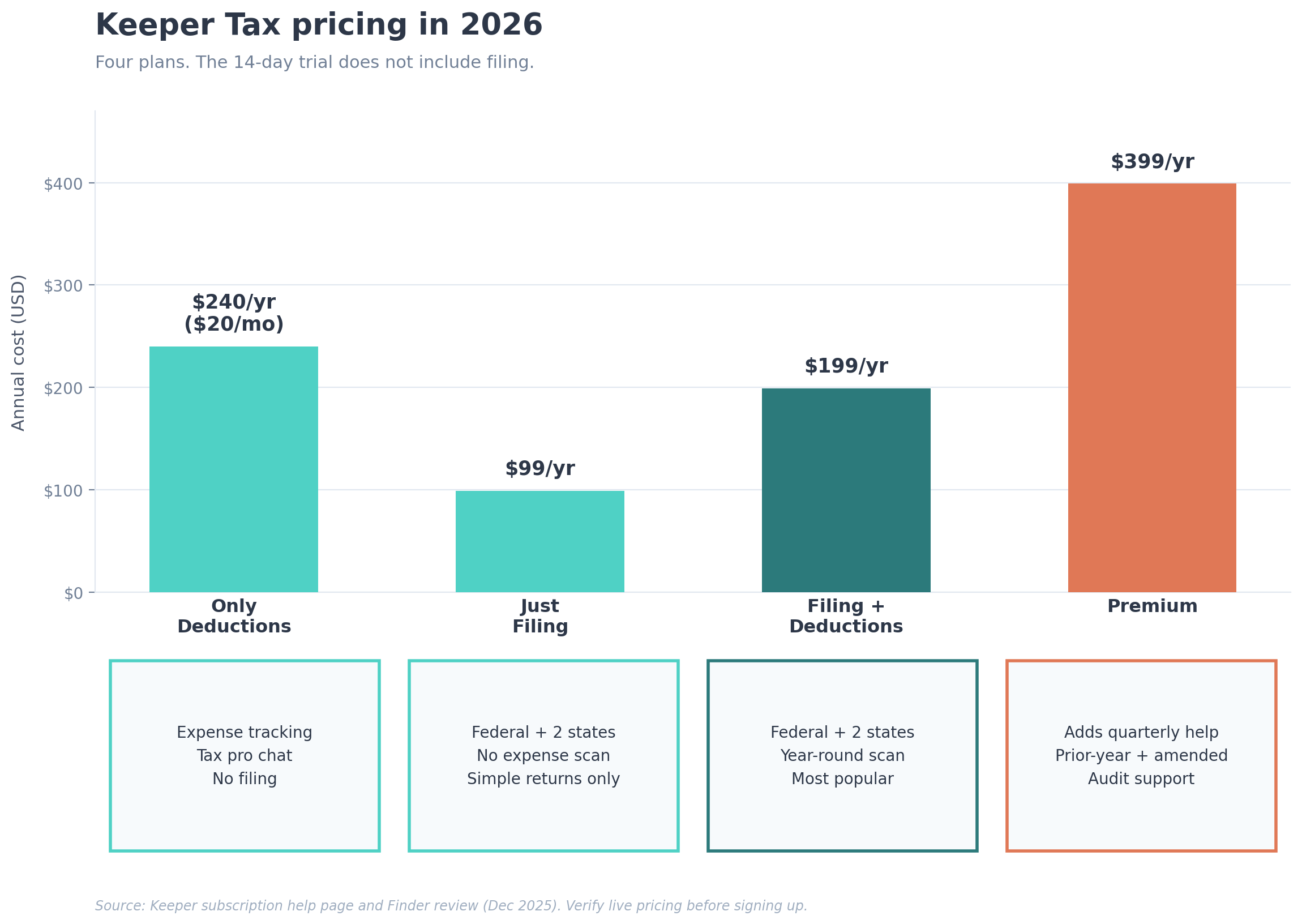
Keeper sells four plans right now. Pricing comes from Keeper’s own subscription help page and Finder’s December 2025 review. Check the live pricing page before you sign up.
- Only deductions, $20 per month. Expense tracking and tax pro chat. No filing. You export your data and file somewhere else.
- Just filing, $99 per year. Federal e-file plus two state returns. No expense tracking, no AI deduction scan. For simple W-2 or 1099 returns.
- Filing and deductions, $199 per year. The plan most full-time freelancers actually want. Year-round expense scanning plus federal and two-state filing.
- Premium, $399 per year. Adds quarterly tax help, prior-year and amended returns, audit resolution support, and one 30-minute call with your assigned tax pro per quarter. Extra calls run $60 each.
One pattern shows up over and over in App Store reviews and BBB complaints. People sign up during the 14-day free trial thinking they can file for free. Then they hit the wall: filing requires the paid annual plan. Keeper’s terms spell this out. The in-app flow doesn’t always make it obvious. If you walk in expecting the trial to cover filing, you’re going to be surprised.
The Trustpilot vs BBB gap nobody is explaining
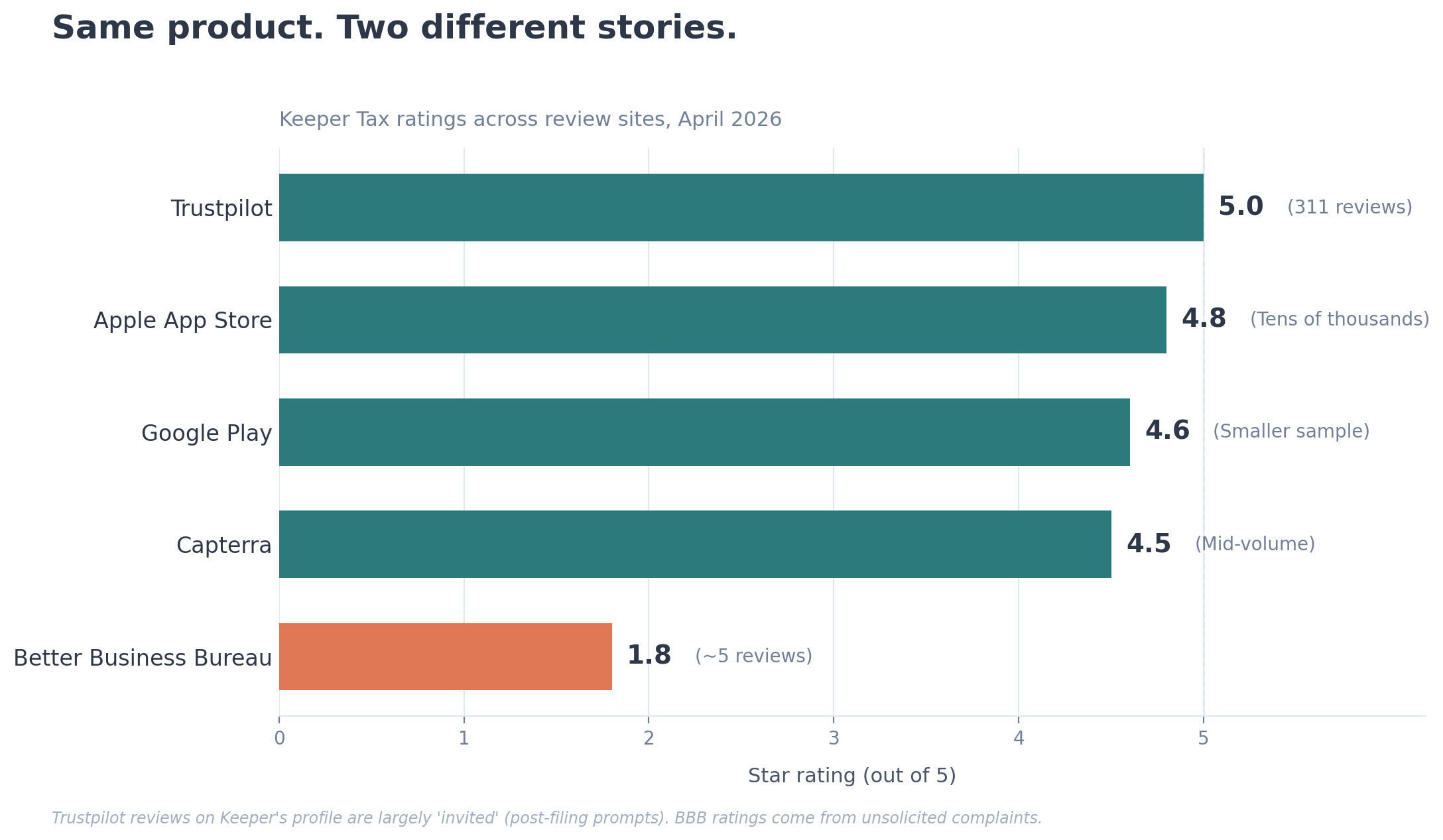
This is the most important thing in this review. Look at where Keeper’s ratings live, and you’re basically looking at two different companies.
| Source | Rating | Review count | What you mostly see |
|---|---|---|---|
| Trustpilot | 5.0 / 5 (rounded from 4.8) | 311 | Glowing reviews, many marked “invited” |
| Apple App Store | 4.8 / 5 | Tens of thousands | Mostly positive, with a meaningful 1-star tail about filing errors |
| Google Play | 4.6 / 5 | Smaller sample | Positive plus complaints about a $399 price increase and removed SMS feature |
| Capterra | ~4.5 / 5 | Mid-volume | Many tagged as “incentivized” reviews |
| Better Business Bureau | 1.8 / 5 | Small sample (around 5 reviews) | Filing errors, surprise charges, support unreachable |
A high share of the Trustpilot reviews on Keeper’s profile are flagged “Invited,” which means Keeper asks happy customers to leave reviews after a successful filing. That’s allowed. Most software companies do it. It also pulls the average up by 1 to 2 stars compared to places where unhappy users self-select to complain (BBB, App Store 1-star reviews). The truth lives somewhere in the middle. FinanceBuzz noted the same thing in their March 2026 update: A+ BBB accreditation but a 1.8-star user rating on the BBB review tab.
Translation: don’t read only the 5-star Trustpilot blurbs. Don’t read only the BBB horror stories. Read both. Then scroll through the App Store 1- and 2-star reviews, because those come from paying users who hit a real problem.
Where Keeper genuinely works
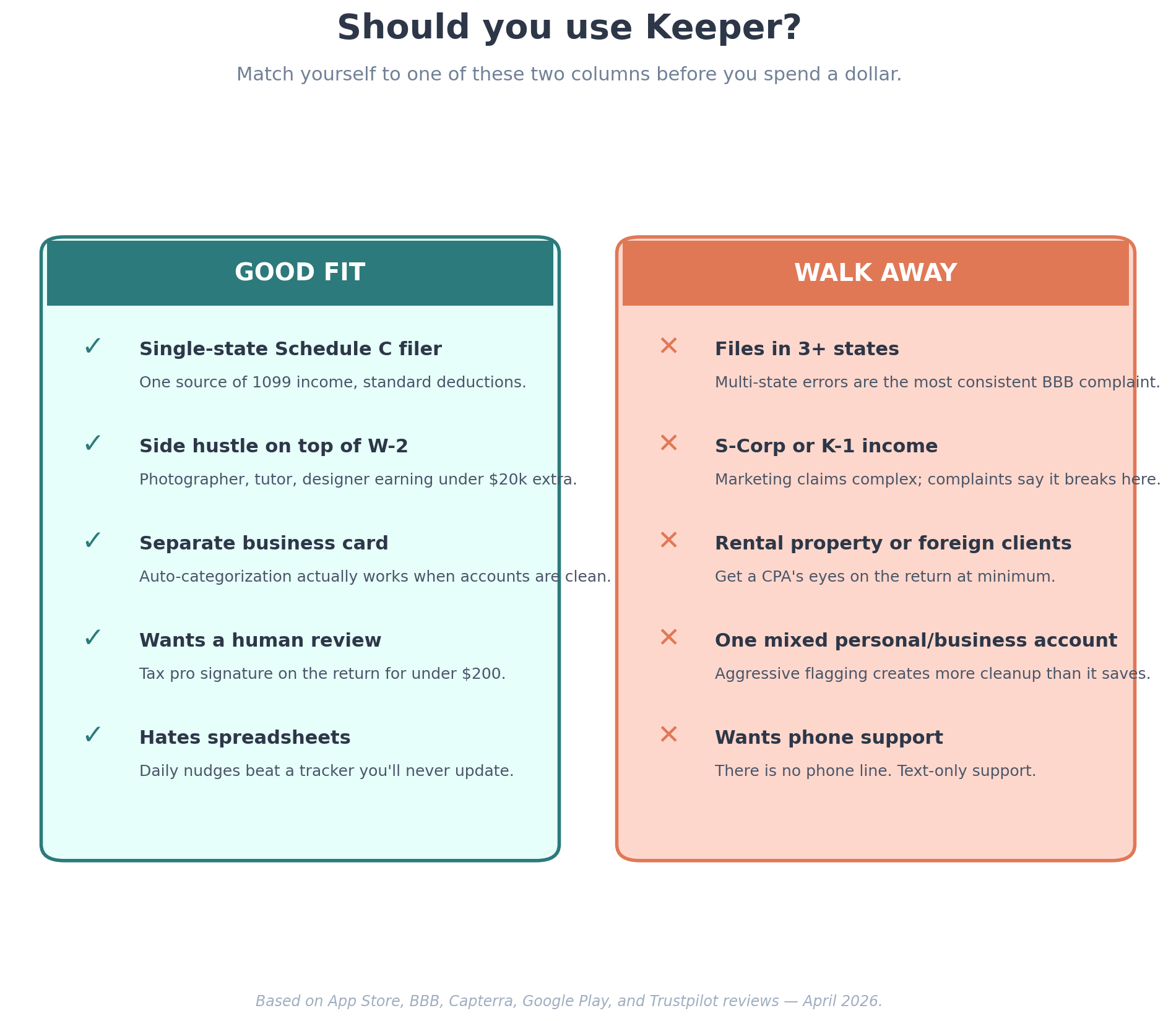
I don’t want this to read like a hit piece. Keeper does some things well, and the freelancers who like it really like it. Going through the Trustpilot, App Store, and Capterra reviews, four use cases keep showing up.
You have a side hustle that mixes with W-2 income
A part-time photographer making $14,000 on top of a W-2 day job doesn’t need a CPA at $1,200. Keeper at $199 a year is a sane middle ground. Multiple App Store reviewers describe this exact setup and say it works. The AI flags the lens you bought, the SD cards, the editing software, the mileage to the wedding venue. You file federal plus state in an hour. Done.
You hate paperwork and need a daily nudge
This is where the product is strongest when it works. The app scans your linked accounts, asks whether each ambiguous transaction was business or personal, and logs it in seconds. A Capterra reviewer who described herself as a part-time freelancer making “next to nothing” said the daily texts saved her hours at tax time. If your alternative is a spreadsheet you’ll never update, Keeper’s nudges might genuinely move you from chaos to a tracked Schedule C.
You want a human signature on the return without paying CPA prices
Every annual filing plan includes a tax pro review before submission. For freelancers earning under $100,000 with a moderate level of complexity, that’s genuinely useful. A CPA in a US metro charges $400 to $1,200 to prepare a 1099-heavy return. Keeper’s filing-and-deductions plan is $199. The tradeoff: the human reviewing your return is not your CPA. They’re checking AI output. That distinction matters when something goes wrong, which we’ll get to.
You’re a Schedule C filer with a basic return
Single state. One source of 1099 income. A handful of standard deductions. Home office, software subscriptions, mileage, professional development. Keeper handles this cleanly. App Store reviewers in this bucket use words like “easy” and “fast.” I believe them. The product was designed for this exact freelancer.
Where Keeper falls apart (and the complaints are specific)
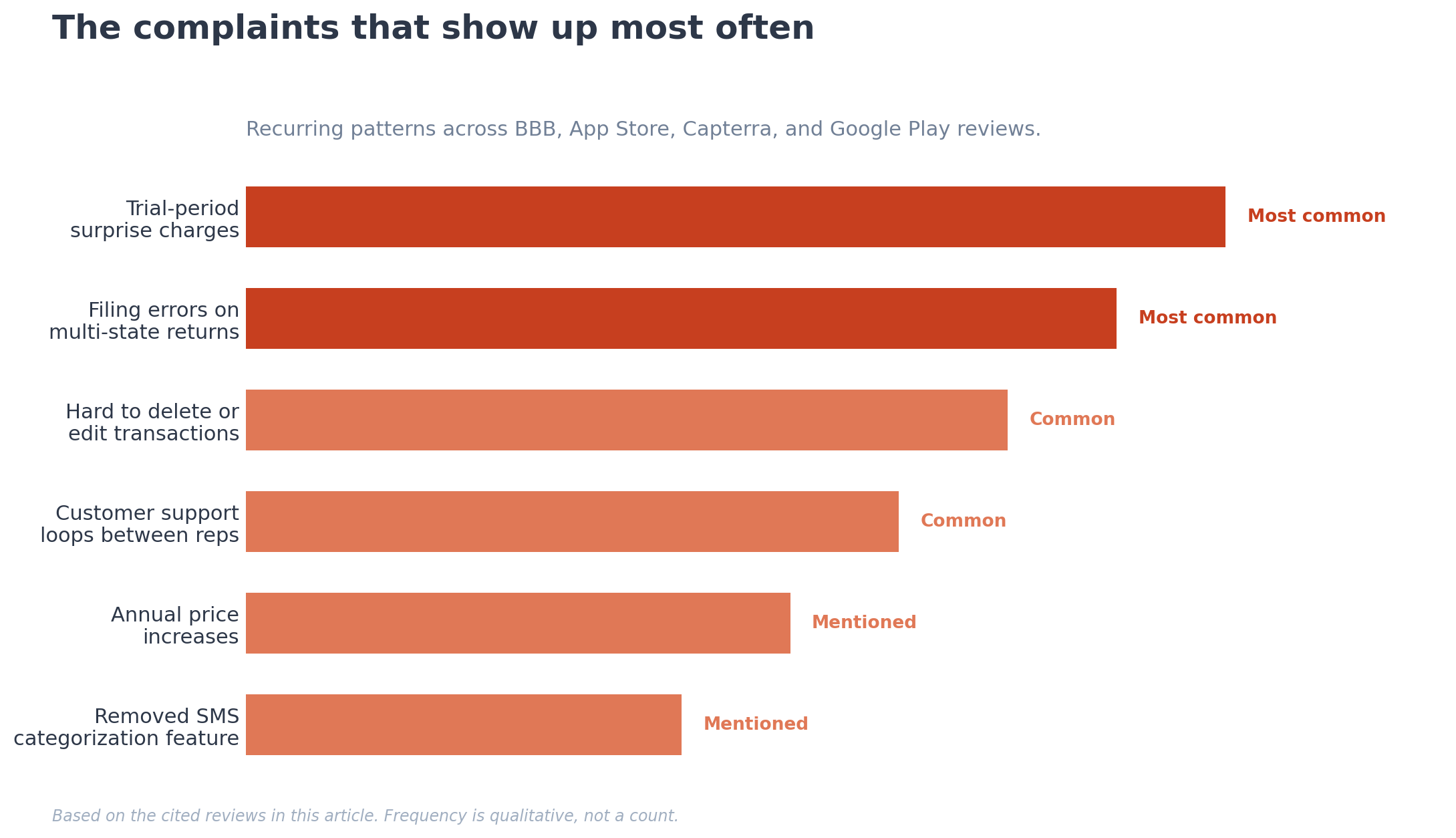
This is the section other reviews skip. Every complaint below comes from a verifiable source: BBB filings, App Store 1-star reviews from 2024 to 2026, or Google Play reviews from this year. I’m paraphrasing to respect the reviewers and to keep the piece clean, but the source is linked.
Filing errors on multi-state or complex returns
The most worrying pattern shows up on returns that cross state lines. A BBB reviewer described a multi-state filing where her DC and Virginia state returns got switched: her husband’s W-2 had Virginia withholding by mistake, they should have received a Virginia refund and paid DC, and Keeper filed the opposite. Sorting that out means filing an amendment with two state revenue departments instead of one. An App Store reviewer in February 2025 reported a 2024 return where her premium-tier filing missed forms she had asked the team to triple-check, delayed her refund, and turned an expected refund into a bill for thousands she hadn’t budgeted for. Keeper’s own developer responses on these reviews acknowledge the frustration but don’t deny the underlying error.
If your return involves two or more states, K-1 income, an S-Corp, rental properties, or out-of-country clients, treat Keeper with caution. The marketing says it handles complex situations. The complaint pattern says complex situations are where the system breaks.
Surprise charges after the trial
Multiple BBB complaints describe trial-period charges users didn’t expect. One reviewer reported a $168 charge after a trial she didn’t realize had ended. Another, who specifically used a low-balance debit card to protect herself, watched Keeper try to put through the full $192 annual charge before the trial converted (source: bbb.org Keeper complaints page). Keeper’s terms are clear that the trial auto-converts unless you cancel by 11:59pm Pacific the day before it expires. Read those terms before you put a card in.
Two takeaways. First, set a calendar reminder for day 13 of the trial if you decide to test it. Second, subscription refunds are tightly limited. Per Keeper’s terms, you can request a refund within one month of your first subscription term, and after that fees are non-refundable.
The over-aggressive expense flagging problem
Sole proprietors who mix personal and business spending on one card report a real frustration: the AI flags everything, and once a transaction is in the deductions list, you can’t easily delete it or fully edit it. A 2025 App Store reviewer said the system worked better for established businesses with separate accounts and felt like extra work for someone whose income and accounts were less predictable.
This is exactly the problem Keeper is supposed to solve. If you’re organized enough to have a separate business card, you don’t really need aggressive flagging. If you’re not, the aggressive flagging creates a documentation pile you have to argue with. There’s a middle case where it works, but you should know which side of the line you’re on.
The SMS expense feature got removed
This was the original Keeper Tax pitch in 2019. Make a purchase, get a text seconds later asking “business or personal?”, reply with one tap. A current Google Play reviewer says that feature has been quietly pulled and the experience now requires opening the app to categorize. Several other reviewers say the same. If real-time SMS categorization was the thing you wanted, Keeper no longer offers it the way it did. Verify in the app before you commit.
The price has gone up, fast
A multi-year Keeper customer wrote a 1-star Google Play review in 2026 saying the annual price moved from a tier they’d been paying for years to $399, and they were leaving for a competitor. Whether you think $399 is fair depends on your situation. The trajectory is real. Plan for price increases on renewal.
Customer support is hard to reach
Keeper has no published phone number. Support is in-app chat, email at support@keepertax.com, and your assigned tax pro. Finder flagged the lack of a phone line as a downside in their review. App Store and BBB complaints describe being passed between rotating support reps when there’s a filing problem. If something goes wrong with your return, the resolution path is text-based and slower than calling a CPA’s office.
Keeper vs the alternatives, side-by-side
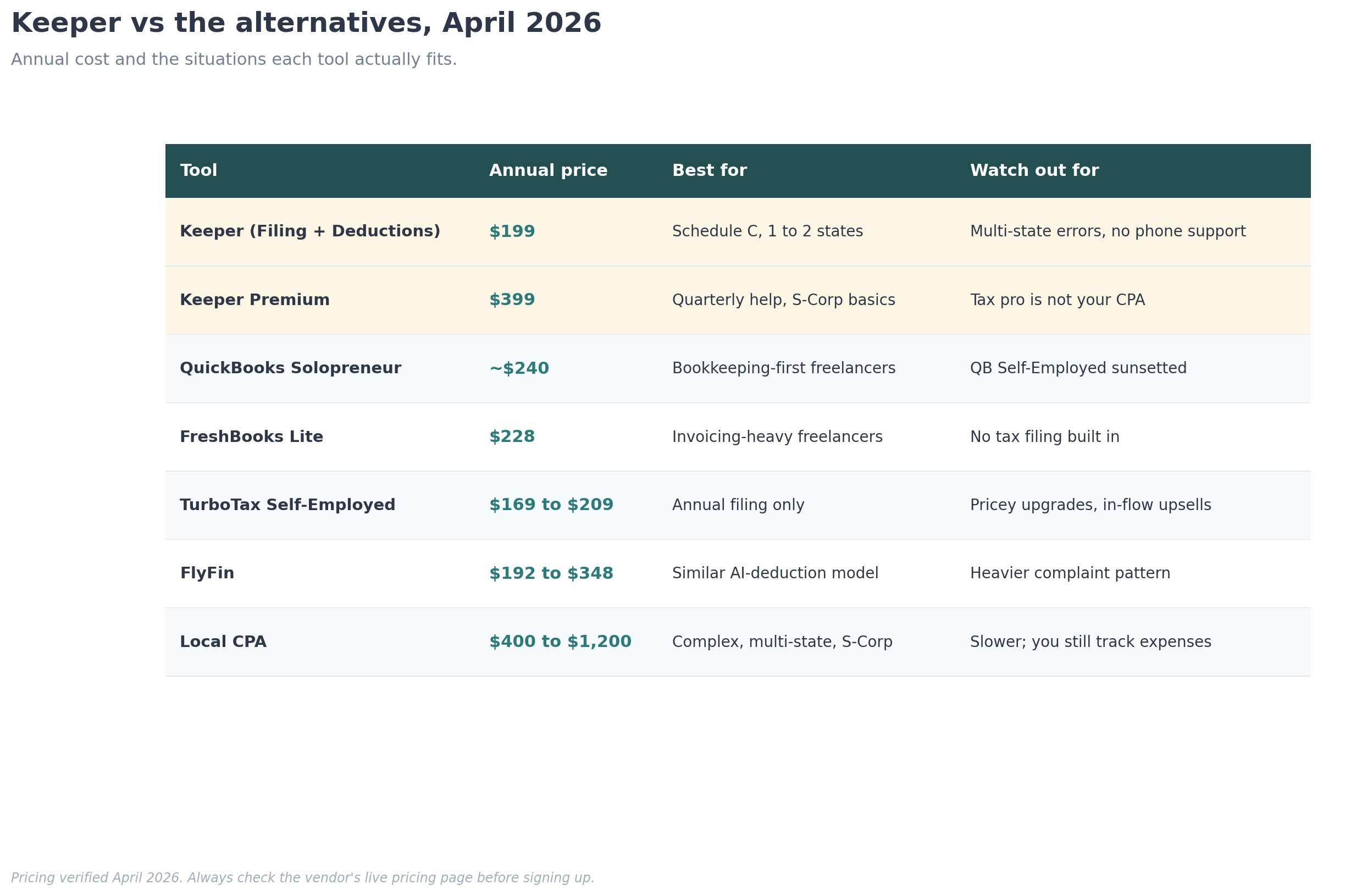
Pricing verified April 2026. Always check the vendor’s live pricing page before signing up.
| Tool | Annual price | Best for | Watch out for |
|---|---|---|---|
| Keeper (Filing + Deductions) | $199 | Schedule C filers, 1 to 2 states, moderate complexity | Multi-state errors, removed SMS feature, no phone support |
| Keeper Premium | $399 | Quarterly tax help, prior-year amendments, S-Corp basics | Pricier than the next tier; tax pro is not your CPA |
| QuickBooks Solopreneur | ~$240 ($20/mo) | Bookkeeping-first freelancers who file elsewhere | QB Self-Employed has been sunset; migration path was bumpy |
| FreshBooks Lite | $228 ($19/mo) | Invoicing-heavy freelancers | Tax filing is not built in |
| TurboTax Self-Employed | ~$169 to $209 | Annual filing only, no year-round tracking | Pricey upgrades, upsells inside the flow |
| FlyFin | $192 to $348 | Similar AI-deduction model | Heavier complaint pattern than Keeper. See our FlyFin review |
| A local CPA | $400 to $1,200 | Complex returns, multi-state, S-Corp | Slower; you still need to track expenses yourself |
Three things stand out from this table. Keeper isn’t the cheapest option, but it’s one of the few that bundles year-round expense tracking with filing. A CPA is more expensive, yet often cheaper than the cost of a botched filing if your situation is complicated. And QuickBooks Solopreneur is the closest direct competitor for the bookkeeping piece. We compare the bookkeeping options here.
A 5-minute decision framework
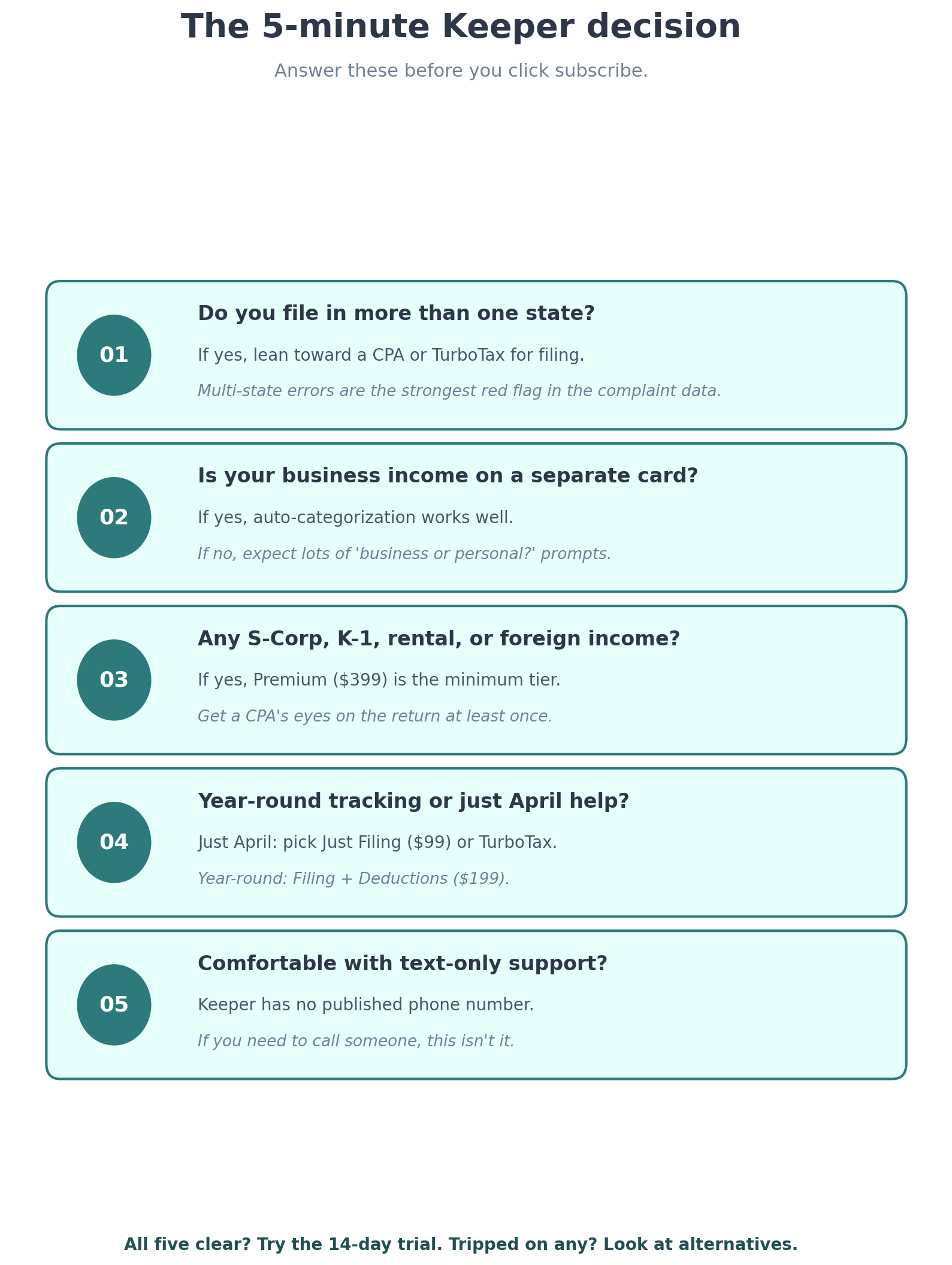
Run yourself through these five questions before you click subscribe.
- Do you file in more than one state? If yes, lean toward a CPA or TurboTax Self-Employed for the actual filing, even if you keep Keeper for tracking. The multi-state error pattern is the strongest red flag here.
- Is your business income on a separate card or account? If yes, Keeper’s auto-categorization works well. If no, expect to manage a lot of “is this business or personal?” prompts.
- Do you have any of the following: S-Corp, K-1 income, rental property, foreign clients, AMT exposure? If yes, Keeper Premium is the minimum tier you should consider, and you should still get a CPA’s eyes on the return at least once.
- Do you actually want year-round tracking, or just April help? If just April, the Just Filing plan at $99 or a one-time TurboTax purchase will save you money.
- Are you comfortable with text-only support? If you want to be able to call someone when there’s a problem, Keeper isn’t the right fit.
Cleared all five? The 14-day trial is worth your time. Tripped on any of them? Look at the alternatives in the table.
The mistake most reviews keep making
Most Keeper reviews online get written for one of two reasons. Either the reviewer is an affiliate earning a commission if you sign up, or the reviewer is summarizing Keeper’s marketing copy and the company’s selected testimonials. Both produce the same article: “Keeper is a solid AI-powered tax tool for freelancers, with a few drawbacks.”
The mistake is treating Keeper as one product. It’s two products glued together. The expense tracker is decent and getting more expensive. The tax filing service is fine for simple Schedule C returns and risky for anything multi-state or structurally complex. Reviewers who treat the bundle as a single yes-or-no recommendation miss this entirely. You can use one without the other. The Only Deductions plan at $20 a month gives you the tracker, and you can take the export to TurboTax, a CPA, or any other filing tool. That’s often the smartest play.
What real freelancers say (paraphrased)
From the App Store, Capterra, and BBB reviews, the recurring themes:
- Positive, repeated. Saves time on expense categorization. Easy to use on the phone. The tax pro review feels reassuring. Cheaper than the local CPA they tried before.
- Negative, repeated. Filing errors on multi-state returns. Trial-period charges that surprised people. Hard to delete or edit a misclassified transaction. Customer support that loops between reps. The price keeps going up.
- Mixed. Some App Store reviewers love the AI assistant. Others find the canned answers unhelpful when their question is specific to their situation.
The pattern is clear. Simple situations: works. Complex situations: be careful.
Get the freelancer tax tool checklist

A one-page PDF that walks you through the seven questions to ask before you pay for any tax tool. Built from the complaint patterns I found across Keeper, FlyFin, QuickBooks, and TurboTax. It will save you the $200 mistake of picking the wrong one.
Frequently Asked Questions
Is Keeper Tax legit (per this Keeper Tax review)?
Yes. Keeper Tax Inc. is a registered US company, BBB accredited with an A+ rating, incorporated in San Francisco. The “scam” complaints on Trustpilot and the BBB are mostly about subscription auto-renewal after the 14-day free trial, not about the company being fake. The product is real and tens of thousands of freelancers use it. Whether it’s the right product for your situation is a separate question, and that’s what the rest of this review is for.
How much does Keeper Tax cost in 2026?
Four plans. Only Deductions is $20 per month for expense tracking. Just Filing is $99 a year for federal and two states without tracking. Filing and Deductions is $199 a year and bundles both. Premium is $399 a year and adds quarterly tax help, prior-year amendments, audit resolution, and quarterly calls with your tax pro. The 14-day free trial does not let you actually file, so plan for that.
Can Keeper handle multi-state returns?
Each annual filing plan includes federal and up to two state returns. Technically the answer is yes. Practically, the most consistent complaint pattern in the BBB and App Store reviews is errors on multi-state filings. If you owe in one state and expect a refund from another, get a CPA’s eyes on the draft before you submit, even if you stay on Keeper.
How does Keeper compare to QuickBooks Self-Employed?
QuickBooks Self-Employed has been sunset by Intuit, and existing users were migrated to QuickBooks Solopreneur. Keeper’s expense tracker is more granular than QuickBooks Solopreneur’s two-bucket system, but QuickBooks integrates with the wider Intuit tax stack and offers phone support. If you already pay for TurboTax Self-Employed, the QuickBooks side is the lower-friction add. If you want one tool to do both bookkeeping and filing, Keeper is the simpler bundle.
Is the Keeper free trial actually free?
Yes for 14 days. You get expense tracking and access to tax pro chat during the trial. You cannot file your return inside the trial: filing requires the paid annual plan. The trial auto-converts unless you cancel by 11:59pm Pacific the day before it ends. Set a calendar reminder. Refunds after that point are tightly limited per Keeper’s terms.
Who should not use Keeper?
Three groups. Freelancers filing in three or more states. Anyone with an S-Corp election, K-1 income from another partnership, rental income across multiple properties, or material foreign income. And anyone whose business and personal spending share a single account with no separation, because the auto-categorization will create more cleanup work than it saves.
Does Keeper actually file my taxes, or just prepare them?
Files them. On the annual plans, your return is prepared by the AI, reviewed and signed by an in-house tax pro, and e-filed to the IRS and your state(s). You see the draft and approve before submission, although one BBB reviewer reported a glitch where her return submitted without final approval. Worth verifying you can see the draft before you click final submit.
What about audit support?
Audit resolution support is included on the Premium plan at $399 per year. The Filing and Deductions plan does not include it. Keeper’s documentation also notes that the company is not financially responsible for refund discrepancies if you’re audited due to an error in the information you provided. In plain terms: they help you respond to the IRS, but they will not write the cheque if a mistake on the return costs you. Read the terms.
The bottom line: Keeper Tax review verdict
Keeper is a real product that solves a real problem for the right freelancer. Single state, Schedule C, separate business card, and you want one tool to track expenses and file your return for under $200? It earns its place. If your tax situation is more complicated, the gap between what the marketing promises and what the BBB and App Store complaints describe is wide enough that you should walk away or use Keeper only for tracking and file your return somewhere else.
Take one action this week. Open the Keeper app’s pricing page and your last tax return at the same time. Look at how many states are on it, how many K-1s or 1099-Bs are stapled to it, and whether you currently have a separate business bank account. If your return is one state and one Schedule C, start the trial today. Anything else, book a 30-minute consultation with a CPA in your state before you spend $199 to $399 on Keeper.
Start Your Free Trial with Keeper
This article is informational and reflects pricing and features as of April 2026. Tax laws change. Software pricing changes. Verify current rates at IRS.gov and on the vendor’s pricing page before making a decision. This is not tax or legal advice. For complex situations, consult a licensed CPA or enrolled agent in your state.
About the author
Gareth is an entrepreneur based in Dubai and the founder of AI Finance Tools for Freelancers. He’s not a CPA or a bookkeeper. He built this site because he couldn’t find honest, thorough reviews of AI finance tools written for freelancers. Every guide is researched from real user reviews, official documentation, and expert sources.