
FreshBooks vs Xero is the question that costs most freelancers $480 to $1,200 over three years — because most pick the wrong accounting tool in year one. Here is the honest math, broken down by what you actually do for a living.
Random Tuesday. You just sent your third “just following up” email about the $3,200 invoice that has been sitting open for 42 days. You know the client is good for it. You also know that an hour you spent writing that email was an hour you weren’t billing for, and a tool that chased the client and added a late fee on its own would have given that hour back.
FreshBooks was built for that Tuesday. Xero was built for a different one. The day your books are a mess and your CPA wants three weeks at $200 an hour to untangle them.
Both call themselves accounting software. They aren’t really the same product. Most comparison articles line them up against a 14-point feature checklist and tell you to pick the one with more ticks. That misses what matters. The real question is which one fits how you already work, and which one you outgrow first.
What follows: 3-year cost math, my pick by profession (designer, developer, consultant), what real freelancers actually say on G2 and Reddit, and the migration trap nobody mentions until you’re already stuck in it.
FreshBooks vs Xero: The 30-second answer
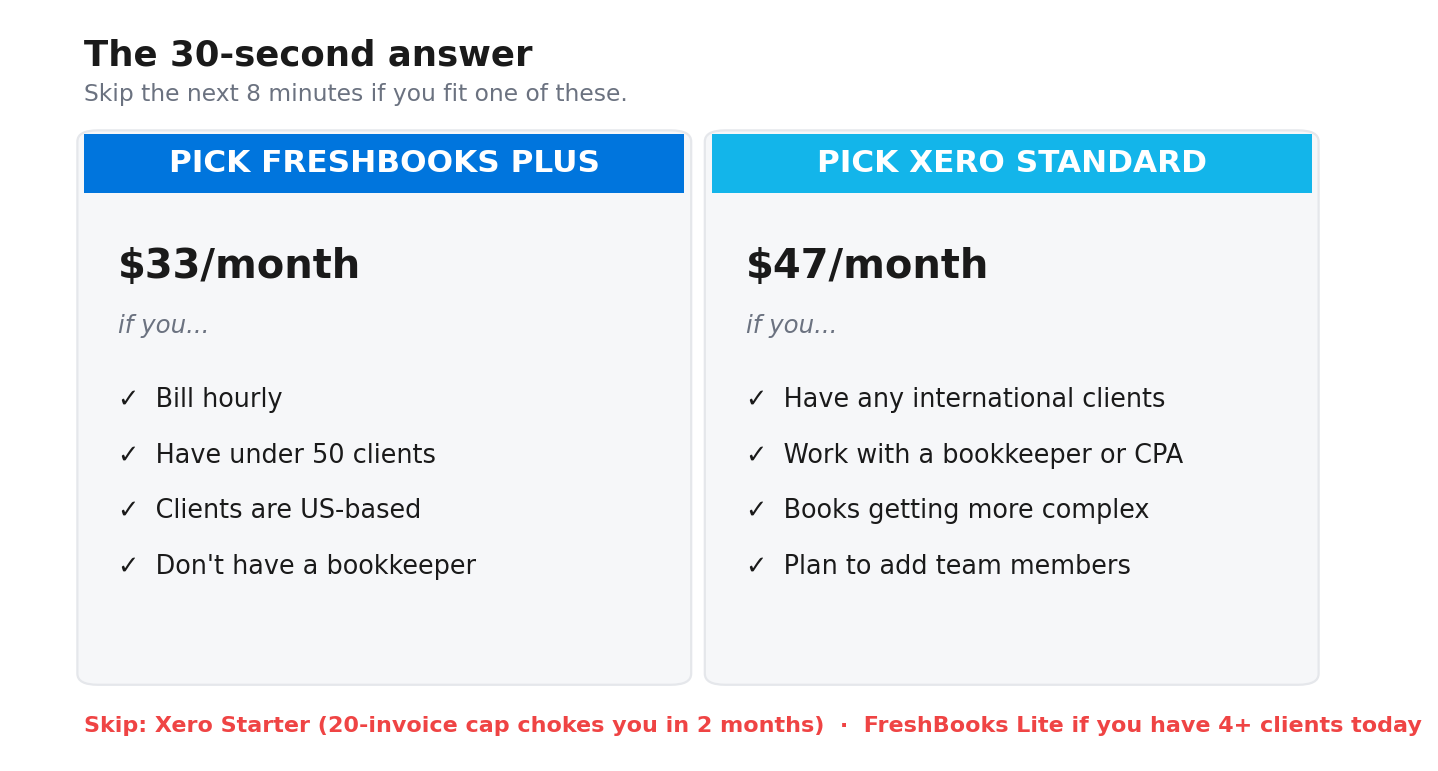
Pick FreshBooks Plus if you bill hourly, you’re under 50 clients, your clients are US-based, and you don’t have a bookkeeper. The Plus plan is $33/month. You get 50 client slots, recurring invoices, accountant access, and time tracking that becomes invoice line items in one click.
Pick Xero Standard if any of your clients pay in another currency, you work with a bookkeeper or CPA who has opinions, or you can already see your books getting more complicated than your invoicing. $47/month. Unlimited users on every plan, multi-currency, and reconciliation that holds up when your transaction count grows.
Skip Xero Starter. The 20-invoice and 5-bill monthly cap will choke you inside two months. Skip FreshBooks Lite if you have more than 4 clients today. The 5-client ceiling forces an upgrade fast.
Read the next 8 minutes if you want the full 3-year math.
How FreshBooks and Xero actually differ (and why most articles get it wrong)
FreshBooks launched in 2003. It started as an invoicing tool for service businesses. Accounting features came later. The product DNA is simple: get this freelancer paid faster.
Xero launched in 2006 as cloud accounting software. Invoicing was a feature inside a bigger system. The DNA there: keep clean books that an accountant can read. More than 250,000 accountants worldwide are signed up to Xero’s partner program. That number tells you who the product was actually built for.
This matters more than feature checklists do. Both tools can technically do most of the same things. They feel completely different in daily use.
Open FreshBooks. The first screen pushes you toward creating an invoice. Open Xero, and the first screen pushes you toward reconciling your bank feed. That single difference shapes the mobile app, the reports, the language they use (“client” vs “contact”), how time tracking works, and how the chart of accounts is structured.
NerdWallet’s review concluded “Xero wins” overall. That’s a fair conclusion for small businesses with employees and inventory. It’s the wrong conclusion for most solo freelancers earning under $100k.
Pricing in 2026: what each tier actually costs you
Both companies run heavy promo pricing that hides what you really pay. FreshBooks shows 90% off for 4 months on the homepage. Xero shows 90% off for 6 months. Neither price is what you actually pay across 36 months.
 FreshBooks pricing (verified April 2026)
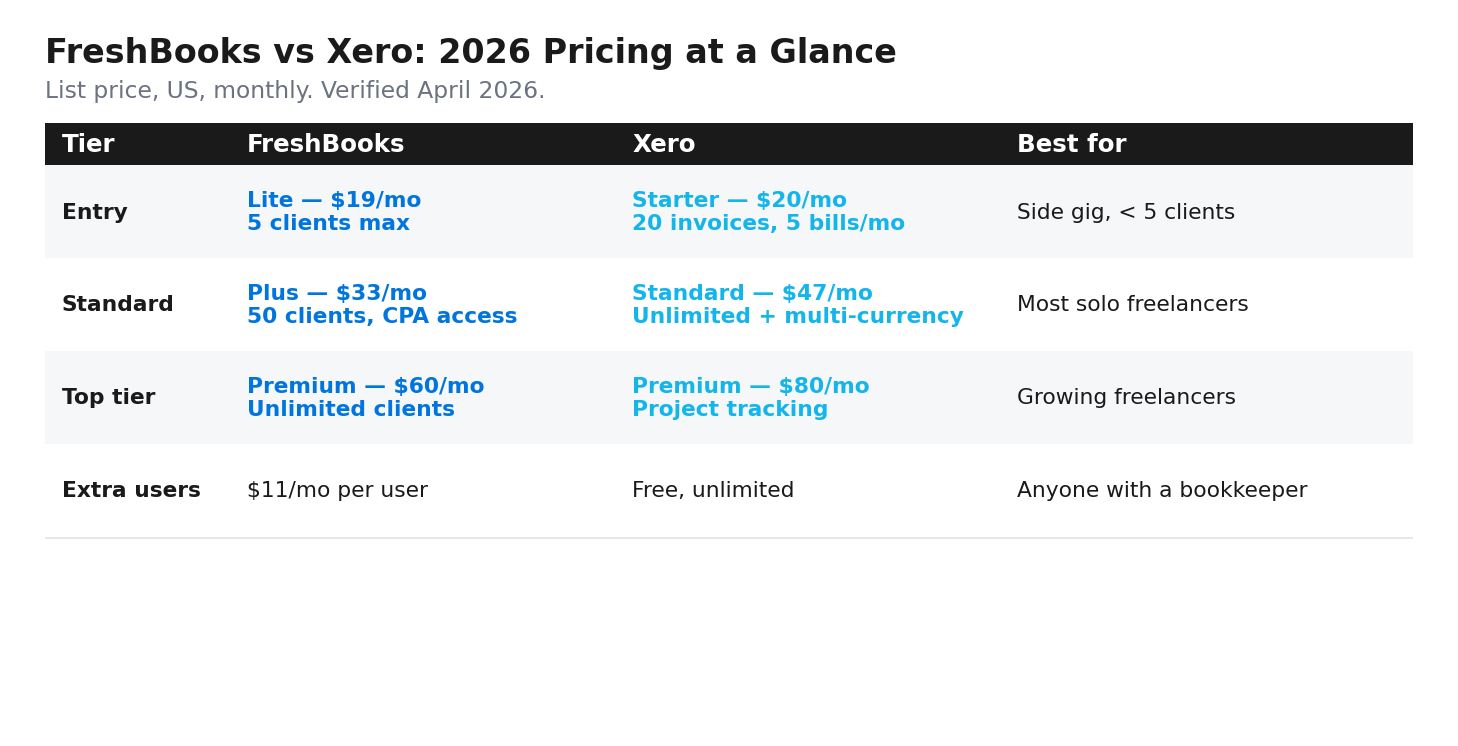
- Lite: $19/month month-to-month, $17.10/month billed annually ($205.20/year). Up to 5 billable clients.
- Plus: $33/month month-to-month, around $29.70/month annual. Up to 50 billable clients. Adds double-entry accounting, recurring invoices, accountant access.
- Premium: around $60/month month-to-month, $54/month annual. Unlimited clients. Adds project profitability tracking.
- Select: custom pricing, sales call required. 2 users included.
- Add-ons: $11/month per extra user. Advanced Payments at $20/month plus 3.5% + $0.30/transaction. Payroll at $40/month plus $6/employee/month.
 Xero pricing (verified April 2026, US)
- Starter: $20/month. Capped at 20 invoices and 5 bills per month.
- Standard: $47/month. Unlimited invoices, unlimited bills, multi-currency.
- Premium: $80/month. Adds project tracking, expense claims, advanced analytics.
- Unlimited users on every plan. This is Xero’s standout pricing feature.
- Add-ons: Projects (time tracking) at $11/user/month. Expenses at $5/user/month. Hubdoc receipt capture is free. Payroll runs through Gusto, starting around $40/month plus $6/employee.
Pricing variance flag: Xero restructured its US plans in early 2026. Some sources still show old pricing ($25/$55/$90 under the old Early/Growing/Established names). Verify on xero.com/us/pricing-plans before you sign up.
The 3-year cost table for real freelancer profiles
Here’s what you actually pay over 36 months at full list price. All numbers in USD, annual billing assumed where it makes sense.
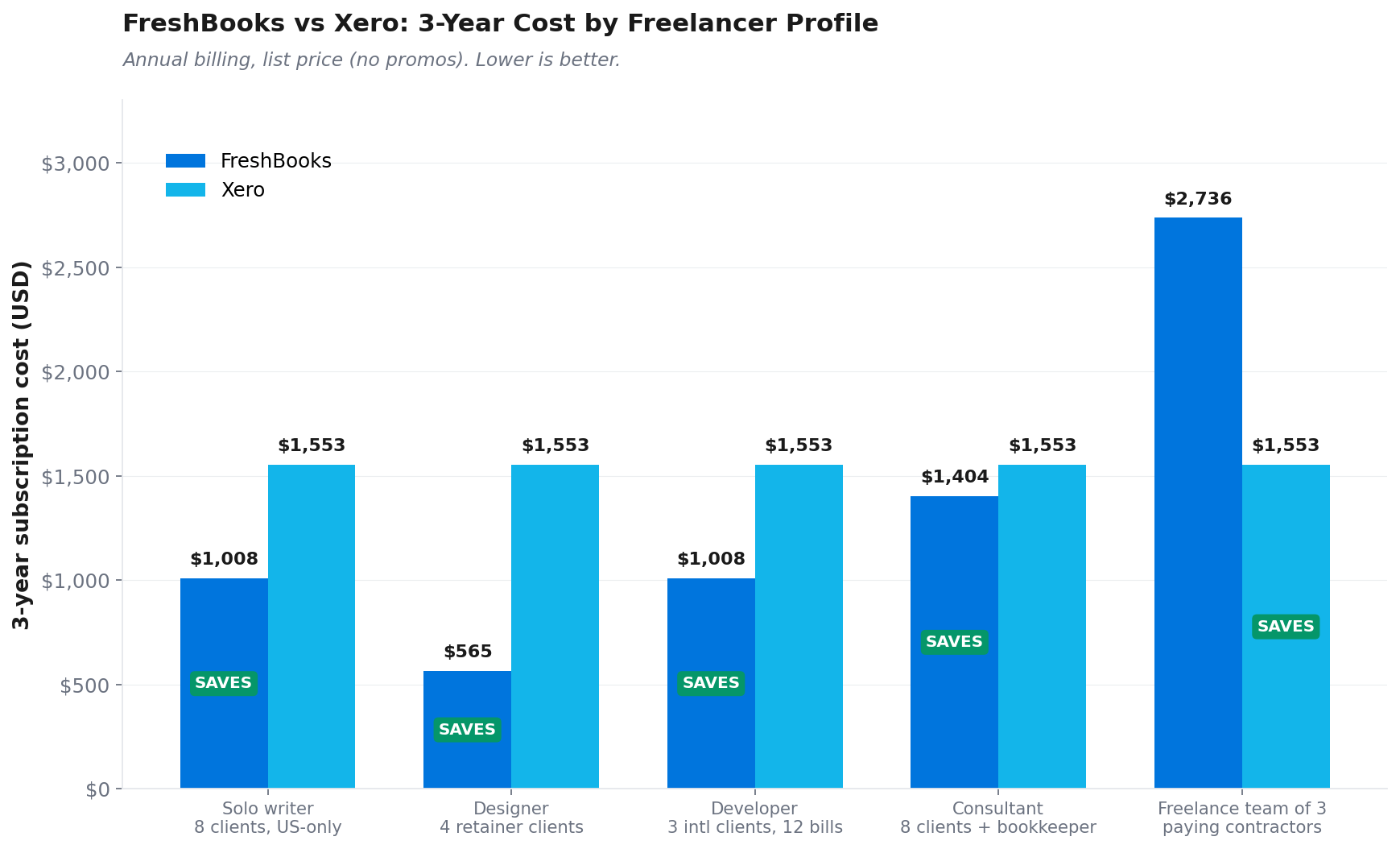
Two patterns. If you’re solo with no bookkeeper and no team, FreshBooks costs $300 to $900 less across 3 years. The moment you add even one extra user, the math flips. Xero saves you $1,000 or more over the same window because users are free.
If you’re putting away the right amount for quarterly taxes (and most freelancers under-set), the savings on accounting software roughly cover one missed estimated payment penalty. If you also want a line-by-line walkthrough of Schedule C for freelancers, that’s where your accounting tool’s P&L report is heading anyway. Worth getting right. We covered the tax-set-aside math separately in our guide to how much freelancers should set aside for taxes.
I’m a designer. Which one should I pick?
Designers (graphic, UX, web, brand) usually have 4 to 8 retainer clients. You send branded invoices. You track hours against project budgets. You care about how the client experience looks. You probably don’t need inventory tracking or multi-entity accounting.
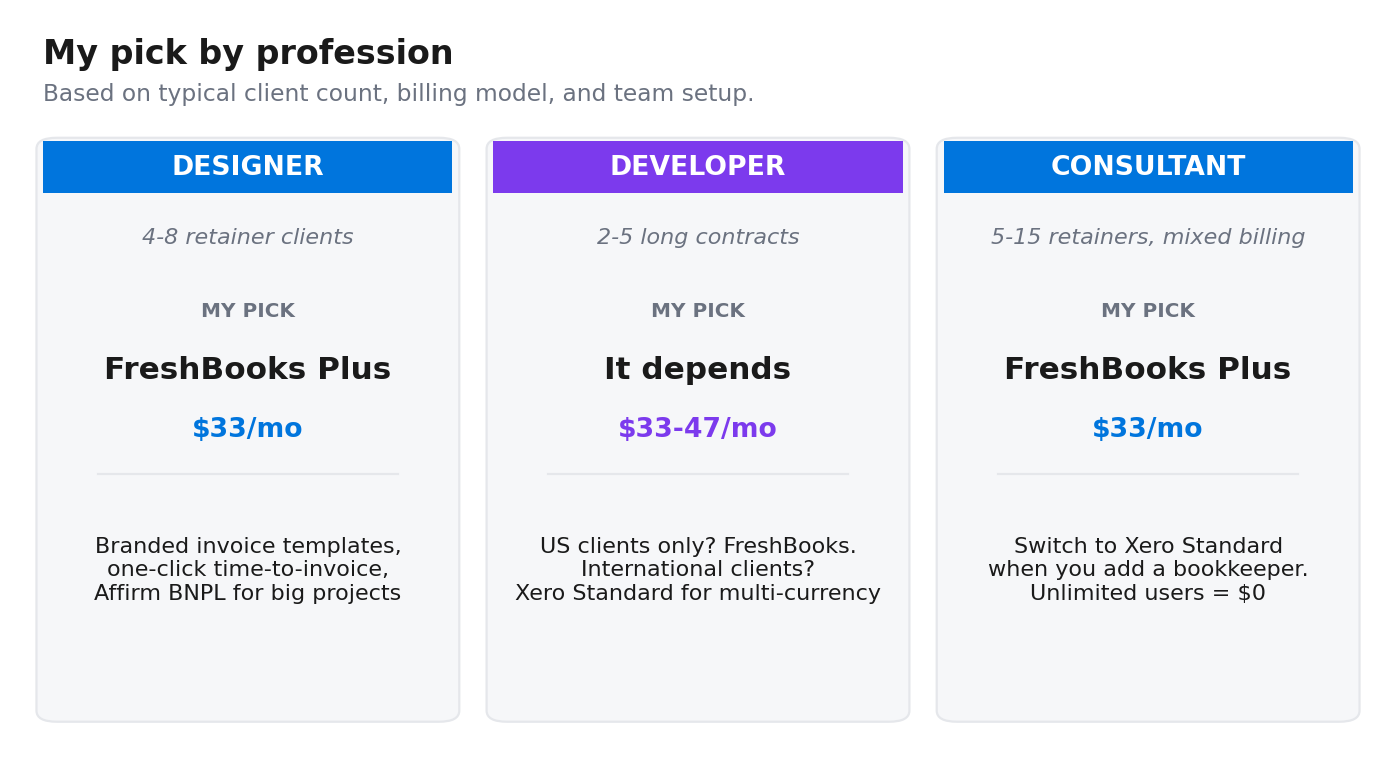
My pick: FreshBooks Plus. Three reasons.
- Invoice template branding matters when you’re a designer. FreshBooks lets you adjust logo placement, colour, and layout inside fixed templates. Xero invoices are functional. They look like accounting outputs, not client deliverables.
- Time-tracker-to-invoice flow. One click on FreshBooks. Hours map to clients and projects automatically. Xero needs the Projects add-on at $11/user/month to do the same thing.
- FreshBooks added Affirm Buy Now Pay Later in October 2025. Your client can pay a $4,500 brand identity invoice in installments while you get paid upfront. Useful if you bill big project fees. Affirm covers invoices from $50 minimum to $30,000 maximum in CAD or USD.
The catch. If you grow past 50 clients you need Premium at $60/month. Most solo designers won’t get there. Design studios usually do. If that’s where you’re heading, Xero Standard handles it cleaner because client count never matters.
One counter-example worth flagging. A graphic designer reviewing Xero on G2 in March 2026 said the bank-feed reconciliation was the reason they preferred it over their previous invoicing tool. If you take payments through PayPal and your bank feed gets messy, Xero Standard handles it cleaner than FreshBooks does.
I’m a developer. Which one should I pick?
Developers usually have fewer clients on longer contracts. 2 to 5 active clients, monthly retainers, and a stack of recurring software bills. AWS, GitHub, Linear, Vercel, Sentry, monitoring tools. You know the list.
My pick depends on where your clients are.
- US-only clients, 2 to 3 of them: FreshBooks Lite at $19/month or Plus at $33/month. You won’t ever bill 50 clients, so the lower tier covers you.
- International clients (anyone paying you in EUR, GBP, CAD, AUD): Xero Standard at $47/month. Multi-currency is built in above the Starter tier. FreshBooks only adds multi-currency at the Premium tier ($60/month), and the Stripe-based payment flow has clunky UX for international clients.
Watch the Xero Starter trap. 20 invoices a month is fine for a developer with 3 monthly clients. The 5-bill cap is what kills you. Start expensing AWS, GitHub Pro, Vercel, Linear, plus a couple of monitoring tools, and you’re already at 5 bills before the actual freelance expenses (laptop, coffee shop wifi, conference travel) hit. You’ll outgrow Starter in month 2.
A developer making $95k with 3 monthly recurring clients and 12 monthly bill payments is on the wrong tier from day one if they pick Starter. Go straight to Standard.
I’m a consultant. Which one should I pick?
Consultants tend to run 5 to 15 retainer clients, mix hourly and project-fee pricing, and care about looking professional in proposals and contracts. Many are heading toward eventually hiring a bookkeeper.
My pick: FreshBooks Plus, with one caveat.
Switch to Xero Standard if you have a bookkeeper now, or you’re planning to hire one in the next 12 months. Unlimited users means your bookkeeper costs you $0/month on Xero. On FreshBooks Plus, every additional user is $11/month. That’s $132/year per person.
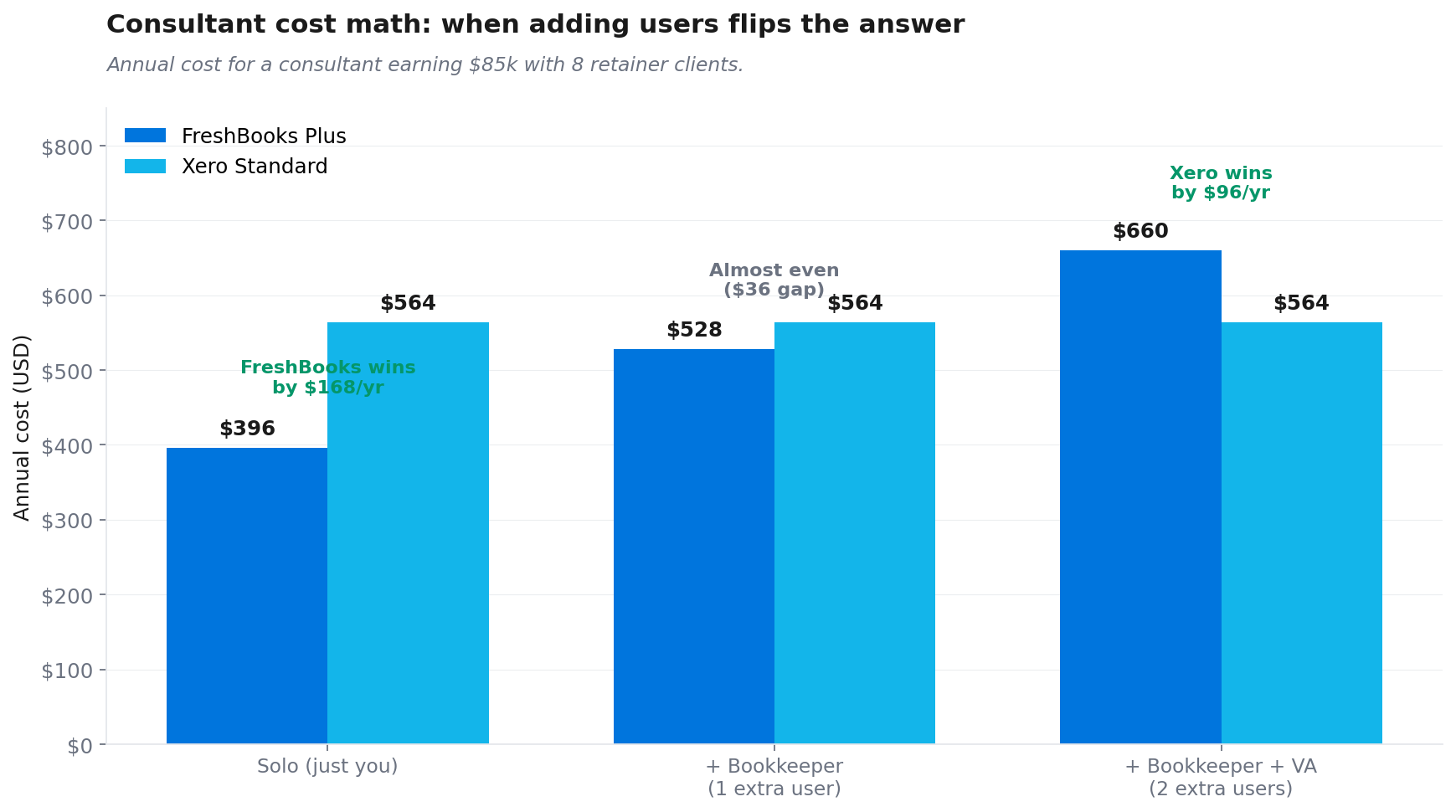
Run the math:
- Consultant earning $85k, 8 retainer clients, no bookkeeper: FreshBooks Plus at $33/month = $396/year. Xero Standard at $47/month = $564/year. FreshBooks wins by $168/year.
- Same consultant adds a bookkeeper at $200/month: FreshBooks Plus + 1 user = $44/month = $528/year. Xero Standard with bookkeeper free = $564/year. Gap closes to $36/year.
- Same consultant adds a virtual assistant too: FreshBooks Plus + 2 users = $55/month = $660/year. Xero Standard with both included free = $564/year. Xero now wins by $96/year.
Consultants who plan to grow a small team should treat Xero as the safer 3-year bet. Solo consultants who plan to stay solo will pay less on FreshBooks.
What real freelancers say on Reddit and G2
I pulled the most-cited praise and complaints from G2, Capterra, Trustpilot, and r/freelance threads from the last 12 months. Here is the win/loss view by feature, followed by what real users actually say.
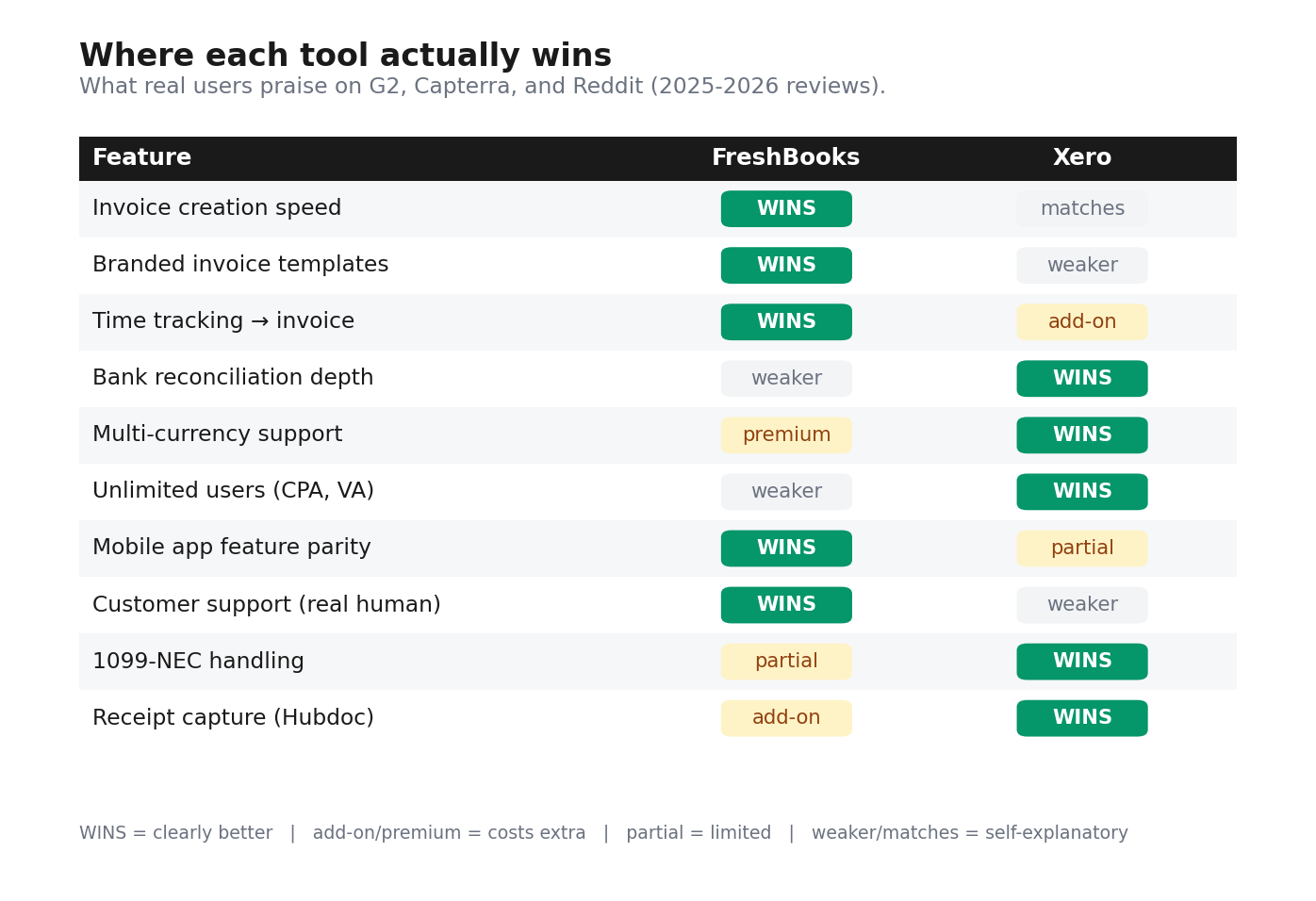
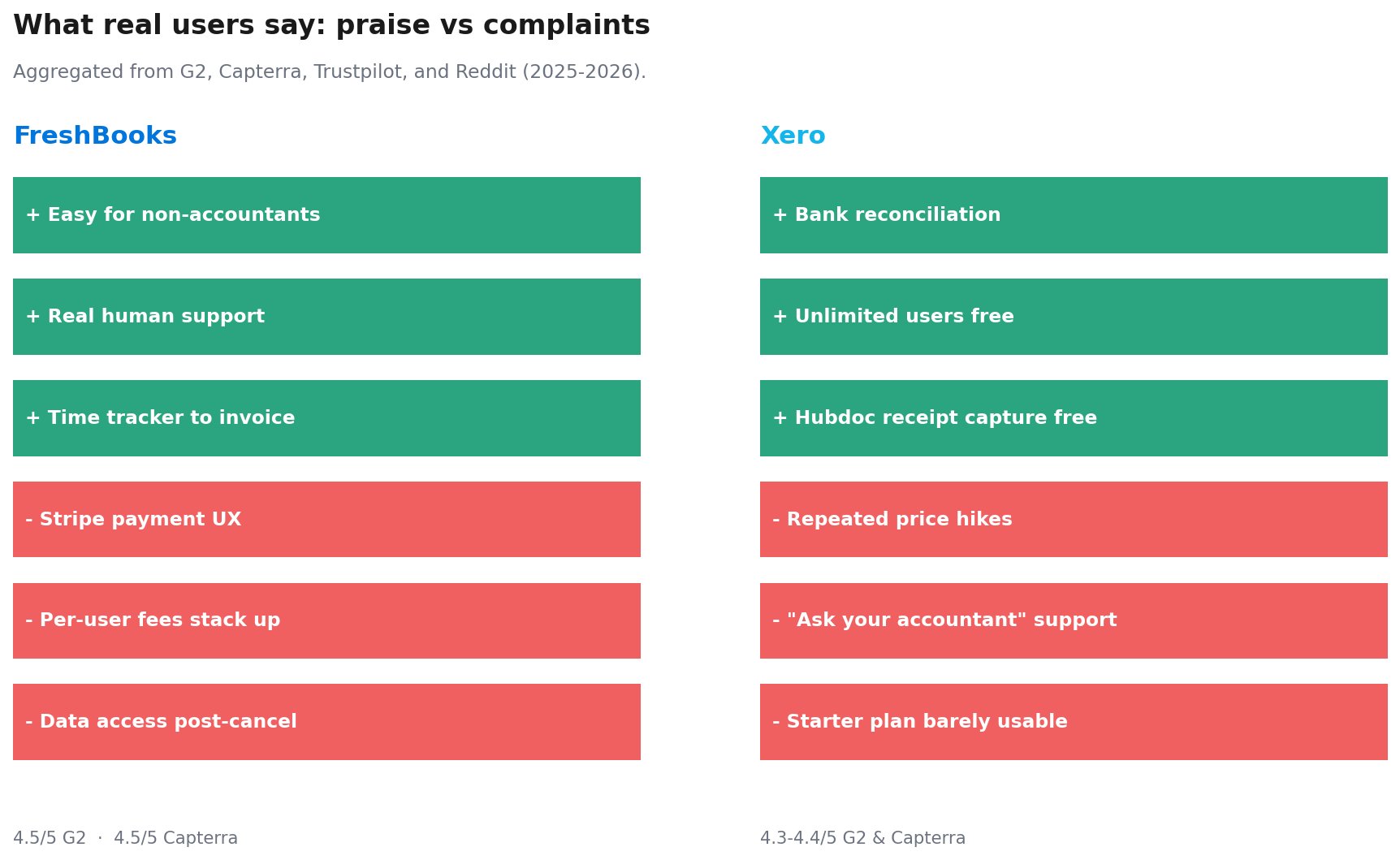
Aggregator sites publish polished reviews. Reddit and verified Capterra reviews show what people actually think after 2 years of daily use. These are the patterns that came up over and over across G2, Capterra, Trustpilot, and the freelance subreddits.
What freelancers love about FreshBooks
- The non-accountant interface. A Capterra reviewer in February 2026 called it “easy and simple for non accountants”. Several G2 reviewers describe FreshBooks as the only accounting tool they didn’t have to study before using.
- Real human customer support. A Trustpilot reviewer wrote that calling FreshBooks gets you a real person inside a minute, which is rare in SaaS.
- Time tracker that becomes an invoice. Hourly billers cite this as the workflow that saves them the most time per week. A B2B Reviews aggregation of 4,604 user reviews flagged this as the top feature praise.
What freelancers complain about with FreshBooks
- Stripe payment UX is clunky for clients. A B2B Reviews aggregation of 4,604 reviews put this as the single biggest complaint. Clients struggle to set up Stripe payments, and freelancers can’t help them from inside FreshBooks.
- Long-term data access can get tricky. A verified Capterra reviewer named Ronald wrote that he lost easy access to his historical invoice data after his FreshBooks subscription ended. FreshBooks’s actual policy is that data remains intact post-cancellation, but accounts inactive for 30+ days can be deactivated. Either way, the safer move is monthly CSV exports while you’re still a paying customer.
- Per-user fees compound fast. The $11/month per-user charge is the most-cited price complaint. A ProfitBooks reviewer named Mohnish, after a 3-month test, called the per-user pricing model “punitive for growing businesses”.
What freelancers love about Xero
- Bank reconciliation that works. The reconciliation engine and bank rules system get the most praise across G2, Capterra, and NerdWallet.
- Unlimited users on every plan. A consistent praise point. Adding your accountant, bookkeeper, or VA costs nothing. Xero says more than 250,000 accountants are signed up to its partner program.
- Hubdoc included free. Snap a photo of a receipt, file it, post it straight to Xero. FreshBooks does this too, but Xero made Hubdoc free across all plans, which matters at the Starter tier.
What freelancers complain about with Xero
- Repeated price hikes for existing customers. One G2 reviewer flagged that Xero raised prices nearly twice a year for three years with no added benefit.
- Support tells you to ask your accountant. A common complaint from freelancers using Xero specifically because they don’t have an accountant. The support team’s first response is often to send them back to their CPA, which defeats the purpose.
- The Starter plan is barely usable. Stackscored called it “essentially a free trial pretending to be a paid plan” because of the 20-invoice and 5-bill cap. Several reviewers across G2 and Capterra say the same thing.
Quick context on review reliability. FreshBooks scores 4.5/5 on G2 (959 reviews) and 4.5/5 on Capterra (~4,500 reviews) but 3.7/5 on Trustpilot (~999 reviews). Xero scores 4.3 to 4.4 across the same platforms. The Trustpilot gap reflects platform behaviour more than product quality. People who write Trustpilot reviews are usually angry. Both tools are well-rated by daily users.
The mistake almost every freelancer makes in year one
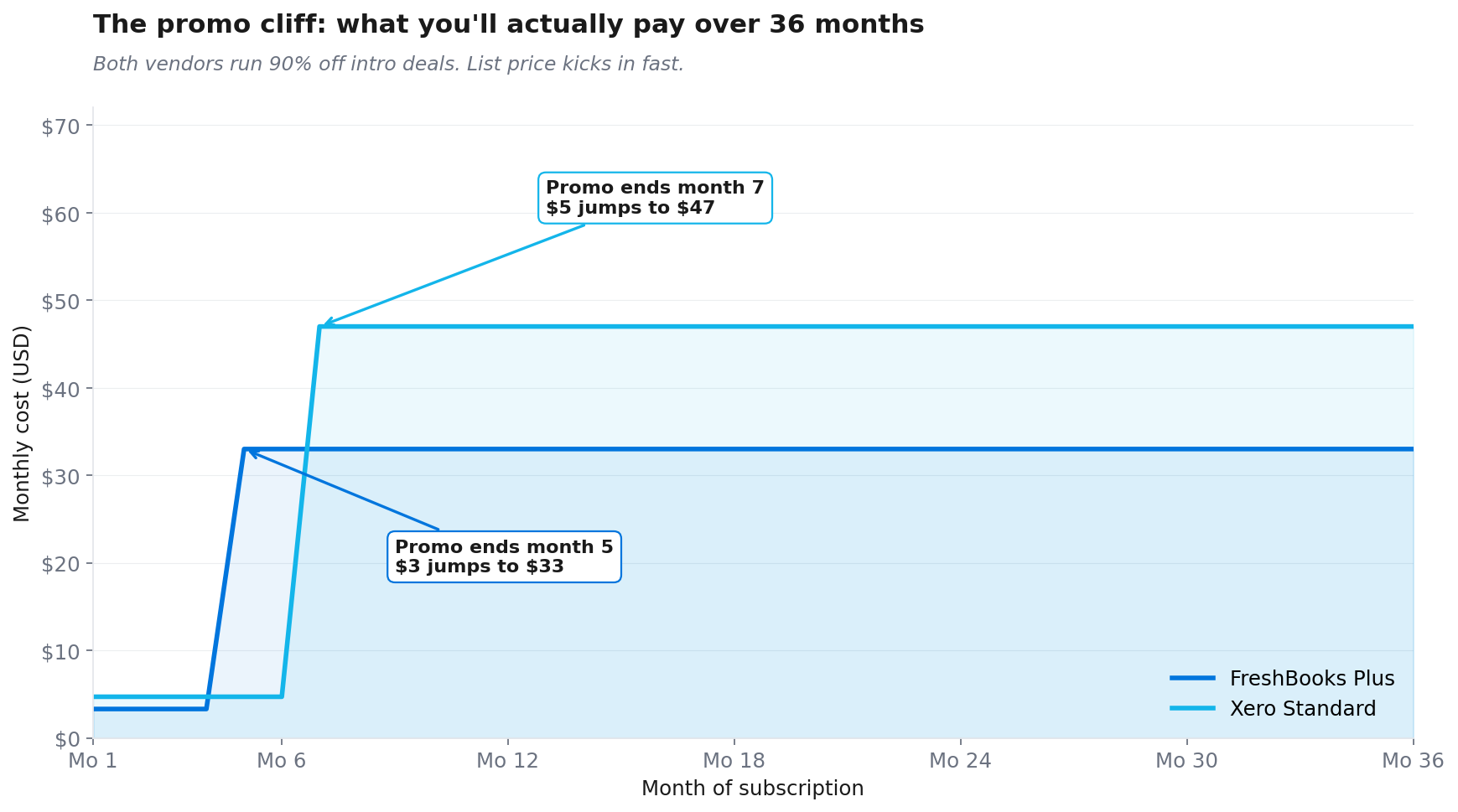
You compare on month-one promo price instead of 3-year list price.
Both vendors run heavy promos. As of April 2026, FreshBooks offers 90% off Lite, Plus, or Premium for 4 months. Xero offers 90% off for 6 months on the new $20/$47/$80 tiers. With the Xero promo, Starter drops to $2/month and Standard drops to $4.70/month for the introductory window.
Six months later, full price kicks in. A freelancer who picked Xero Standard thinking they were paying $28 across 6 months wakes up in month 7 paying $47/month. Across 36 months that’s $1,553 in subscription, not $28.
The fix. When you compare tools, use list price for years 2 and 3 and add the year-1 promo price separately. The right tool is the one that costs less across the full 36 months, not the one with the loudest discount banner.
FreshBooks vs Xero: A 5-minute decision framework
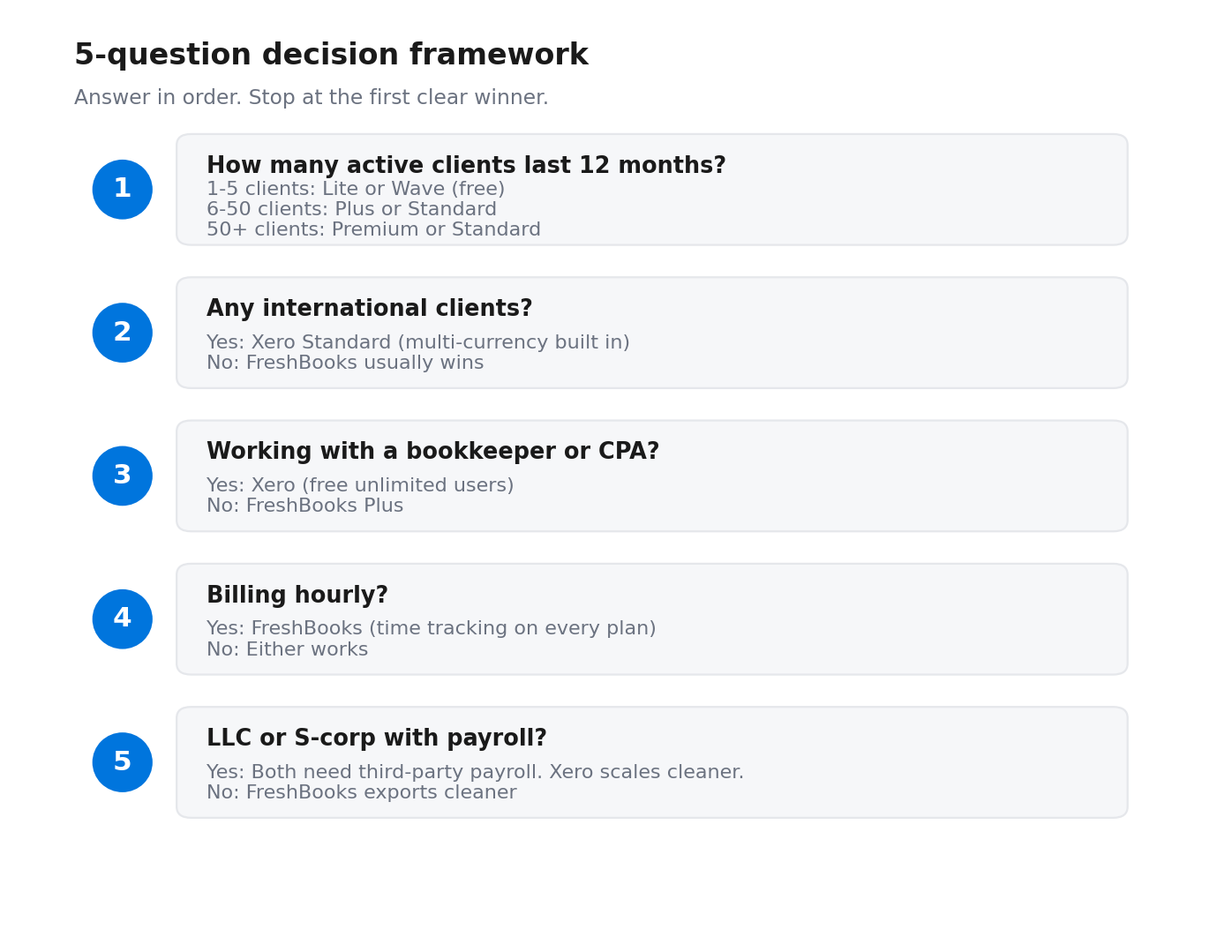
Answer these five questions in order. Stop at the first clear winner — most freelancers find their answer by question 3.
What happens when you cancel (the data trap nobody mentions)
This one rarely shows up in comparison articles. It should.
FreshBooks: when you cancel your subscription, your account stays accessible until the end of the billing cycle. After that, your data is preserved as long as you reactivate within 30 days. Accounts inactive for 30+ days may be deactivated, with email warning first. Translation: short-term safe, long-term risky if you stop logging in.
Xero: cancellation requires one month’s notice. During that month, full access continues so you can export everything you need. After cancellation, your data is archived for up to 7 years and can be retrieved by reactivating the subscription, unless you specifically request deletion.
What this means for you. Both vendors keep your data alive longer than people assume. Neither lets you sit on a dormant cancelled account and assume the records will be there in 2 years. The safe move on either platform: export your invoices, clients, and transaction history as CSV before the cancellation date hits. That gives you a backup that doesn’t rely on either vendor’s retention policy.
Migration: what it actually costs to switch
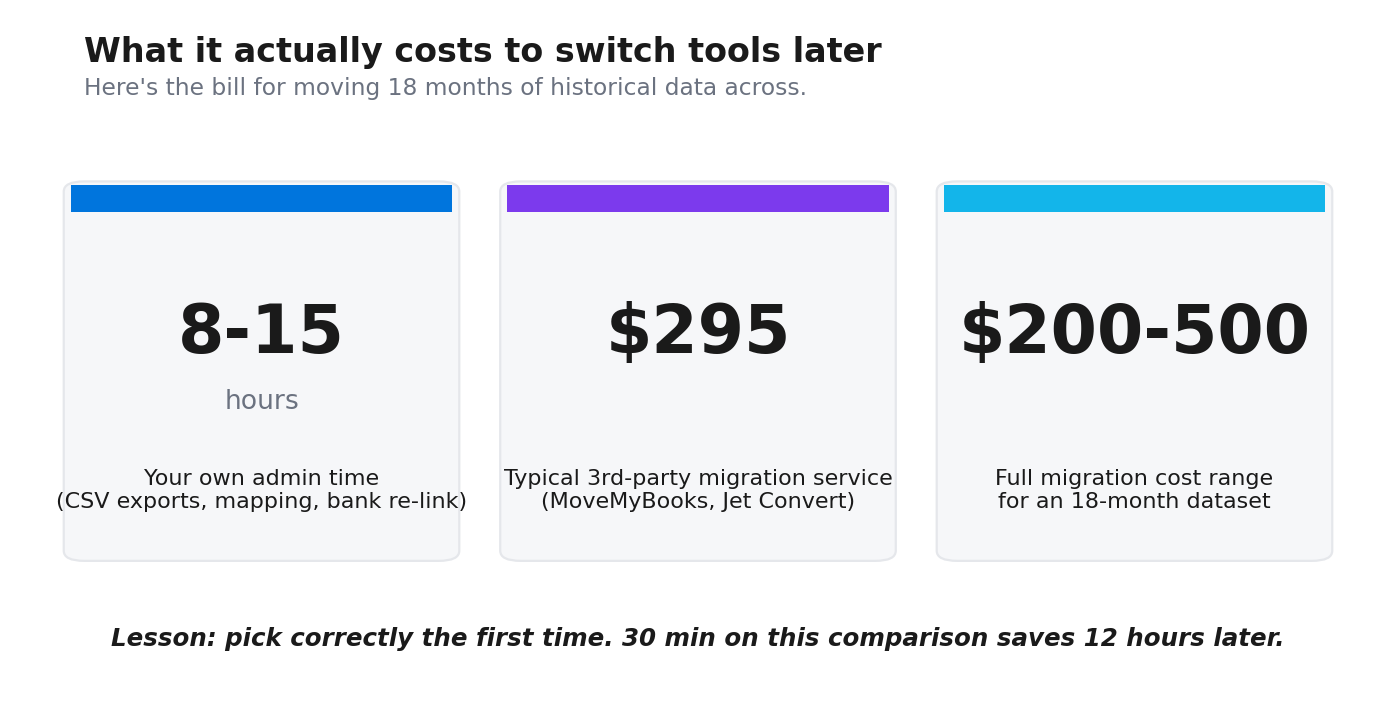
Switching from FreshBooks to Xero (or back) is harder than the marketing suggests. You export CSV files. You map categories. You re-link your bank feeds. You rebuild your client records. Plan for 8 to 15 hours of admin time per year of historical data.
Third-party migration tools handle some of it for $200 to $500. MoveMyBooks and Jet Convert are the two most-used. A standard 18-month migration runs around $295.
Practical advice. If there’s any chance you outgrow FreshBooks Lite within 12 months, start on Xero Starter despite the higher entry price. The migration cost you save is bigger than the price difference. The 13-month gap between FreshBooks Lite and Xero Starter is roughly $13/month or $169 across the period. The migration cost wipes that out and then some.
The exception. If you’re 100% sure you’ll be solo, US-only, and under 50 clients for the next 3 years, FreshBooks costs less and you won’t need to migrate.
The 2026 features that actually matter
Both tools shipped real updates in the last 12 months. Most won’t change your decision. These three might.
- FreshBooks Affirm BNPL (October 2025). Your client pays your invoice in installments while you get paid upfront. Useful if you bill $1,500+ per project and clients sometimes ask for payment plans. Covers invoices from $50 to $30,000 in CAD or USD.
- FreshBooks Instant Payouts. Eligible users access invoice payments on nights, weekends, and holidays. Useful if your cash flow is tight enough that 2-day ACH delays cause you stress.
- Xero JAX (Just Ask Xero). An AI agent that answers plain-English finance questions. Type “show me overdue invoices” or “what is my profit this quarter” and it pulls the answer. Rolling out in beta to US users since September 2025. Still in beta as of writing.
Other 2026 changes (UI tweaks, new integrations, minor reporting improvements) won’t change the decision for a freelancer. Skip them.
Get the 3-Year FreshBooks vs Xero Cost Calculator
I built a Google Sheets calculator that takes your client count, team size, country mix, and projected growth and gives you the actual 3-year cost on each tool. It uses live April 2026 pricing and accounts for the promo cliffs.
Drop your email below and I’ll send it. No upsell. You can fill in your numbers in 4 minutes and see whether FreshBooks or Xero costs less for your specific situation.
Frequently Asked Questions
Is FreshBooks better than Xero for a solo freelancer?
For most solo freelancers earning $45k to $110k with US-only clients and no bookkeeper, yes. FreshBooks Plus at $33/month gives you invoicing, time tracking, and accountant access in a tool you don’t have to learn first. Xero is the better pick if you take international clients, plan to add a bookkeeper, or expect your books to get more complicated than your invoicing volume. The break-even moment is usually when you add your first additional user. That’s when Xero’s unlimited-users policy starts paying for itself.
Can my CPA work in FreshBooks?
Yes, but only on Plus and above. The Lite plan doesn’t include accountant access. Plus, Premium, and Select all let you invite your CPA at $0. Adding more team members beyond the included one is $11/month each. Every Xero plan including Starter includes unlimited users at no charge, which is one of Xero’s bigger selling points for freelancers who work with a CPA. If your CPA already uses one of these tools daily, that should weigh into your choice.
Why does Xero say my plan is limited to 20 invoices? I have 35.
You’re on Xero Starter. The 20-invoice and 5-bill monthly cap is the defining limit on the entry plan, and one of the most-complained-about restrictions in Xero reviews. Once you hit the cap mid-month, you can’t send any more invoices until you upgrade or wait for next month. If you regularly bill more than 15 clients, skip Starter entirely and start on Standard at $47/month. The price gap is $27/month. Hitting the cap costs you more than that in chased payments.
Does FreshBooks handle 1099-NEC for contractors I pay?
Partially. FreshBooks tracks contractor payments on the Plus plan and above and lets you export totals for 1099-NEC filing. It doesn’t file the 1099-NEC for you. Xero handles 1099 reporting on every plan including Starter, including W-9 collection and 1099 report generation, with e-filing through partner apps like Tax1099 or 1099SmartFile. You can also verify the current 1099-NEC threshold and filing rules on IRS.gov. If you pay 3 or more contractors a year, Xero is materially less work at tax time. We covered the broader tax-set-aside question in our guide to how much freelancers should set aside for taxes.
What happens to my invoices if I cancel FreshBooks?
Your account stays accessible to the end of the billing cycle. After that, FreshBooks preserves your data as long as you reactivate within 30 days. Accounts that stay inactive for 30+ days may be deactivated, with email warning first. The safe move regardless of vendor. Export your invoice history and client records as CSV every quarter while you’re still paying. That way you have a backup that doesn’t depend on either company’s retention policy. Xero gives you a one-month notice period to export, then archives data for up to 7 years recoverable by reactivation.
Is Xero overkill for someone earning under $100k?
Depends on your workflow, not your income. A solo freelancer earning $90k who sends 8 invoices a month and tracks expenses in 4 categories will find Xero overkill. The chart of accounts, reconciliation depth, and reporting options are built for businesses with more moving parts. A freelancer earning $60k who pays 3 contractors, takes international clients, and works with a bookkeeper will find Xero exactly right. Use the 5-step decision framework above to figure out which side you’re on.
Which app is better on iPhone for invoicing on the go?
FreshBooks. Its mobile app supports live time tracking, billing for tracked time, full expense entry with receipt photos, and invoice creation. Xero’s mobile app handles invoicing and basic bank reconciliation but is missing several features available on the desktop version. If you bill from a coffee shop or client site more than once a week, FreshBooks is the clear pick.
Can I migrate from FreshBooks to Xero (or back) without losing data?
Yes, but it costs you time and money. CSV exports cover invoices, clients, and transactions. Bank feeds need to be re-linked. Categories need manual mapping because each tool uses different naming. Third-party migration services like MoveMyBooks and Jet Convert charge $200 to $500 for an 18-month migration. Plan for 8 to 15 hours of your own admin time on top of that. The lesson. Pick correctly the first time. The 30 minutes you spend on this comparison saves you 12 hours later.
Take this action this week
Open both vendors’ free trials side by side this Sunday evening. Create the same test invoice in each: same client, same line items, same amount. Time how long each one takes from blank screen to “send.”
Whichever felt easier is your answer. Freelancers spend a meaningful chunk of every week on admin, according to surveys from Freelancers Union and Upwork. Shaving even 30 minutes a week off invoicing is worth more than the $30/month price gap between any two tiers in this comparison.
Both offer 30-day free trials with no credit card required. You can run this test in under an hour and stop guessing.
Tax laws and software pricing change. Verify current pricing on freshbooks.com/pricing and xero.com/us/pricing-plans before you sign up. This article is informational and is not tax or legal advice. For guidance specific to your situation, consult a CPA or tax professional.
Official sources referenced in this guide
Pricing and features verified April 2026. We have no affiliate relationship with either vendor.
About the author
Gareth is an entrepreneur based in Dubai and the founder of AI Finance Tools for Freelancers. He is not a CPA or a bookkeeper. He built this site because he couldn’t find honest, thorough reviews of AI finance tools written for freelancers. Every guide is researched from real user reviews, official documentation, and expert sources.