
Two free tools for freelancers. Only one of them is actually doing the job you think it’s doing. Here’s where each one quietly costs you money or time.
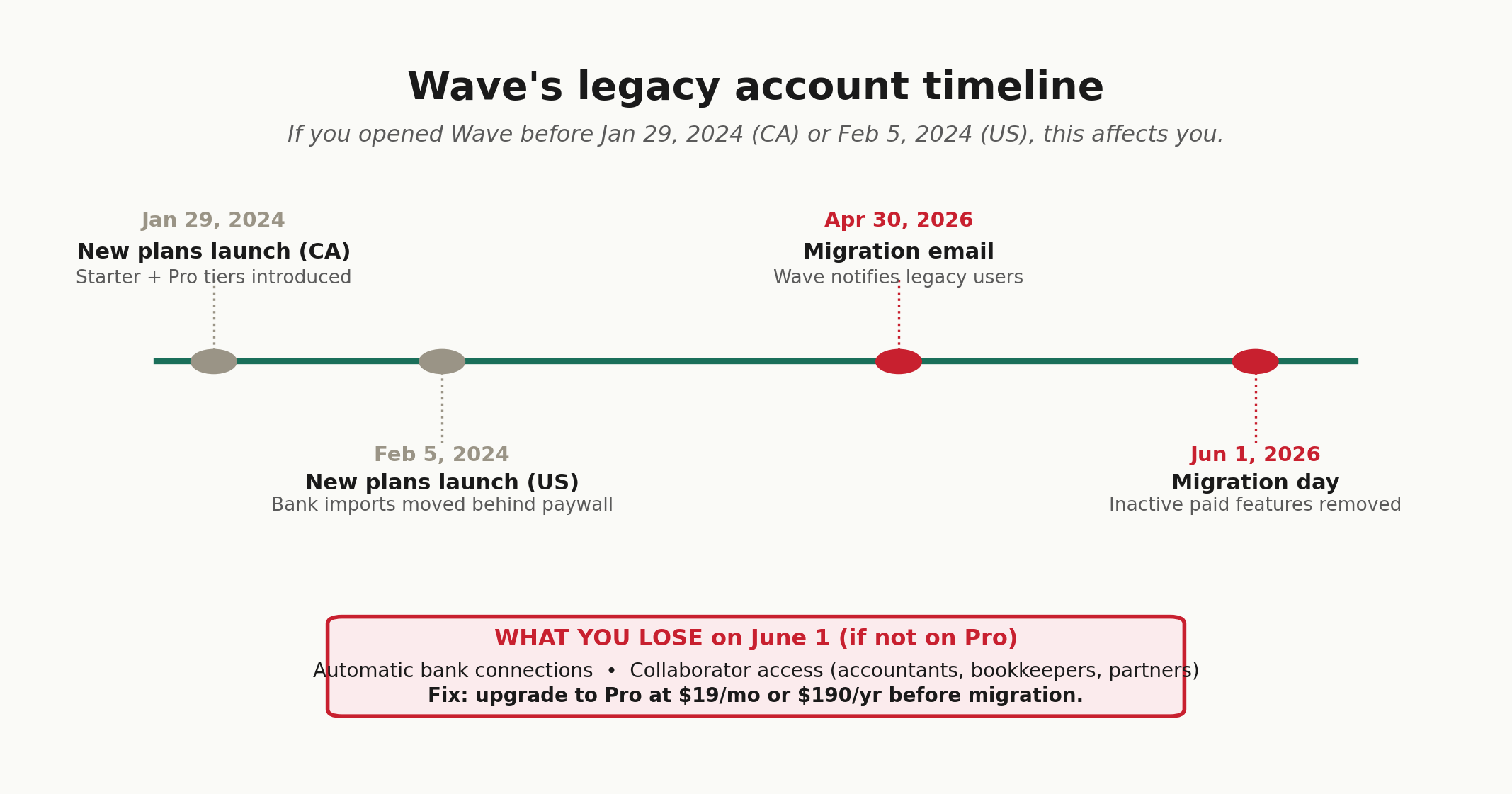
You opened a Wave account in 2022 because someone on Reddit said it was the best free option. They were right at the time. Then on January 29, 2024 in Canada and February 5, 2024 in the US, Wave rolled out new Starter and Pro plans. Bank imports moved behind a $19-a-month paywall. On April 30, 2026, Wave emailed legacy users that anyone not actively using paid features would be migrated to the free Starter plan on June 1, 2026. Automatic bank connections gone. Shared user access gone.
Zoho Invoice has been quietly free since 2021. Most reviews bury the catch: 500 invoices per year, 2 users, 3 projects. Hit any of those caps and you’re upgraded to Zoho Books at $20 a month, not to a paid tier of Zoho Invoice itself.
So the real question isn’t which one is better. Wave and Zoho Invoice solve different freelancer problems. One does double-entry bookkeeping with invoicing bolted on. The other does invoicing with no real accounting at all. Pick the wrong one and tax season turns into a weekend of untangling.
Wave vs Zoho Invoice: what each tool actually is in 2026
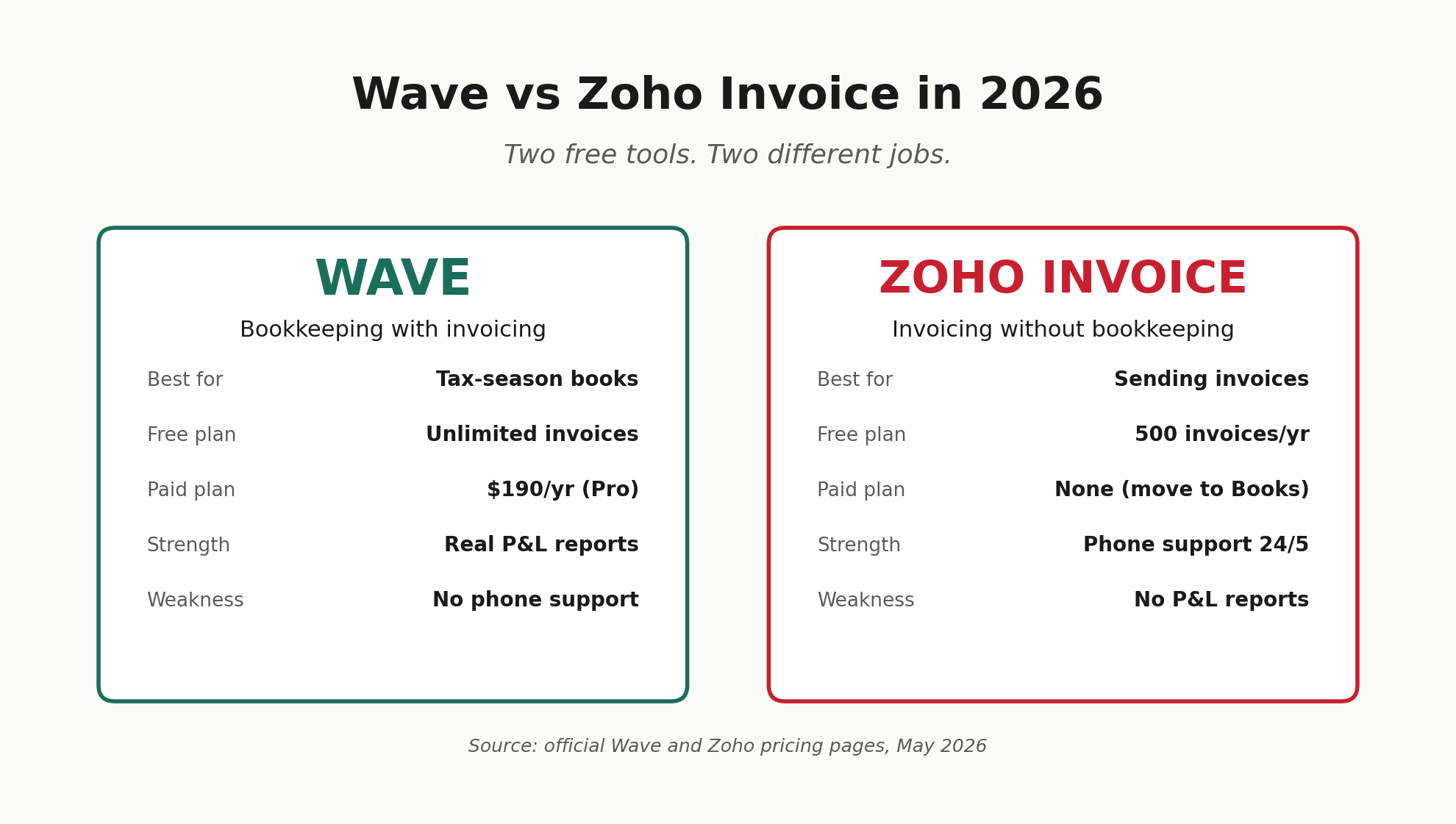
Wave runs double-entry bookkeeping with built-in invoicing. The free Starter plan covers unlimited invoices, manual income and expense tracking, and basic financial reports including a profit and loss statement. The Pro plan costs $19 per month billed monthly, or $190 per year billed annually. Pro adds automatic bank imports, receipt scanning, multi-user access, and late payment reminders. Bank connections run through Plaid, the same provider QuickBooks and Mercury use, so your bank’s compatibility depends on Plaid’s coverage rather than Wave’s.
Zoho Invoice is a standalone invoicing tool. It’s been completely free since 2021 with no paid tier. If you outgrow the limits, Zoho points you at Zoho Books at $15 per month annually (or $20 monthly), which is a different product entirely. Zoho Invoice handles invoicing, estimates, time tracking, expense logging, and a client portal. It does not handle accounting in any real sense.
That single distinction matters more than every feature comparison you’ll see online. If you file a Schedule C and you’re keeping books for tax season, you need accounting. If you mostly need to send invoices and chase late payments, you need an invoicing tool. They are not the same job.
The pricing tables nobody else publishes accurately
Most comparison sites get this wrong. Every number below comes straight from the official Wave and Zoho pricing pages this week.
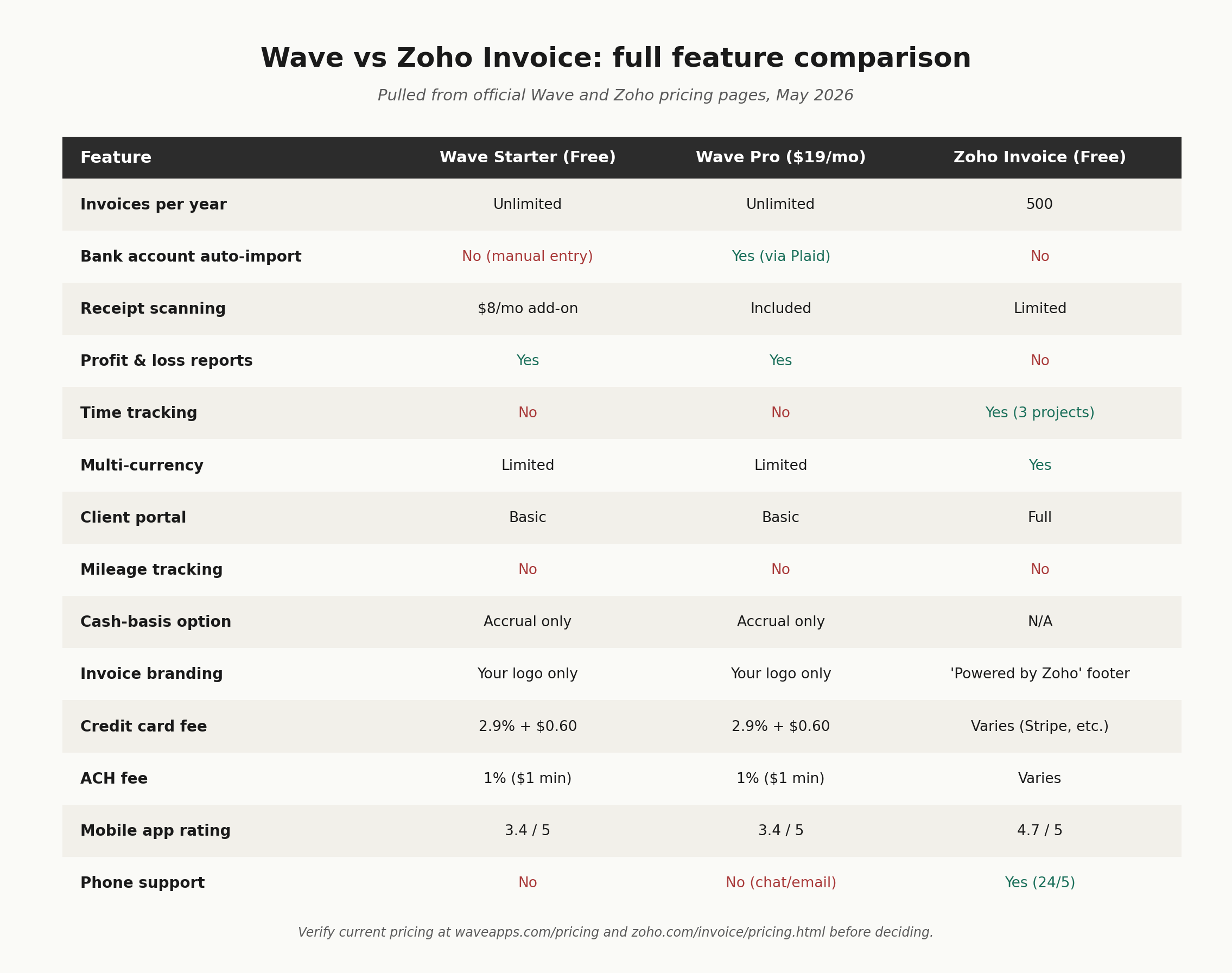
Three numbers in that table do most of the work. Wave Pro is $190 a year billed annually, or $228 a year billed monthly. Zoho Invoice is $0. The 500-invoice cap on Zoho works out to about 42 invoices a month. That’s plenty for most freelancers, but not all of them. If you bill 15 to 20 retainer clients monthly with multiple invoices each, you’ll hit that cap by October.
What Wave does well, and where it now hurts
The strength: real bookkeeping in a free tier
Wave still gives you something Zoho Invoice cannot. A proper double-entry bookkeeping ledger. A profit and loss statement. A balance sheet. For a freelance graphic designer making $72,000 a year who files a Schedule C, that matters. You can run a P&L for the year, hand it to your tax preparer, and have something that looks like books. Zoho Invoice can show you total revenue and expenses, but it isn’t generating accounting reports your CPA will recognise.
Wave’s invoice templates are clean. The estimate-to-invoice conversion takes two clicks. Setup runs about 30 minutes if you already know your way around basic categories. For the freelancer who just needs to track income, expenses, and send a few invoices a month, the Starter plan is genuinely free. No time limit. No trial expiration. That part is real.
The weakness: support is a known problem
This is the most-cited complaint across r/smallbusiness, r/freelance, and Capterra reviews from late 2025 and 2026. Free Starter users get a chatbot. Pro users get email and live chat with response times that stretch to 48 hours during peak periods. There’s no phone support on any plan, and there’s no proper client portal where freelancers can route problem accounts for resolution. One Reddit user described being stuck talking to a bot for three days after they hit a real bank-feed problem. Multiple Capterra reviewers report account freezes with no responsive resolution path.
If you process payments through Wave invoices and an issue lands on your account, that lack of phone support becomes the problem, not a footnote.
The weakness: accrual-basis only
Wave records income when invoices go out and expenses when bills get entered. There’s no option to switch to cash-basis. Most freelancers report on a cash basis to the IRS, which means recognising income when it actually hits your bank account. You can still use Wave on a cash basis by manually entering transactions only when paid, but the reports will reflect Wave’s accrual logic. QuickBooks, FreshBooks, and Xero all let you toggle between cash and accrual. Wave does not.
The weakness: features that used to be free aren’t anymore
Before January 2024, Wave offered automatic bank imports, receipt capture, and multi-user access on the free plan. Those now sit behind the Pro paywall at $19 per month. Existing users with active paid features kept their setup. Anyone who wasn’t actively using those features got an email on April 30, 2026, telling them their account migrates to Starter on June 1, 2026, with bank connections and collaborator access removed.
One Capterra reviewer summed up the sentiment: this used to be a robust free platform, and now you pay for some of the best features. That captures the mood across recent reviews.
What Zoho Invoice does well, and where it falls short
The strength: it’s actually free, and it’s actually good
Zoho Invoice consistently rates 4.7 out of 5 on G2 and Capterra. Wave averages 4.3 to 4.4. The mobile app is genuinely strong, which matters if you invoice from your phone after client meetings. You can send 500 invoices a year, customise templates, automate payment reminders, accept payments through Stripe, PayPal, Razorpay and others, set up recurring invoices, track time on up to 3 projects, and let clients pay through a self-service client portal.
Phone support is included. That alone puts Zoho ahead of Wave for anyone who has ever spent 90 minutes lost in a chatbot loop.
The catch: it’s invoicing, not accounting
You can log expenses inside Zoho Invoice, but you cannot connect a bank account to import transactions. There’s no profit and loss report. There’s no balance sheet. There’s no category-by-category expense breakdown that maps cleanly to Schedule C lines. If your tax preparer asks for a year-end P&L, Zoho Invoice cannot produce one.
To get bank feeds and proper accounting reports, you need Zoho Books. The Zoho Books free plan covers businesses with under $50,000 in annual revenue and includes 1,000 invoices per year, but only 1 user. Above $50,000, you’re paying $15 per month annually or $20 per month monthly for the Standard plan.
The catch: branding on every invoice
Every invoice you send through Zoho’s free tier carries a “Powered by Zoho Invoice” footer. Most freelance clients won’t notice. Some will. If you charge premium rates for design or consulting work and your invoice looks like it came from a free tool, that small footer can quietly undercut your pricing in a way that’s hard to measure.
The catch: hard caps you’ll hit before you expect to
500 invoices a year sounds like a lot. It’s about 42 a month. A freelance copywriter with one retainer client gets there easily. A freelance virtual assistant managing 12 retainer clients billed weekly hits the cap by month 9. The 3-project ceiling on time tracking trips up freelancers who manage even small portfolios.
One G2 reviewer documented Zoho disabling multi-currency on the free plan and pushing users to Zoho Billing. Another flagged that Zoho’s OneAuth two-factor implementation has been unstable enough that they couldn’t log in to send invoices on time. These aren’t deal-breakers for most freelancers. They’re real, though.
The 5-minute decision framework
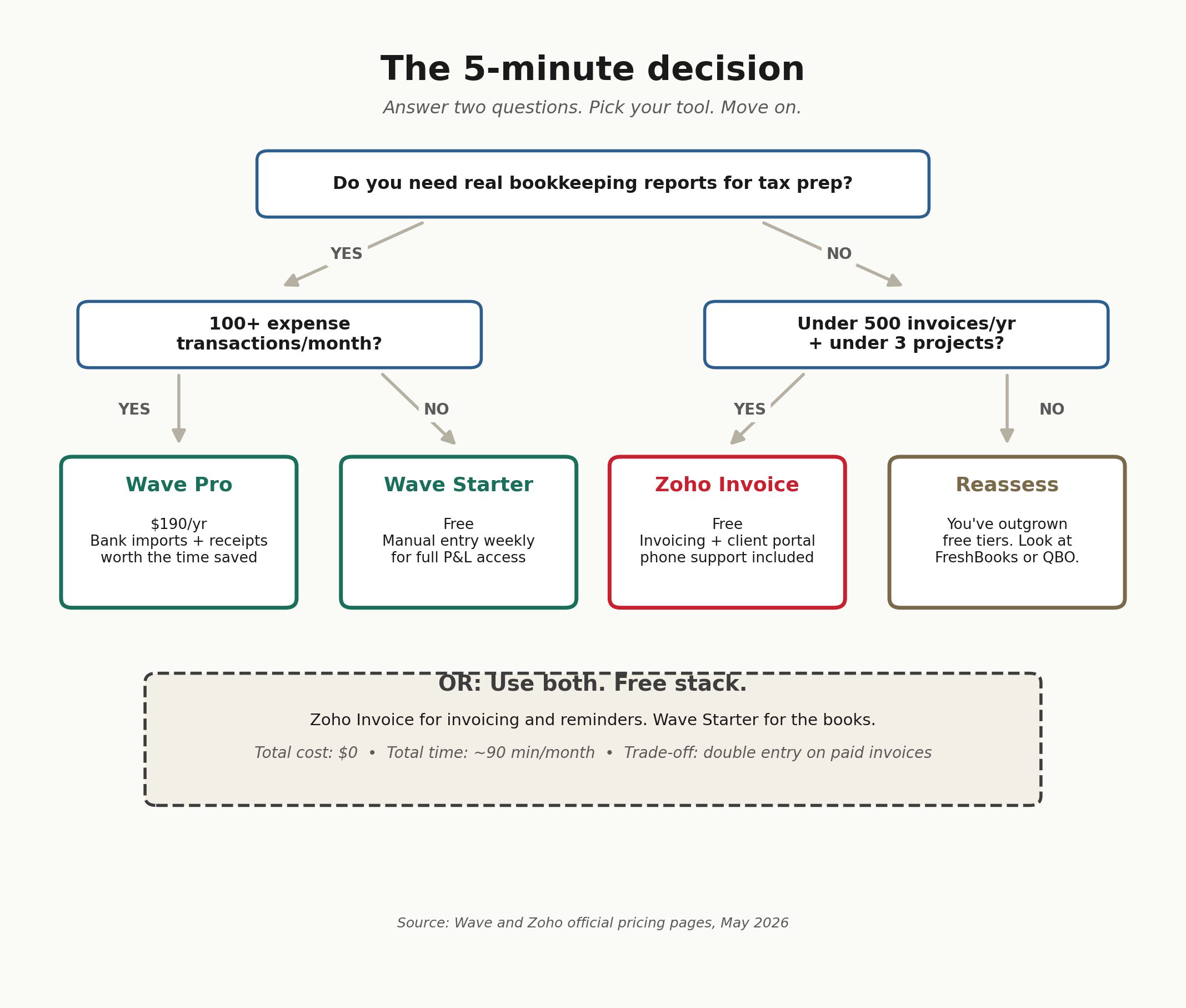
Pick in five minutes. Don’t overthink it.
- Pick Wave Starter if you need actual bookkeeping reports for tax season, you send fewer than 100 invoices a year, you can manually enter bank transactions once a week, and you don’t mind no phone support.
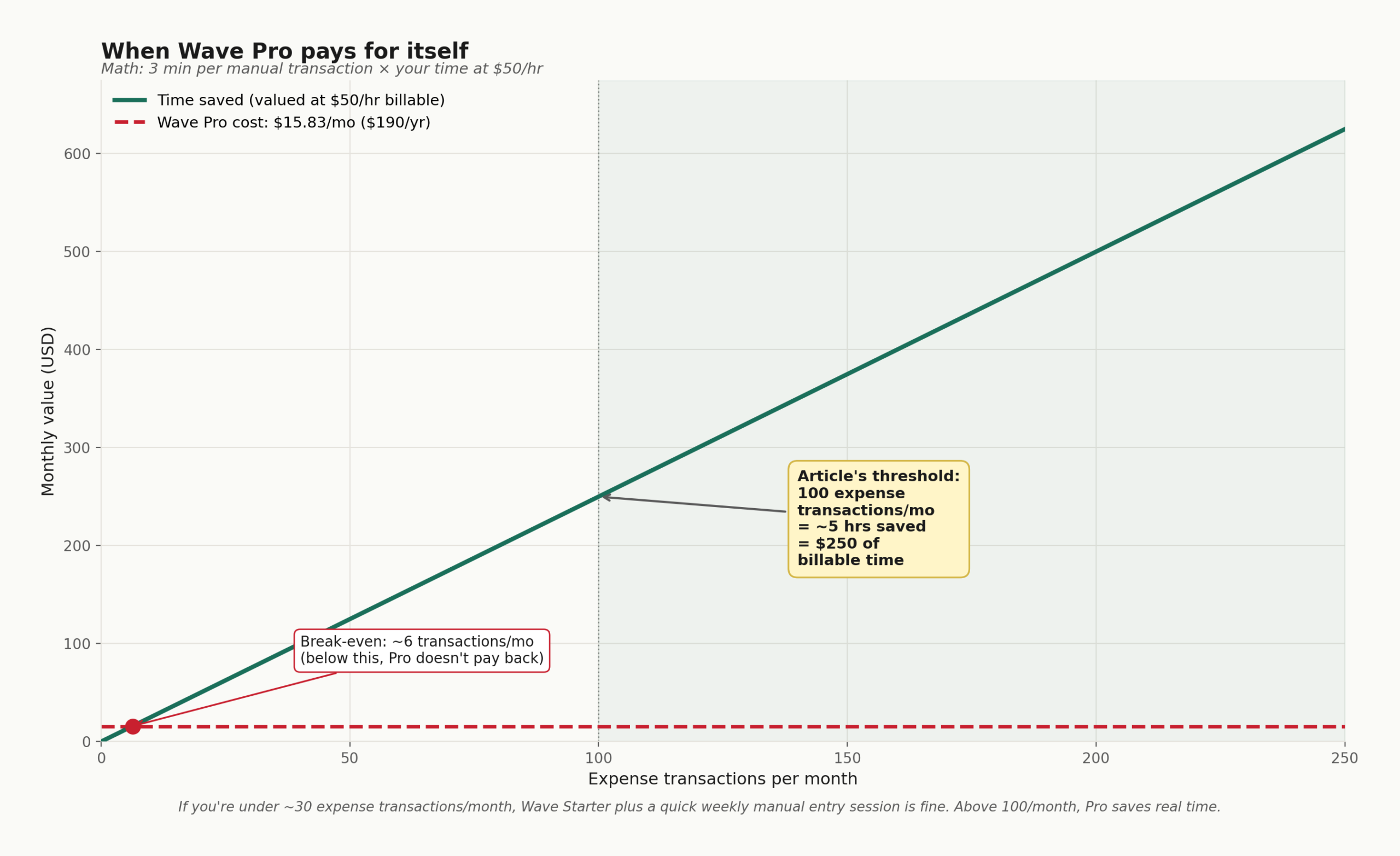
- Pick Wave Pro at $19/month ($190/year) if you have over 100 expense transactions a month, you want bank auto-import, you want receipt scanning included, and you want your books tax-ready without a weekend of manual entry. The math works at roughly 100+ transactions monthly. Below that, Starter plus a spreadsheet is fine.
- Pick Zoho Invoice if your main need is sending professional invoices, getting paid through a client portal, automating reminders, and tracking time on a few projects. You handle bookkeeping elsewhere or your accountant handles it. You stay under 500 invoices and 3 active projects.
- Use both if you want the strongest free setup. Wave Starter for the books and basic P&L. Zoho Invoice for the invoicing and client portal. Manually update Wave once a week with payments received. Total cost: $0. Total time: about 90 minutes a month for a freelancer billing $5,000 to $10,000 monthly.
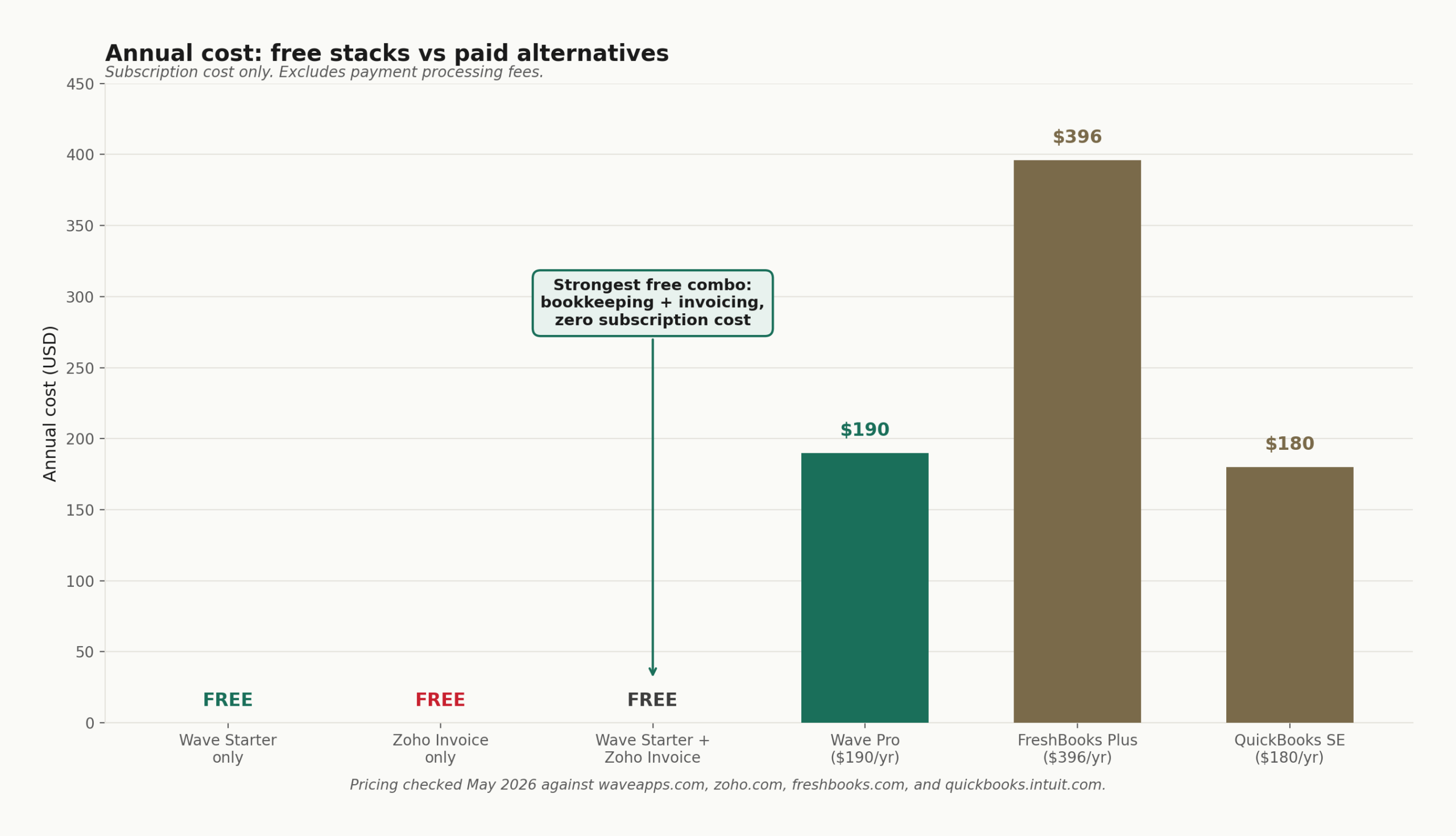
That last option is what plenty of freelancers on r/freelance and r/selfemployed have quietly settled into in 2026. Looks like a hack. Works.
The mistake almost nobody talks about
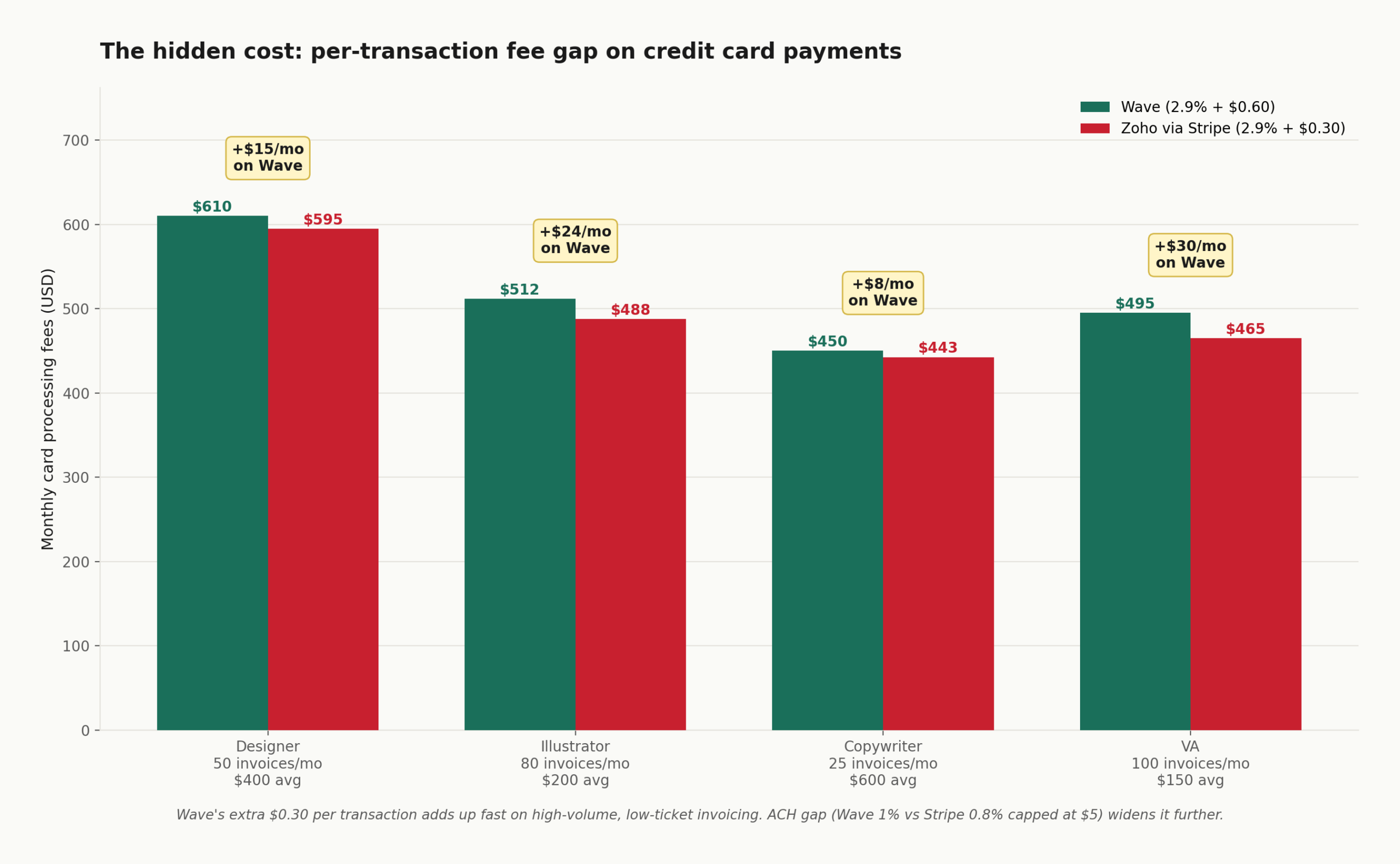
Both tools let you accept credit card payments directly through invoices. Wave charges 2.9% plus $0.60 per credit card transaction (3.4% plus $0.60 for Amex) and 1% on ACH transfers with a $1 minimum. Zoho Invoice routes payments through your connected gateway, usually Stripe or PayPal, where Stripe charges 2.9% plus $0.30 per card transaction in the US.
That extra $0.30 on every Wave transaction is the part most freelancers ignore. On 50 invoices averaging $400, the per-transaction fee gap is $15 a month, $180 a year. If you’re processing larger invoices less frequently, the gap shrinks. If you’re processing many small invoices, it grows fast. A freelance illustrator sending 80 invoices a month at $200 each pays Wave roughly $48 more per month in flat-fee add-ons than they’d pay Stripe through Zoho.
Pair that with the fact that ACH on Wave costs 1%, while Stripe ACH through Zoho costs 0.8% capped at $5 per transaction, and the “free” tool can quietly become more expensive than the paid one once you actually start collecting payments.
If you want to dig deeper into the real cost of free tools versus paid alternatives, our breakdown of the best invoicing software for freelancers shows where the per-transaction math turns against you.
How they handle the three moments freelancers actually live in
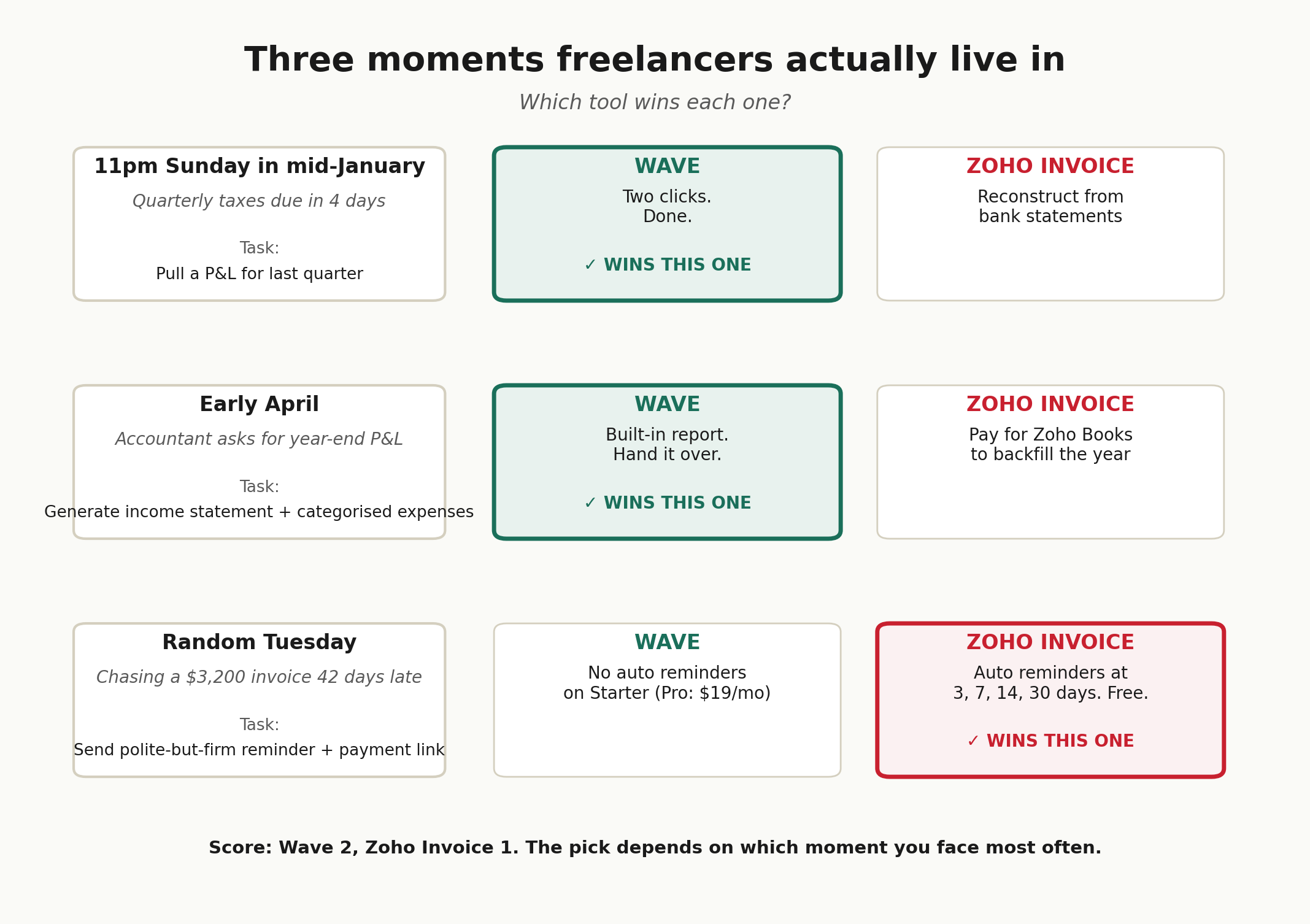
11pm Sunday in mid-January, quarterly taxes due in four days
You need to know roughly how much you earned in Q4 and what your deductible expenses look like. Wave Starter pulls a P&L for the quarter in two clicks. Zoho Invoice can show you total invoiced and total paid, but you’ll be reconstructing the expense side from your bank statements. Wave wins this moment.
If you don’t already have a system for the quarterly math, our 2026 guide to filing quarterly estimated taxes walks through the calculation, the IRS Form 1040-ES safe-harbor rules, and the dates that actually matter.
Early April, you owe $6,400 you didn’t expect
Your accountant asks for a P&L and a categorised expense report. Wave Starter generates both. Zoho Invoice shows you a list of invoices and a list of expenses, but no proper income statement. If you’re at this moment with only Zoho Invoice, you’re either pulling the data manually or paying for Zoho Books to retroactively reconstruct the year. Wave wins this one too, by a wide margin.
If this is the year you got blindsided by your tax bill, our piece on how to avoid tax liability shock covers the set-aside math and the safe-harbor rules that protect you from underpayment penalties next year.
Random Tuesday, chasing a $3,200 invoice 42 days late
You need to send a polite-but-firm reminder. Zoho Invoice’s automated reminder system is the better tool here. You can schedule reminders at 3, 7, 14, and 30 days past due, customise the wording, and let the client pay directly through the portal without re-sending the original invoice. Wave Starter has no automated reminders. Wave Pro adds them at the $19/month tier. Zoho wins this moment.
The Schedule C question
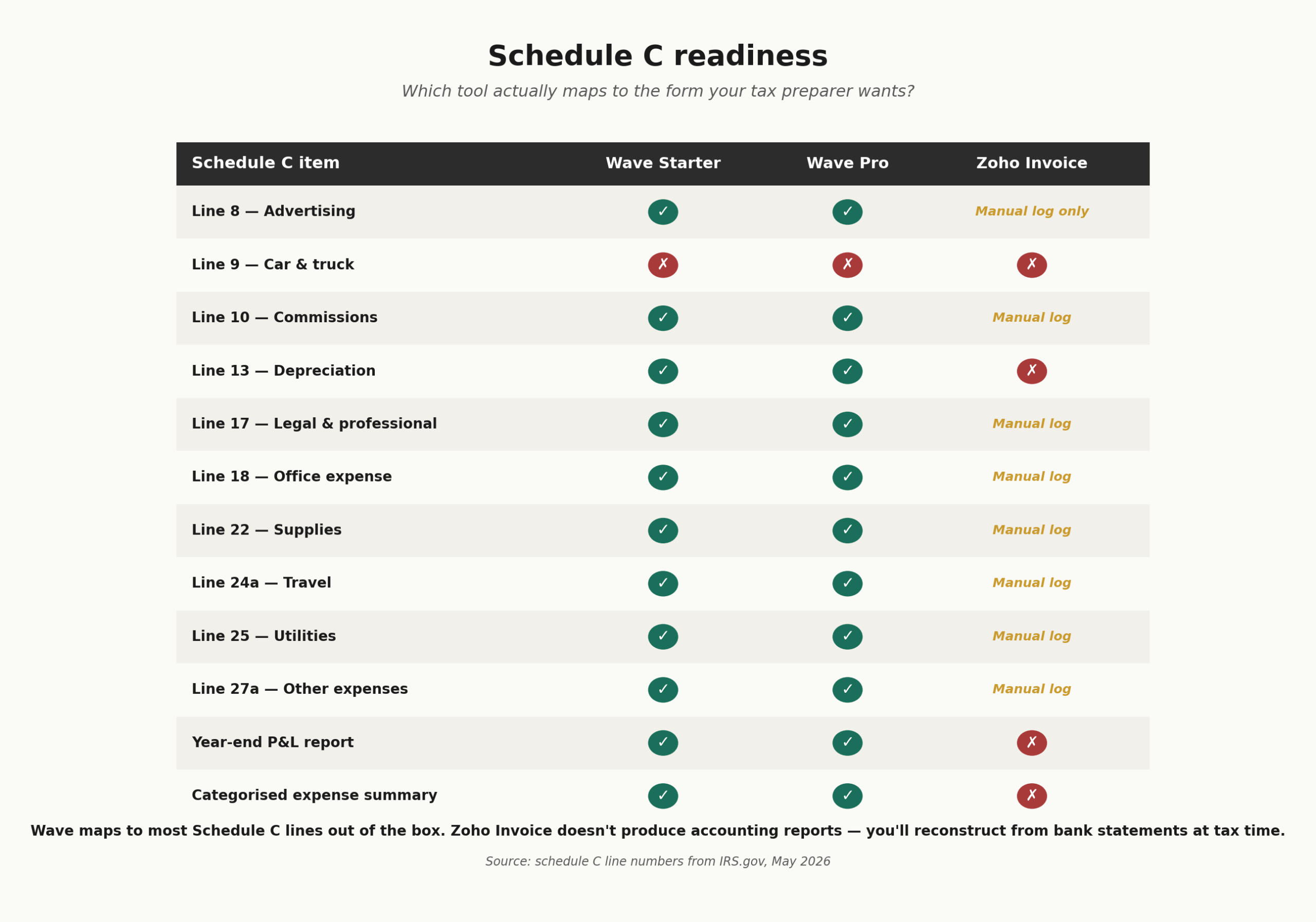
Most freelancers earning under $110,000 a year file a Schedule C as a sole proprietor. Before you pick a tool, it helps to decide your business structure, because that affects which forms you’ll actually be filling in. The form has 30+ expense categories, including office expenses on Line 18 and vehicle expenses on Line 9. Your bookkeeping software should let you map expenses to those categories, or close enough to them, so tax prep is a 30-minute job and not a weekend.
Wave handles this reasonably well. You can customise expense categories and run a year-end report that maps to most Schedule C lines. Zoho Invoice does not. If you’re using Zoho Invoice as your only tool, your Schedule C will be reconstructed from credit card statements, which is exactly the position you don’t want to be in on April 12.
For a line-by-line walkthrough, see our Schedule C guide for freelancers, which covers the 2025 tax year and the expense categories that trip people up most.
Who should pick what (with real numbers)
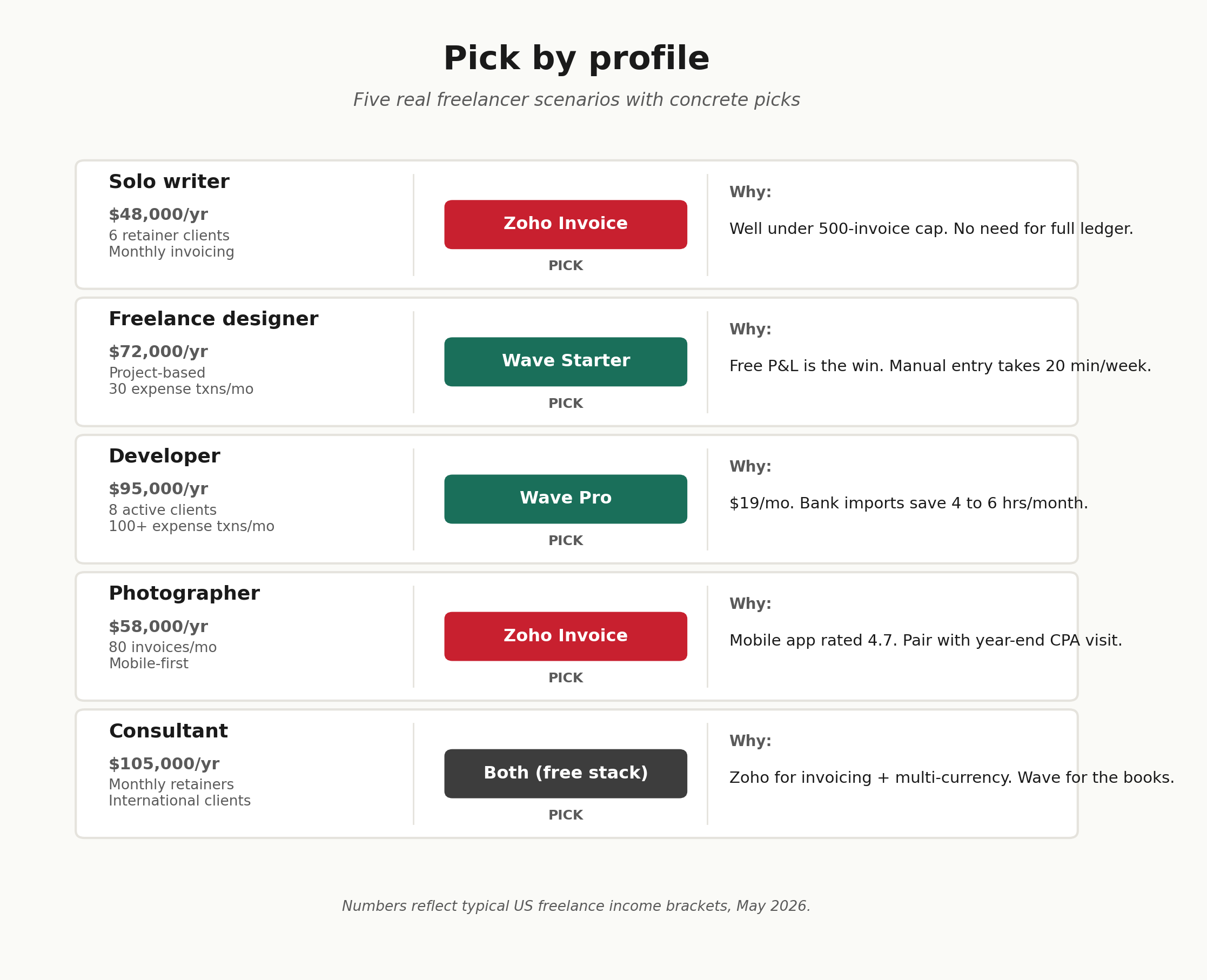
- Solo writer making $48,000/year, 6 retainer clients, monthly invoicing. Zoho Invoice. You’re well under the 500-invoice cap. You don’t need a full accounting ledger. Use a separate business bank account and reconcile manually for tax season.
- Freelance designer making $72,000/year, project-based work, 30 expense transactions a month. Wave Starter. The free P&L is what you need for tax prep. Manual expense entry once a week takes 20 minutes. If you want a deeper look at the right accounting tool if you’re a freelance designer specifically, that comparison covers the design-niche tools that beat Wave on workflow.
- Developer making $95,000/year, 8 active clients, 100+ expense transactions a month. Wave Pro at $19/month. You’re past the manual-entry threshold. Bank imports through Plaid save 4 to 6 hours a month.
- Photographer making $58,000/year, 80 invoices a month, mobile-first workflow. Zoho Invoice. The mobile app is the deciding factor. Pair it with a separate business bank account and a year-end CPA visit at $400 to $600.
- Consultant making $105,000/year, monthly retainers, international clients. Zoho Invoice for invoicing (multi-currency works on the free tier with workarounds), plus Wave Starter for the books, plus a CPA. The combined free stack saves you roughly $400 a year compared with paid alternatives.
Stop guessing. Get the free freelancer tax-prep checklist.
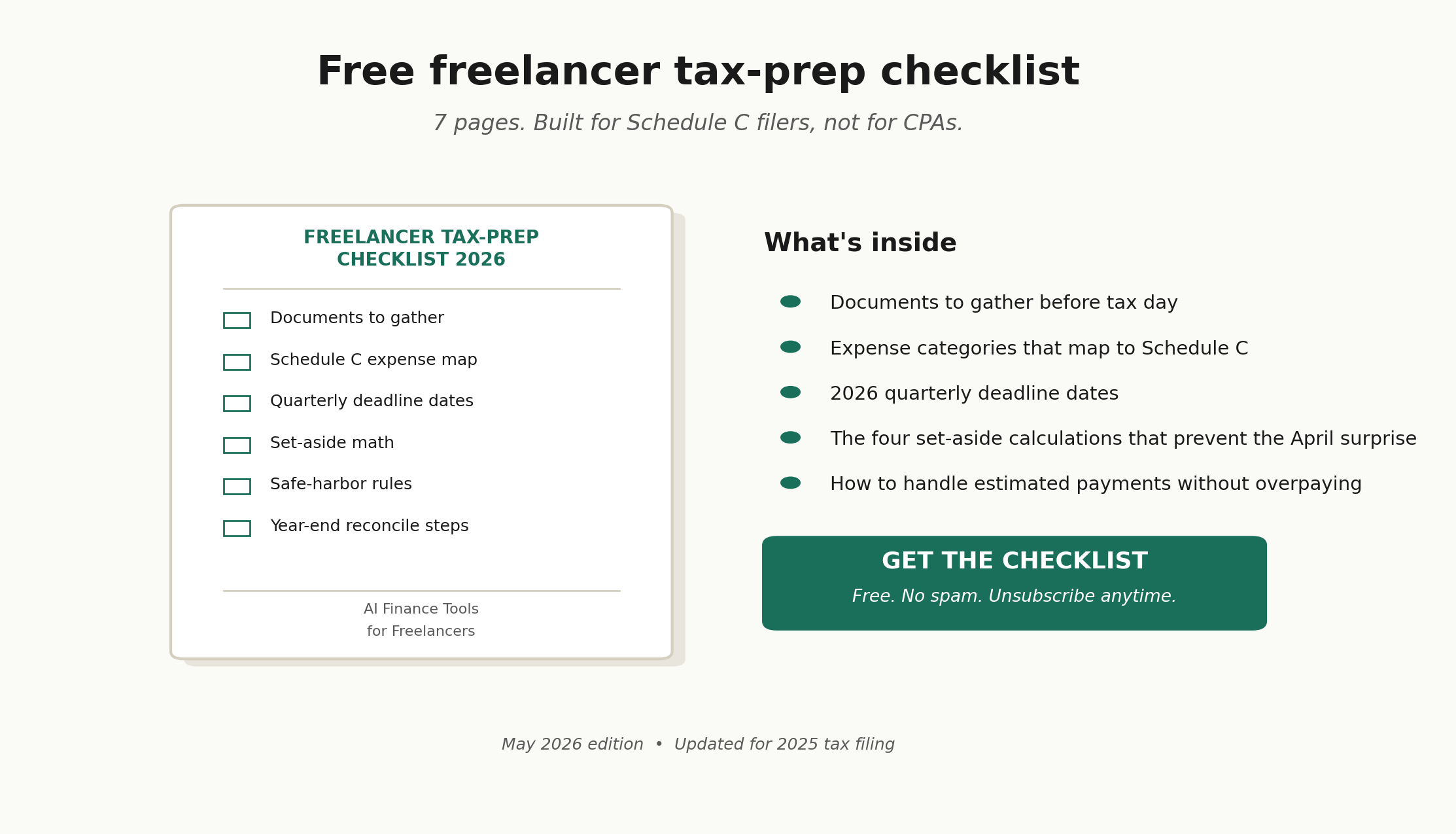
The 7-page checklist covers everything you need before you sit down to do your taxes. Documents to gather. Expense categories that map to Schedule C. The 2026 quarterly deadline dates. The four set-aside calculations that prevent the April surprise. Built for freelancers, not for CPAs.
Frequently Asked Questions
Is Wave really free in 2026?
The Wave Starter plan is genuinely free. No time limit. No trial. It includes unlimited invoices, manual income and expense tracking, and basic financial reports. The Pro plan costs $19 per month billed monthly, or $190 per year billed annually, and adds bank imports, receipt scanning, and multi-user access. Wave makes money primarily from payment processing fees (2.9% plus $0.60 per credit card transaction), payroll add-ons starting at $40 per month for Starter users, and Wave Advisors bookkeeping services starting at $199 per month. The free Starter plan is real. Bank imports and receipt scanning now sit behind the paywall.
Is Zoho Invoice free forever?
Yes. Zoho Invoice has been completely free since 2021, and Zoho has confirmed there’s no paid tier of the Invoice product. The free plan caps you at 500 invoices per year, 2 users, and 3 projects, and adds a “Powered by Zoho Invoice” footer to invoices. If you outgrow those limits, Zoho directs you to Zoho Books at $15 per month annually, which is a separate product with proper accounting features.
Which is better for tax preparation?
Wave is better for tax preparation because it produces actual accounting reports including profit and loss statements and a basic balance sheet. Zoho Invoice does not generate accounting reports. If you file a Schedule C and you’re using Zoho Invoice alone, you’ll need to reconstruct your books from bank statements at tax time. Wave’s expense categorisation maps reasonably well to Schedule C lines, which makes year-end prep faster.
Can I migrate from Wave to Zoho Invoice or vice versa?
Both tools let you export invoices and contact data, usually as CSV files. Wave exports transaction data to Google Sheets through Wave Connect. Zoho Invoice supports CSV import for contacts and items. There’s no one-click migration between the two. Historical accounting data does not transfer cleanly because Zoho Invoice has no proper books to receive it. Most freelancers who switch start fresh on the new tool with the new fiscal year and keep the old account read-only for historical reference.
What happens to my Wave account on June 1, 2026?
If you opened your Wave account before January 29, 2024 (Canada) or February 5, 2024 (US), it’s a Legacy account. On June 1, 2026, Wave migrates Legacy accounts that aren’t actively using paid features to the free Starter plan. You’ll lose automatic bank connections, and any collaborators (accountants, bookkeepers, business partners) lose access. Wave emailed affected users on April 30, 2026. To keep bank imports and collaborators, upgrade to Pro at $19 per month, or $190 per year billed annually, before the migration date.
Does either tool track mileage for the standard mileage deduction?
No. Neither Wave nor Zoho Invoice has built-in mileage tracking. For the IRS standard mileage rate (70 cents per mile in 2025, 72.5 cents per mile in 2026), you’ll need a separate tool. Common options include MileIQ, Stride, and the mileage tracker built into Keeper Tax. If you drive for business regularly, treat mileage tracking as a separate line in your tool stack regardless of which invoicing or bookkeeping app you choose.
Can I use Wave and Zoho Invoice together?
Yes, and plenty of freelancers do. Use Zoho Invoice for sending professional invoices, automated reminders, and the client portal. Use Wave Starter for the bookkeeping side, manually entering payments received and expenses. Total cost is $0. The drawback is double entry: you’ll log paid invoices in both tools. For a freelancer billing $5,000 to $10,000 monthly, this stack costs roughly 90 minutes a month in admin time and saves the $190 a year you’d otherwise pay for Wave Pro or a paid invoicing tier elsewhere.
Which has better customer support?
Zoho Invoice, by a clear margin. Zoho offers 24/5 toll-free phone and email support on the free plan. Wave offers chat and email Monday to Friday, 9am to 4:45pm Eastern, with no phone support on any plan. Reviews from 2025 and 2026 consistently flag Wave’s support as a major weakness, with response times stretching to 48 hours and free users routed to a chatbot. If responsive support matters to you, Zoho is the better choice.
One concrete action this week. Pick the tool that fits your invoice volume and your bookkeeping need. Set up a separate business checking account. Connect or manually start logging the last 90 days of transactions. Whichever tool you pick, the part that actually saves you money on your tax bill is tracking business expenses properly in a separate account, not the software.
Start Your Free Trial with Wave
Start Your Free Account with Zoho Invoice
Tax laws change. Pricing changes more often than that. Verify all current rates and rules at IRS.gov and on the official Wave and Zoho pricing pages before making decisions. This article is informational only and not tax, legal, or financial advice. Consult a CPA or tax professional for your specific situation.
About the author
Gareth is an entrepreneur based in Dubai and the founder of AI Finance Tools for Freelancers. He’s not a CPA or a bookkeeper. He built this site because he couldn’t find honest, thorough reviews of AI finance tools written for freelancers. Every guide is researched from real user reviews, official documentation, and expert sources.