
Eight AI bookkeeping tools tested against real freelancer workflows. Honest pricing, the bugs nobody mentions, and the one most solo freelancers actually need.

It’s 11pm on a Sunday. You’ve got a Google Sheet open, three months of Stripe deposits you haven’t categorised, and a half-finished tax estimate that says you owe $4,200. You searched “AI bookkeeping for freelancers” because you’re tired of doing this by hand. You also don’t want to pay $300 a month for Bench. Bench imploded in December 2024 and got resurrected under new ownership a few days later, but the chaos pushed thousands of customers out, so even that fallback isn’t what it used to be.
Most ranking lists for AI bookkeeping tools are written for venture-backed startups with a controller. They’ll point you at Zeni at $549 a month, or LayerNext with custom pricing and a “book a demo” button. That isn’t your life. You make $72,000 a year as a solo designer or developer or copywriter. You file a Schedule C. You need something that costs less than $40 a month, doesn’t lose your data, and gets your books to a state where TurboTax or your CPA can finish the job.
FlyFin and Keeper Tax get most of the attention because they spend hard on Google Ads. They’re not the only options. For a lot of freelancers, they aren’t even the right ones. This guide covers the eight AI-assisted bookkeeping tools worth your time in 2026, what each one does well, and where each one falls apart.
What “AI bookkeeping” actually means in 2026
The phrase has been stretched so far it’s almost meaningless. Every accounting tool now claims AI features. Most of what they call “AI” is the same rule-based categorisation that’s existed since QuickBooks 2010, with a chatbot bolted on top.
Here’s the honest breakdown of what AI does in this category right now:
- Receipt scanning (OCR plus extraction). The tool reads a photo of a receipt and pulls the vendor, date, and amount. This works well in 2026. Most tools get it right 90 percent of the time.
- Transaction categorisation. The tool looks at “STRIPE PAYOUT” or “ADOBE CC SUBSCRIPTION” and assigns a Schedule C category. Works well for repeat transactions. Less well for one-offs and ambiguous merchant names.
- Deduction surfacing. The tool flags transactions you might be missing as deductions. Useful, but you still need to confirm each one. Don’t trust the auto-tagging without checking.
- Chat-based queries. “What did I spend on software in March?” Accuracy on these queries varies wildly. One bookkeeper put it bluntly in a community thread: AI is good at plausible answers, not correct ones.
- Reconciliation matching. The tool matches bank transactions to invoices automatically. This is the feature that saves the most hours. It works well in Xero, FreshBooks, and Bonsai. It’s getting better in QuickBooks.
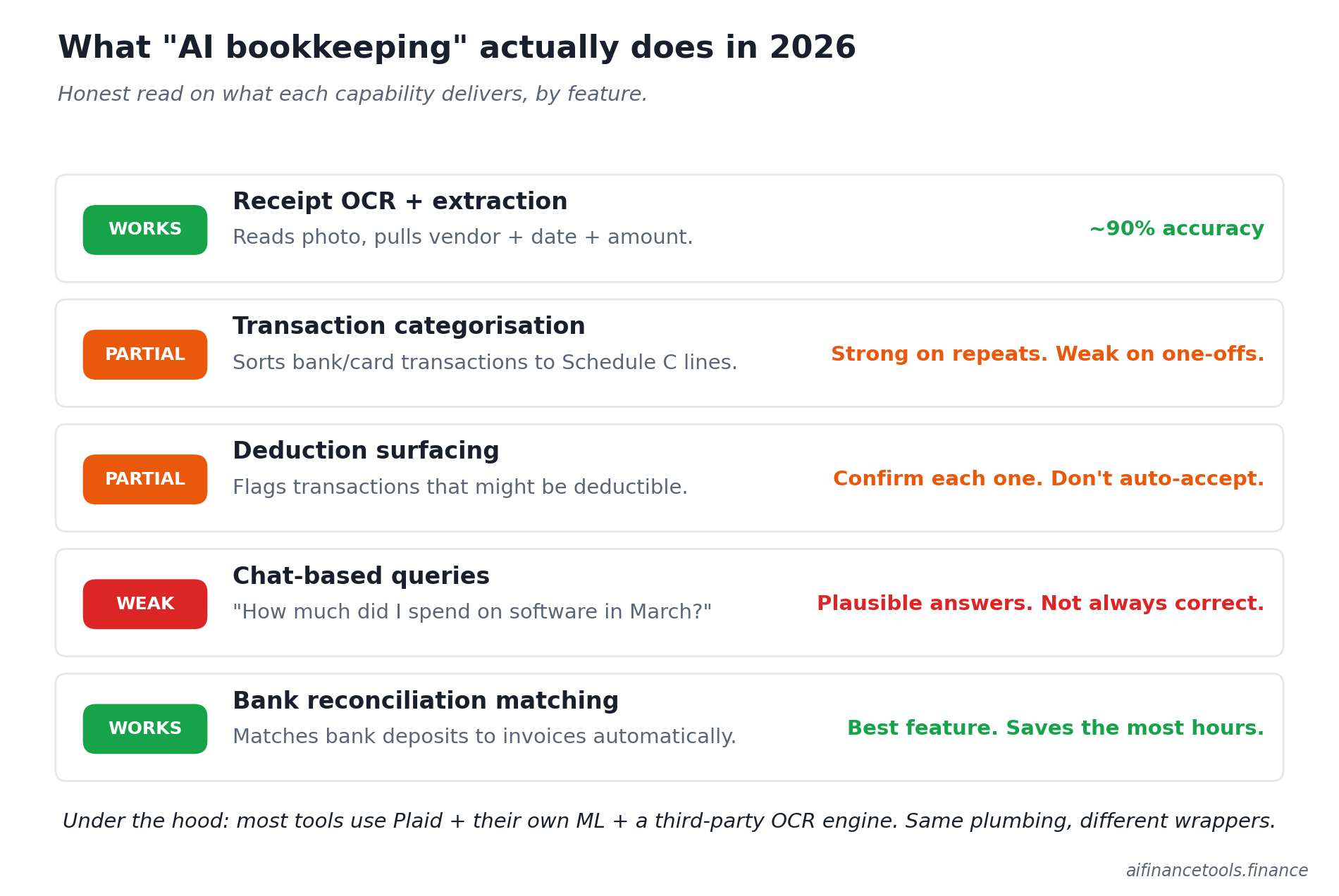
Under the hood, most of these tools use Plaid to connect to your bank, plus their own machine learning layer for categorisation, plus a third-party OCR engine for receipts. The differences between products are mostly about the interface and the workflows wrapped around the same core plumbing.
What AI does not do well in 2026: full month-end close, accruals, complex multi-entity work, or anything that needs real judgement. If a tool promises to “do your bookkeeping for you with AI,” read the reviews before you pay. The pattern across G2, Capterra, and Reddit is consistent. Tools that overpromise on AI under-deliver on accuracy. You end up cleaning up the mess at year end.
Cash basis or accrual: pick one before you pick a tool
Most freelancers should be on cash basis accounting. You record income when the money hits your account and expenses when they leave it. Simple, intuitive, and what every tool in this guide defaults to.
Accrual accounting records income when you invoice and expenses when you incur them, regardless of when money actually moves. It gives you a more accurate picture of business performance, but it’s overkill for a solo Schedule C filer. Stay on cash basis unless your CPA tells you otherwise. Switching mid-year creates a tax filing mess.
Who this guide is for
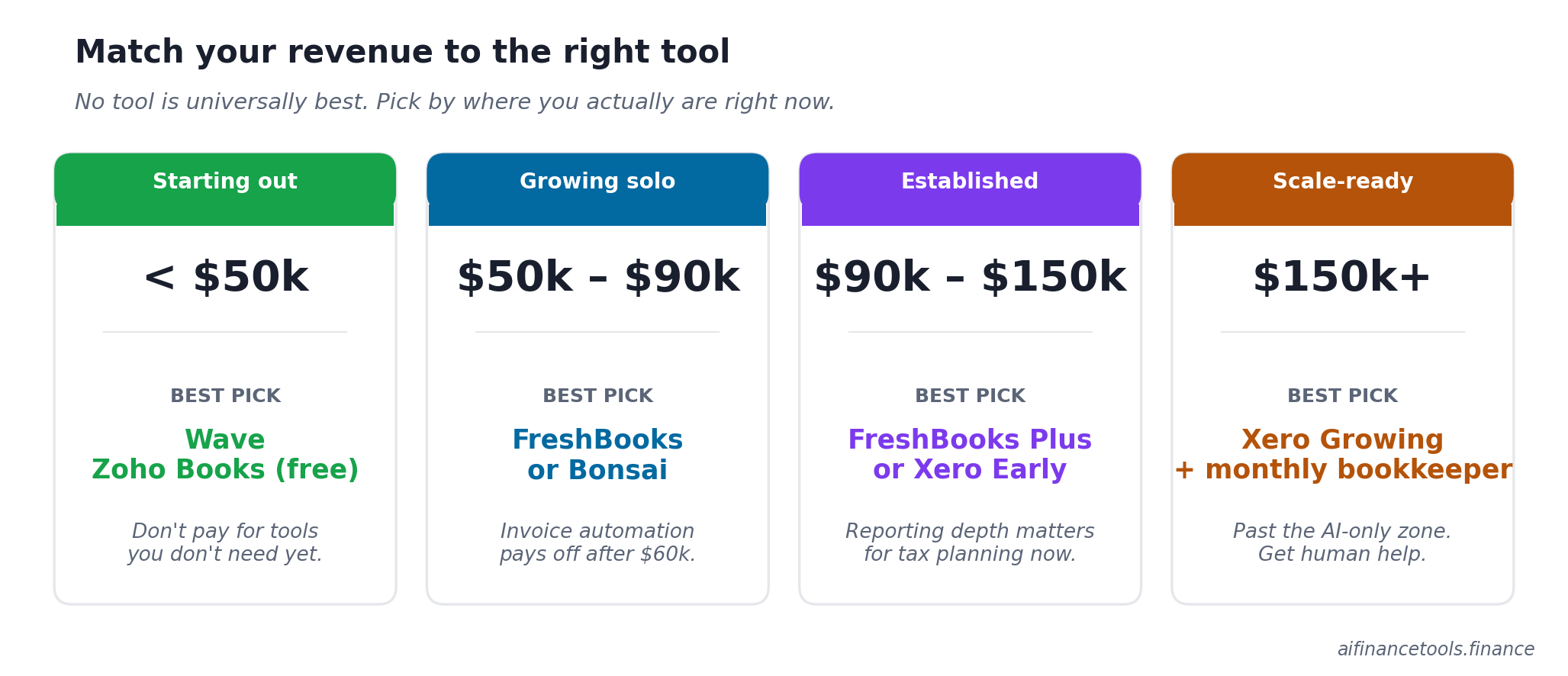
You’re a solo freelancer or self-employed person making between $40,000 and $150,000 a year. You file a Schedule C. You have one or two business bank accounts. You don’t have inventory, payroll for employees, or multi-state nexus issues that need a CPA on retainer. You want your books in a state where you can hand them to a tax pro in March without spending three weekends fixing them first.
If you’re running an agency with contractors, billing more than $250,000 a year, or you’ve moved to an S-corp structure, the rules change. We’ve covered the structure question separately in our guide on sole proprietorship vs LLC vs S-corp for freelancers.
The eight AI bookkeeping tools worth considering
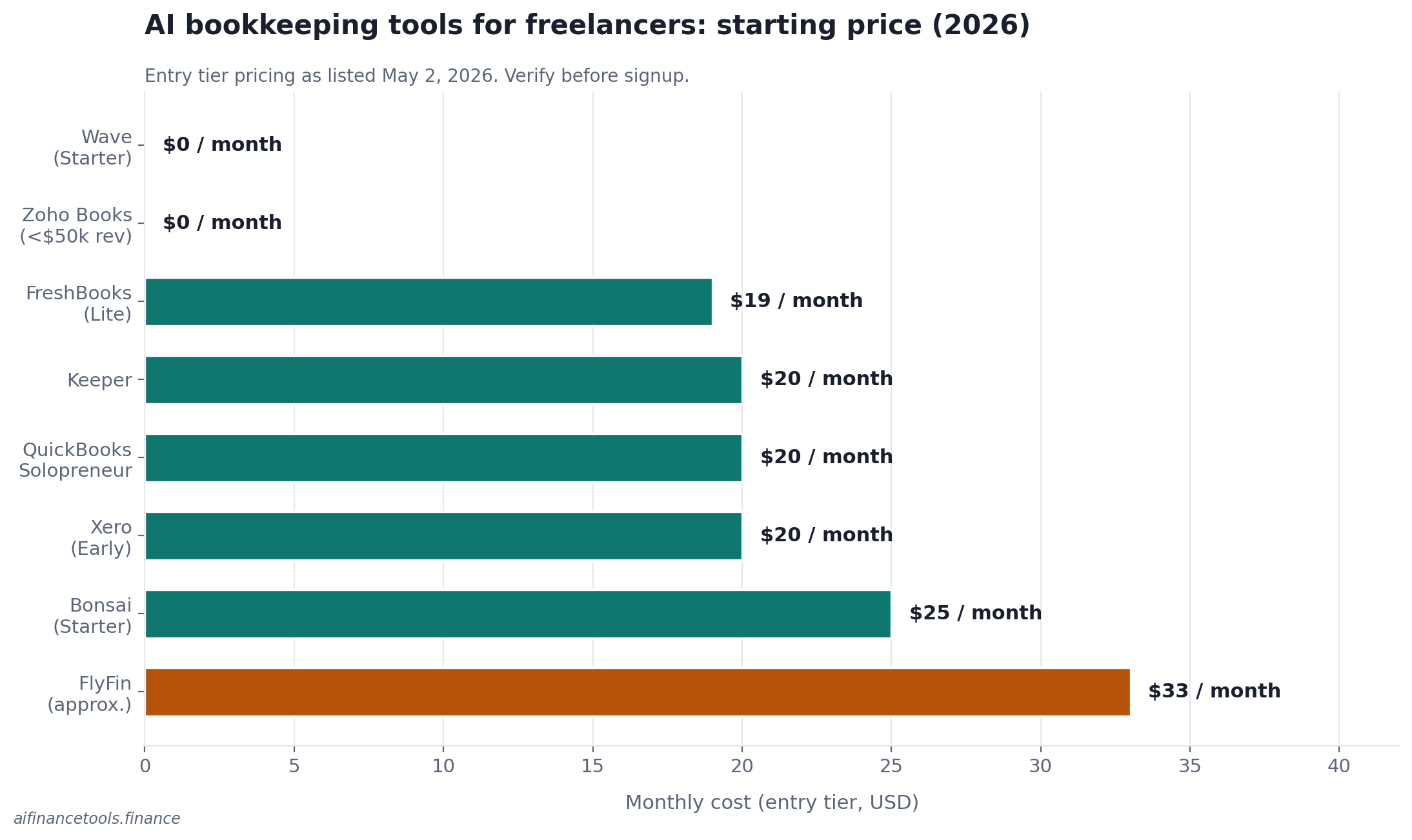
Pricing checked May 2, 2026 from each vendor’s official pricing page. These shift more often than they should, so verify before you sign up.
| Tool | Best for | Starting price | AI strength | Watch out for |
|---|---|---|---|---|
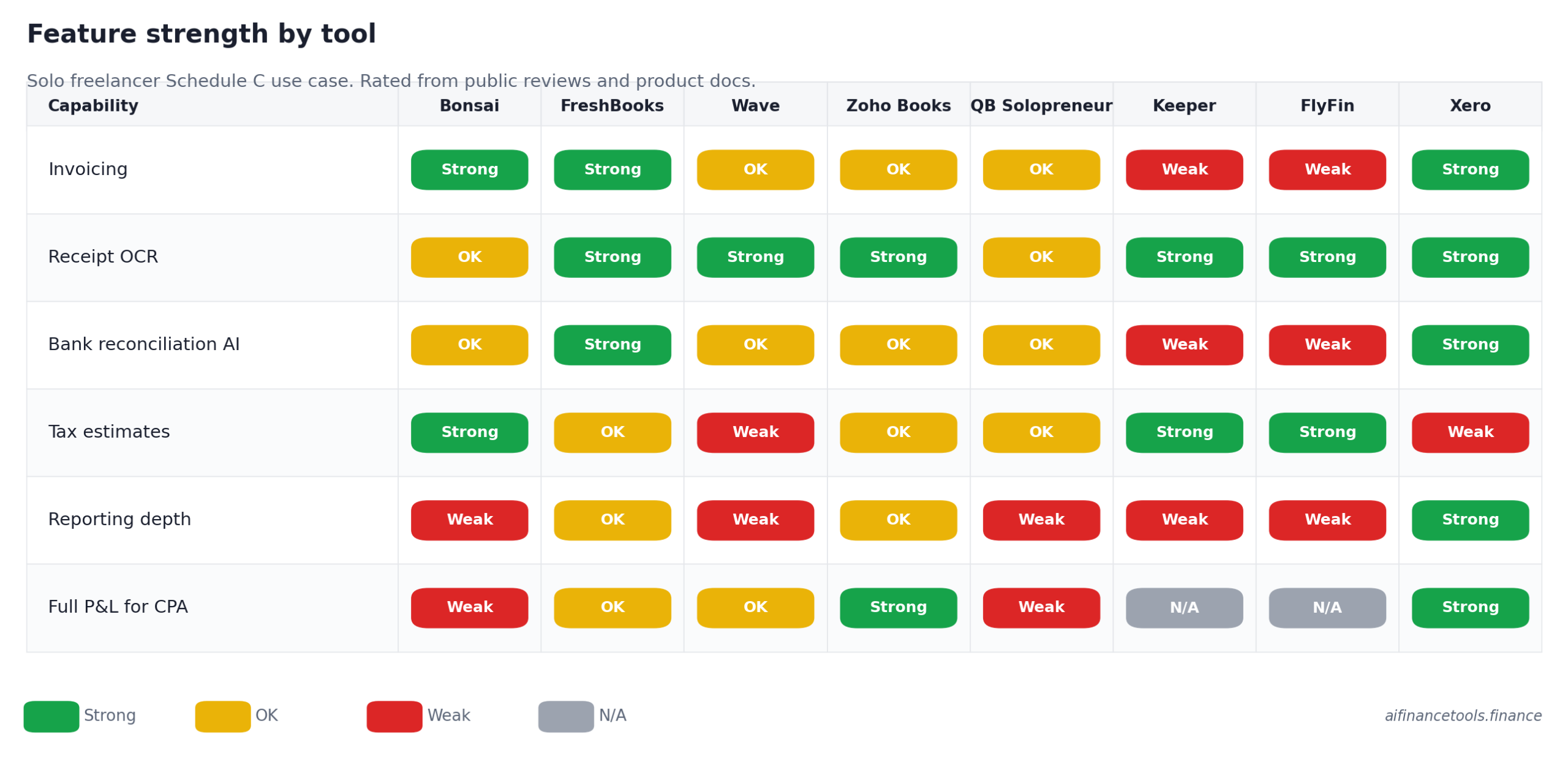
| Bonsai | Freelancers who want contracts, invoices, and books in one place | $25/mo (Starter) | Auto-categorisation, tax estimate engine | Reporting depth is shallow |
| FreshBooks | Service-based freelancers with retainer or project billing | $19/mo (Lite) | Strong invoicing automation, decent receipt OCR | Lite caps at 5 clients, lose data on cancellation |
| Wave | New freelancers under $60k who want $0/month | Free (Pro $16/mo) | Free receipt scanning, bank feed matching on Pro | Free tier limits on bank feeds, verify on Wave’s pricing page |
| Zoho Books | Freelancers earning under $50k (free tier eligibility) | Free under $50k revenue, $20/mo Standard | Good auto-scan, mileage tracking, Zia AI assistant | Steeper learning curve, US support is thin |
| QuickBooks Solopreneur | QBSE refugees who want continuity | $20/mo | Intuit Intelligence categorisation, Schedule C export | Single-entry only, no balance sheet |
| Keeper | Freelancers who only need expense tracking and tax filing | ~$20/mo or annual plans | Deduction-finder AI, text-based interface | Not a full bookkeeping tool, no balance sheet |
| FlyFin | Freelancers who want AI deduction-finding plus optional CPA review | Annual plans, basic and premium | Aggressive AI deduction surfacing | Mixed reviews on CPA quality, billing complaints |
| Xero | Freelancers planning to grow past solo | $20/mo (Early) | Best-in-class bank reconciliation AI | Early plan caps at 20 invoices/month |
1. Bonsai: best all-in-one for freelancers who hate admin
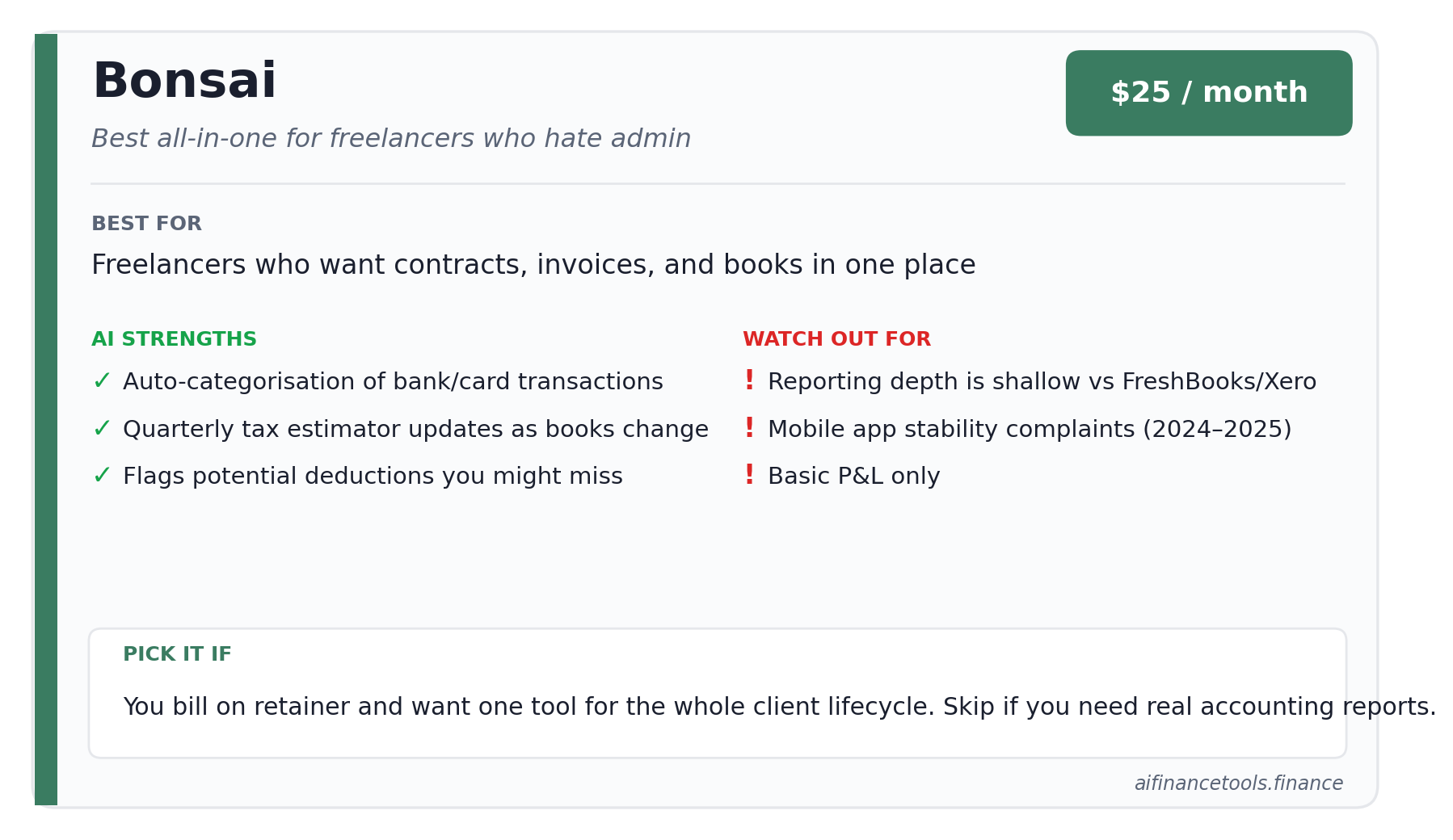
Bonsai started as a contract tool for freelancers and grew outward. It now handles proposals, contracts, invoicing, time tracking, expense categorisation, and quarterly tax estimates in a single product. The Starter plan is $25 a month. Bonsai’s tax-focused tier sits higher up the pricing ladder and bundles in deduction tracking and quarterly tax estimates. Check hellobonsai.com for current pricing before you sign up.
Where the AI helps: it pulls bank and card transactions and sorts them by Schedule C line. It also flags potential deductions you might miss. The quarterly tax estimator updates your projected liability as your books update, which is genuinely useful when you’re trying to figure out how much to send the IRS in June or September.
Where it falls short: reporting is shallow compared to FreshBooks or Xero. If you need a proper profit and loss with categories your accountant will recognise without translation, Bonsai is workable but basic. The mobile app has had stability issues that show up in App Store reviews going back through 2024 and 2025.
Pick Bonsai if you bill clients on retainer, you want one tool for the whole client lifecycle, and you don’t want to pay for a separate accounting product. Skip it if you need real accounting reports.
Start Your Free Trial with Bonsai
2. FreshBooks: the invoicing-first option
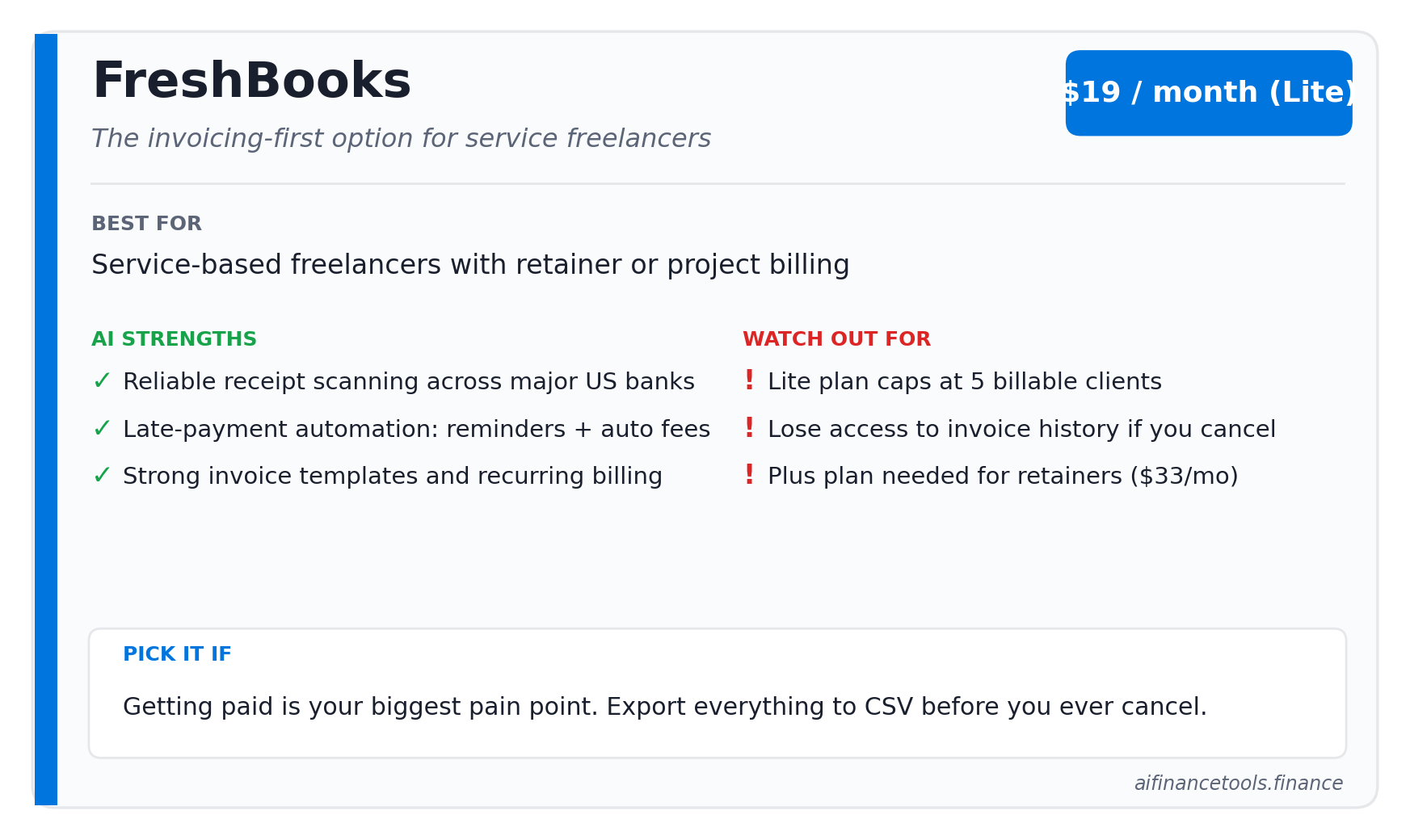
FreshBooks remains the strongest pick if your main pain point is getting paid. The Lite plan is $19 a month and caps you at 5 billable clients. The Plus plan, at $33 a month (often discounted to $11.40 a month for the first 4 months), raises the cap to 50 clients. It also unlocks recurring billing, retainers, late fees, and proposals.
The AI here shows up in two places. First, receipt scanning and expense categorisation that’s reliable across the major US banks. Second, late payment automation, which sends reminders on a schedule you set and adds late fees automatically. Freelance writers and designers tend to favour FreshBooks for the invoicing experience alone. We’ve covered why in detail in our guide to the best invoicing software for freelance writers and the broader best accounting software for freelance designers guide.
One thing to know before you sign up. When you cancel a FreshBooks subscription, you lose access to your historical invoices and client data. This complaint shows up repeatedly on G2 reviews. If you ever leave, export everything to CSV first.
For a head-to-head against the closest direct competitor, see our FreshBooks vs Xero 2026 comparison.
Start Your Free Trial with FreshBooks
3. Wave: the free option that’s actually good
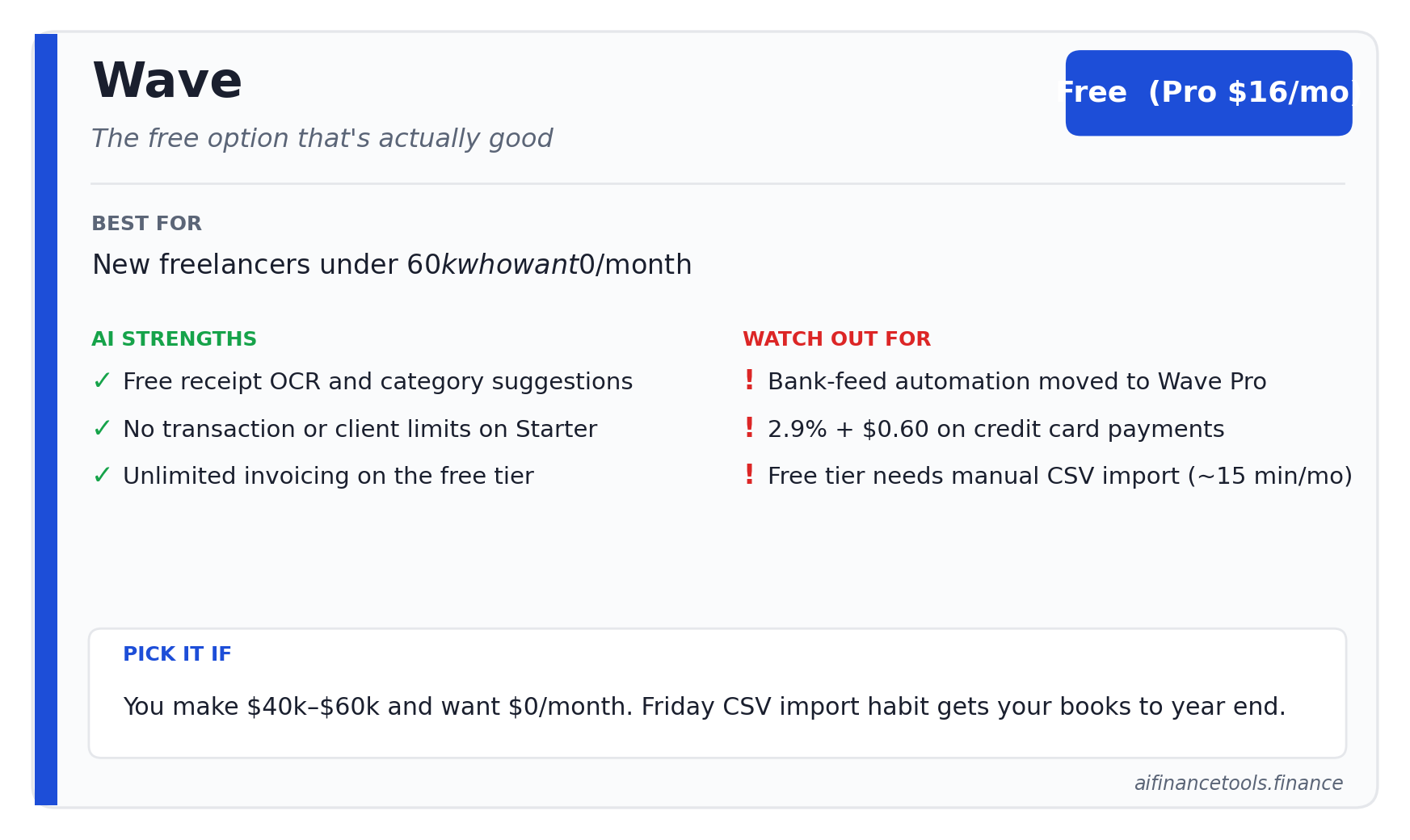
Wave’s core accounting, invoicing, and receipt scanning are free. No transaction limits. No client caps. No trial expiry. They make money on payment processing (2.9% plus $0.60 per credit card transaction) and payroll, which you probably don’t need as a solo freelancer.
The catch: bank feed automation has been moved behind Wave Pro at $16 a month. The free Starter tier still includes manual CSV import, which works but takes 15 minutes a month. Wave shifts what’s included on which tier, so check waveapps.com/pricing the day you sign up.
Wave’s AI features are limited to receipt OCR and category suggestions on imported transactions. Nothing fancy. If you’re a new freelancer making $40k to $60k a year, Wave Starter plus a Friday-afternoon CSV import habit will get your books to year-end in good shape for $0 a month.
For the head-to-head we ran with the other strong free contender, see Wave vs Zoho Invoice for freelancers.
4. Zoho Books: the dark horse
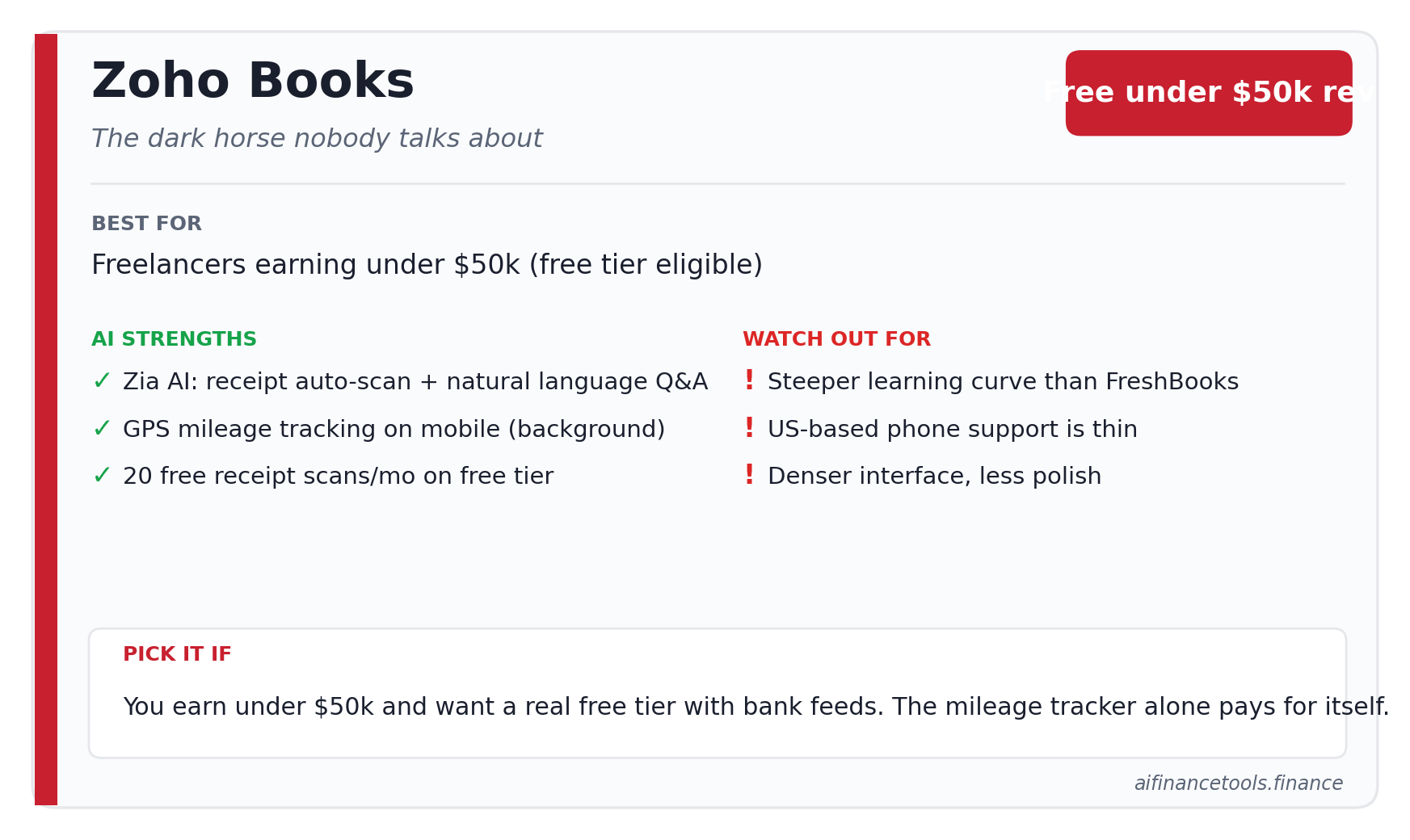
Zoho Books is the freelancer accounting tool nobody talks about, mainly because Zoho doesn’t run aggressive ads in this niche. The free plan covers businesses with revenue under $50,000 a year. Above that, the Standard plan is $20 a month, or $15 a month billed annually.
The AI piece here is Zia, Zoho’s assistant. It handles auto-scan on receipts (20 free scans a month on the free tier, 50 on Standard), sorts transactions, and answers natural-language questions about your books. The mileage tracker uses GPS and runs in the background on the mobile app, which is a real benefit if you’re a photographer or consultant racking up business miles. The IRS standard mileage rate for 2026 is 72.5 cents per mile, up 2.5 cents from 2025, so even modest mileage adds up. IRS Notice 2026-10 has the official figures.
The downside: Zoho Books has a steeper learning curve than FreshBooks or Wave. The interface is denser. US-based phone support is limited compared to FreshBooks. If you want hand-holding, this isn’t your tool.
Start Your Free Trial with Zoho Books
5. QuickBooks Solopreneur: for the QuickBooks Self-Employed refugees
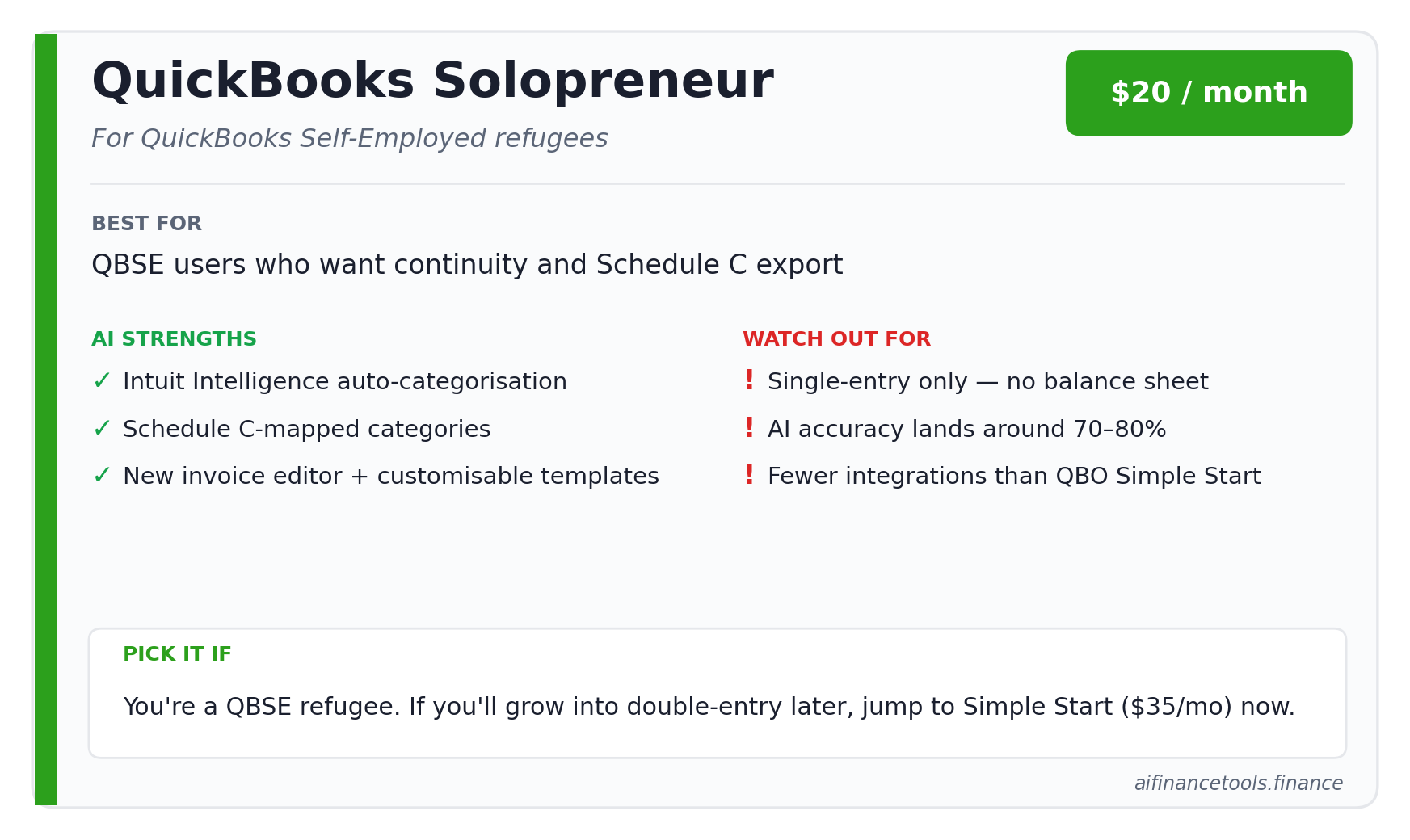
Intuit retired QuickBooks Self-Employed for new subscribers. Existing QBSE customers can keep using it for now, but new freelancers get pushed to QuickBooks Solopreneur at $20 a month, often discounted 50% for three months. Solopreneur is a meaningful upgrade on QBSE for invoicing. You get the new invoice editor, customisable templates, and basic profit and loss reporting.
Intuit Intelligence is the AI layer. It auto-categorises transactions and offers chat-based answers. The accounting community is mixed on accuracy. One bookkeeper described Intuit’s pattern as hitting the 70 to 80 percent mark on AI features, which sounds great until you realise the missing 20 to 30 percent is the part that matters at tax time.
Solopreneur is single-entry only. No balance sheet. No accounts payable. Limited integrations compared to QuickBooks Online Simple Start at $35 a month. If you ever expect to grow into double-entry bookkeeping, you’ll migrate eventually anyway, so consider whether Simple Start makes more sense from day one.
6. Keeper: deduction-finder plus tax filing
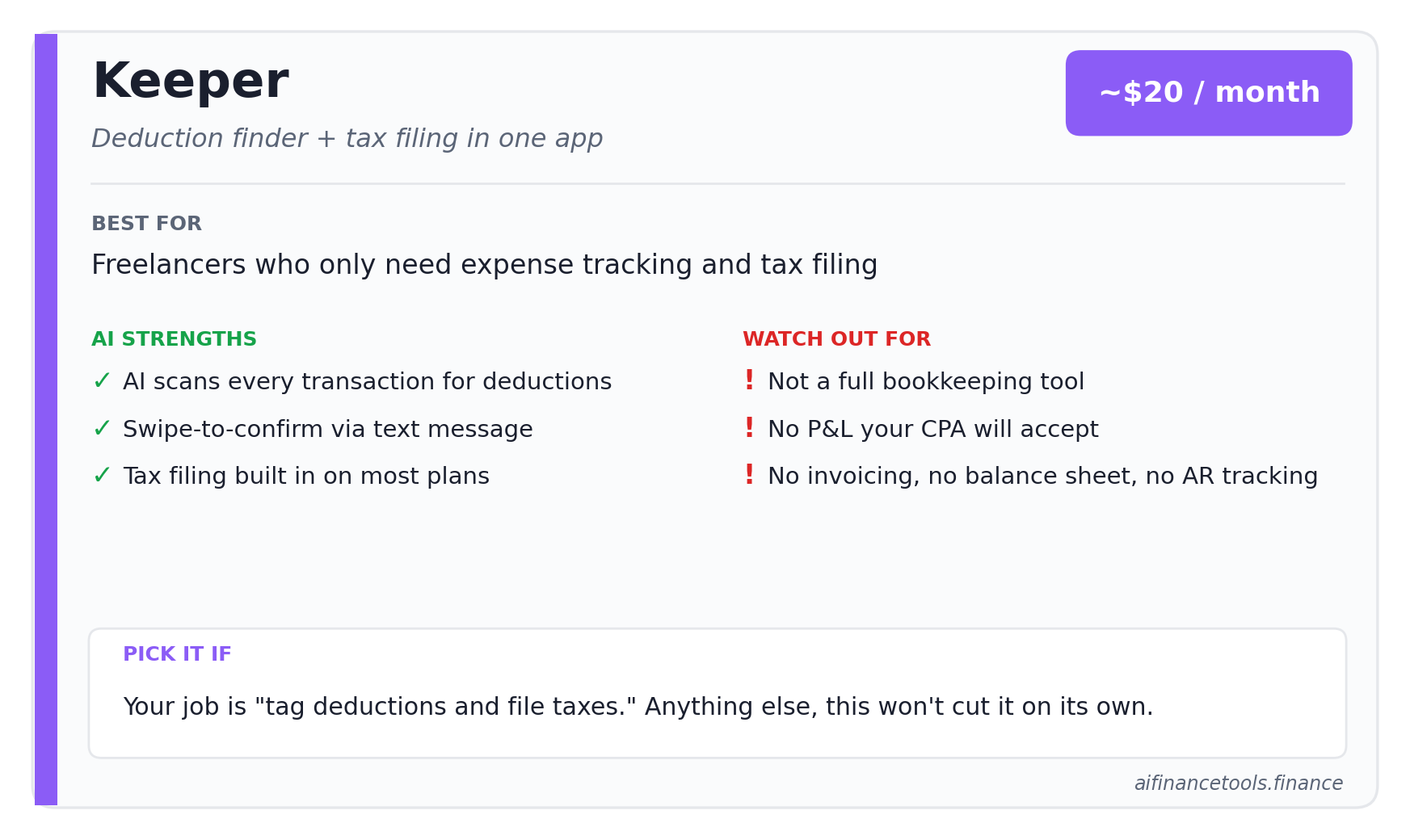
Keeper isn’t really a bookkeeping tool. It’s an expense tracker plus tax filing service with an AI layer that finds deductions. Pricing runs around $20 a month with annual options. Tax filing through their platform is included on most plans. Verify current pricing at keepertax.com before you sign up.
The pitch is simple. Connect your bank and credit cards, the AI scans every transaction, you swipe to confirm or reject business expenses by text message, and at year end you can file your return through the same app. For freelancers who hate spreadsheets and want their deductions captured, this works.
What it won’t do: produce a profit and loss your CPA will accept, handle invoicing, track AR, or give you a balance sheet. If your bookkeeping needs are “tag my deductions and file my taxes,” Keeper is a reasonable pick. If you need actual books, it’s not enough on its own. We’ve gone deeper in our Keeper Tax review.
7. FlyFin: aggressive AI deduction surfacing
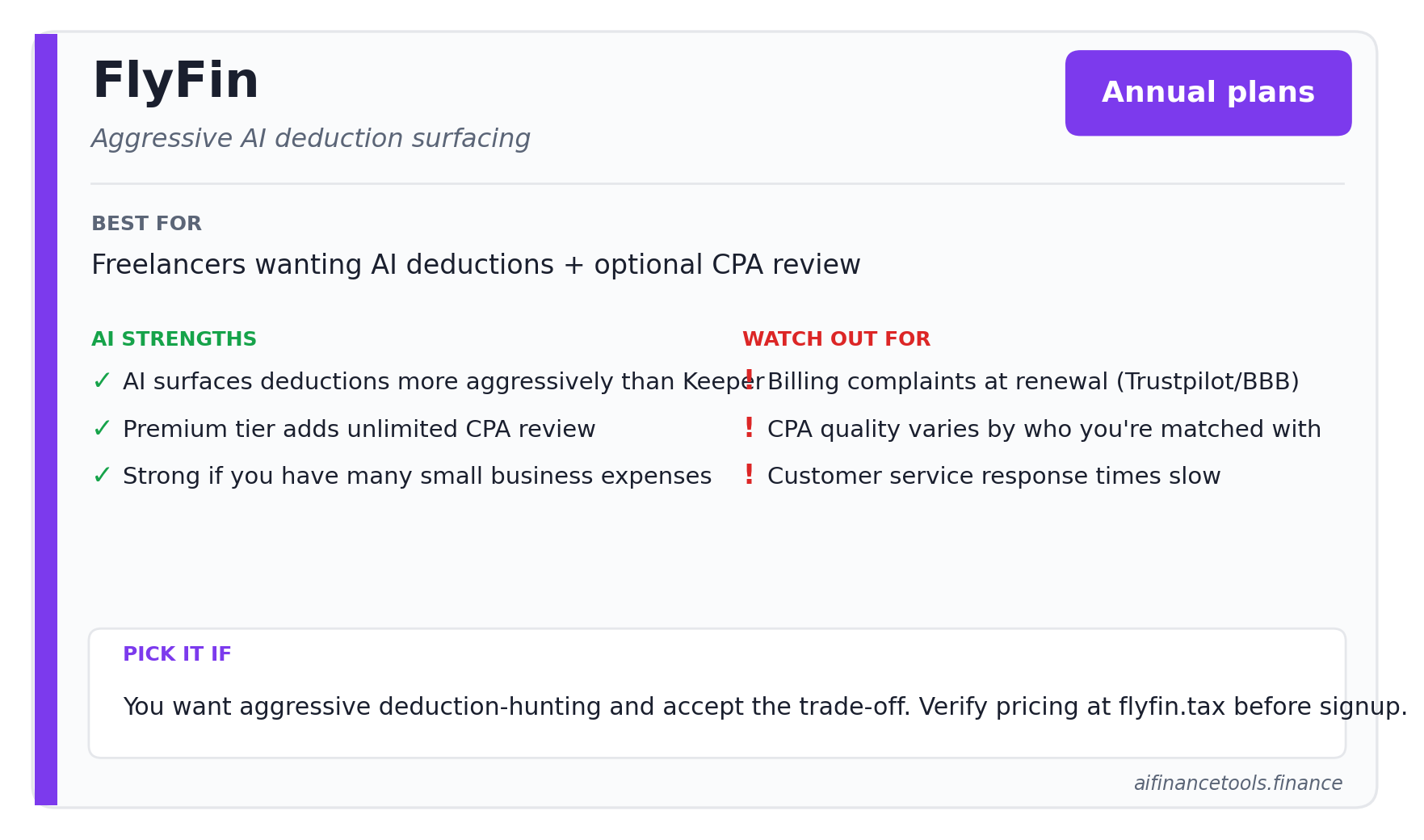
FlyFin sits in similar territory to Keeper. The AI scans transactions and surfaces potential deductions, often more aggressively than Keeper does. They sell annual plans, with a basic tier and a premium tier that adds unlimited CPA review. Pricing has shifted multiple times in 2025 and 2026, so check flyfin.tax/pricing the day you decide.
The complaints worth knowing about, pulled from Trustpilot and BBB filings: billing issues at renewal, CPA quality varying widely depending on who you get matched with, and customer service response times that frustrate users when something goes wrong. FlyFin has more 1-star reviews on Trustpilot than the polished marketing suggests, and the pattern is consistent enough to take seriously.
Our full take, with side-by-side comparison, lives in the FlyFin review and the head-to-head FlyFin vs Keeper Tax 2026 comparison.
8. Xero: pick this if you’re planning to grow
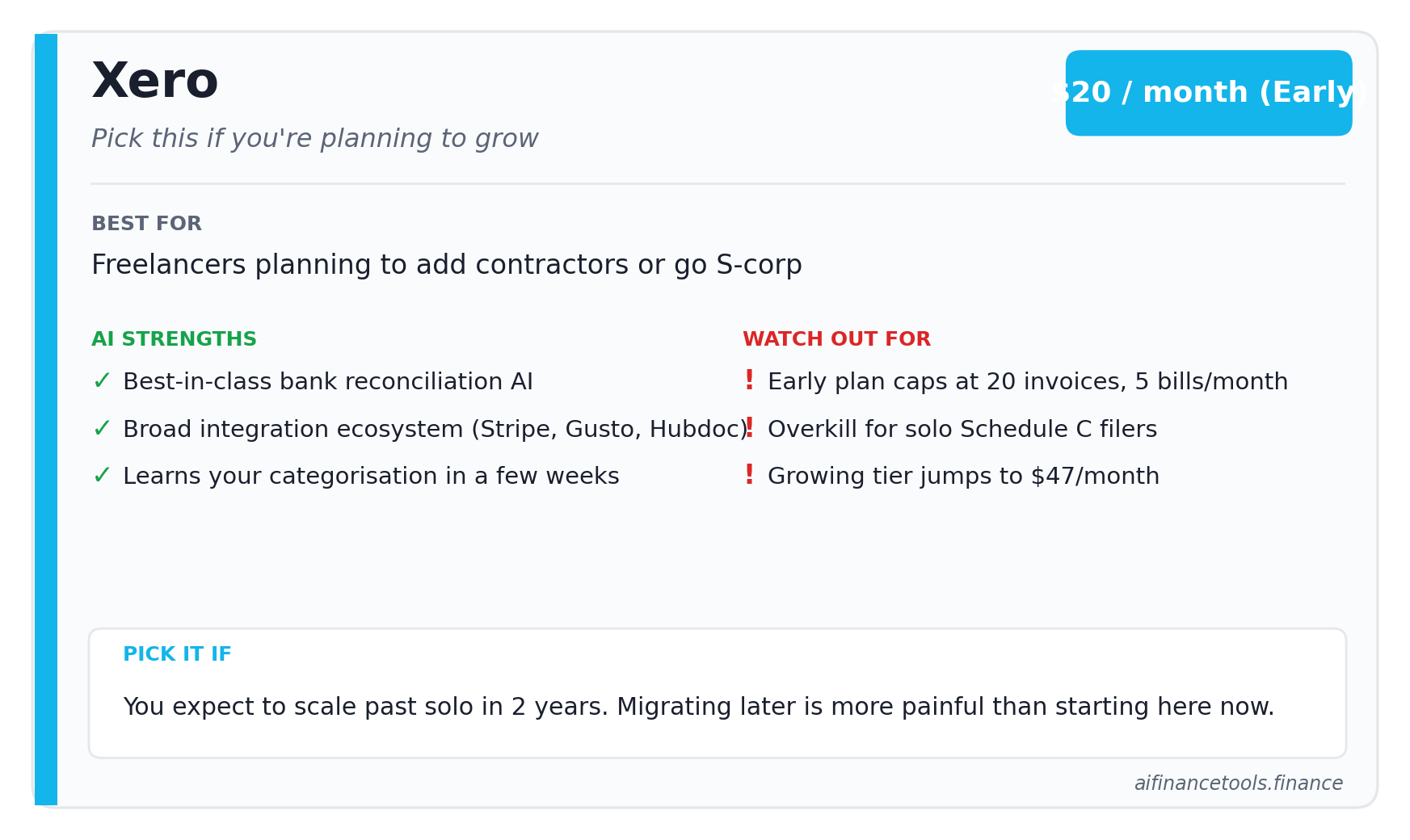
Xero is overkill for most solo freelancers. But if you expect to add a contractor or two, bring on a virtual assistant for admin, or move to an S-corp in the next two years, starting on Xero saves you a migration headache later. The Early plan is $20 a month and caps you at 20 invoices and 5 bills a month. The Growing plan is $47 a month with unlimited invoices.
Xero’s bank reconciliation AI is the best in this category. It learns your categorisation patterns fast and suggests matches accurately within a few weeks of consistent use. The integration ecosystem is broader than FreshBooks or Bonsai, including Stripe, Gusto, and Hubdoc for receipt capture.
Don’t pick Xero if you’re a Schedule C-only freelancer who’ll never have employees. The product is built for double-entry accounting and you’ll pay for features you don’t need.
The 5-minute decision framework
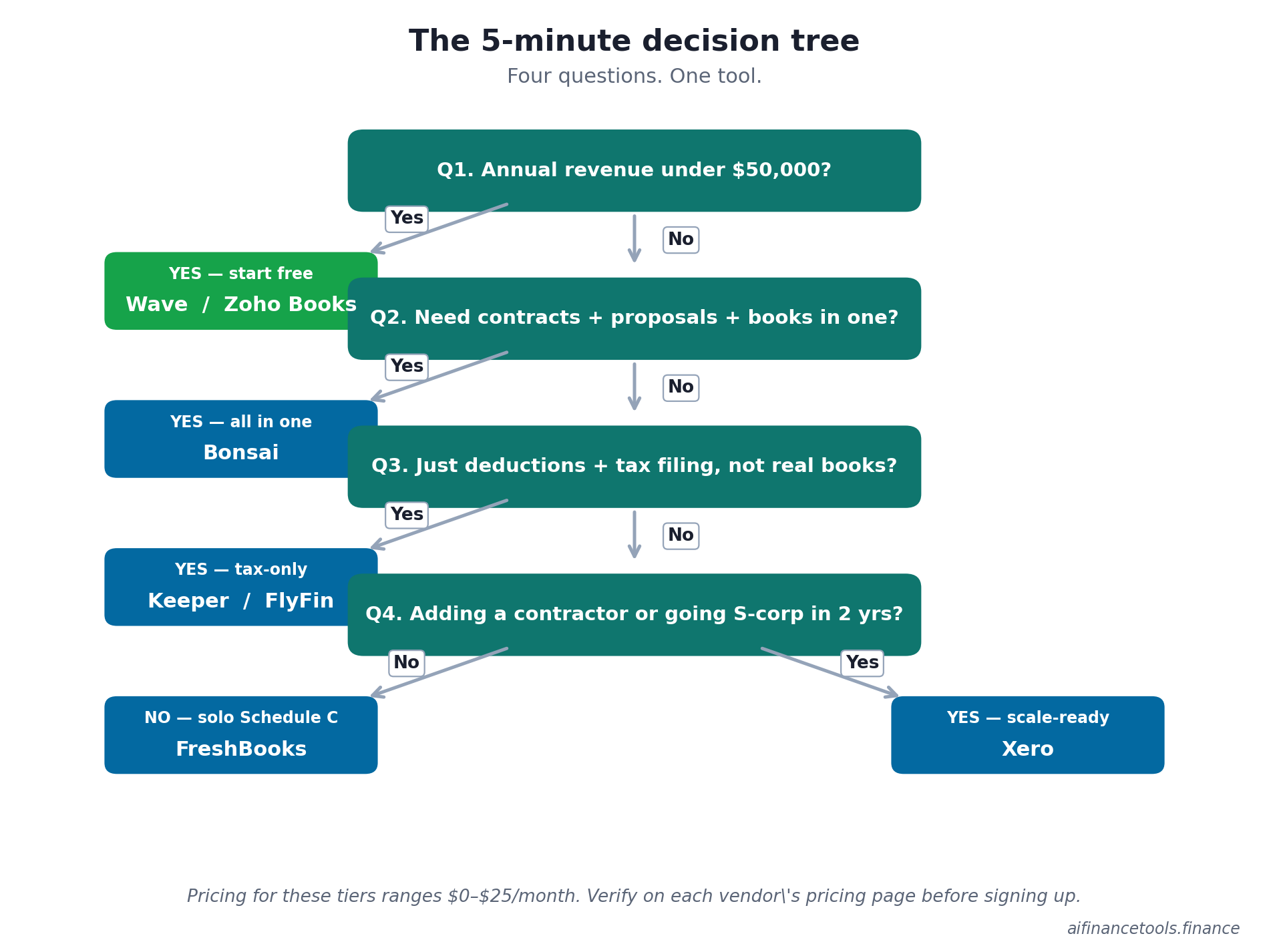
Answer these four questions and you’ll land on the right tool in under five minutes.
- Q1: Is your annual revenue under $50,000? If yes, start with Wave Starter (free) or Zoho Books free tier. Don’t pay for tools you don’t need yet.
- Q2: Do you need contracts, proposals, and project tracking in the same tool? If yes, Bonsai. If no, FreshBooks or Wave.
- Q3: Do you only care about deductions and tax filing, not real bookkeeping? If yes, Keeper or FlyFin. If you need a profit and loss your CPA will accept, neither is enough.
- Q4: Will you have a contractor or part-time helper within 2 years? If yes, Xero. If no, FreshBooks or Bonsai will serve you better day to day.
The biggest mistake freelancers make picking a bookkeeping tool
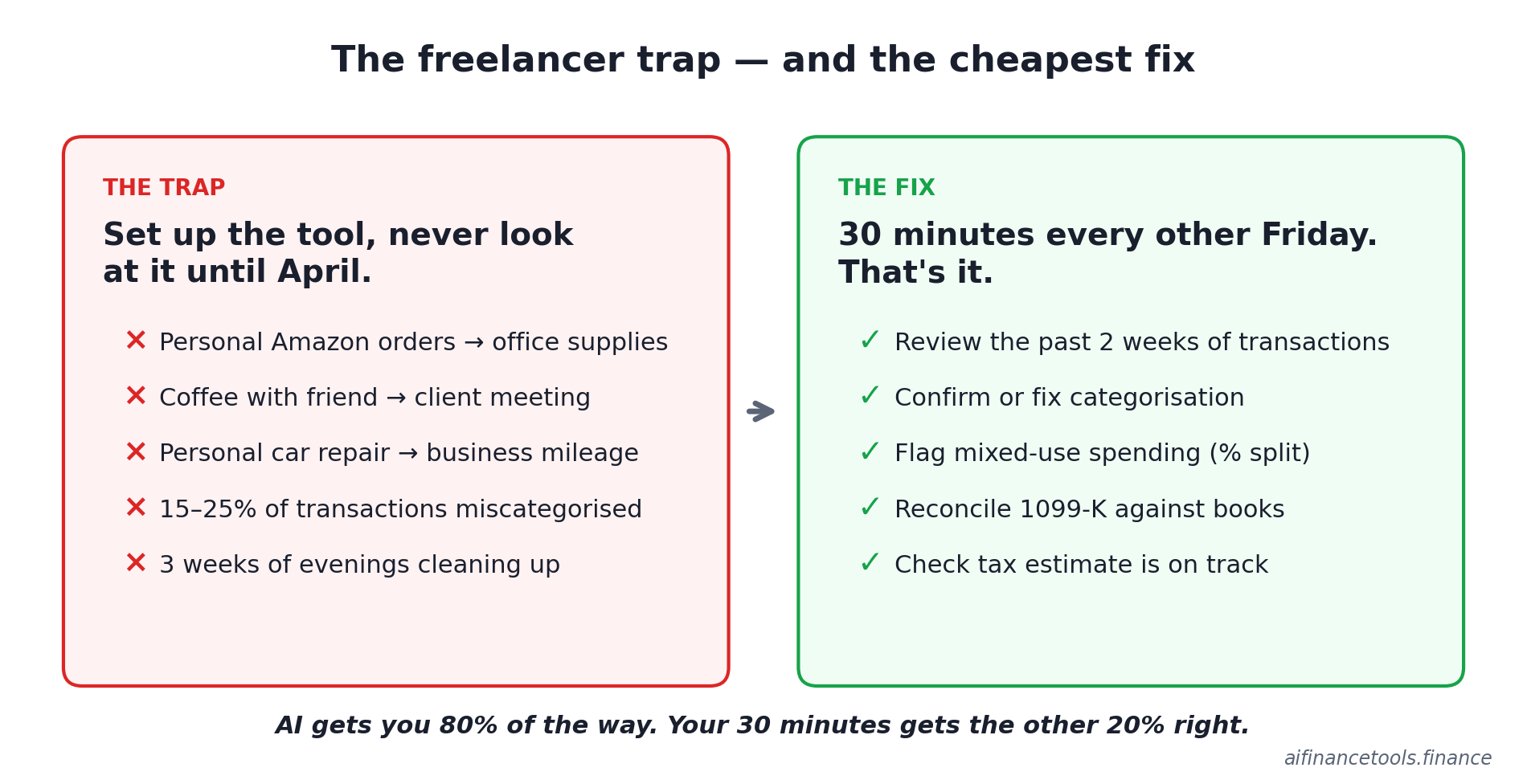
They pick the cheapest tool, set it up in an afternoon, and never look at it again until April. Then they spend three weeks of evenings trying to clean up nine months of mis-categorised transactions.
Across Reddit threads in r/freelance, r/tax, and r/smallbusiness, the same complaint shows up. People sign up for an AI bookkeeping tool, trust the auto-categorisation, and discover at year end that the AI was wrong on 15 to 25 percent of their transactions. Personal Amazon orders got tagged as office supplies. Coffee with a friend got tagged as a client meeting. A car repair got categorised under business mileage when it was personal.
The fix is unsexy. Spend 30 minutes every other Friday reviewing the week’s transactions in whatever tool you pick. Not at year end. Not quarterly. Every two weeks. The AI gets you 80 percent of the way. Your 30 minutes gets the other 20 percent right.
If you’re not separating personal and business expenses yet, that’s the deeper fix. We’ve covered the why and how in how to track business expenses as a freelancer and the bank account side in best bank accounts for freelancers.
Where AI bookkeeping still falls down in 2026
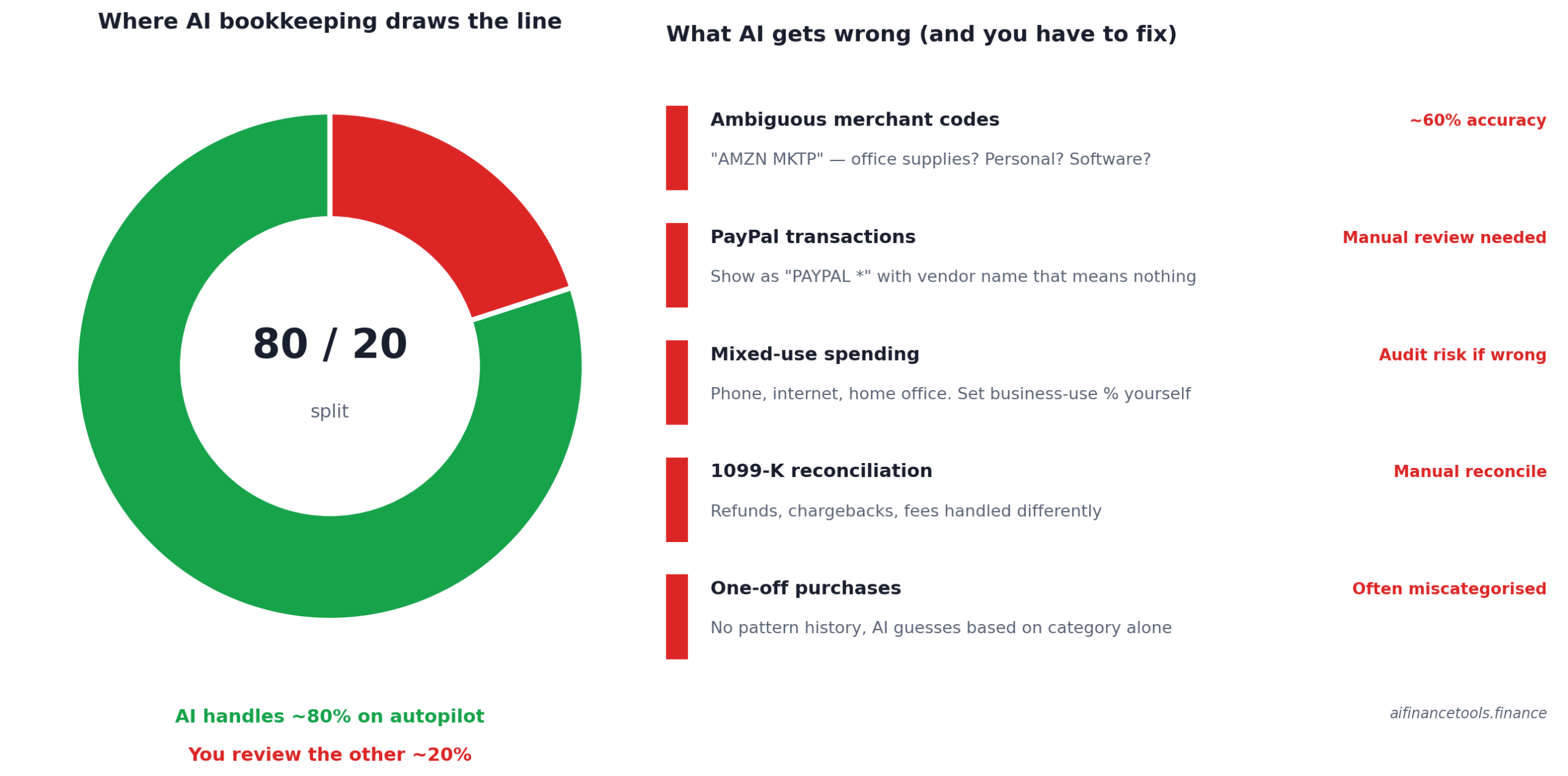
Three things the marketing pages won’t tell you.
Ambiguous merchant names
“AMZN MKTP” could be office supplies, a personal book, a software subscription, or a gift. The AI guesses based on past patterns, and the guesses are right maybe 60 percent of the time. PayPal transactions are even worse because they show up as “PAYPAL *” with a vendor name that often means nothing. Plan to review these manually.
Mixed-use spending
Phone bills, internet, and home office costs that are partly business and partly personal don’t fit cleanly into AI categorisation. You have to set the business-use percentage yourself, and you have to back it up if you’re audited. We covered the rules in detail in the home office deduction guide.
1099-K reconciliation
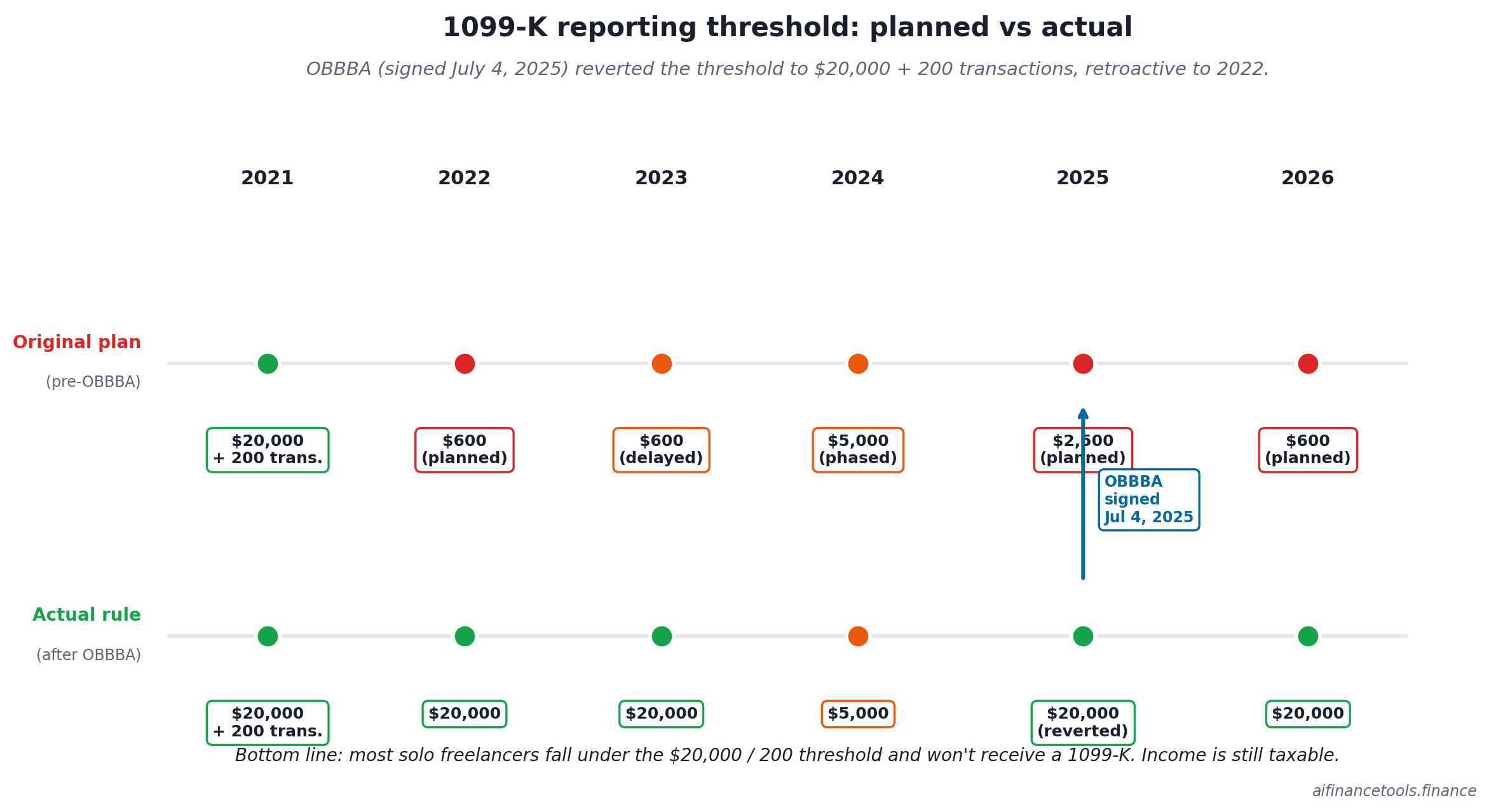
If you take payment through Stripe, PayPal, or Square, you might get a 1099-K. The number on that form often won’t match the income in your bookkeeping tool because of refunds, chargebacks, or processor fees handled differently. AI won’t fix this. You’ll need to reconcile manually. The One Big Beautiful Bill Act, signed July 4, 2025, reverted the 1099-K reporting threshold back to $20,000 in payments and more than 200 transactions, retroactive to 2022. The previously planned drops to $2,500 for 2025 and $600 for 2026 were repealed before they took full effect. Most solo freelancers will fall under the threshold and not receive a 1099-K, but the income is still taxable. IRS Form 1099-K FAQs has the current rules.
Get the freelancer bookkeeping checklist

One page. The 12 things to check every other Friday so your books don’t blow up at year end. Includes the categorisation review process, the 1099-K reconciliation steps, and the quarterly tax estimate worksheet. Free, no fluff, sent once.
How AI bookkeeping fits into the bigger tax picture
Bookkeeping is half the battle. The other half is what you do with those numbers. A few things to line up alongside whichever tool you pick:
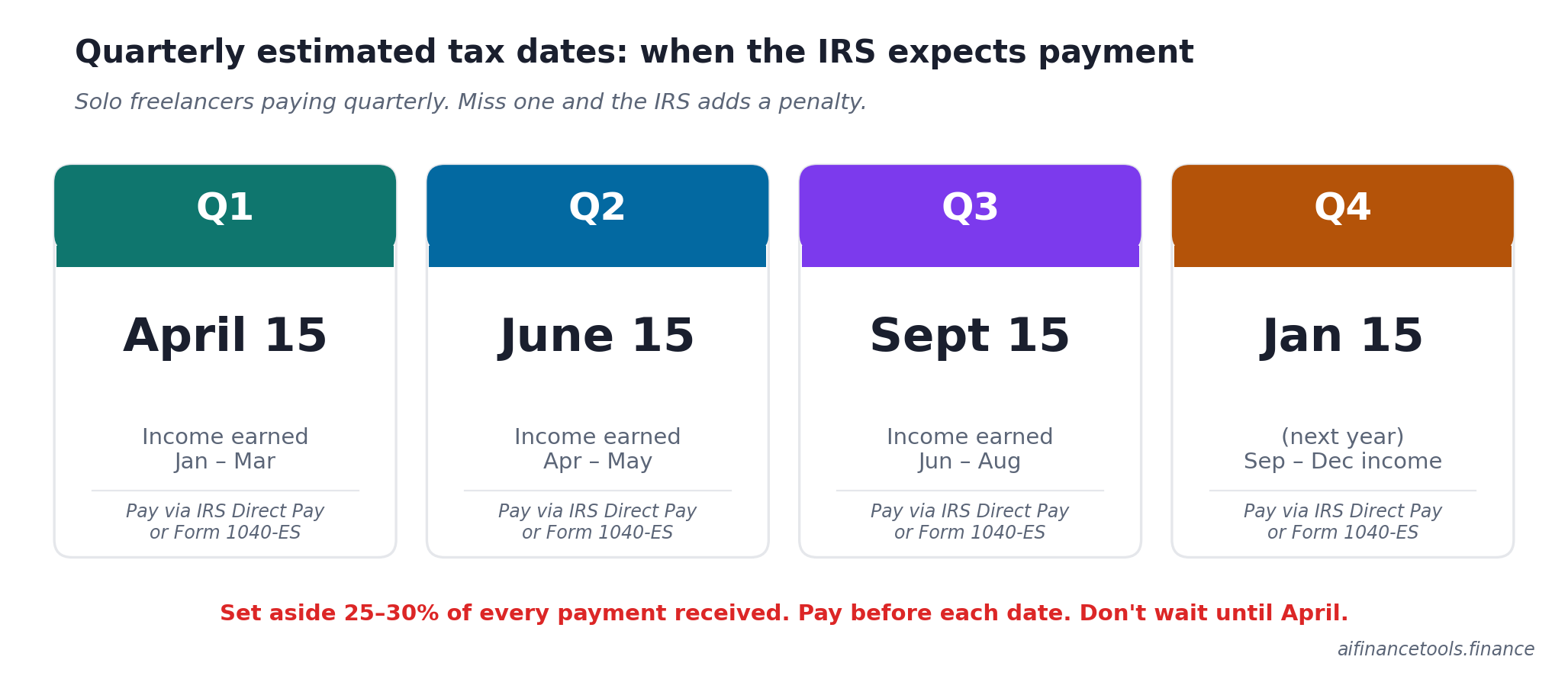
- Quarterly estimated taxes. Your AI bookkeeping tool will give you a P&L. You still have to figure out what to send the IRS by April 15, June 15, September 15, and January 15. We walk through the math in how to file quarterly estimated taxes and the simpler set-aside version in how much should freelancers set aside for taxes.
- Schedule C. Your bookkeeping output flows into Schedule C at year end. If your categories don’t map cleanly to the form, you’ll waste hours translating. See Schedule C for freelancers, line by line.
- State tax variance. Self-employment tax is federal, but state income tax varies enormously. A freelancer earning $80,000 in California pays thousands more than the same freelancer in Texas. We mapped it in freelance taxes by state, 2026.
- Deductions you might miss. The AI surfaces what it can see. There’s still a list of deductions freelancers leave on the table because they don’t know about them. See freelancer tax deductions.
- Cash flow management. Bookkeeping shows you what happened. Cash flow planning shows you what’s coming. Two different jobs. See how to manage cash flow as a freelancer and our companion guide on how to avoid tax liability shock in April.
Frequently Asked Questions
Can AI replace a bookkeeper for a freelancer making $80,000 a year?
For a single-Schedule-C freelancer with one or two bank accounts and no inventory, yes. AI bookkeeping plus 30 minutes every other Friday is enough. You probably don’t need a monthly bookkeeper at this revenue level. What you might want is a CPA review at year end, which costs $300 to $800 and catches the things you missed. Hire a monthly bookkeeper when you cross $200,000 a year, add employees, or move to an S-corp structure.
Is QuickBooks Self-Employed still available?
Not for new subscribers. Intuit closed QBSE to new signups and replaced it with QuickBooks Solopreneur at $20 a month. Existing QBSE customers can keep using their accounts for now, but Intuit hasn’t committed to long-term support. If you’re a current QBSE user, plan to migrate within the next 12 to 18 months. Solopreneur is the most direct upgrade. QuickBooks Online Simple Start at $35 a month is the better choice if you ever want a balance sheet.
Can I trust AI to categorise my transactions correctly?
Trust it for repeat transactions from the same vendor (Adobe, Google Workspace, your phone carrier). Don’t trust it blindly for one-offs, ambiguous merchant codes, mixed-use spending, or anything from PayPal or Amazon. Plan to review every transaction at least once before tax filing. The 30-minute fortnightly check is the cheapest insurance you’ll buy as a freelancer.
What’s the cheapest AI bookkeeping option that actually works?
Wave Starter is free and includes receipt scanning and category suggestions on imported transactions. The free tier has limited bank-feed automation, so confirm what’s included on Wave’s pricing page before signing up. If you’re under $50,000 in revenue, Zoho Books’ free tier is a stronger pick because it includes bank feeds plus 20 free receipt scans a month.
Do I need separate tools for bookkeeping and tax filing?
Usually yes. Bookkeeping tools (FreshBooks, Wave, Bonsai, Xero) keep your books clean during the year. Tax filing tools (TurboTax Self-Employed, Keeper, FlyFin) handle the actual return in March or April. The exception is FlyFin and Keeper, which combine deduction tracking and filing in one product. They work for simple Schedule C situations but break down once you have anything unusual: rental income, multi-state filing, K-1s, or self-employment plus W-2 income.
Does the One Big Beautiful Bill Act change anything for freelancers?
Yes, in two big ways. First, the OBBBA, signed July 4, 2025, made the qualified business income deduction permanent at 20 percent for most pass-through structures, including sole proprietors. Second, it reverted the 1099-K reporting threshold back to $20,000 in payments and more than 200 transactions, undoing the planned drops to $2,500 for 2025 and $600 for 2026. Both changes matter for freelancers. The QBI deduction is calculated off your bookkeeping output, so accurate net-income tracking is more valuable than ever. Garbage in, garbage out: if your books are wrong, your QBI calculation will be wrong too. Verify with a CPA, especially in the first year you cross the income thresholds where QBI starts to phase out.
Should I switch tools mid-year?
Avoid it if you can. Migrating mid-year creates two partial sets of books, which makes year-end reconciliation painful. If your current tool genuinely isn’t working (you can’t get reports out, the categorisation is wrong constantly, the support is unresponsive), migrate at the start of the next quarter and accept a few hours of cleanup. Otherwise, stick it out until December 31 and switch on January 1.
This is general informational content, not tax or legal advice. Tax law changes frequently. Verify current rules at IRS.gov and consult a qualified CPA or enrolled agent for your specific situation. Pricing on third-party tools was checked May 2, 2026 from each vendor’s official pricing page and is subject to change.
About the author
Gareth is an entrepreneur based in Dubai and the founder of AI Finance Tools for Freelancers. He’s not a CPA or a bookkeeper. He built this site because he couldn’t find honest, thorough reviews of AI finance tools written for freelancers. Every guide is researched from real user reviews, official documentation, and expert sources.