
A receipts-backed comparison of FreshBooks and QuickBooks for solo freelancers in 2026, with the real annual math at $40k, $80k, and $150k income.
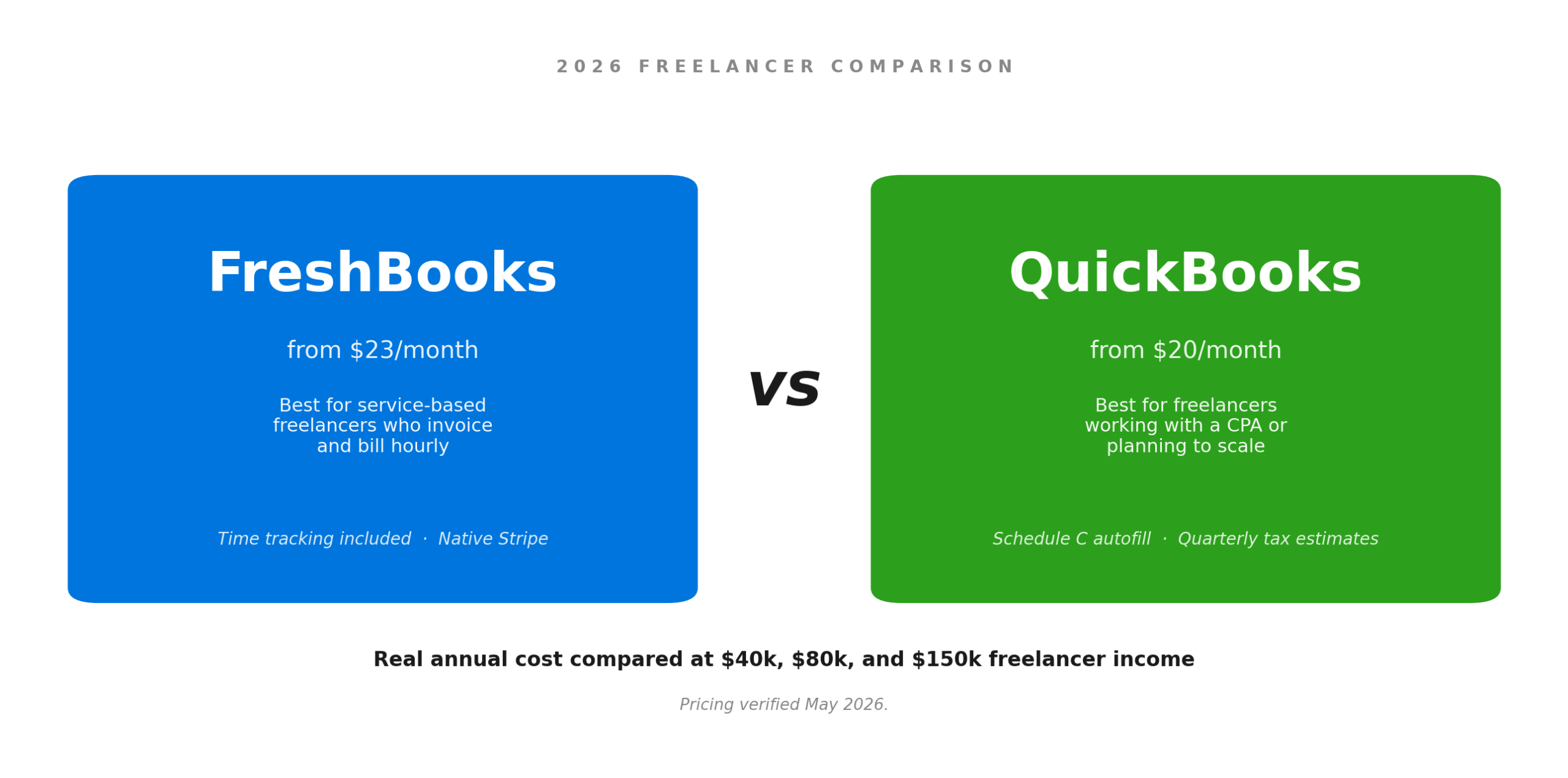
You earn $85,000 a year as a freelance designer. You signed up for QuickBooks Self-Employed three years ago because it was $15 a month and your CPA mentioned it once. Last week you found out QBSE is being shut down. Intuit wants you on QuickBooks Solopreneur for $20 a month. Your designer friend keeps telling you to switch to FreshBooks instead.
You have about an hour to figure this out before your next client deliverable. The wrong choice costs you four hours of admin a month and possibly $200 a year in fees you do not need to pay.
This guide breaks down FreshBooks vs QuickBooks for one-person businesses. Real pricing as of May 2026. Real complaints from real users. Three income brackets so you can see what each tool actually costs you over a year, not just per month.
What changed in 2026 (you probably missed this)
Two big shifts hit freelancer accounting software in the last 18 months. Intuit retired QuickBooks Self-Employed for new users. Existing customers can still log in, but the door is closed for fresh signups. The replacement is QuickBooks Solopreneur at $20 a month, and Intuit is steadily pushing everyone over to it.
The migration is messy. Read the QuickBooks community forum and you will see the same story repeating. People click the migrate button, end up staring at a half-empty account, and have to manually re-import months of transactions. According to multiple Intuit community forum threads, bank connections often re-pull only the last 90 days, which is useless if you are mid-tax-year and need the full picture.
The second shift is price. Both vendors went up. FreshBooks Lite is now $23 a month at the standard rate. Plus is $43. Premium is $70. QuickBooks Online Simple Start is $38, Essentials is $75, Plus is $115. Intuit has raised prices by 12 to 17 percent every year since 2023. FreshBooks adjusts annually too. Whatever you pay this year, plan for a 10 to 15 percent bump next year and budget for it now.
FreshBooks vs QuickBooks at a glance
Side-by-side, freelancer-relevant features only. No payroll, no inventory, none of the enterprise stuff you do not need.
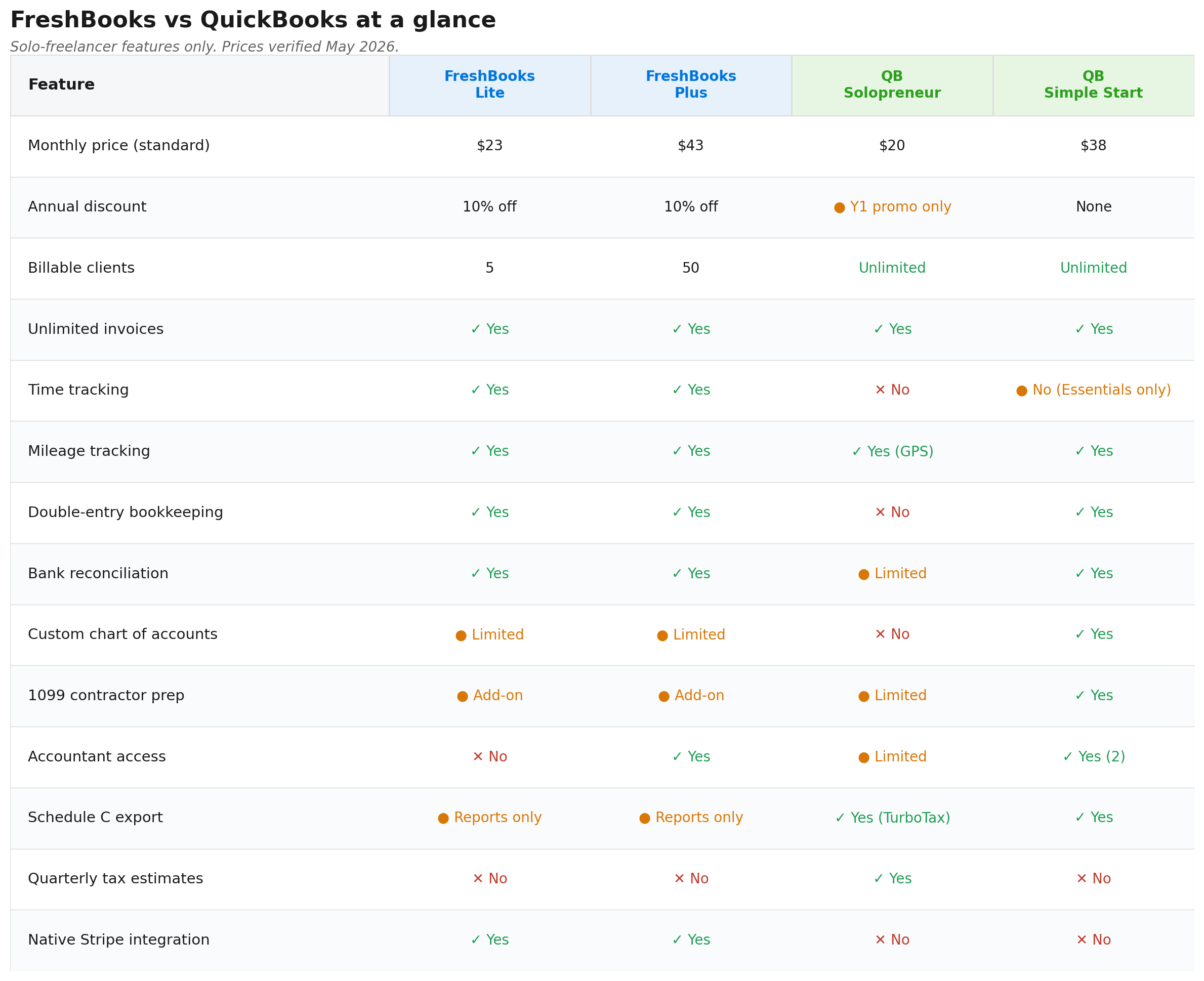
The table cannot capture how the software feels to use. FreshBooks is built around invoices and clients. You log in and the dashboard asks you who owes you money. QuickBooks is built around the chart of accounts. You log in and it asks you to categorise transactions. That difference matters more than any feature checklist. The tool you actually open at 9am on a Monday is the tool that earns its monthly fee.
FreshBooks vs QuickBooks Online: the full breakdown
QuickBooks Online (QBO) is the proper accounting platform. Simple Start, Essentials, Plus, and Advanced are all double-entry bookkeeping with a full chart of accounts, real reports, and integrations across most accountant tooling. FreshBooks Lite, Plus, and Premium are also double-entry. FreshBooks added that capability a few years ago. The platform leans toward service businesses that bill clients.
Where FreshBooks beats QuickBooks Online for freelancers

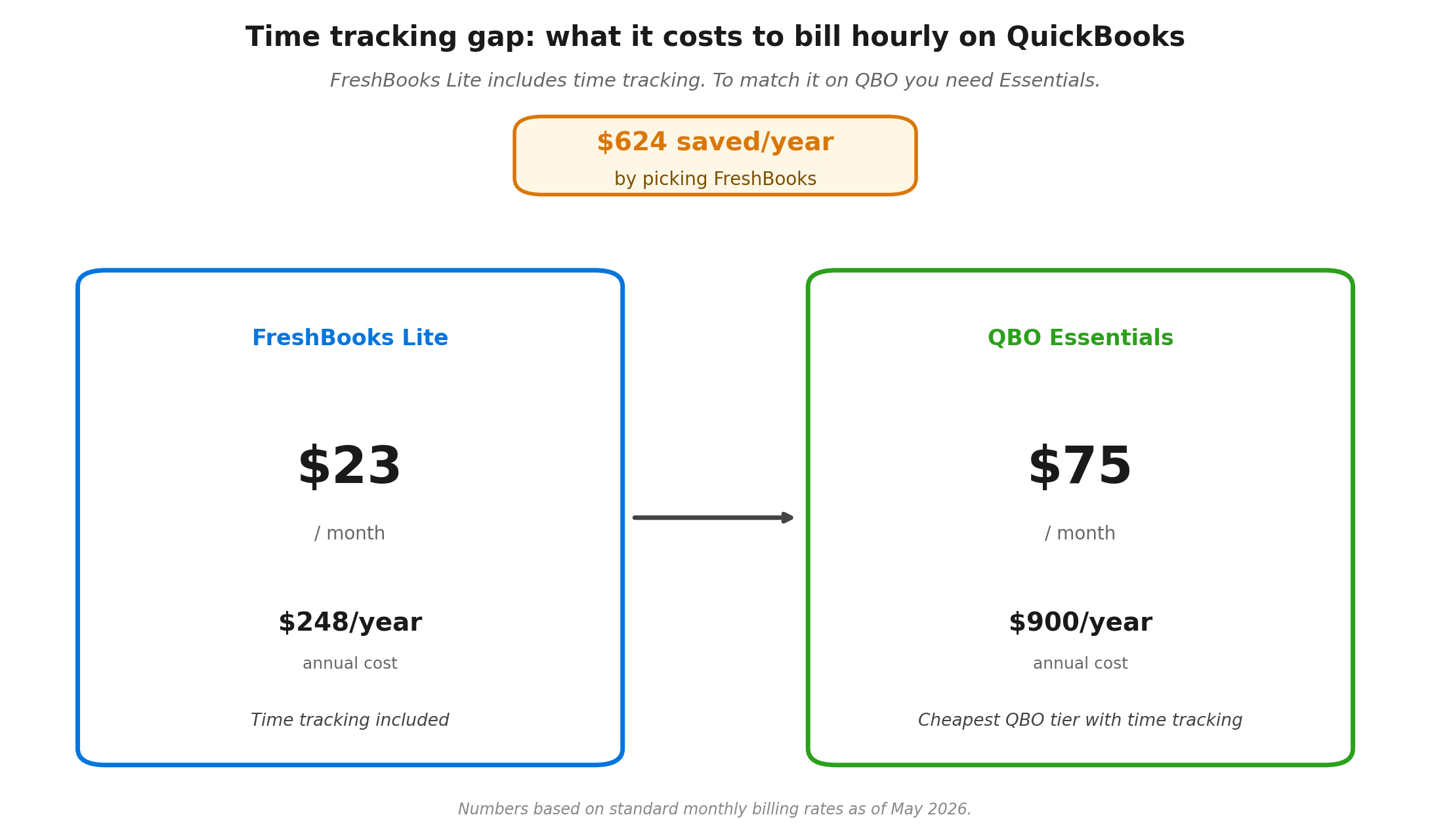
Time tracking is built into every FreshBooks plan from Lite up. You start a timer, stop it, the time becomes a line item on an invoice. QuickBooks Online does not include time tracking until Essentials at $75 a month. That is a $52 monthly gap if you bill hourly. Over a year that is $624 you did not need to spend.
Invoicing is genuinely better in FreshBooks. The templates look more polished out of the box and you can adjust colours, logos, and reminder schedules from one screen. Late-payment reminders are easier to configure. Client retainers, those recurring fixed monthly amounts, are a Plus-tier feature in FreshBooks. QuickBooks needs workarounds. Stripe and PayPal connect natively, with no plugin dance. For a deeper look at invoicing tools by craft, see our guide to the best invoicing tools for writers.
The learning curve is smaller. Most freelancers I have spoken with set up FreshBooks in under 30 minutes. QuickBooks Online takes longer because it asks accounting-flavoured questions during setup that a designer or writer has no business answering.
Where QuickBooks Online beats FreshBooks

Reports are deeper. QBO Simple Start gives you 20+ standard reports including Profit and Loss by month, Balance Sheet, and Sales by Customer. FreshBooks Lite is more limited. Real cash flow reporting and comparative P&L need FreshBooks Plus or higher.
QBO also wins on three things every CPA cares about. Bank reconciliation is built in and lets you match every transaction against your monthly statement. The chart of accounts is fully customisable, so you can name accounts the way your CPA wants them and split categories that FreshBooks lumps together. And 1099 contractor management is included from Simple Start up, which matters if you ever hire a sub-contractor and need to file a 1099-NEC at year-end. FreshBooks handles all three, although less smoothly, and 1099 prep is an add-on rather than a standard feature.
Your CPA probably already uses QuickBooks. Roughly 80 percent of US small-business clients in outsourced accounting practices run on QuickBooks. Handing your CPA a QuickBooks file at year-end is faster than handing them a FreshBooks export. If you pay a CPA $400 to do your Schedule C, expect them to bill an extra one to two hours at their hourly rate to convert FreshBooks data into something they can work with.
Scaling is easier. QBO Simple Start grows into Essentials, Plus, and Advanced without changing platforms. Hire a contractor, add inventory, or open an LLC with payroll, and you stay on the same software. FreshBooks scales too. The upgrade path stops sooner.
Pricing math at three income levels
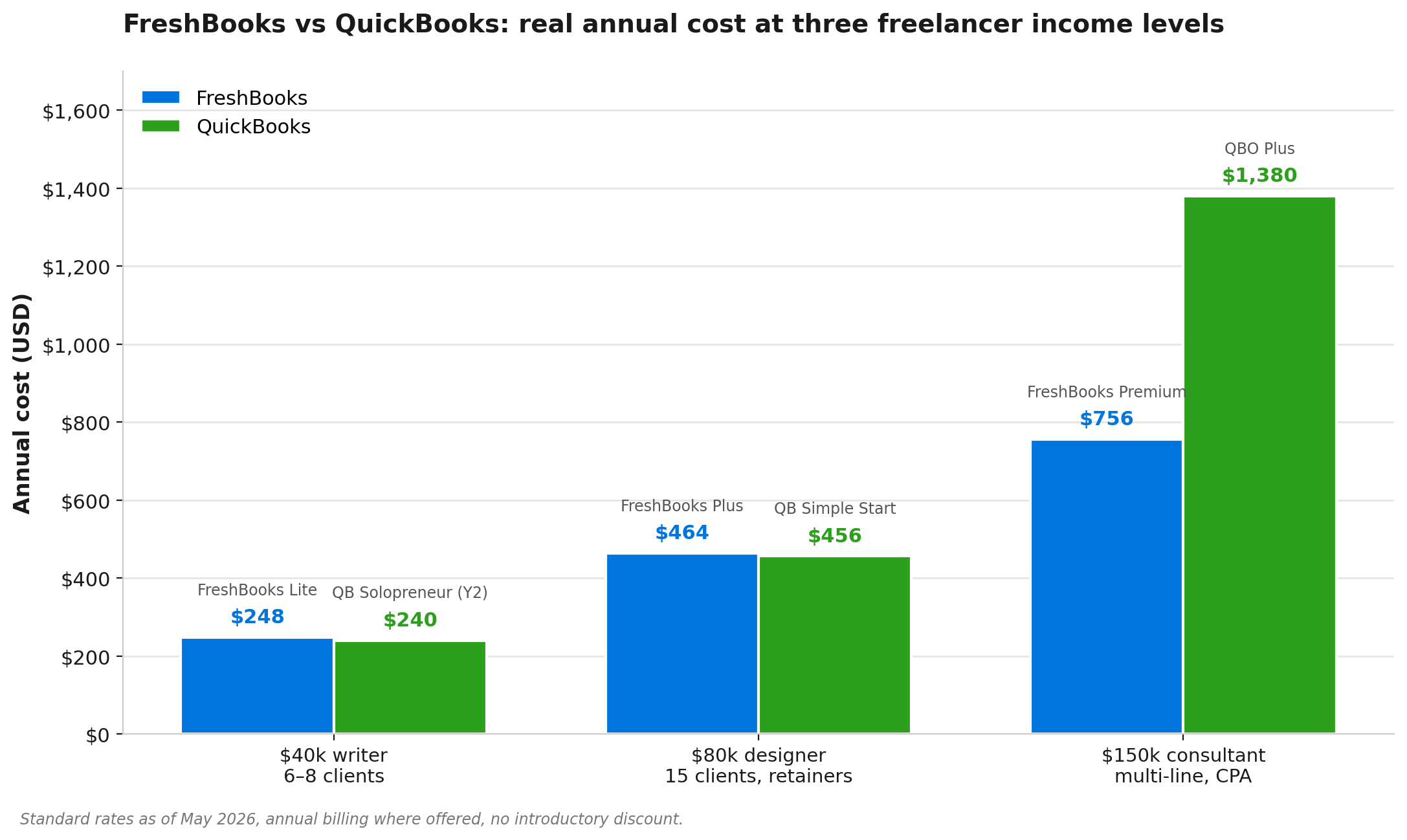
What each option costs you across a year. Annual billing where applicable, no introductory discount, no add-ons.
- $40k freelance writer, six to eight clients, simple expenses: FreshBooks Lite at $20.70/month annual works fine. Annual cost: $248. QuickBooks Solopreneur at $20/month, or roughly $120 in year one with promo pricing and $240/year at the standard rate after. Solopreneur wins on price. FreshBooks wins on invoicing.
- $80k freelance designer, 15 clients, time-tracked retainers: FreshBooks Plus at $38.70/month annual covers 50 clients, retainers, and time tracking. Annual cost: $464. QuickBooks Simple Start at $38/month is $456. Almost identical price, except Simple Start has no time tracking and weaker invoicing. To match FreshBooks Plus, you need QBO Essentials at $75/month, or $900/year. FreshBooks wins by $436 a year. For more on this segment, our breakdown of the best accounting tools for freelance designers goes deeper on the workflow fit.
- $150k freelance consultant, multiple service lines, working with a CPA: FreshBooks Premium at $63/month annual is $756. QBO Plus at $115/month is $1,380. QBO costs more, then claws it back through the CPA hand-off and deeper reports. If your CPA charges by the hour to clean up your books, the $624 difference can disappear in two to three hours of accountant time.
The pattern is clear once you see it. FreshBooks wins on price up to about $100k revenue. Above $100k, QuickBooks Online wins on total cost once you factor in CPA time.
FreshBooks vs QuickBooks Self-Employed (and Solopreneur)
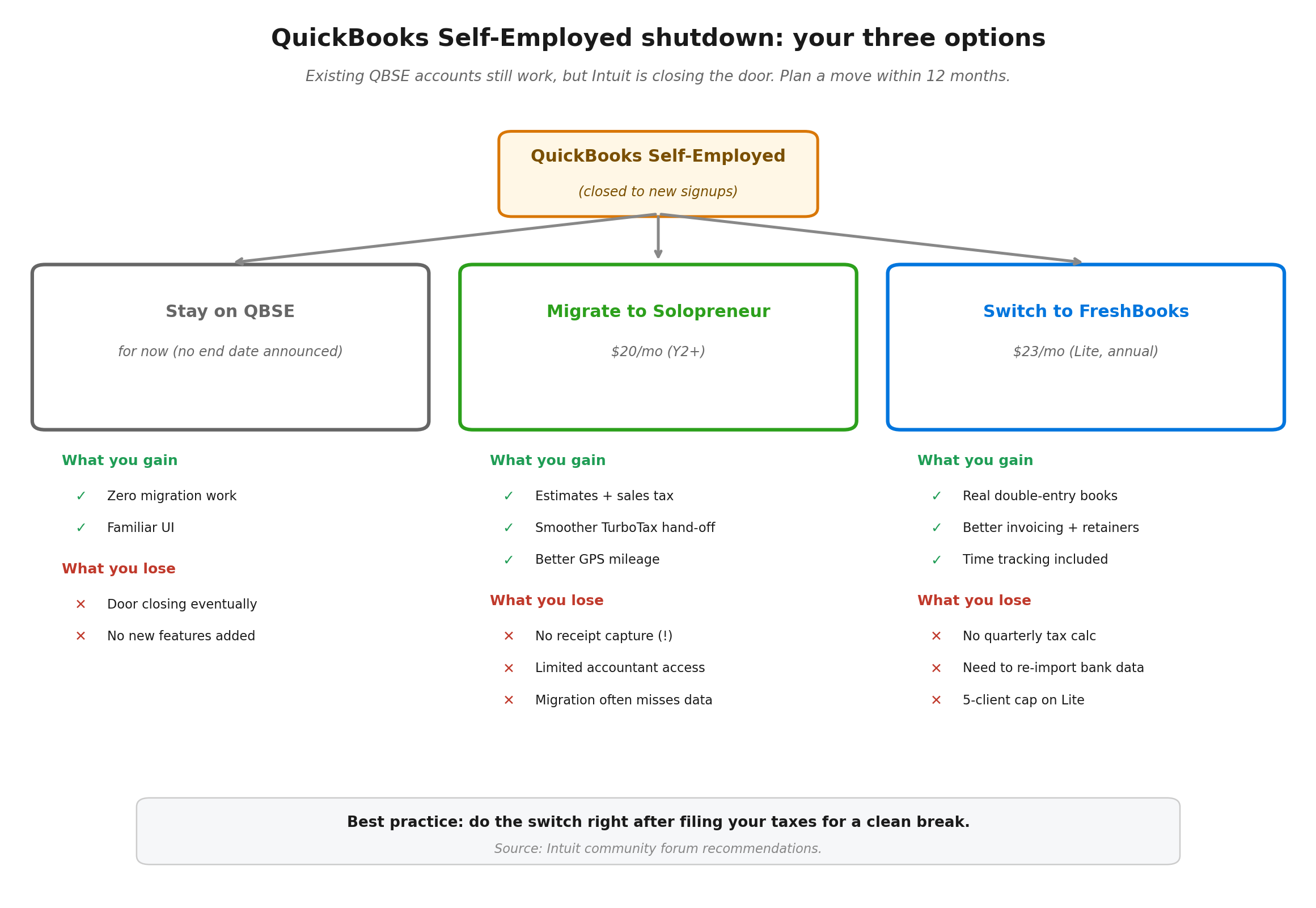
If you are a current QuickBooks Self-Employed user, this is the section that matters most. You have three options: stay on QBSE while it lasts, migrate to QuickBooks Solopreneur, or switch to FreshBooks.
What QBSE users gain by moving to Solopreneur
Solopreneur adds estimates, customisable invoices, sales tax tracking, and goal-setting tools. The interface is cleaner. GPS mileage tracking is more reliable. The Schedule C hand-off to TurboTax is smoother than QBSE ever was.
What QBSE users lose
This is the part Intuit does not advertise. Solopreneur does not include receipt capture, which QBSE offered. To get receipt capture back, you have to upgrade to QuickBooks Simple Start at $38/month or higher. There is no customisable chart of accounts in Solopreneur. It does not generate personal income reports. Accountant access is limited. The migration itself is the worst part. Some users on the QuickBooks community forum report that bank connections only re-pulled the last 90 days, leaving them to manually re-import months of transactions. If your books are messy going in, read our guide to tracking business expenses cleanly before you move.
One user on the Intuit community forum put it bluntly: there is no real migration solution from Self-Employed to Solopreneur, and they recommend doing the switch only after your taxes are filed.
Why FreshBooks is a real alternative for QBSE refugees
If you are already going to lose data in the QBSE-to-Solopreneur migration, you might as well evaluate switching tools entirely. FreshBooks has a clean import option for QuickBooks data. CSV-based, slightly fiddly, and it works. You get real double-entry bookkeeping, better invoicing, time tracking, and a much friendlier UI than Solopreneur.
The trade-off is this. Solopreneur calculates quarterly estimated tax payments for you. FreshBooks does not. If you want help figuring out what you owe each quarter, our guide to filing quarterly estimated taxes as a freelancer walks through the math without needing a tool to do it.
FreshBooks vs QuickBooks pricing in 2026
Both vendors run heavy promotions. FreshBooks frequently offers 60 to 90 percent off the first three or four months. QuickBooks runs 50 percent off for three months. Both promos require you to skip the free trial. Both auto-renew at full price.
Standard rates after the promo expires:
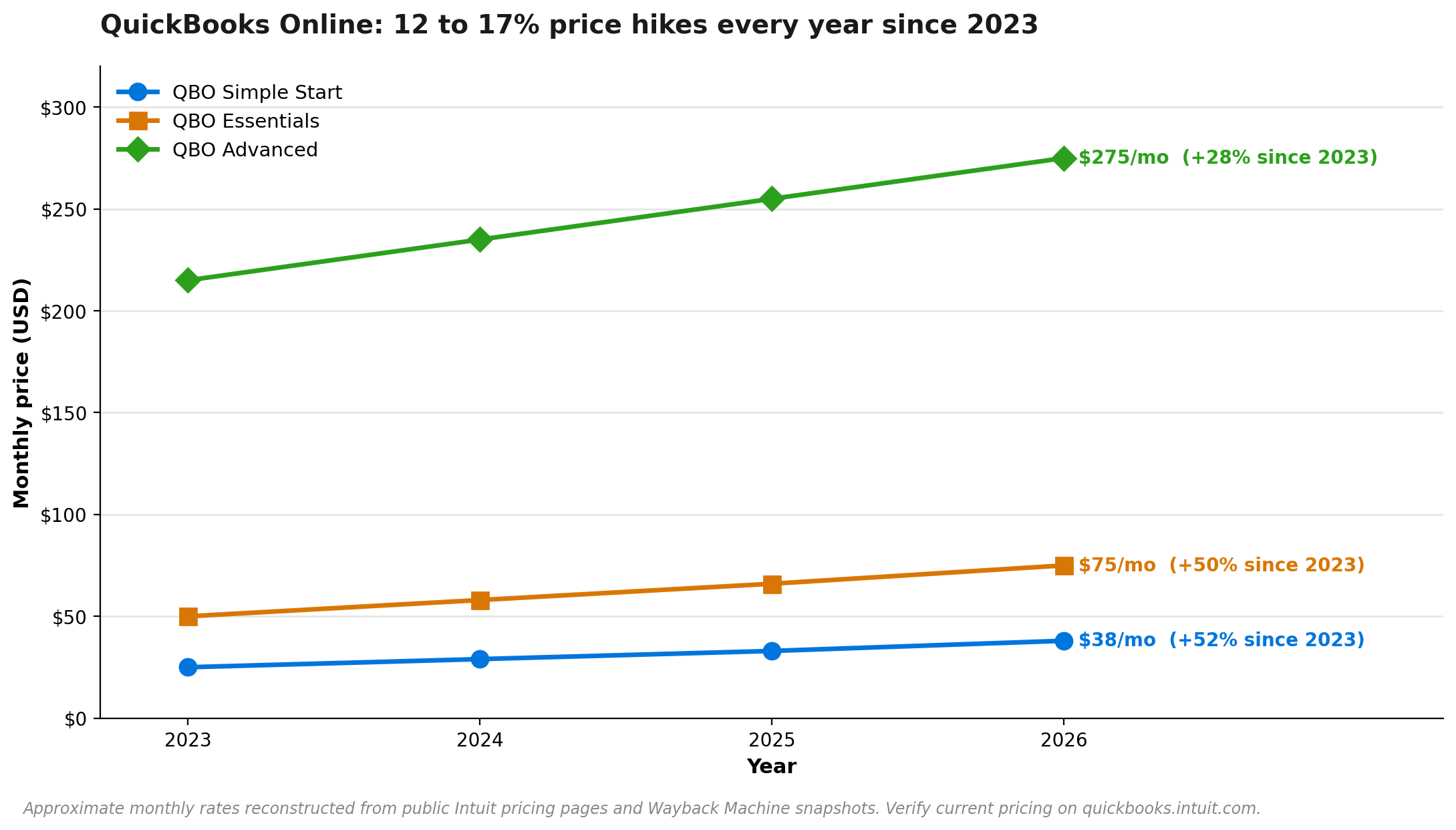
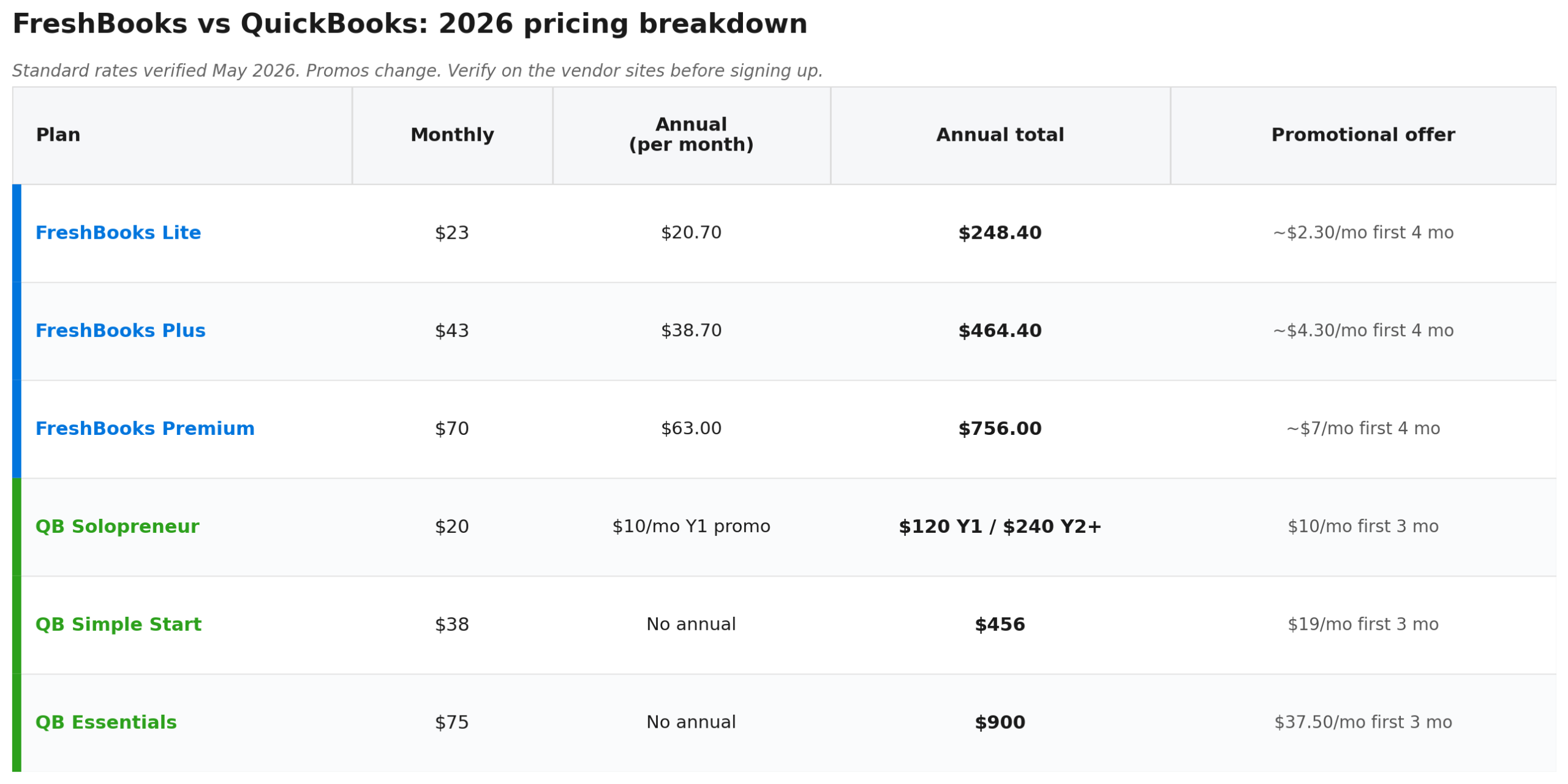
QuickBooks Online does not offer annual billing on Simple Start, Essentials, or Plus. You pay monthly or you pay nothing. FreshBooks gives you a 10 percent annual discount on every plan. Over five years on Plus, that is roughly $260 in savings. One more thing worth noting on QuickBooks: Advanced went from $200 to $275 a month over four years, a 37 percent increase, and Intuit has signalled similar pricing pressure across the line. If you stay on QuickBooks long-term, build the price hikes into your software budget.
FreshBooks vs QuickBooks for freelancers: who picks what
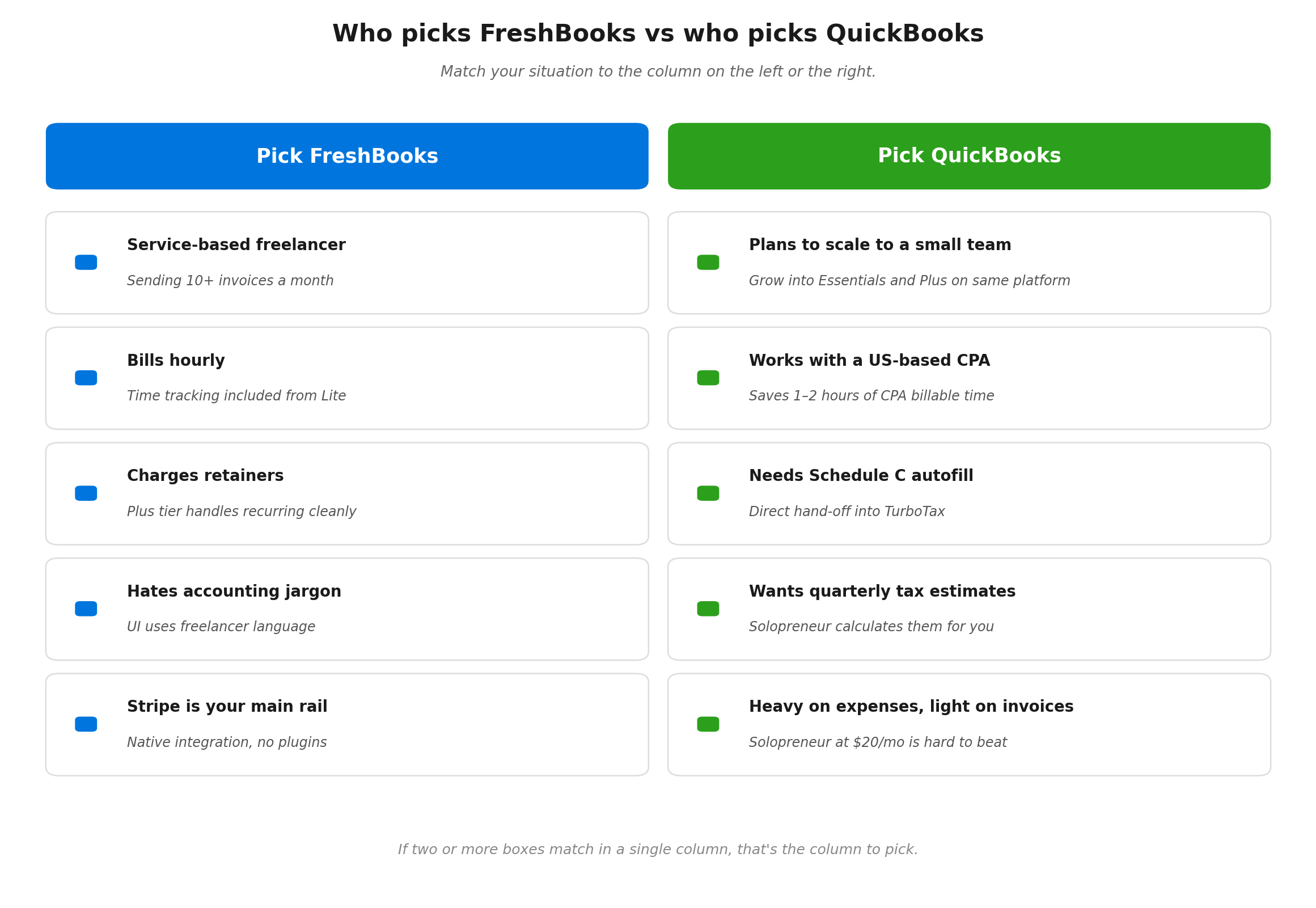
Who should pick FreshBooks
- Service-based freelancers who bill 10 or more invoices a month. Designers, copywriters, consultants, coaches. The invoicing UX saves you two to four hours a month.
- You bill hourly. Time tracking is built in. You start a timer, stop it, and it becomes a billable line. No add-on fee.
- You charge retainers. Plus tier handles recurring fixed monthly amounts cleanly. QuickBooks needs workarounds.
- You hate accounting. The interface uses the words a freelancer uses, not the words a CPA uses. You will actually log in.
- You want native Stripe integration. Connect once, and Stripe payments flow automatically into FreshBooks with the fees deducted correctly.
Who should pick QuickBooks
- You plan to scale to a small business. Hiring a contractor next year, then an employee, then maybe a second one. Stay on QBO Simple Start now and grow into Essentials and Plus on the same platform.
- You work with a US-based CPA. Most CPAs use QuickBooks daily. Handing them a QBO file at year-end can save you one to two hours of their billable time.
- You need Schedule C autofill. QB Solopreneur and Simple Start both export directly into TurboTax. FreshBooks gives you reports your CPA can use, although no autofill. (Schedule C is the form sole proprietors use to report business income, see the IRS Schedule C page.)
- You want quarterly estimated tax help built in. Solopreneur calculates this. FreshBooks does not. (You can still figure it out with our freelancer tax-set-aside calculator.)
- You bill very few clients but track lots of expenses. Solopreneur at $20 a month is hard to beat for pure expense tracking and Schedule C prep.
Real user complaints (the receipts)
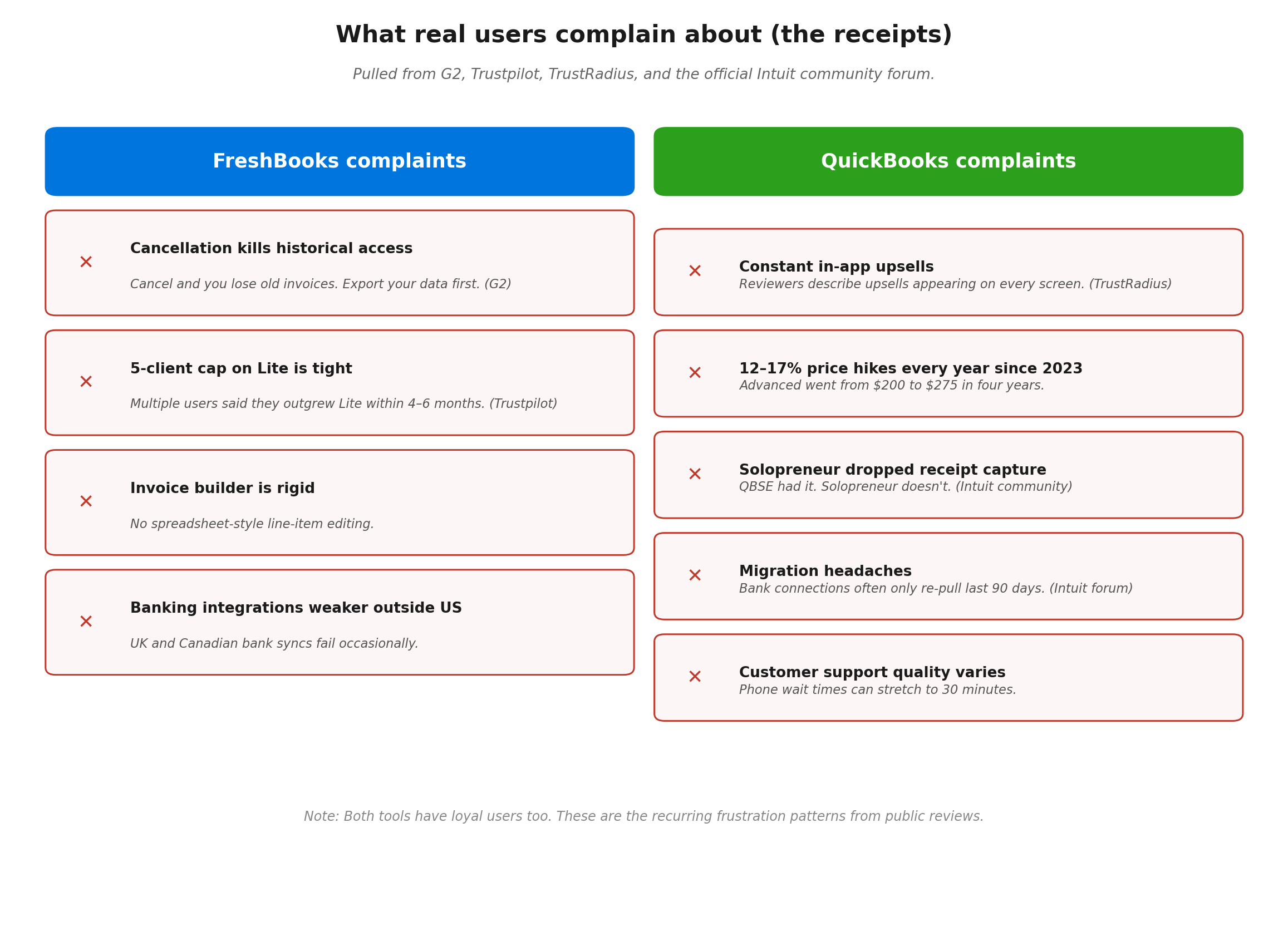
Both platforms have loyal users and frustrated ex-users. What shows up most often once you read past the marketing pages:
FreshBooks complaints
- Cancellation kills historical access. A G2 reviewer noted that cancelling FreshBooks meant losing access to old invoices and customer data. Export your data before you ever cancel.
- The 5-client cap on Lite is too tight. Multiple Trustpilot reviewers said they outgrew Lite within four to six months and felt forced into Plus.
- Invoicing flexibility is limited. A few users want spreadsheet-style line item editing. The FreshBooks invoice builder is rigid.
- Banking integrations are weaker outside the US. If you have a UK or Canadian bank, expect occasional sync failures.
QuickBooks complaints
- Constant in-app upsells. A TrustRadius reviewer described the upsells as appearing on every screen, which gets old when you have been a paying customer for years.
- Yearly price hikes. Plans have increased 12 to 17 percent every year since 2023. Advanced went from $200 to $275 in four years.
- Solopreneur missing features that QBSE had. One Intuit community user wrote that Solopreneur lacks receipt capture and called the change incredibly frustrating.
- Migration headaches. Multiple users on the official QuickBooks community report failed migrations, missing transactions, and bank connections that only re-pull the last 90 days of data.
- Customer support quality varies. Phone wait times can stretch to 30 minutes. Chat agents sometimes escalate basic questions multiple times.
If neither tool feels right, you have alternatives. FreshBooks vs Xero is worth reading if you want a third option. Wave vs Zoho Invoice covers the free tools that work for under-$50k earners. And our roundup of AI-powered bookkeeping options covers tools that sit alongside or replace the traditional accounting platforms.
A 5-minute decision framework
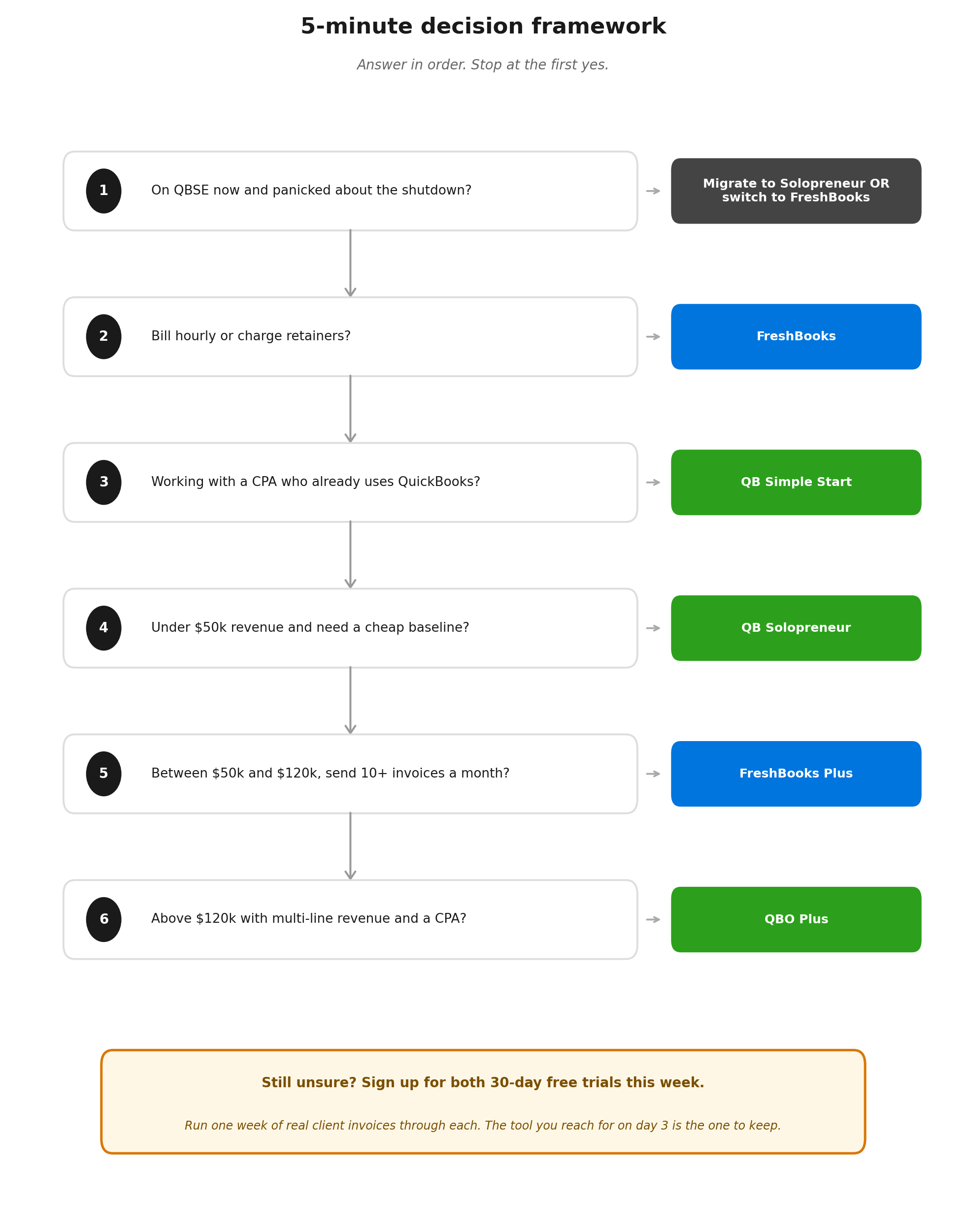
If you are still stuck, run through these questions in order and stop at the first yes.
- Are you currently on QBSE and panicked? Migrate to Solopreneur if your books are clean and you trust the auto-migration. Switch to FreshBooks if you have time to start fresh and want a better invoicing experience.
- Do you bill hourly or charge retainers? FreshBooks. Time tracking and retainers are built in.
- Do you work with a CPA who already uses QuickBooks? QuickBooks Simple Start. The hand-off saves you money.
- Are you under $50k revenue and need a cheap baseline? QuickBooks Solopreneur at roughly $120 in year one with promo pricing. Or skip both and use a free tool.
- Are you between $50k and $120k and send 10+ invoices a month? FreshBooks Plus.
- Above $120k with multi-line revenue and a CPA? QuickBooks Online Plus. The reports and CPA hand-off pay you back.
This week, sign up for both free trials. Both vendors offer 30 days without a credit card. Run one week of real client invoices through each. The tool you reach for on day three is the one to keep.
Free freelancer tool comparison checklist

Sign up below and I will send you the same comparison spreadsheet I use when I help a freelancer pick between accounting tools. It has every feature in this article, plus a scoring system you fill in for your own situation. It takes 10 minutes and gives you a clear winner.
Frequently Asked Questions
Is FreshBooks better than QuickBooks?
For service-based freelancers who send a lot of invoices and bill by the hour, yes. FreshBooks is faster to set up, has better invoicing, and includes time tracking on every plan. For freelancers who plan to scale into a multi-employee business, who need deep reports, or who already work with a CPA on QuickBooks, QuickBooks is the better long-term choice. Neither is universally better. The right answer depends on whether you bill clients (FreshBooks wins) or run a complex book of accounts (QuickBooks wins).
FreshBooks or QuickBooks for freelancers?
If you are a solo freelancer earning between $40k and $100k and your work is service-based, FreshBooks Lite or Plus is usually the better fit. The pricing is friendlier, time tracking is included, and the invoicing experience is built around your workflow. Pick QuickBooks Solopreneur ($20/month) if your priority is the cheapest possible Schedule C and quarterly tax estimate tool. Pick QuickBooks Simple Start ($38/month) if you want full double-entry bookkeeping and a smooth path to a CPA.
FreshBooks vs QuickBooks Online for self-employed?
QuickBooks Online (Simple Start, Essentials, Plus) is overkill for most self-employed freelancers. Simple Start at $38/month gets you genuine double-entry bookkeeping, although no time tracking. FreshBooks Lite at $23/month gives you better invoicing and time tracking, although reports are thinner. For most self-employed people, the choice comes down to QuickBooks Solopreneur (cheapest, basic) or FreshBooks Lite (better UX, more features). QBO Simple Start makes sense only if you need real reports or are headed toward a small team.
Can you switch from QuickBooks to FreshBooks?
Yes, although plan for a few hours of work. Export your data from QuickBooks: client list, invoice history, expense categories, transaction history, and any open balances. FreshBooks accepts CSV imports for clients and invoices. Bank transactions need to be re-imported by reconnecting your bank in FreshBooks (which usually pulls 90 days of history) or uploaded as a CSV from your bank for older transactions. Take your ending balances from QuickBooks and enter them as opening balances in FreshBooks. Do the switch right after filing your taxes for a clean break.
Which has better mobile, FreshBooks or QuickBooks?
Both apps rate above 4.6 stars across iOS and Android. The FreshBooks app is faster for sending an invoice while you are out, with a streamlined invoice flow built around the timer. The QuickBooks app is better for GPS mileage tracking, which runs in the background reliably and logs trips you would otherwise forget. If your priority is invoicing on the go, FreshBooks. If your priority is automatic mileage logging, QuickBooks Solopreneur.
Which integrates with Stripe better?
FreshBooks. FreshBooks Payments is powered by Stripe and embedded directly inside FreshBooks. You connect Stripe once, and every invoice you send has a Pay Now button that processes through Stripe. Fees are calculated correctly and recorded as expenses automatically. QuickBooks Online connects to Stripe through third-party plugins (Intuit recommends Stripe by Commerce Sync) which can introduce sync delays and occasional reconciliation errors. If Stripe is your main payment rail, FreshBooks is the cleaner choice.
Is QuickBooks Self-Employed really being shut down?
Intuit is no longer selling QuickBooks Self-Employed to new customers. Existing QBSE subscribers can keep using it for now, although Intuit is steering everyone toward QuickBooks Solopreneur. There is no announced final shutdown date for existing QBSE accounts as of May 2026. If you are on QBSE, plan your next move within the next 12 months. The migration to Solopreneur is offered for free, although users in the Intuit community forum report incomplete data transfers and missing transaction history.
Start Your Free Trial with FreshBooks
Start Your Free Trial with QuickBooks
This article is for general information only and does not replace tax or legal advice. Pricing and product features can change at any time. Verify the latest pricing on the FreshBooks and QuickBooks websites before you sign up. Tax rules referenced here apply to US-based sole proprietors filing Schedule C. Verify your specific situation with a CPA at IRS.gov or with a licensed tax professional.
About the author
Gareth is an entrepreneur based in Dubai and the founder of AI Finance Tools for Freelancers. He’s not a CPA or a bookkeeper. He built this site because he couldn’t find honest, thorough reviews of AI finance tools written for freelancers. Every guide is researched from real user reviews, official documentation, and expert sources.