
The best invoicing software for freelance writers isn’t the one with the most features. I tested nine tools against the work writers actually do. Real pricing. Real flaws. One honest pick for most people.
It’s the third Tuesday of the month. You’re $3,200 into work for a content marketing agency, and the invoice you sent 42 days ago still says “viewed” but not “paid.” You’ve sent two follow-ups. The second one took you twenty minutes to write because you didn’t want to sound desperate. You sounded desperate anyway.
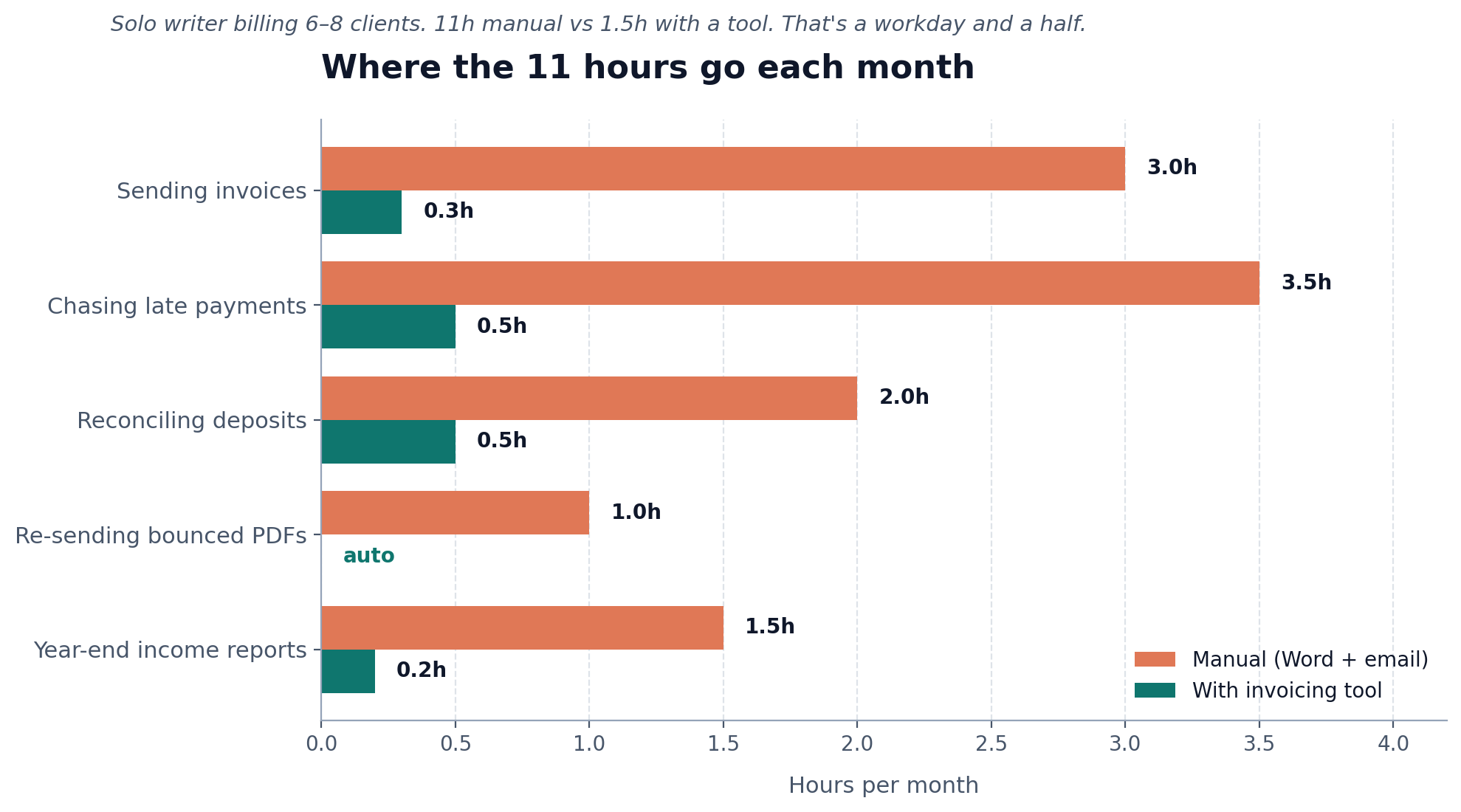
Nobody warned you about this part of freelance writing. You went solo to write more and admin less. Now you spend eight to twelve hours a month sending invoices, chasing payments, reconciling deposits, and re-sending PDFs that bounced because somebody’s accounts inbox hates attachments over 2MB.
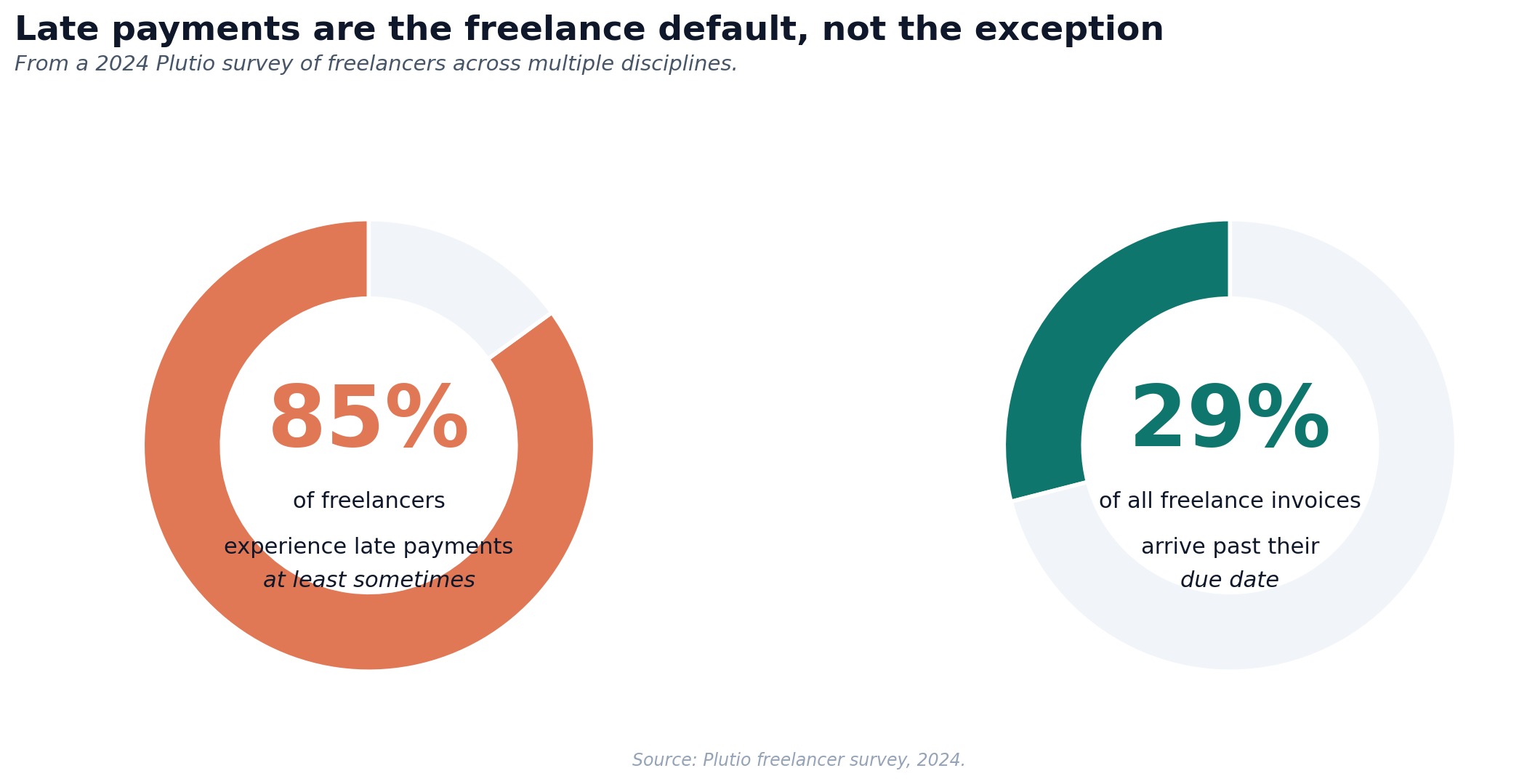
Plutio’s survey data says 85% of freelancers experience late payments at least sometimes, and 29% of all freelance invoices arrive past due. A sterner email won’t fix it. What works is software that sends the reminders for you, accepts cards and ACH without a separate merchant account, and produces a PDF that doesn’t make a Fortune 500 finance team think you’re an amateur.
I tested nine of them against the way writers actually work. Monthly retainers. Per-piece fees. Milestone projects. Agencies that pay net-30. Direct clients who pay net-7. The occasional UK or EU job that drags VAT into the conversation. Even the awkward “kill fee” line item nobody else seems to plan for. Here’s what’s worth your money.
What writers actually need from invoicing software
Most “best invoicing software” lists rank tools on features that don’t matter to you. Inventory tracking. Vendor bills. Project profitability dashboards. You write words for money. Your needs are narrower and more specific.
- Recurring retainers on autopilot. If you have three clients on $1,500/month retainers, the tool should send those three invoices on the 1st without you touching anything.
- Automatic late payment reminders. Three reminders, three different tones, all triggered by the due date. You should never have to type the words “just following up” again.
- ACH and credit card payment. Card processing for fast clients. ACH for finance teams that won’t pay $80 in card fees on a $4,000 invoice.
- A clean PDF that travels. Some agency procurement systems strip HTML emails. Your PDF needs to look right when downloaded, with your logo, your tax ID, and clear payment instructions on it.
- Multi-currency, if you have non-US clients. A UK content director paying you in GBP shouldn’t trigger a 30-minute wrestling match with conversion math.
- Late fees you can actually enforce. Some tools let you write a late fee policy on the invoice itself, applied automatically after a set number of days. This works. Confronting clients in email rarely does.
- A way to track what you billed for tax time. At year-end you need a clean total of gross income to drop into Schedule C. The tool should export this in two clicks.
What you probably don’t need: deep accounting, double-entry ledgers, balance sheets, complex project management, or time-tracking integrated to twelve other apps. If you want bookkeeping baked in, read our guide to the best accounting software for freelancers. For pure invoicing, simpler wins.
The shortlist: nine tools tested for freelance writers
Pricing is current as of May 2026. Prices change. Verify on the vendor’s pricing page before you commit.
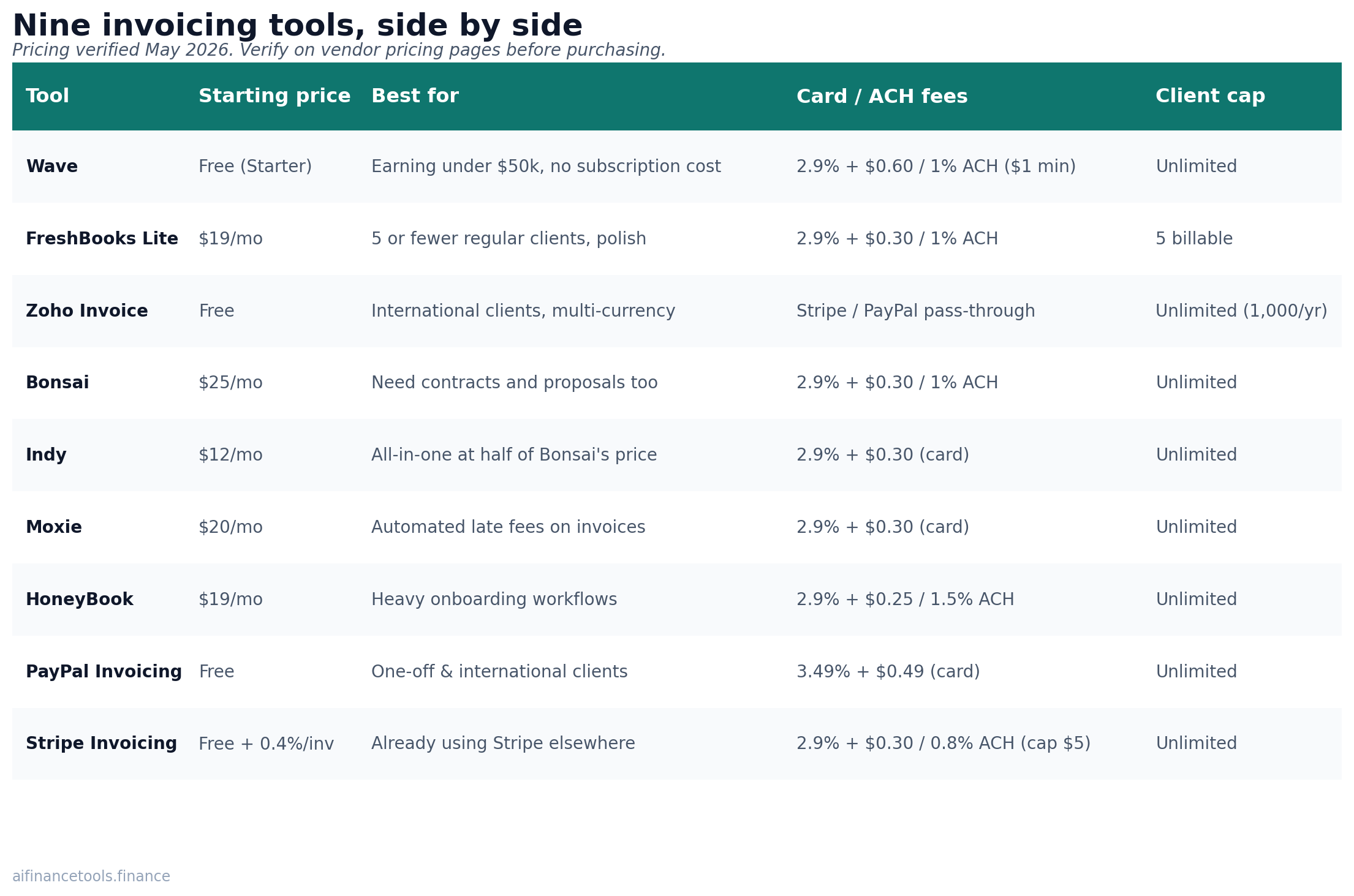
| Tool | Starting price | Best for | Card / ACH fees | Client cap on entry plan |
|---|---|---|---|---|
| Wave | Free (Starter) | Writers earning under $50k who want zero subscription cost | 2.9% + $0.60 card; 1% ACH ($1 min) | Unlimited |
| FreshBooks Lite | $19/mo (or $17.10 annual) | Writers with 5 or fewer regular clients who want polish | 2.9% + $0.30 card; 1% ACH | 5 billable clients |
| Zoho Invoice | Free | Writers with international clients, multi-currency needs | Stripe/PayPal pass-through | Unlimited (1,000 invoices/yr) |
| Bonsai | $25/mo (Starter) | Writers who also need contracts and proposals | 2.9% + $0.30 card; 1% ACH | Unlimited |
| Indy | $12/mo (Pro) | Writers who want one tool for proposals, contracts, invoices | 2.9% + $0.30 card | Unlimited |
| Moxie | $20/mo (annual) | Writers who want automated late fees built into invoices | 2.9% + $0.30 card | Unlimited |
| HoneyBook | $19/mo (Starter) | Writers who run heavy onboarding workflows | 2.9% + $0.25 card; 1.5% ACH | Unlimited |
| PayPal Invoicing | Free | Writers with one-off clients and international payers | 3.49% + $0.49 card | Unlimited |
| Stripe Invoicing | Free (0.4% per invoice) | Writers comfortable with a developer-flavored interface | 2.9% + $0.30 card; 0.8% ACH (capped $5) | Unlimited |
Wave: the free pick that actually works
Wave’s free Starter plan covers what most writers need. Unlimited invoices. Unlimited clients. Recurring billing. Automatic payment reminders. A clean dashboard that shows what you’re owed and what you’ve collected. The Pro plan at $19/month adds bank transaction auto-import and waives the per-transaction credit card fee for the first ten transactions each month.
What writers like: it’s free. It looks professional. The recurring invoices fire reliably. Capterra reviews average around 4.4 stars across 1,400+ ratings.
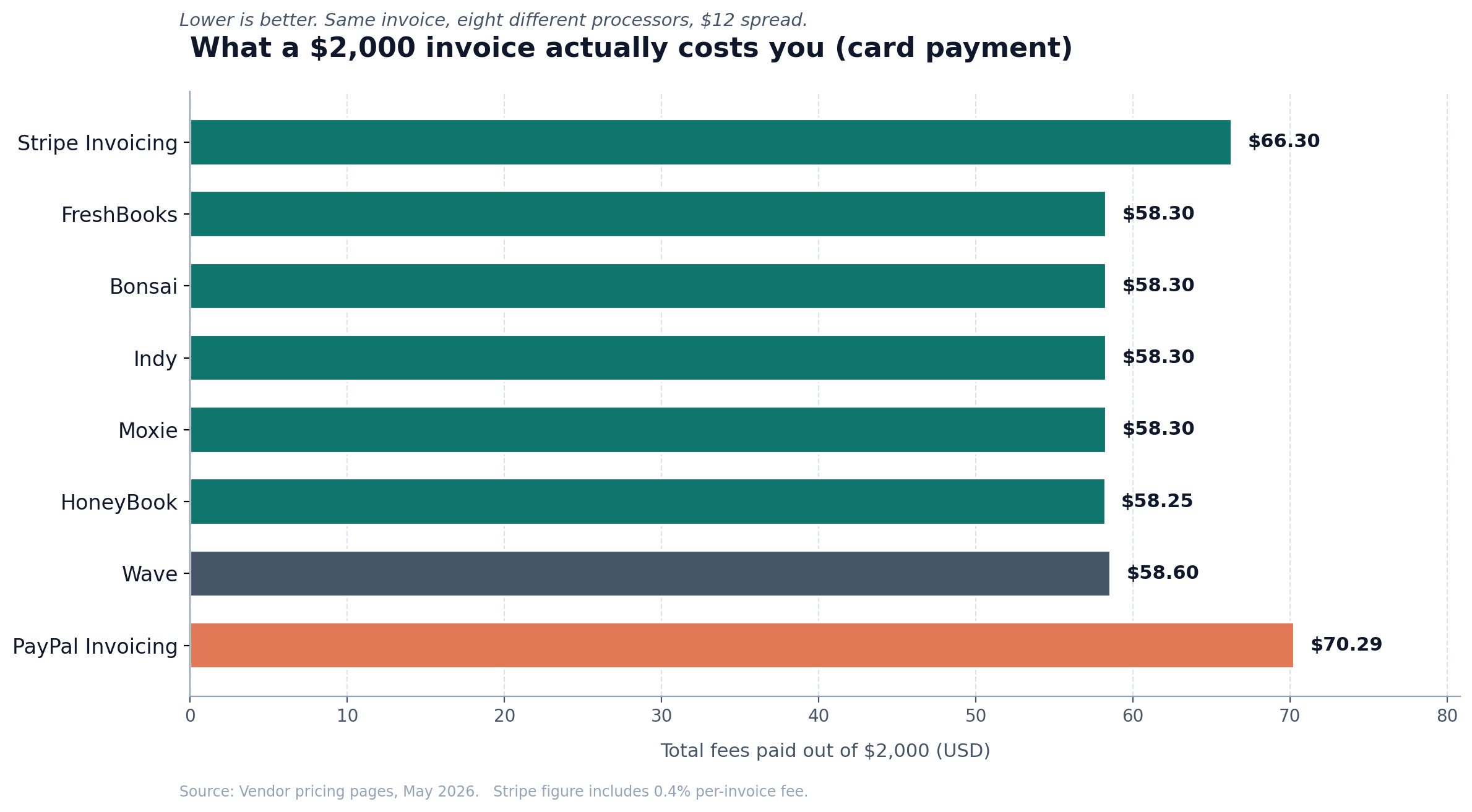
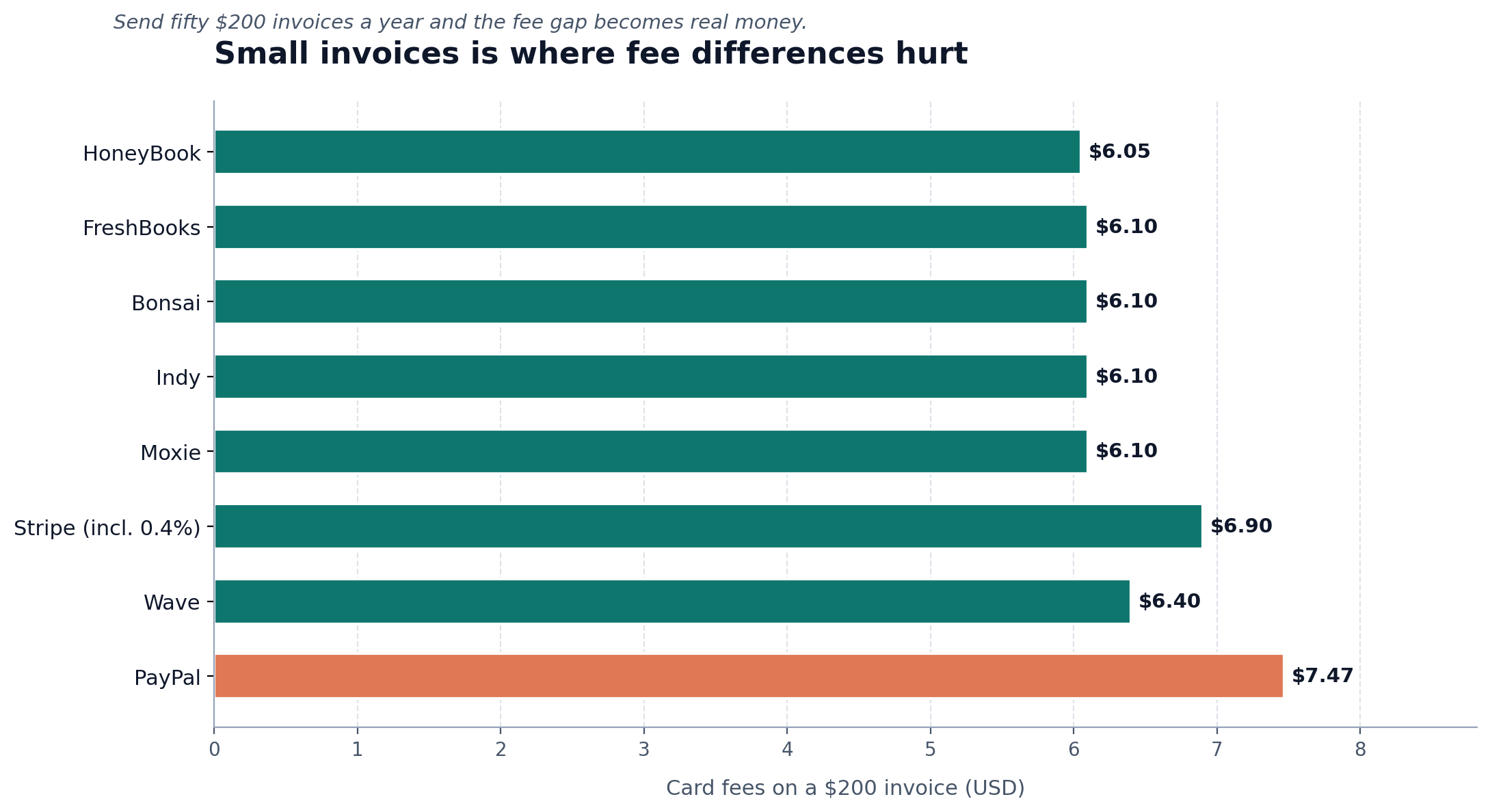
What’s worth knowing: Wave’s payment processing fees are higher than most competitors. 2.9% + $0.60 per card transaction on the free plan, versus 2.9% + $0.30 most rivals charge. On a $2,000 invoice that’s only a $0.30 difference. On a $200 invoice paid by card, it’s a $0.60 hit out of $5.80 in total fees, which adds up if you do a lot of small invoices. ACH starts at 1% with a $1 minimum, so an ACH payment under $100 still costs you $1.
One historical note worth your attention. Wave has occasionally cut off payment processing for users in certain “high-risk” categories. Some travel and consulting verticals reported this on Capterra in 2025 and early 2026. Writing isn’t usually flagged, but if your bio says “freelance journalist covering crypto,” you may get extra scrutiny. Worth knowing before you build your whole stack on it.
FreshBooks: the polished default
FreshBooks Lite costs $19 per month, or $17.10/month if you pay annually, and caps you at 5 billable clients. That cap is the catch. If you have a regular roster of 6 to 8 retainer clients plus a few one-offs, you’ll need to upgrade to Plus at $33/month to reach the 50-client limit.
What FreshBooks does well: invoices look genuinely good. Clients can pay directly from the invoice with one click. The mobile app is the best in this list. Late payment reminders and late fees are automatic on the Plus plan and above. The reporting at year-end gives you a clean income summary for Schedule C.
What writers complain about on G2 and TrustRadius: the 5-client cap on Lite. One reviewer described upgrading from Lite within two months because they crossed the limit. The bigger concern shows up in cancellation reviews. When you cancel, you lose access to old invoices and client data. Export your full history before you walk away. We covered this and other tradeoffs in our FreshBooks vs Xero comparison if you want a deeper look at the platform.
Zoho Invoice: the free tool nobody talks about
Zoho Invoice is genuinely free. Not a free tier with a paywall behind every useful button. Free, with multi-currency support, automated reminders, time tracking, a client portal, and recurring invoices. You can send up to 1,000 invoices a year, which is roughly 19 a week. If you’re hitting that volume as a writer, congratulations.
Why so few people recommend it: the interface looks like it was designed in 2017. It works fine, but it doesn’t have the visual polish of FreshBooks or Bonsai. If you write for design-conscious clients, this might bother you. If you don’t care, you’re saving $228 a year over FreshBooks Lite.
The trap: Zoho wants you in the broader Zoho product family (Books, CRM, Mail, the rest). The upsell prompts are persistent. If you can ignore them, the free invoicing is one of the best deals in this category.
Bonsai: the all-in-one for writers who hate writing contracts
Bonsai’s pitch is bundling. $25/month gets you contracts, proposals, invoices, time tracking, and basic accounting in one place. For a writer who closes deals on email and never sends a written contract, this is the single biggest upgrade you can make.
What works: Bonsai’s contract templates are written by lawyers and tested for the freelance writer use case. Their late fee clause sits inside the contract itself, then gets applied automatically to overdue invoices. One reviewer on the Bonsai blog explained the practical effect. When a clear late fee clause appears on every invoice, clients pay faster, and the few who push back rarely dispute the fee itself.
What’s annoying: $25/month adds up to $300/year. If you’re earning $40,000 a year and sending five invoices a month, the cost-per-invoice math gets harder to justify versus a free tool. The Bonsai contract templates are the real reason to pay.
Indy: the underdog at $12/month
Indy gets less attention than Bonsai but covers similar ground at less than half the cost. $12/month for proposals, contracts, invoices, time tracking, a client portal, and a tasks feature. A free tier exists but caps you at 3 active invoices at a time.
What’s good: the price. The interface is cleaner than Zoho. Recurring invoices and reminders work the same as everywhere else. The proposal templates aren’t as legally robust as Bonsai’s, so if you’re sending five-figure project proposals to enterprise clients, Bonsai is the safer pick. For most writing work, Indy covers it.
What’s missing: brand recognition. Some clients will Google “Indy Pro” and wonder if it’s legitimate before paying. (It is.) The fix is to use the white-label option that hides the Indy branding on outgoing invoices.
Moxie: the late-fee weapon
Moxie (formerly Hectic) gets singled out by writers in a few different blog posts and Reddit threads for one specific feature. Automatic late fees applied to invoices, visible to the client before they’re charged. One writer quoted in Elna Cain’s late-payment roundup said Moxie’s automatic late-fee setup is what finally got her clients to pay on time.
The mechanic: you set a late fee policy, say 5% of invoice value or a flat $50 added after 7 days overdue. Moxie shows the policy on every invoice. After the grace period, the fee is automatically added to the invoice, and the client sees a new total. Most clients pay before that happens.
$20/month on annual billing. The interface is busier than FreshBooks, and the time tracking is more thorough than most writers need. If late payments are your specific problem, Moxie is worth the trial.
HoneyBook: more than you need, unless you onboard
HoneyBook started as the wedding industry’s invoicing tool. It now markets to creatives broadly, including writers. $19/month on the Starter plan gets you proposals, contracts, invoices, scheduling, and a client portal. Where HoneyBook shines is the onboarding flow. A prospect signs a contract, pays a deposit, and books a kickoff call without you sending three separate emails.
For a content writer who takes one or two new clients a year, this is overkill. For a copywriter or content strategist running 5-figure project engagements with formal kickoffs, HoneyBook automates work that otherwise eats half a day per client. Worth it for some, not for most writers.
PayPal Invoicing: the universal default
PayPal Invoicing is free to send, but the cost shows up in transaction fees. 3.49% + $0.49 per card transaction in 2026 is the highest rate on this list. On a $2,000 invoice, that’s $70.49 PayPal keeps. On a $200 invoice, it’s $7.47.
Why writers still use it: international clients already have PayPal. A content director in Berlin can pay you in EUR with two clicks. The reminders are basic but they fire automatically. There’s no monthly subscription. The interface looks dated, but every accountant on Earth knows what a PayPal invoice is.
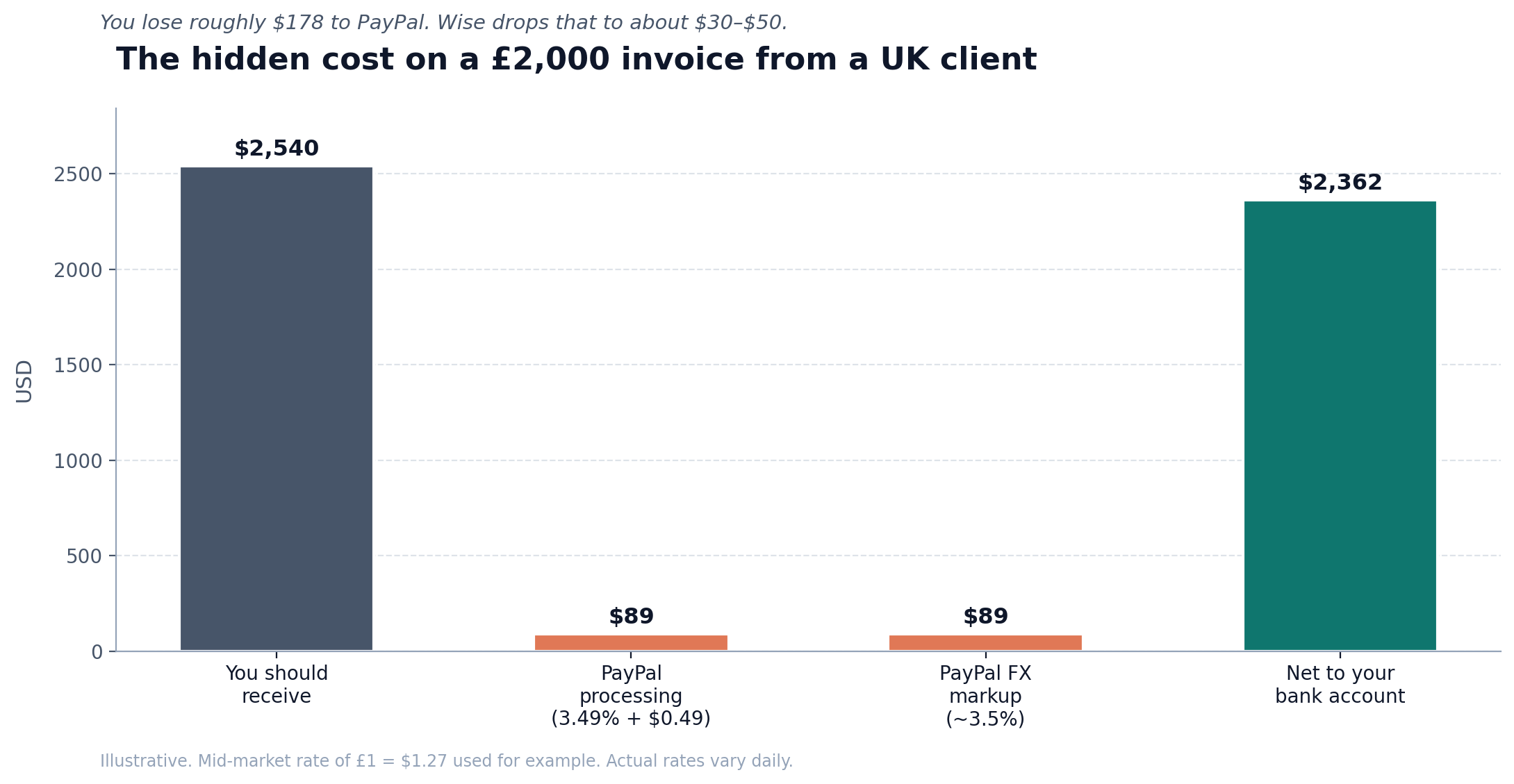
The hidden cost most writers miss is PayPal currency conversion fees. If a UK client pays you GBP, PayPal converts to USD at a rate that’s typically 3% to 4% worse than the mid-market rate. On a £2,000 payment, you might lose $80 to $100 just on conversion. Wise is the standard workaround for converting after the fact, but it adds friction.
Stripe Invoicing: the developer-flavored option
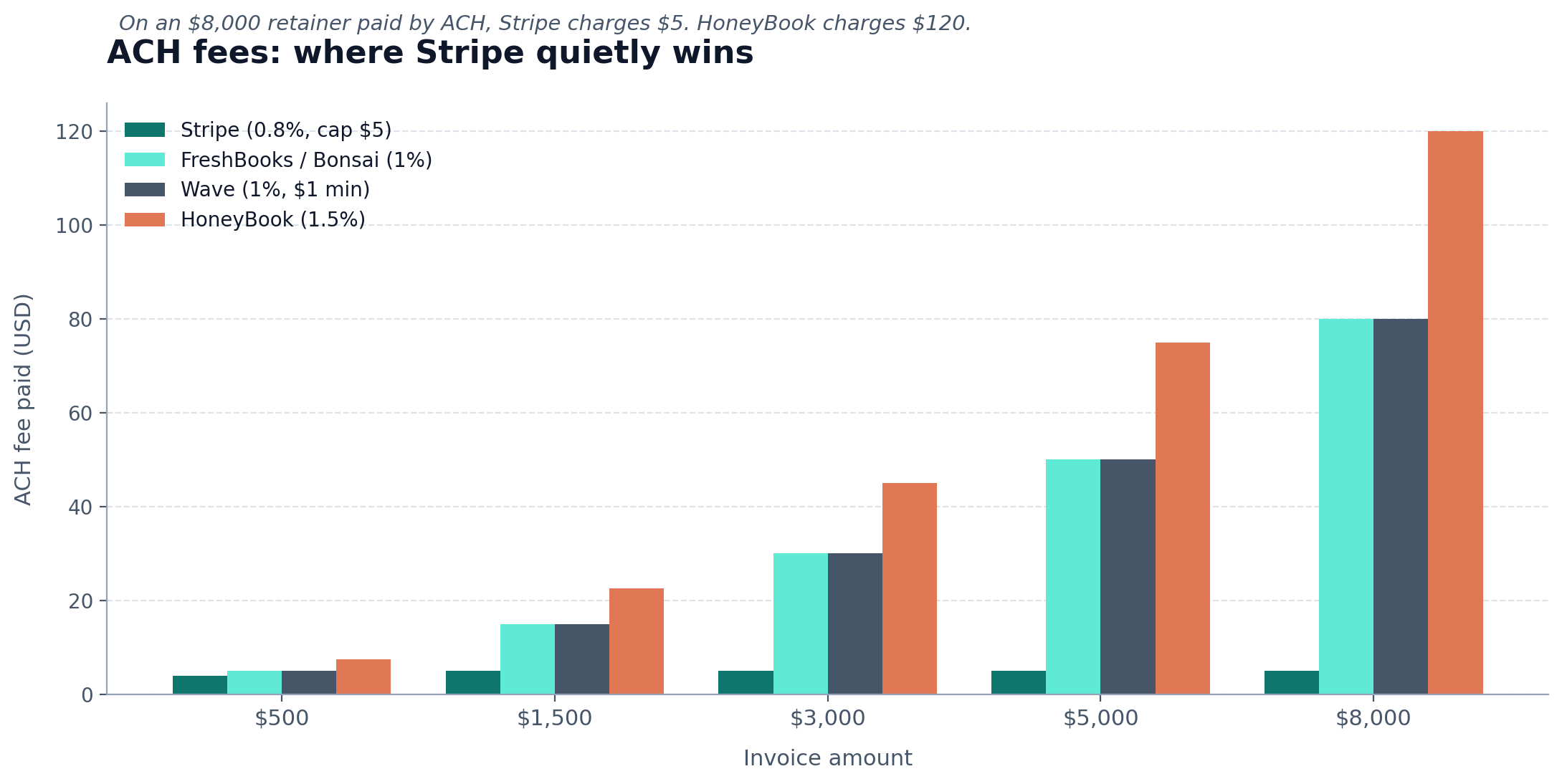
Stripe Invoicing is free to use, with a 0.4% fee per invoice on top of standard 2.9% + $0.30 card processing. The math works out cheaper than Wave for most invoices, and the ACH option at 0.8% capped at $5 is genuinely the best ACH rate in this list.
The catch: Stripe’s interface assumes you’ve used Stripe before. The dashboard talks about “products,” “customers,” “subscriptions” in language that comes from SaaS, not freelance writing. If you can get past the learning curve, you get the cleanest payment experience for clients on this list. Cards, Apple Pay, Google Pay, ACH, and even bank debits work without you configuring anything.
Best fit: writers who already accept payments through Stripe (for course sales, paid Substack, etc.) and want to consolidate.
The best invoicing software for freelance writers: my honest pick
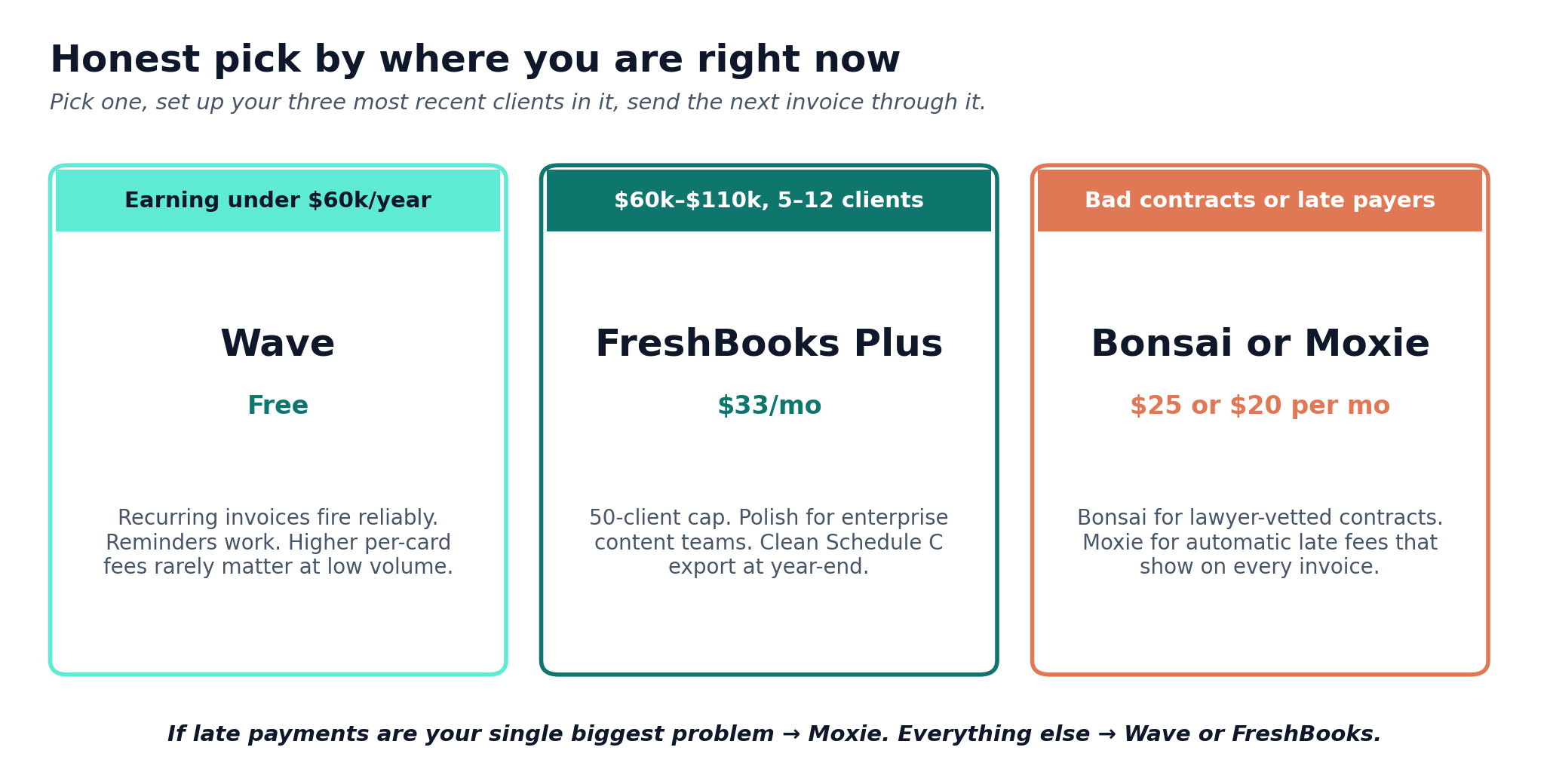
If you’re earning under $60,000/year as a writer and your invoicing pain is “I can’t be bothered to set up something complicated,” start with Wave. It’s free. It works. The recurring invoices and reminders cover 80% of the headache. If your card processing volume is low, the higher per-transaction fees won’t matter much.
If you’re earning $60,000 to $110,000 and you have 5 to 12 regular clients, FreshBooks Plus at $33/month is the sweet spot. The 50-client cap covers any realistic writer’s roster. The polish helps when you’re sending invoices to enterprise content marketing teams. The Schedule C export at year-end saves you a few hours when you’re filing.
If you’re sending sloppy contracts (or no contracts) and getting burned, jump straight to Bonsai at $25/month. The contract templates alone justify the price. The invoicing is fine.
If late payments are your single biggest problem, Moxie’s automatic late fee feature works. Pair it with a contract that explicitly mentions the fee, and most clients pay on time.
A 5-minute decision framework
Run through these five questions. The answers point to a tool.
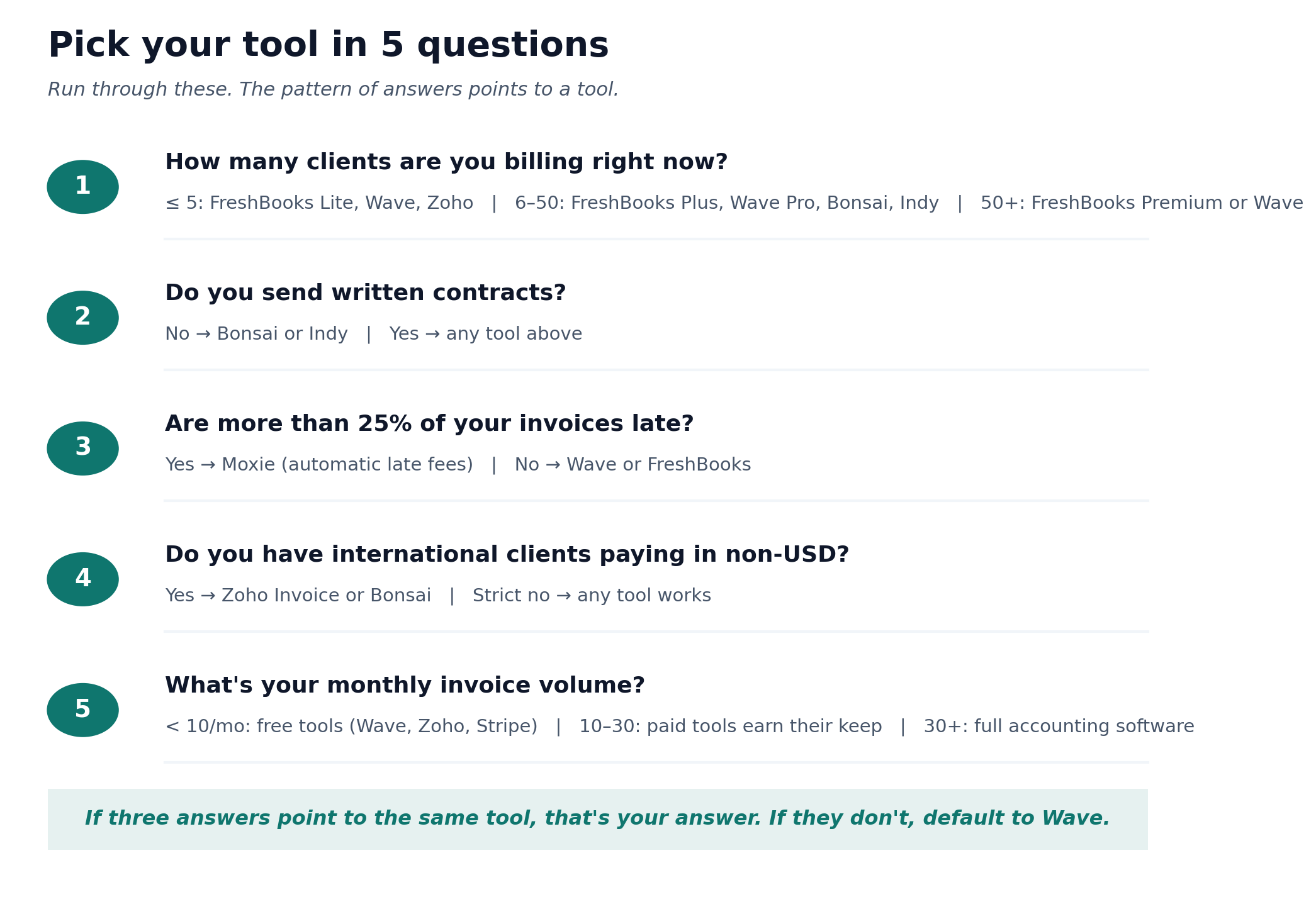
- How many clients are you billing right now? 5 or fewer: FreshBooks Lite, Wave, or Zoho. 6 to 50: FreshBooks Plus, Wave Pro, Bonsai, or Indy. More than 50: FreshBooks Premium, or stay with Wave.
- Do you send written contracts? No: Bonsai or Indy. Yes: any of the above.
- Are late payments a real problem (more than 25% of your invoices late)? Yes: Moxie. No: Wave or FreshBooks.
- Do you have international clients paying in non-USD currencies? Yes: Zoho Invoice or Bonsai. Strict no: anything works.
- What’s your monthly invoice volume? Under 10 invoices: free tools (Wave, Zoho, Stripe) save you real money. 10 to 30 invoices: paid tools earn their keep through automation. 30+: you probably need to level up to full accounting software.
The mistake most writers make with their first invoicing tool
I’ve watched writers spend three weeks researching tools, pick the most feature-rich one, set up four automations, and then never use it. The wrong question is “which tool has the most features?” The right question is “which tool will I actually open when an invoice is due?”
A common pattern on r/freelanceWriters: a writer signs up for FreshBooks or Bonsai during a free trial, builds a perfect setup, and then defaults back to a Word doc PDF and PayPal because the new tool requires logging in and the old method is two clicks. The fix is to commit to using the tool for one full month, even when it’s slightly slower than your old system. After 30 days, the muscle memory is built.
The other mistake is mixing business with personal. If you’re invoicing through PayPal and the same PayPal account holds personal Venmo-style transfers from friends, you’re going to get a 1099-K mess at year-end. Set up a business PayPal or use a tool with a dedicated business bank connection. Our piece on the best bank accounts for freelancers walks through the options.
Late payments: the structural fix nobody talks about
Software helps. It doesn’t fix late payments on its own. The structural fix is two layers:
Layer one: contract terms. Every project should have a written contract or, at minimum, an email confirmation that quotes payment terms. Net-30 is standard but slow. Net-7 or net-14 with new clients gets you paid faster, and it filters out clients who can’t pay quickly. Include a late fee clause: “If this invoice is unpaid by the due date, a non-compounding late fee of 5% accrues monthly on the outstanding amount.” That language is roughly what Bonsai includes by default. Most state laws (and UK law for UK clients) back you up if the contract is signed.
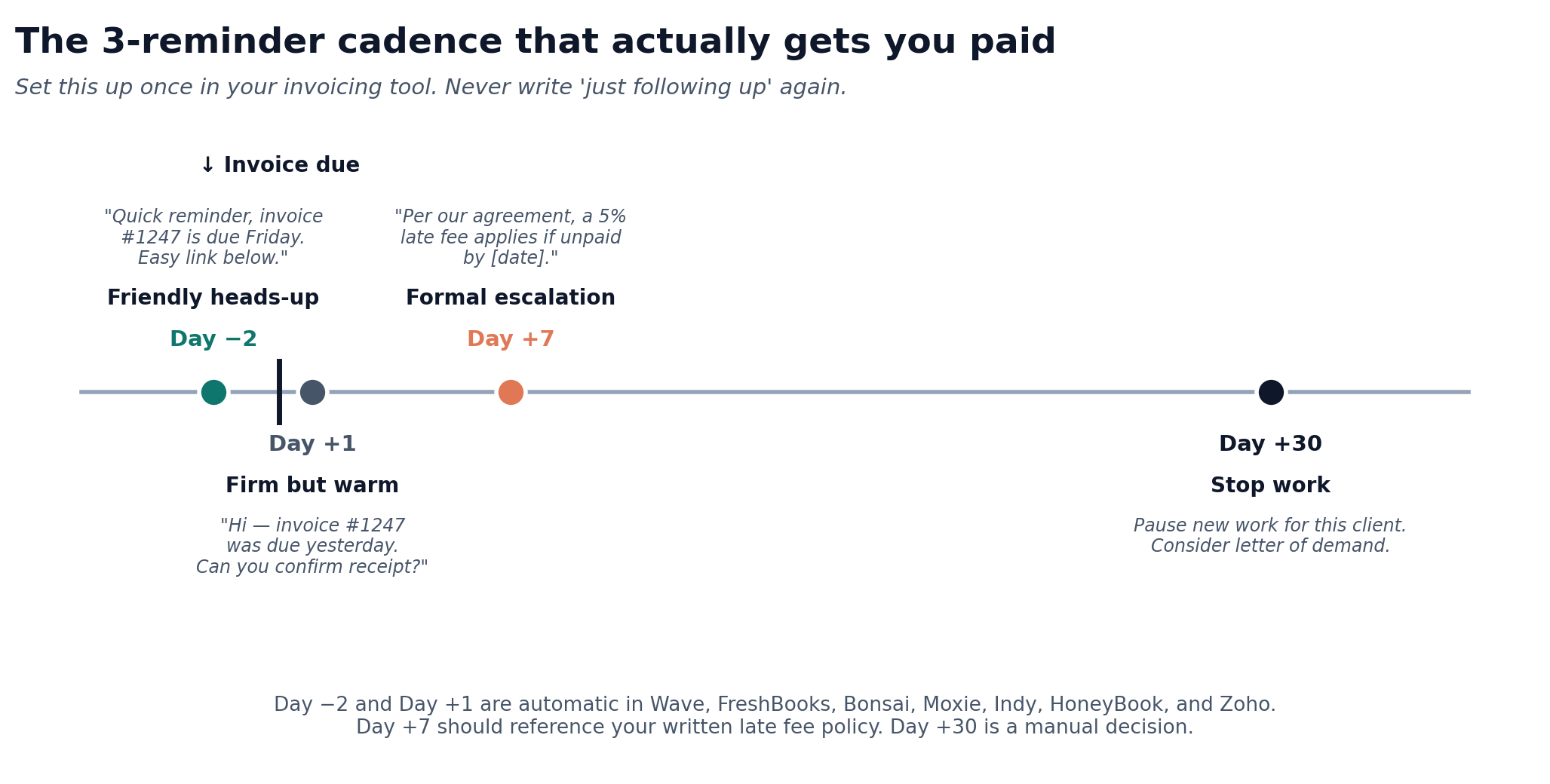
Layer two: automated reminders. Three reminders, three different escalation levels. Day -2 (friendly heads-up). Day +1 (firm but warm). Day +7 (formal, references the late fee policy). All three should be set up in your invoicing tool and triggered automatically. You should never write these emails by hand.
One trick worth knowing, popularized by writer Mallorie Wilson on Elna Cain’s blog: invent a fake accounts manager. “Mike from accounts” or “Jonathan from billing” sends the third reminder. Companies that ignore individual freelancers tend to pay invoices that look like they came from another business. It’s a 5-minute setup (a separate email alias), and several writers report it dropping their late-payment rate by half.
For the broader picture on cash flow when payments do go late, see our guide on managing cash flow as a freelancer.
Tax and 1099 considerations for 2026
Two tax-relevant changes hit freelance writers this year. Both came from the One Big Beautiful Bill Act signed July 4, 2025.
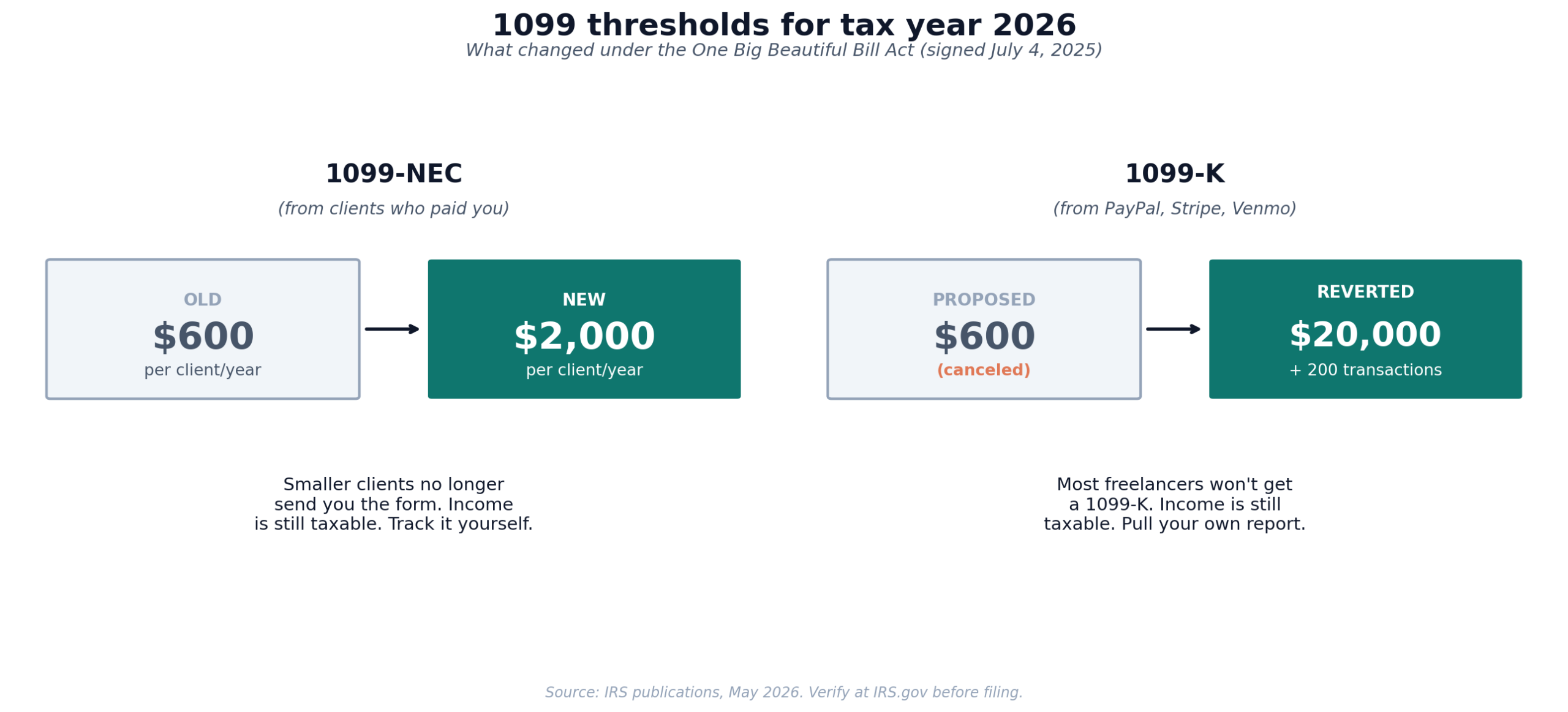
1099-NEC threshold rises from $600 to $2,000 starting tax year 2026. Clients only have to issue you a 1099-NEC if they paid you $2,000 or more in a calendar year. Smaller clients no longer need to send the form. This doesn’t change what’s taxable. Every dollar still gets reported on Schedule C, with or without a 1099.
1099-K threshold reverted to $20,000 + 200 transactions. The phased drop to $600 was canceled. PayPal, Stripe, Venmo, and similar platforms now only issue you a 1099-K if you cross both thresholds in a year. Same rule applies. Income is taxable whether or not you receive a form.
The practical effect is more responsibility on you to track every invoice yourself. The “I’ll just wait for the 1099s in January” approach was always a bad idea, and it’s worse now that fewer 1099s will arrive. Pull a year-end income report from your invoicing tool and reconcile it against your bank deposits. Every dollar should be accounted for. Our Schedule C line-by-line guide walks through where this income lands on your return. If you’re trading under your own name, the entity question matters too. Our breakdown of sole proprietorship vs LLC vs S-corp for freelancers covers when it’s worth restructuring.
If you’re new to handling taxes as a freelancer, the next mountain is quarterly estimated payments. Read our guide on filing quarterly estimated taxes, our breakdown of how much to set aside, and our state-by-state guide to freelance taxes if you’ve moved or have multi-state clients.
Free freelance writer invoicing checklist
A one-page checklist covering everything that should be on every invoice you send. Legal name. Tax ID. Payment terms. Late fee clause. Accepted payment methods. Project reference. The exact wording I use on follow-up reminders. Built specifically for freelance writers. Drop your email and I’ll send it.
Frequently Asked Questions
What’s the cheapest invoicing software for freelance writers?
Wave and Zoho Invoice are both free for unlimited invoices. PayPal and Stripe are free to use, but their per-transaction fees are higher than tools that charge a monthly subscription. For a writer sending under 10 invoices a month at average values under $1,000, free tools usually win on total cost. For higher volumes or invoice values, the math flips, and a $19 to $25/month subscription with lower transaction fees becomes cheaper overall.
Do I really need invoicing software, or can I just use Word or Google Docs?
You can run your business on Word or Google Docs. Plenty of writers do for years. The downsides show up at scale. No automatic reminders. No online payment. No year-end income report. No protection if a client claims they never received the invoice. If you have 3 or fewer clients and they all pay net-7 by check, Word is fine. If you have more clients, a tool saves you 4 to 8 hours a month and gets you paid faster.
Can I write off invoicing software on my taxes?
Yes. Subscription costs for invoicing software are deductible business expenses on Schedule C, line 18 (Office expense) or line 22 (Supplies), depending on how your accountant categorizes it. Payment processing fees are also deductible on Schedule C, line 17 (Legal and professional services) or line 24 (Bank fees), depending on the structure. For more on what counts, see our guide to freelance tax deductions.
What should be on a freelance writer’s invoice?
Your full legal name (or business name), business address, tax ID (your SSN or EIN if you have one), invoice number, invoice date, due date, payment terms (net-7, net-14, net-30), client name and address, line items describing the work delivered, total due, accepted payment methods with details (account number for ACH, payment link, PayPal handle), and a late fee clause. Most invoicing tools include all of this by default.
Should I charge late fees as a freelance writer?
Yes, if your contract allows it. A 5% non-compounding late fee, applied after a 7- or 14-day grace period, is standard and enforceable in most US states. The fee itself rarely matters financially. What matters is that clients see the policy on every invoice, which makes them prioritize your invoice over invoices without late fee policies. Tools like Bonsai and Moxie automate the application. FreshBooks Plus and above let you configure it manually.
How long should I wait before chasing a late invoice?
Send a friendly heads-up reminder 2 days before the due date. If the invoice goes past due, send a firm reminder on day +1. After 7 days overdue, escalate to a formal email referencing your late fee policy and a stated deadline (e.g., “Please remit payment by [date] to avoid the late fee”). If you reach 30 days overdue with no response, stop work on any other projects for that client and consider a letter of demand. Most invoices get paid before reaching that point if your reminder system is automated.
Can I use the same invoicing tool for US and international clients?
Yes. Wave, FreshBooks, Bonsai, Zoho Invoice, and Stripe all support multi-currency invoices. The main difference is in how the conversion happens. PayPal, Wise, and Stripe convert at different rates, and the markup varies. For UK or EU clients paying significant amounts (£2,000+ or €2,000+), accepting payment via Wise Business or a similar low-markup service typically saves $50 to $150 per invoice compared to PayPal’s default conversion.
Will I get a 1099 from every client who uses an invoicing tool?
Starting in tax year 2026, clients only have to issue a 1099-NEC if they paid you $2,000 or more in the calendar year, up from the old $600 threshold. The 1099-K from payment processors (PayPal, Stripe) only kicks in at $20,000 and 200 transactions. You’re still required to report all income regardless of which forms you receive.
Pick one tool this week. Set up your three retainer clients (or your three most-recent invoices) in it. Send the next invoice through the tool, not through your old method. Don’t research a fourth option. The best invoicing software is the one you’ll actually use on Tuesday morning when you’ve got 800 words to write and a $1,800 invoice to send to a client who paid you 18 days late last time.
Tax laws and software pricing change. The figures in this article were verified against IRS publications and vendor pricing pages in May 2026. Verify current rules at IRS.gov and confirm pricing on each vendor’s site before purchasing. This is informational content, not tax or legal advice.
About the author
Gareth is an entrepreneur based in Dubai and the founder of AI Finance Tools for Freelancers. He’s not a CPA or a bookkeeper. He built this site because he couldn’t find honest, thorough reviews of AI finance tools written for freelancers. Every guide is researched from real user reviews, official documentation, and expert sources.