
Seven accounting tools freelance designers use, what each one costs in 2026, and which one matches the way you actually bill clients.
The best accounting software for freelance designers in 2026 isn’t the one with the most features. It’s the one you’ll actually open every Friday. The spreadsheet stopped working. A client asked for a W-9 and an itemized invoice in the same email, or you’re staring at a Stripe payout on your phone wondering if the $340 Adobe Creative Cloud renewal counts as a business expense. It does. The bigger question is which tool will track that for you over the next five years without falling over when your income jumps from $58,000 to $94,000.
Most “best accounting software” articles you’ll read were written by content teams at QuickBooks, FreshBooks, or affiliate sites that earn $80 to $200 every time you click through. They lump freelance designers in with restaurants and trucking companies. You don’t need inventory tracking. You need clean invoicing, mileage and home office capture, easy 1099 reconciliation in January, and a quarterly tax estimate you can act on.
I’ve pulled real user complaints from Trustpilot, Reddit, and the App Store on every tool below. Pricing is from each vendor’s own page as of April 2026. Where a tool has been quietly downgraded for solo users, you’ll see it flagged.
What freelance designers actually need from accounting software
Define the job before any tool comparison. A designer running solo with one to twelve active clients has different needs than an agency with payroll. The realistic feature list:
- Invoicing that doesn’t embarrass you in front of a client. PDF download, online payment links, automatic late reminders, recurring invoices for retainer clients.
- Bank and Stripe sync so you’re not exporting CSVs at midnight on April 14.
- Cash-basis accounting as the default. Most freelance designers report on a cash basis, which every tool below supports out of the box. You only need accrual accounting if your CPA tells you otherwise.
- Expense categorization mapped to Schedule C lines. Software subscriptions, contract labor, home office, mileage, equipment.
- Mileage tracking for client meetings, conferences, or coworking trips. The 2026 IRS standard mileage rate is $0.70 per business mile.
- Quarterly estimated tax estimates you can act on. If the tool can’t tell you what to send the IRS by June 15, it’s not finished.
- Year-end exports in formats your CPA or TurboTax Self-Employed will accept.
- Multi-currency if you bill UK or EU clients. Most US-first tools fail here.
Skip these: payroll modules, project management with Gantt charts, inventory tracking, anything marketed as “AI-powered” without specifics. If a tool’s AI claim is just auto-categorization, that’s been standard since 2018.
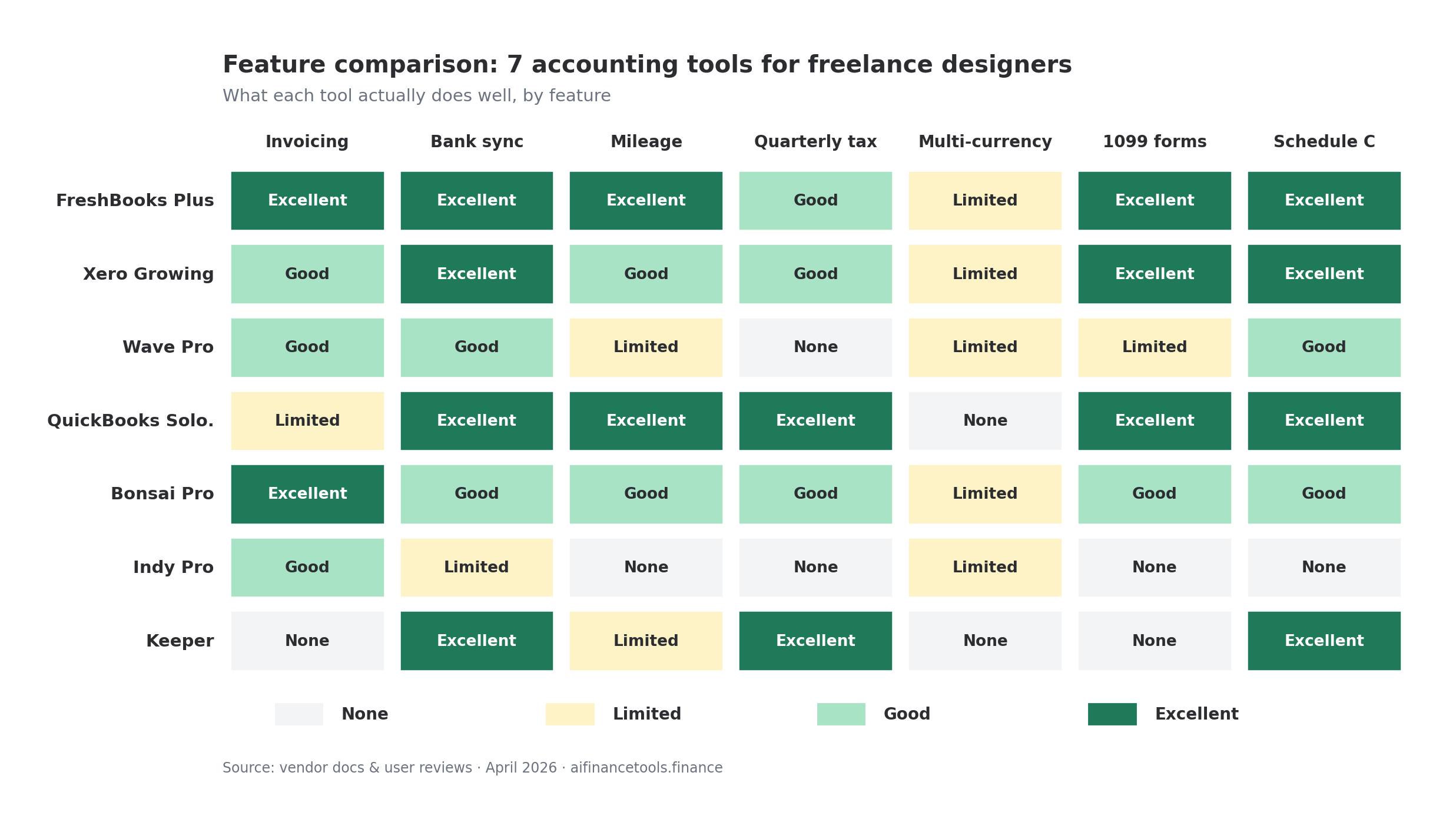
The seven tools worth considering in 2026
Each one with what it does well, where it falls short for designers, and current pricing. Decision framework after.
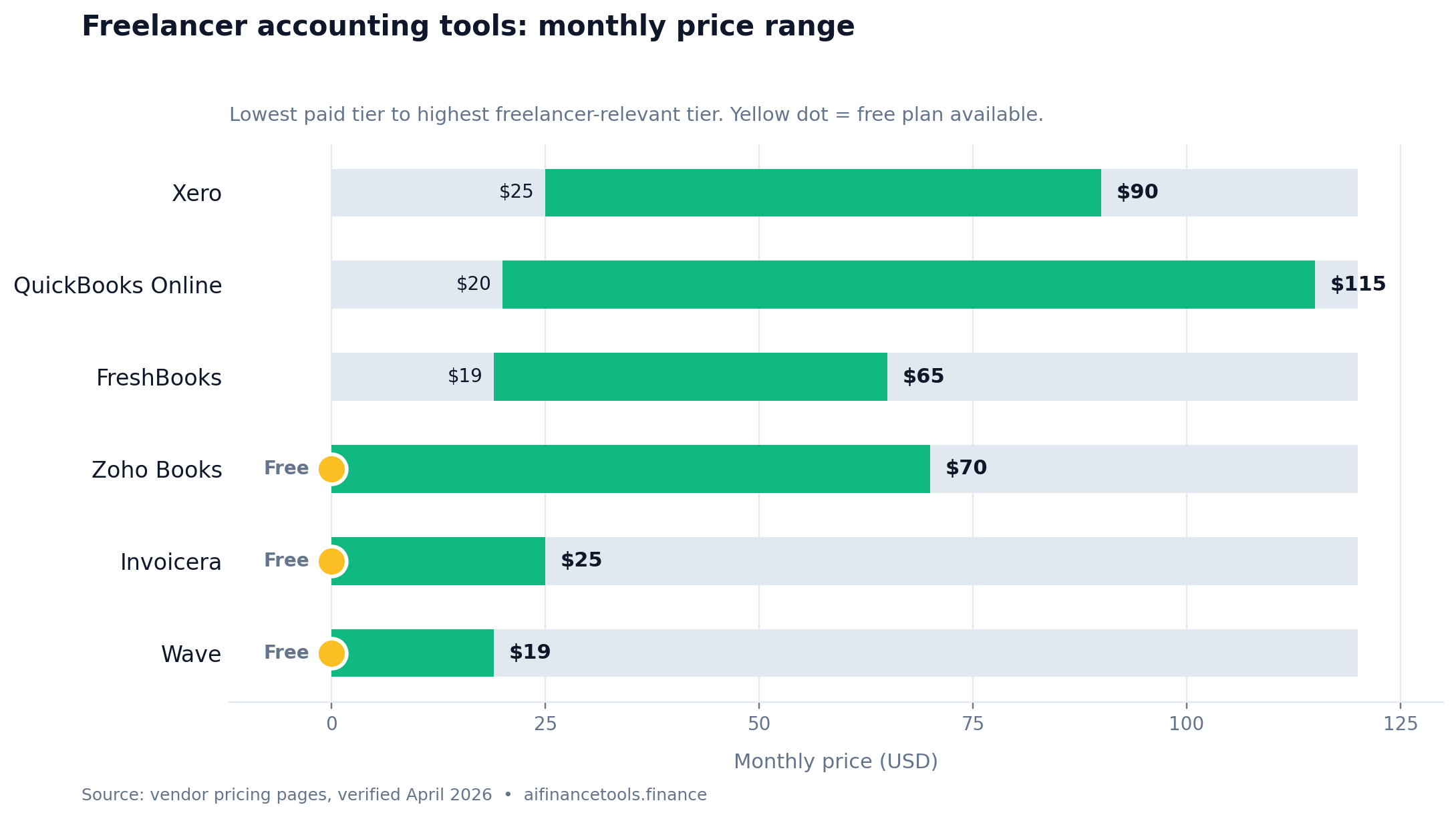
1. FreshBooks
FreshBooks is the default recommendation for freelance designers, and there’s a reason. The invoicing is the cleanest in the category. You can attach proofs, set up retainers, automate late fees, and let clients pay by card or ACH from the invoice itself. Project-based billing works the way most designers actually work.
Pricing as of April 2026: Lite is $21 per month for up to 5 clients. Plus is $38 per month for up to 50 clients (this is where most designers land). Premium is $65 per month. They run a multi-month introductory discount on a near-permanent basis, so the real first-year cost on Plus is closer to $200 to $280. Verify the current promo on the FreshBooks pricing page before you commit.
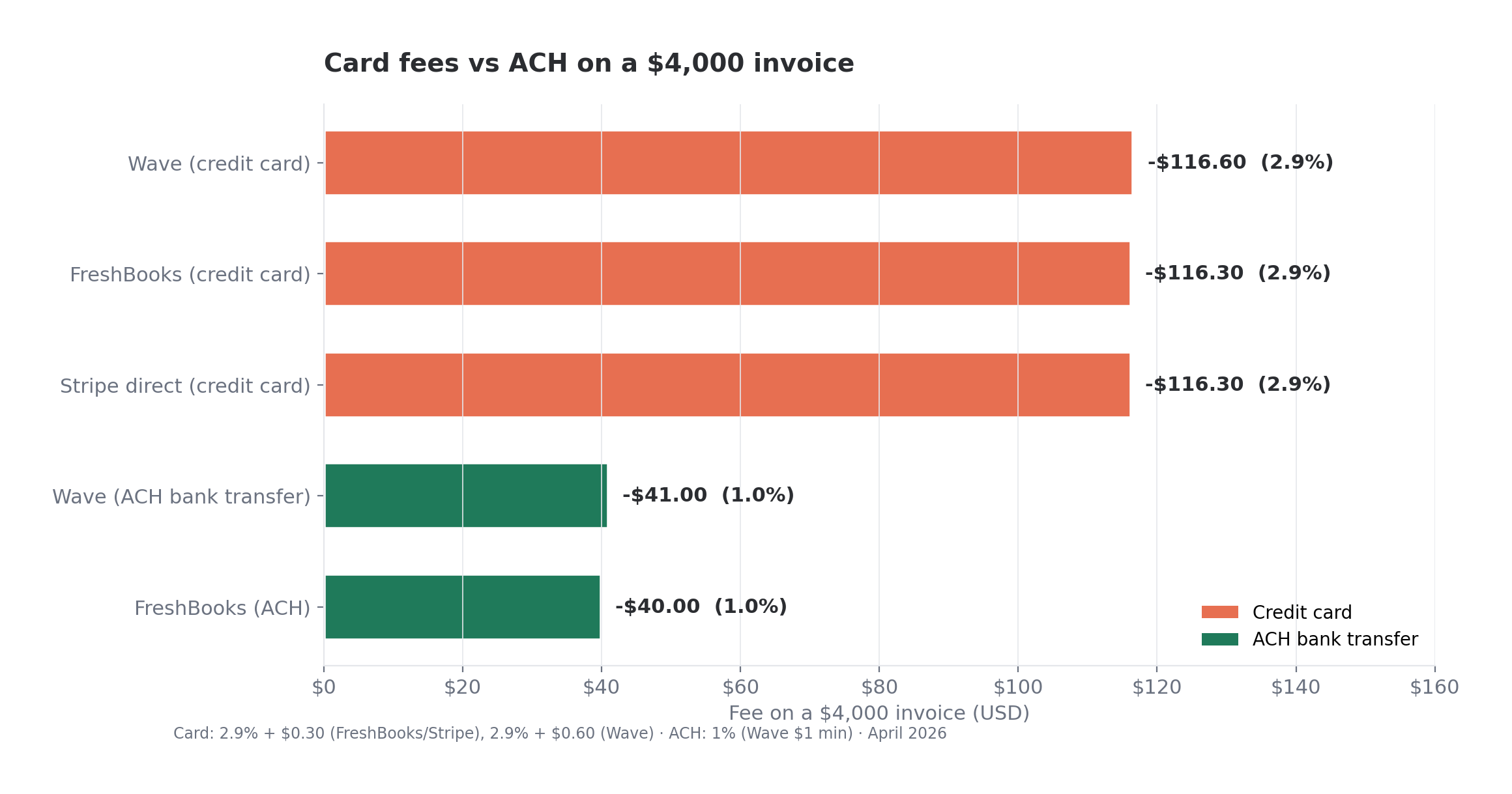
Designer complaints on Reddit and Trustpilot: payment processing fees stack up. The standard rate is 2.9% + $0.30 per transaction, and you’ll feel it on a $4,000 invoice ($116.30 to FreshBooks). Receipt scanning miscategorizes a meaningful share of receipts. There’s no proper double-entry accounting at the lower tiers, which is fine for solo work but means your CPA might grumble.
Best for: designers who invoice 2 to 30 clients a month and want the invoicing experience to feel professional. If FreshBooks vs. something more robust like Xero is on your shortlist, I broke that comparison down in FreshBooks vs Xero 2026.
2. Xero
Xero is what you graduate to when FreshBooks starts feeling thin. Proper double-entry accounting, multi-currency that works, and a reporting suite your CPA will love. The interface is busier and there’s a real learning curve. Plan a weekend to set it up properly.
Pricing as of April 2026: Early is $20 per month and caps you at 20 invoices per month, which most working designers hit by the third week. Growing is $47 per month with unlimited invoices. Established is $80 per month and adds multi-currency and project tracking. UK or EU clients means you need Established.
Common complaints: customer support is email-only and slow. Invoice templates look dated next to FreshBooks. Bank feeds drop and require manual reconnection more than they should.
Best for: designers earning over $90,000 with multiple income streams (client work, course sales, affiliates, royalties), or anyone with international clients. Overkill if you’re a solo illustrator with three retainer clients.
3. Wave
Wave’s pitch is that the core accounting and invoicing is free. That used to be true with no caveats. As of 2026, Wave has a free Starter plan and a Pro plan at $16 per month. Pro adds receipt scanning, automatic bank import (Starter requires manual import), and unlimited users.
Payment processing is where Wave makes its money: 2.9% + $0.60 per credit card transaction (the $0.60 is higher than competitors), 1% for ACH with a $1 minimum. So “free” only works if your clients pay by check or you eat the processing fees.
What r/freelance flags repeatedly: bank sync breaks more often than competitors, customer support is sparse for the free tier, and the platform has been less actively developed since H&R Block acquired Wave in 2019. App Store reviews cluster lower than competitors in 2026, with complaints focused on receipt scan accuracy and login issues.
Best for: designers in their first 12 months billing under $30,000 who need something better than a Notion table without paying for it. Plan to graduate within 18 months.
4. QuickBooks Solopreneur
Important update: QuickBooks Self-Employed, the product most freelance guides used to recommend, is being sunset by Intuit. Existing users have been migrated or pushed toward QuickBooks Solopreneur. A 2024 article saying QBSE is great is now outdated.
Solopreneur is $20 per month as of April 2026 (Intuit also pushes a $25 Solopreneur Plus tier). It includes mileage tracking via the mobile app, Schedule C categorization, quarterly tax estimates, and basic invoicing. The integration with TurboTax Self-Employed at year-end is the genuine selling point. One click and your Schedule C is populated.
Designer-specific complaints: invoicing is bare. No proposals, no retainers, no automatic late fees. Project tracking is absent. You’ll outgrow it the moment you start sending five-figure invoices with milestones. Bank sync is reliable, but expense categorization rules are less flexible than Xero or even FreshBooks.
Best for: designers who will use TurboTax Self-Employed in April and want the cleanest possible handoff. If you already use a separate invoicing tool and just need the books-and-tax side, this works.
5. Bonsai
Bonsai is built for freelancers from the ground up. Contracts, proposals, invoicing, time tracking, and basic accounting in one product. The UI is the friendliest of any tool here. Templates are designed for creative work specifically.
Pricing as of April 2026: Starter is $25 per month, Professional is $39 per month, Business is $79 per month. The “Bonsai Tax” add-on costs an extra $10 per month or $100 per year and gives you Schedule C-ready categorization plus quarterly tax estimates.
The accounting is shallow. It’s invoicing with bookkeeping bolted on, not the other way around. If you need balance sheets, P&L by client, or multi-currency reporting, Bonsai will frustrate you. G2 and Trustpilot reviews praise the contract templates but flag bugs in time-to-invoice conversion and limited integrations with US banks. Users on smaller credit unions report the bank feed never connects.
Best for: designers who hate finance enough to trade depth for design. Useful if you send proposals and contracts as much as invoices.
6. Indy
Indy is similar to Bonsai in spirit. Contracts, invoices, proposals, time tracking, and a basic chat-with-clients module. The differentiator is pricing: Indy has a free tier (limited to 3 of each item) and a Pro tier at $9 per month or $72 per year. It’s the cheapest paid option in this list.
What you sacrifice for that price: the accounting is shallower than Bonsai. No real bank sync, no automated expense categorization, no quarterly tax estimate, no Schedule C export. You’d pair Indy for client-facing work with something like Wave or QuickBooks Solopreneur for the books side.
Best for: designers under $40,000 in revenue who want professional-looking client deliverables without the FreshBooks price.
7. Keeper
Keeper (formerly Keeper Tax) sits in a different category. It’s a tax-focused expense tracker that scans your bank and credit card transactions for missed deductions and offers a CPA-assisted return at year-end. Pricing as of April 2026 is $20 per month for the bookkeeping product, with the tax filing add-on at around $100 to $130 depending on plan.
Honest take: Keeper finds deductions you’d miss. As a primary bookkeeping system it falls short, because there’s no real invoicing. Trustpilot reviews are mixed. Praise clusters around the SMS-based deduction prompts (“hey, was this $48 charge at FedEx Office a business expense?”). Complaints cluster around billing surprises and the cost of the tax filing add-on relative to what you get. I went deeper in my full Keeper review and a FlyFin review for context on the tax-AI category.
Best for: designers who already have an invoicing solution they like and want a deduction-finder layered on top. Not a primary system.
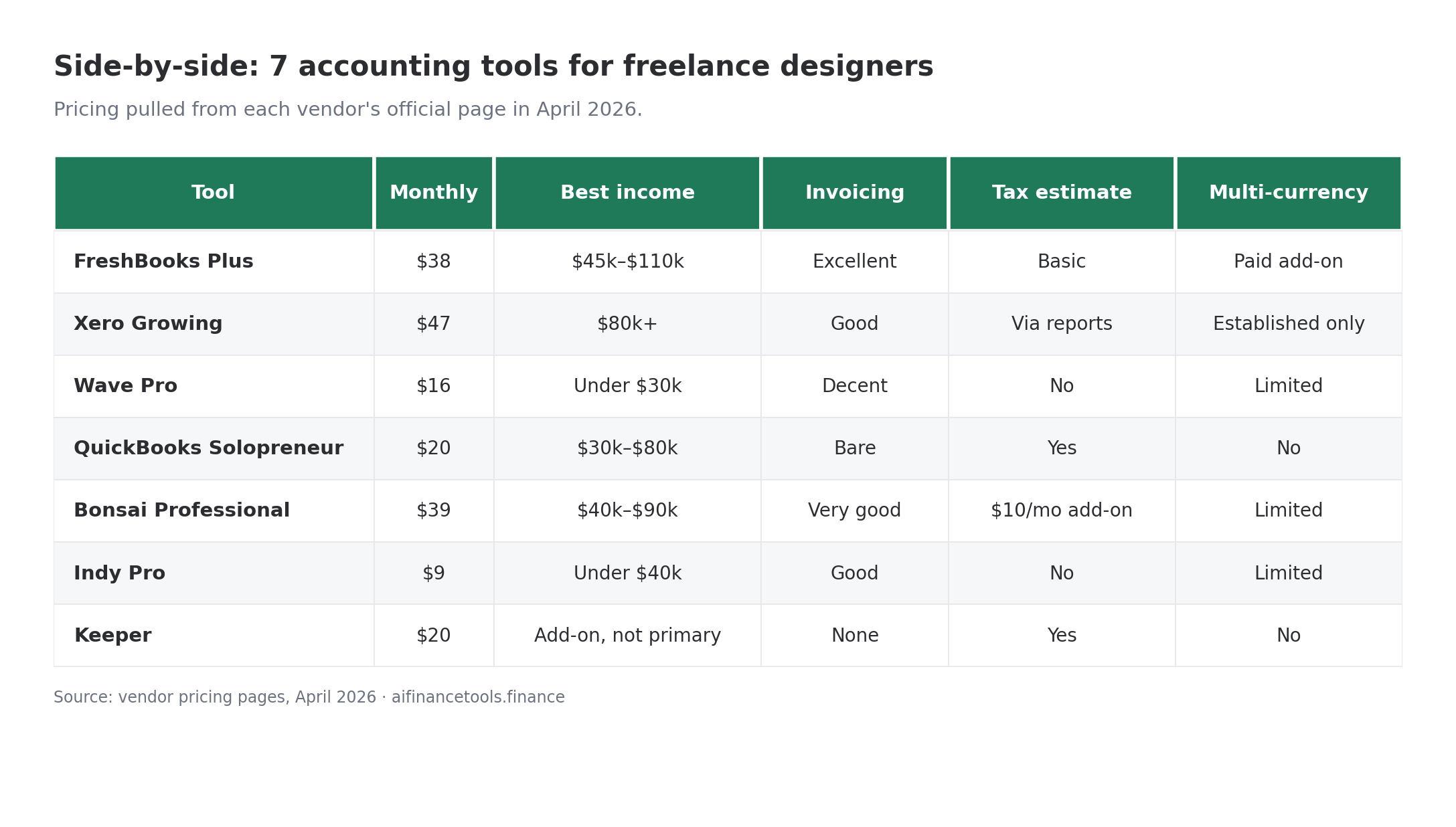
Side-by-side at a glance
All pricing pulled from each vendor’s official pricing page in April 2026.
| Tool | Monthly cost (entry tier) | Best for income range | Invoicing quality | Tax estimate | Multi-currency |
|---|---|---|---|---|---|
| FreshBooks Plus | $38 | $45k–$110k | Excellent | Basic | Yes (paid add-on) |
| Xero Growing | $47 | $80k+ | Good | Via reports | Established tier only |
| Wave Pro | $16 | Under $30k | Decent | No | Limited |
| QuickBooks Solopreneur | $20 | $30k–$80k | Bare | Yes | No |
| Bonsai Professional | $39 | $40k–$90k | Very good | Tax add-on $10/mo | Limited |
| Indy Pro | $9 | Under $40k | Good | No | Limited |
| Keeper | $20 | Add-on, not primary | None | Yes | No |
A 5-minute decision framework
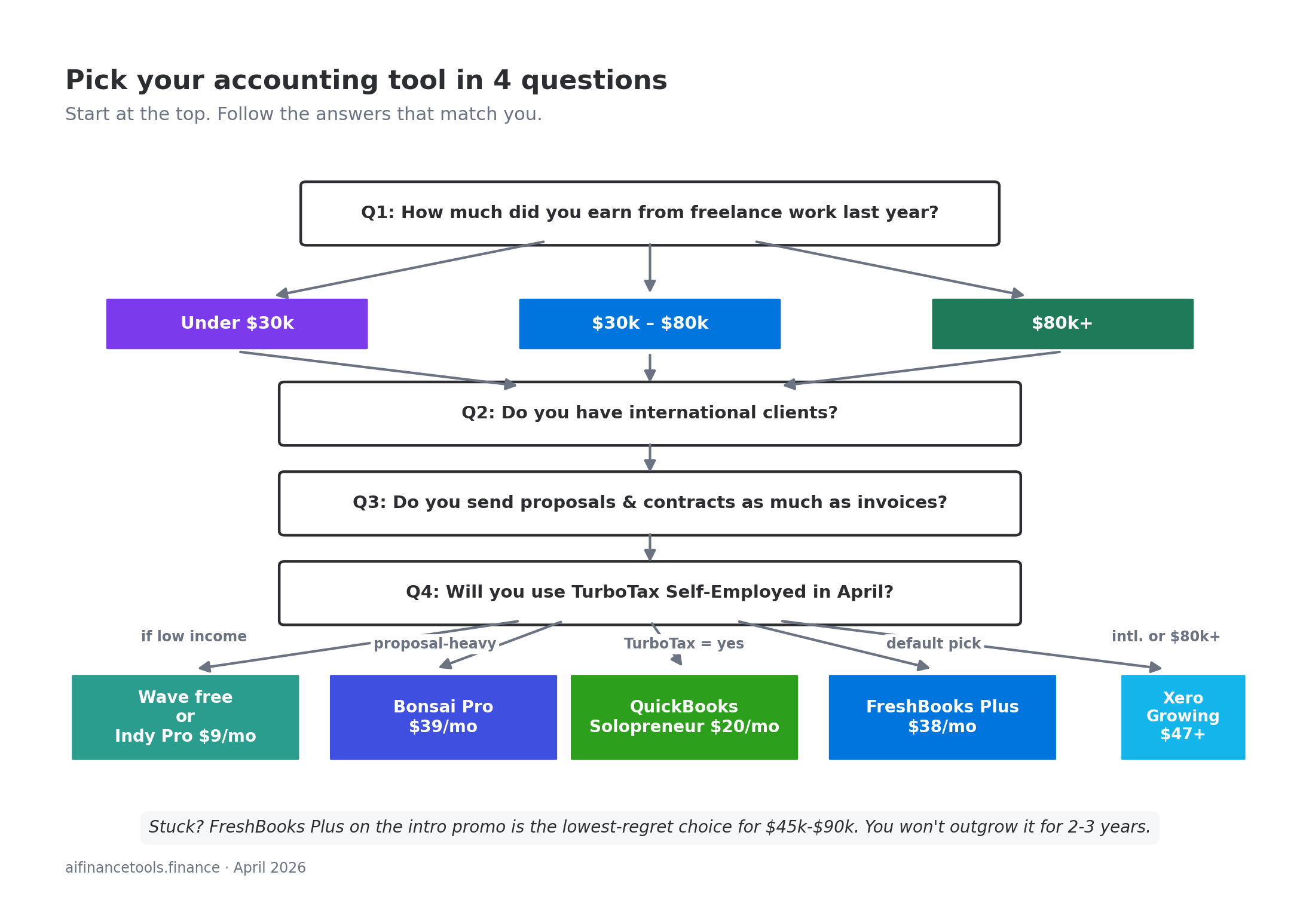
Skip the analysis paralysis. Run through these four questions:
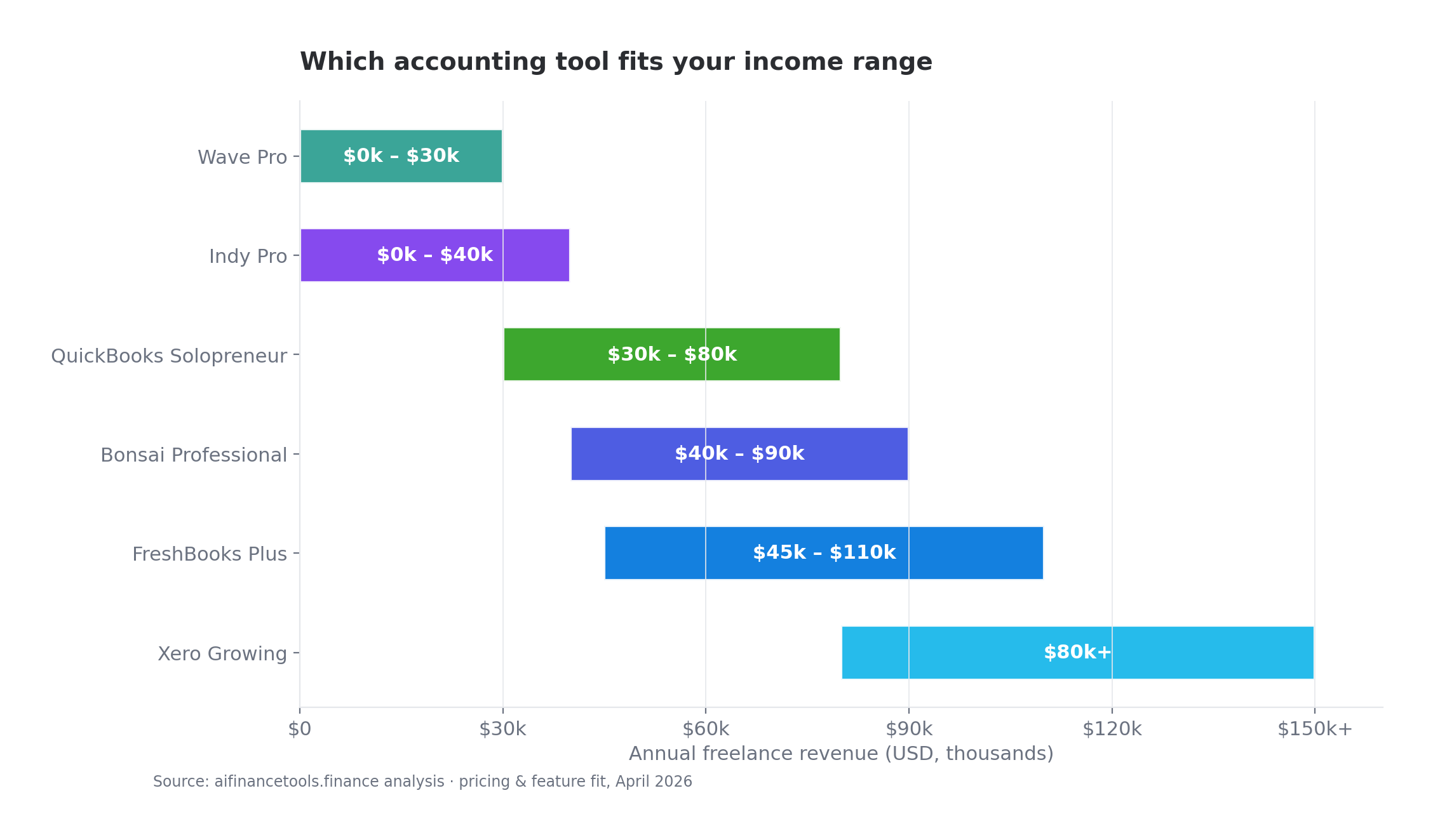
- How much did you earn from freelance work last year? Under $30k: Wave or Indy. $30k to $80k: FreshBooks or QuickBooks Solopreneur. $80k+: Xero or FreshBooks Premium.
- Do you have international clients? If yes, you need Xero Established or pay the FreshBooks multi-currency add-on. The other tools will frustrate you.
- Do you send proposals and contracts as much as invoices? If yes, look at Bonsai or Indy. Their client-facing flow is built for that.
- Will you use TurboTax Self-Employed in April? If yes, QuickBooks Solopreneur saves you 90 minutes at year-end. If you’re going to a CPA, Xero or FreshBooks Plus exports cleaner reports.
Still stuck? The boring answer is FreshBooks Plus on the introductory promo. It’s the lowest-regret choice for designers in the $45k to $90k range. You won’t outgrow it for two to three years and the migration to Xero is straightforward when you do.
The deduction problem these tools won’t solve for you
Every tool above will categorize your Adobe Creative Cloud subscription, your domain renewal, and your client-meeting Uber rides. None will reliably catch:
- Home office deduction if you use the simplified method. You enter square footage manually. Most designers either underclaim or skip this entirely.
- Section 179 equipment deductions on a $2,400 iMac or $1,800 Wacom tablet. The tools categorize as “office equipment” but won’t apply Section 179 unless you tell them.
- Self-employed health insurance premium. Goes on Schedule 1, not Schedule C. Confirm the line number on the current year’s form (the IRS renumbers occasionally).
- Retirement contributions to a SEP IRA or Solo 401(k). These reduce your tax bill but live in a different part of your return.
- Self-employment tax half deduction. Half of the 15.3% SE tax is deductible. Most software handles this at filing time, not in your bookkeeping.
For more on what’s deductible and what isn’t, my Schedule C line-by-line guide walks through every line of the form for freelancers.
The bank account decision matters more than the software
Every accounting tool assumes one thing: your business income and expenses run through a separate account from your personal life. If you’re still using your personal Chase checking for client payments, no software will save you. The categorization will be a disaster every January.
Open a separate business account before you commit to any of the tools above, ideally with an EIN if you’ve registered an LLC or want to avoid handing out your Social Security number on every W-9. The cleaner your transaction list going in, the less time you spend correcting the software’s guesses. I compared the four most common options for solo freelancers in Best Bank Accounts for Freelancers: Found vs Relay vs Novo vs Mercury.
What about the quarterly tax problem
Most accounting tools fall short for freelancers in the same place, and the gap between marketing copy and reality is widest here. QuickBooks Solopreneur and FreshBooks both show a quarterly tax estimate. Both are rough. Neither factors in your spouse’s W-2 income, your state tax obligation properly, or whether you should be using the safe harbor rule (paying 100% of last year’s tax, or 110% if your prior-year AGI was over $150,000, to avoid penalties).
If you want to get quarterlies right, your accounting software is one input. The actual math is its own thing. I broke down how to calculate what to pay in How to File Quarterly Estimated Taxes as a Freelancer, and how much to set aside per dollar earned in How Much Should Freelancers Set Aside for Taxes.
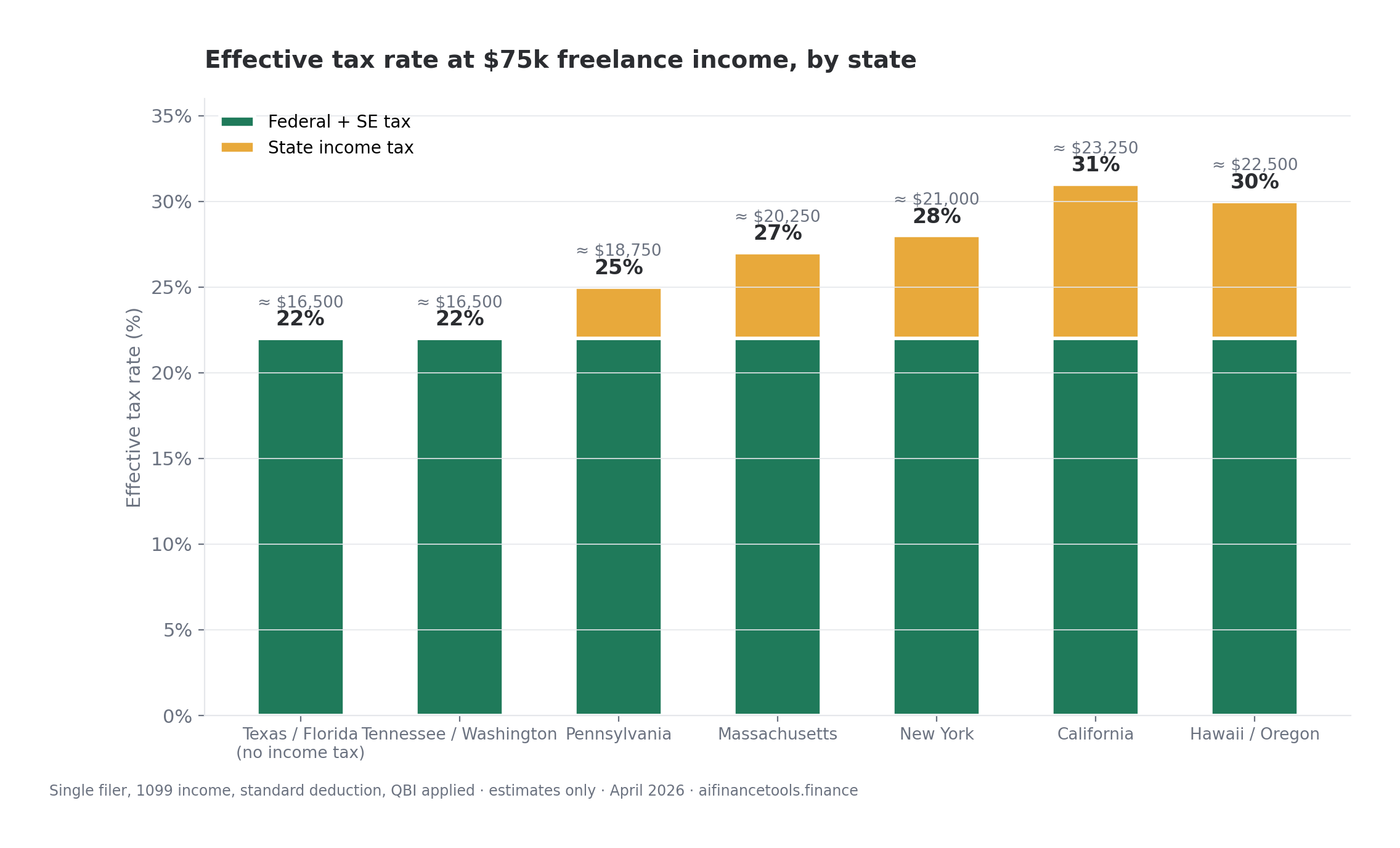
Your effective tax rate as a freelance designer at $75,000 in 2026, single, no state tax: roughly 22% to 24% all-in (federal income + SE tax, accounting for the QBI deduction and standard deduction). Add 4% to 9% if you’re in California, New York, Hawaii, or Oregon at this income level. Your accounting software’s “set aside 25%” suggestion works as a starting point, but it’ll be off by $2,000 to $4,000 in either direction depending on your situation.
A real example: a freelance illustrator at $72,000
The math, played out for one realistic profile. A freelance illustrator in Austin earning $72,000 in 2026 from a mix of editorial commissions, book covers, and a Patreon. Eight active clients in a year, roughly 24 invoices, and 1,400 business miles driven to client studios and conferences.
Her accounting tool needs:
- Decent invoicing for those 24 invoices, with online payment so she’s not chasing checks.
- Mileage capture on the 1,400 miles, which at $0.70 per mile is a $980 deduction.
- Stripe and Patreon import. Patreon issues a 1099-K once she crosses the $2,500 threshold for tax year 2026.
- Schedule C export for her CPA, who charges her $400 to file.
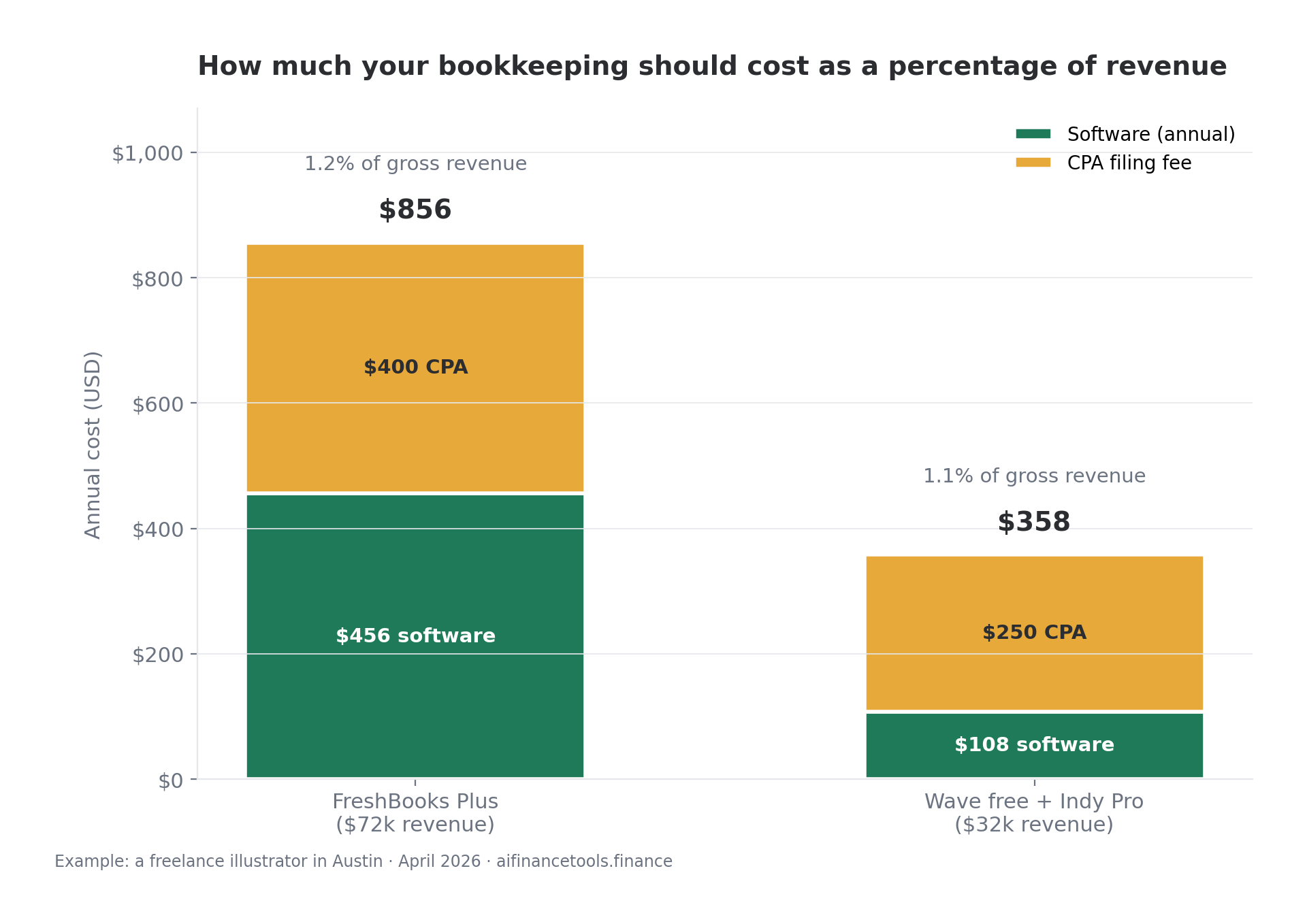
Best-fit tool: FreshBooks Plus at $38 a month, or $456 a year. Add the iPhone mileage app (free, built into FreshBooks) and her CPA at $400, and her total bookkeeping spend is around $856 for the year. On $72,000 in revenue, that’s 1.2% of gross. A reasonable cost.
At $32,000 the math changes. She’d be paying 2.7% of gross for the same setup, which is high. Wave free or Indy at $9 a month makes more sense at that income level.
The mistake most designers make at year two
This pattern shows up repeatedly in r/freelance and r/Bookkeeping threads. Someone signs up for a free tool in year one, never imports a single bank transaction properly, and then in February of year two tries to reconstruct twelve months of transactions in a panic. The tool isn’t the problem. The discipline of weekly reconciliation is.
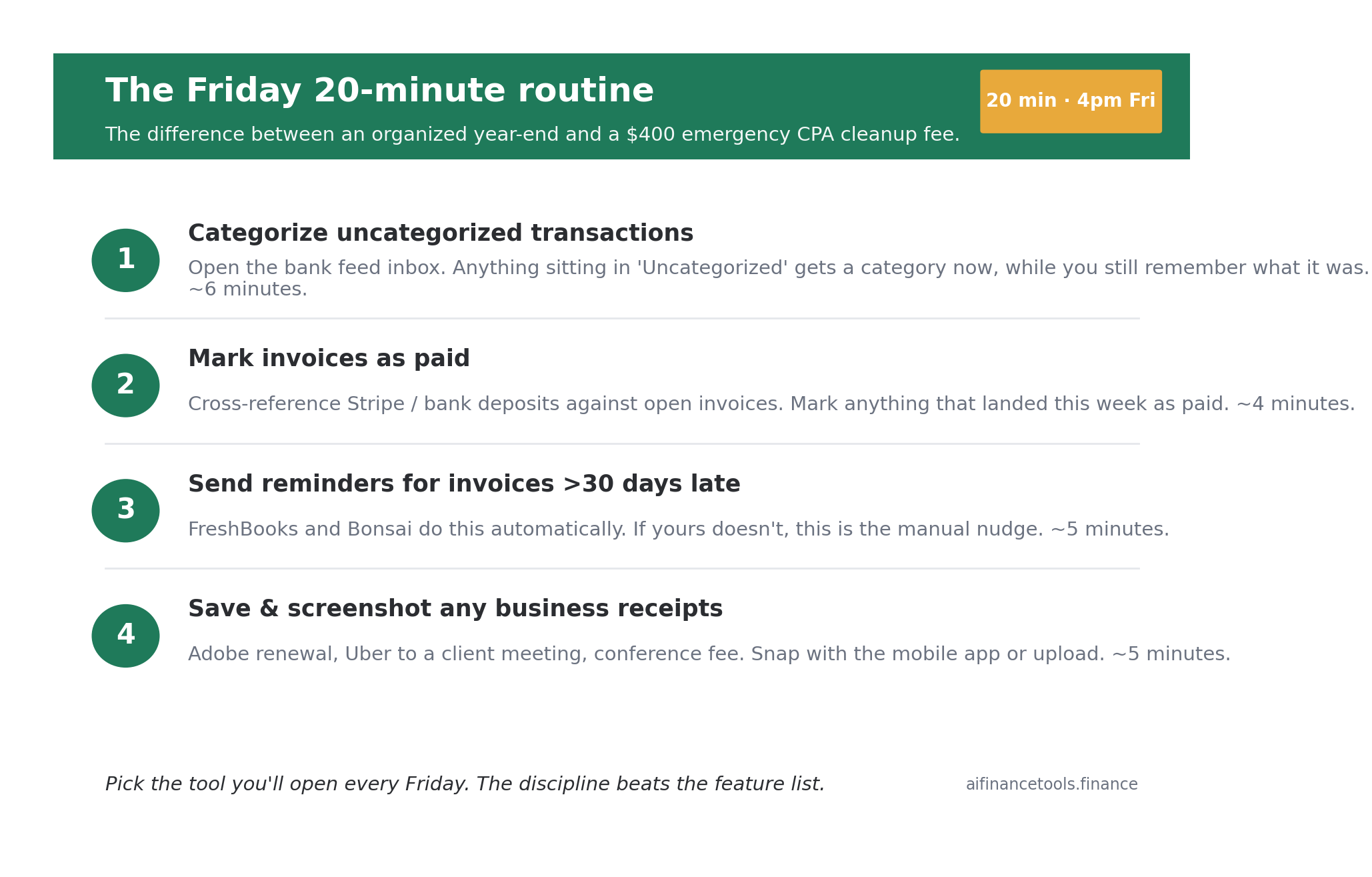
Pick the tool you’ll open every Friday for 20 minutes. If FreshBooks’ design makes you slightly less reluctant to log in than Xero’s reporting wall, FreshBooks is your answer regardless of what’s “objectively better.”
Set a calendar reminder. Friday afternoon, 4pm. Open the tool, categorize uncategorized transactions, mark invoices that got paid, send reminders for invoices over 30 days late. Twenty minutes. That’s the difference between an organized year-end and a $400 emergency CPA cleanup fee.
Get the freelance designer’s tax-and-bookkeeping checklist

A one-page PDF with the 14 deductions designers miss most often, the 4 quarterly tax dates, and a Friday-reconciliation checklist that takes 20 minutes. No fluff. Built for the way you actually work.
Frequently Asked Questions
What’s the cheapest accounting software for a freelance designer just starting out?
Wave’s free Starter plan and Indy’s free tier are the two genuinely free options in 2026. Wave gives you better bookkeeping fundamentals (bank import on the Pro plan, P&L reports). Indy gives you better client-facing tools (proposals, contracts, time tracking). Billing under $20,000 a year with under three active clients, Indy free is enough. Past that, you’ll want to pay for Wave Pro at $16 a month or move up to FreshBooks Lite at $21 a month for proper invoicing.
Is QuickBooks Self-Employed still available in 2026?
Intuit has been sunsetting QuickBooks Self-Employed and migrating users to QuickBooks Solopreneur. If you signed up for QBSE before 2024, your account may still work for now, but expect to be moved. New signups go to Solopreneur. The features overlap heavily. Invoicing in Solopreneur is slightly more capable, and the TurboTax Self-Employed integration still works the same way at year-end.
Do I really need accounting software, or can I just use a spreadsheet?
You can use a spreadsheet up to about $25,000 in annual revenue if you’re disciplined. Past that, you’ll spend more time maintaining the spreadsheet than you’d spend paying for a tool, and the year-end reconciliation when you have 200+ transactions becomes a nightmare. The bigger problem with spreadsheets: they don’t generate professional invoices, they don’t sync with your bank, and they don’t track mileage. If your time is worth $50 an hour and a tool saves you four hours a month, a $20-per-month tool pays for itself.
Will accounting software file my taxes for me?
Accounting software organizes your books and produces reports. Filing your taxes is a separate step. QuickBooks Solopreneur integrates with TurboTax Self-Employed (around $135 for federal + state in 2026). FreshBooks and Xero export reports that you upload to TurboTax or hand to a CPA. Some tax-focused tools like Keeper or FlyFin offer CPA-assisted filing as an add-on. If you’re choosing between handling it yourself or hiring a CPA, my FlyFin vs Keeper Tax comparison goes deeper on that decision.
Which tool handles 1099 forms for designers I subcontract to?
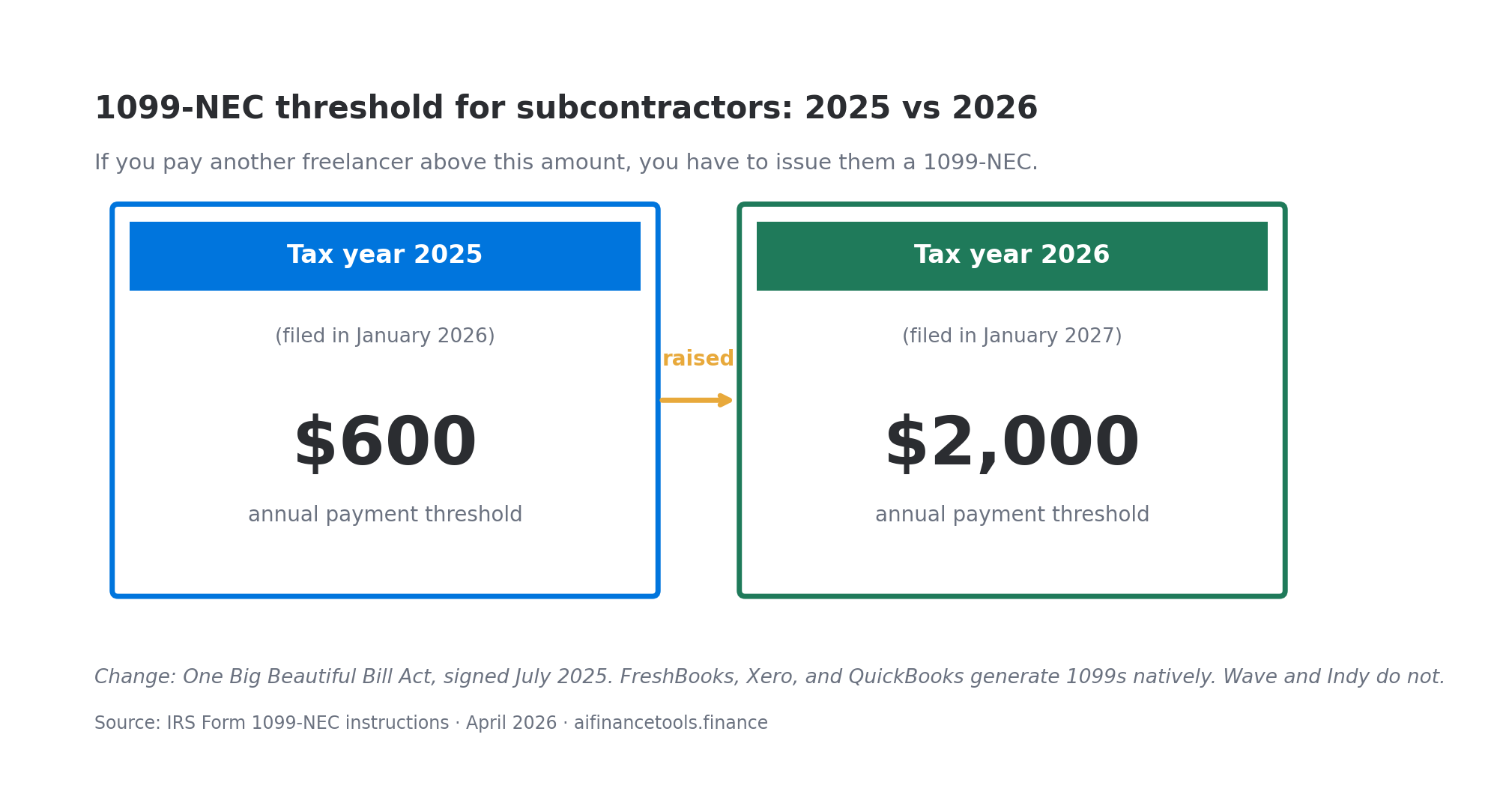
For tax year 2025 (filed January 2026), you file a 1099-NEC for any subcontractor you paid more than $600. The threshold rises to $2,000 for tax year 2026 under the One Big Beautiful Bill Act, signed July 2025. FreshBooks, Xero, and QuickBooks all generate 1099s. FreshBooks Plus does it cleanest, with W-9 collection built into the contractor onboarding flow. Wave and Indy don’t generate 1099s natively. Bonsai handles them on Professional and Business tiers.
Does the state I live in change which tool I should pick?
Slightly. In a high-tax state like California, New York, or New Jersey, you’ll want a tool with quarterly tax estimates that account for state tax (FreshBooks does this, QuickBooks does this, Wave doesn’t). In a no-income-tax state like Florida, Texas, Tennessee, or Washington, you have less to track. State tax obligations can move the needle by $4,000 to $9,000 a year on a $75,000 income. I broke down exactly what freelancers pay by state in How Much Do Freelancers Pay in Taxes by State (2026 Guide).
Should I switch tools mid-year if my current one isn’t working?
Switching mid-year leaves you with two partial-year datasets at tax time, which makes reconciliation harder. Either tough it out until December and switch on January 1, or do the migration in a clean weekend including back-importing all your transactions for the year so far. If your current tool is broken (data loss, sync failure, billing problems), switch immediately and accept the cleanup cost.
Is there an AI accounting tool worth using in 2026?
Most “AI accounting” claims in 2026 are auto-categorization plus a chatbot. That’s been standard for years. Where AI is genuinely useful: deduction-finding tools like Keeper that scan your transactions for missed write-offs, and tax-filing tools like FlyFin that pair AI screening with CPA review. Both are add-ons to a real bookkeeping system, not replacements for one. Treat any “AI does your accounting” headline with skepticism. Read the user reviews on Trustpilot before committing.
What to do this week
Pick one tool from the seven above based on your income tier and the decision framework. Sign up for the free trial. Connect one bank account and one payment processor. Import the last 30 days of transactions. Spend 30 minutes categorizing them. If the tool’s UI annoys you in those 30 minutes, cancel and try the next one on your shortlist. You’ll know within an hour whether it’s the right fit.
Don’t spend a weekend reading more comparisons. The marginal $50 a year between options matters less than which tool you’ll actually open every Friday.
Start Your Free Trial with FreshBooks
Start Your Free Trial with Xero
Start Your Free Trial with Bonsai
Tax laws change every year and software pricing shifts with them. Verify current figures at IRS.gov and on each vendor’s official pricing page before committing. This guide is informational and reflects pricing and rules as of April 2026. It is not tax or legal advice. For your specific situation, consult a qualified CPA or enrolled agent.
About the author
Gareth is an entrepreneur based in Dubai and the founder of AI Finance Tools for Freelancers. He’s not a CPA or a bookkeeper. He built this site because he couldn’t find honest, thorough reviews of AI finance tools written for freelancers. Every guide is researched from real user reviews, official documentation, and expert sources.