
Schedule C instructions, walked through line by line with one freelance writer’s actual 2025 numbers. Read this and you’ll know what goes where, what your net profit is, and how much self-employment tax you owe.
It’s 11pm on a Sunday in February. You have one 1099-NEC, a Stripe report from another client, a folder of receipts you’ve been meaning to sort since October, and Schedule C open on your laptop. The form asks for your “principal business code.” You don’t know what that is. You scroll. You start Googling. An hour later you’re still stuck on Line B.
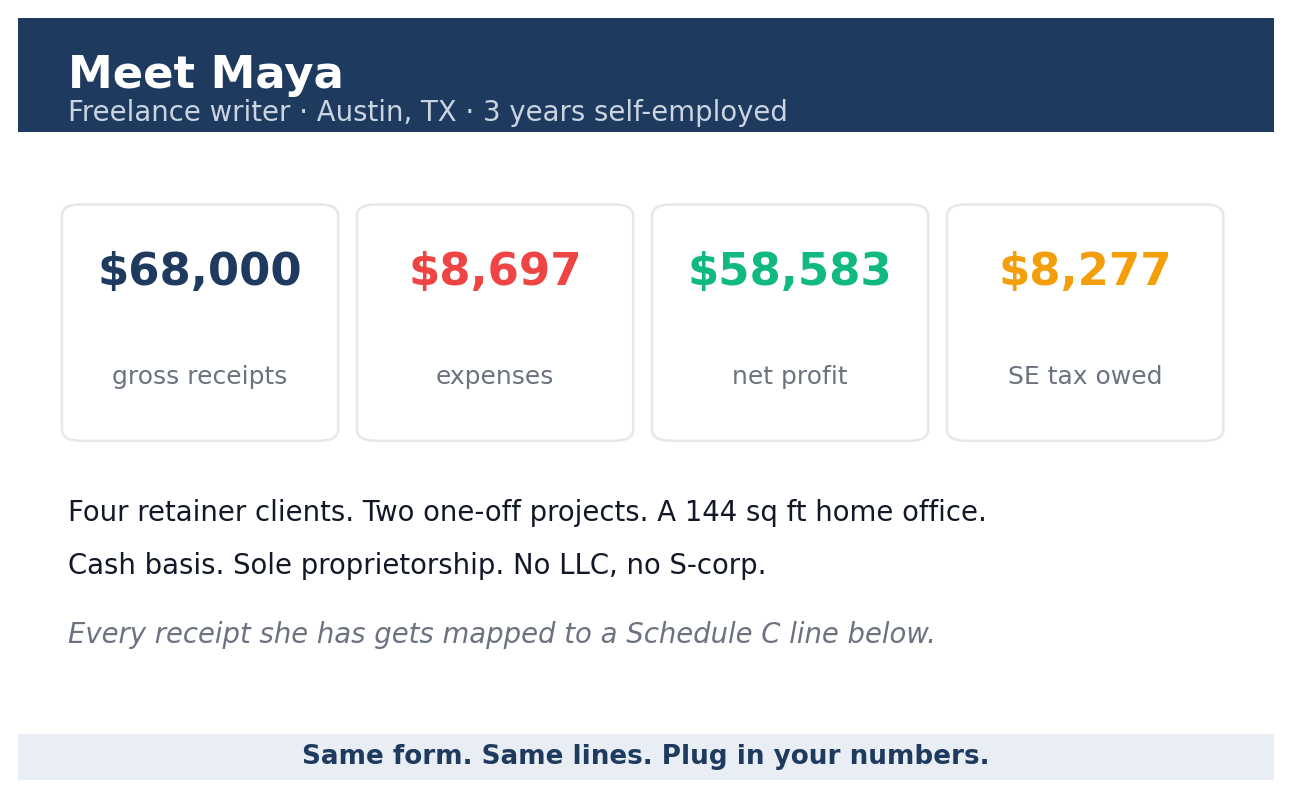
This guide fixes that. We’re going to walk through every line of Schedule C using one freelance writer who earned $68,000 in 2025. Every receipt she has gets mapped to a line. Every line gets a plain answer. By Line 31 you’ll see her net profit. By the end you’ll see exactly how much self-employment tax she owes.
If your numbers look nothing like hers, that’s fine. The form (officially titled “Profit or Loss from Business”) works the same way. Plug your figures into the same lines and you’ve got your return.
Fill out Schedule C in this order, not top to bottom
Schedule C has five parts. Most people try to fill them in the printed order. That’s why they get stuck. The order that actually works is:
- The header (Lines A through J). Your business identifying info.
- Part III (Lines 33 through 42). Only if you sell physical products. Skip it if you sell services.
- Part IV (Lines 43 through 47b). Only if you claimed vehicle expenses on Line 9.
- Part V (Line 48). Itemized “other expenses” that don’t fit Lines 8 to 27a.
- Part II (Lines 8 through 30). Your expenses by category.
- Part I (Lines 1 through 7). Your income.
- Lines 28 through 32. The math at the bottom that gives you your net profit.
Why this order: Part V feeds Part II Line 27a. Part III feeds Part I Line 4. Part IV is required if you used Line 9. Start at the top and you’re guessing about totals that come from sections you haven’t filled in yet.
If you sell services and don’t claim vehicle expenses, the form shrinks to: header, Part V, Part II, Part I, and the bottom math. That’s most freelancers reading this.
Meet Maya: a freelance writer with $68,000 in receipts
Maya is 34, lives in Austin, and writes long-form content for SaaS companies. She’s been freelance for three years. Single, no kids, no W-2 job on the side. In 2025 she invoiced $68,000 across four retainer clients and two one-off projects. Her office is a 144 square foot spare bedroom that she uses only for work, nothing else.
Here’s what her shoebox of records looks like:
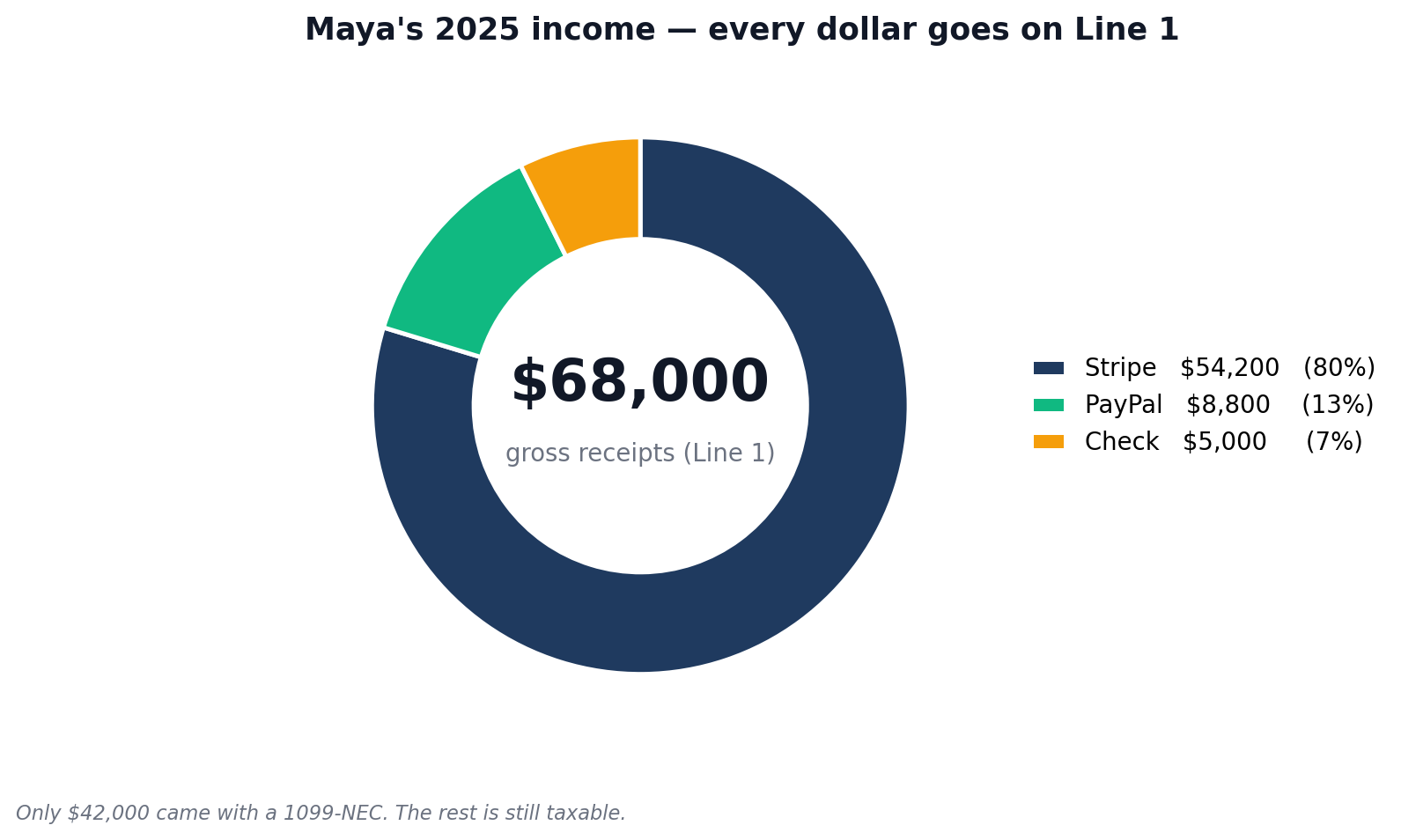
- Income: $54,200 in Stripe payments, $8,800 in PayPal transfers, and a $5,000 check from one client who refused to use either.
- 1099-NECs received: Three of them, totalling $42,000.
- Vehicle: 184 miles to two in-person client meetings, all logged in MileIQ.
- Software: Adobe Creative Cloud, Grammarly Premium, ChatGPT Plus, Notion, plus hosting and a domain.
- Equipment: A new MacBook Pro she bought in March for $1,899.
- Subcontractor: Paid an editor $800 to copyedit a long project.
She uses cash basis accounting, which is what almost every freelancer uses. Her business is a sole proprietorship, no LLC, no S-corp. So everything goes on her personal Form 1040 with Schedule C attached.
How to fill out Schedule C: the top section (Lines A through J)
The top section is just asking who you are and what you do. Most of it takes about 60 seconds.
Line A, Principal business or profession: Maya enters “Freelance writer.” Plain English. The IRS doesn’t need a tagline.
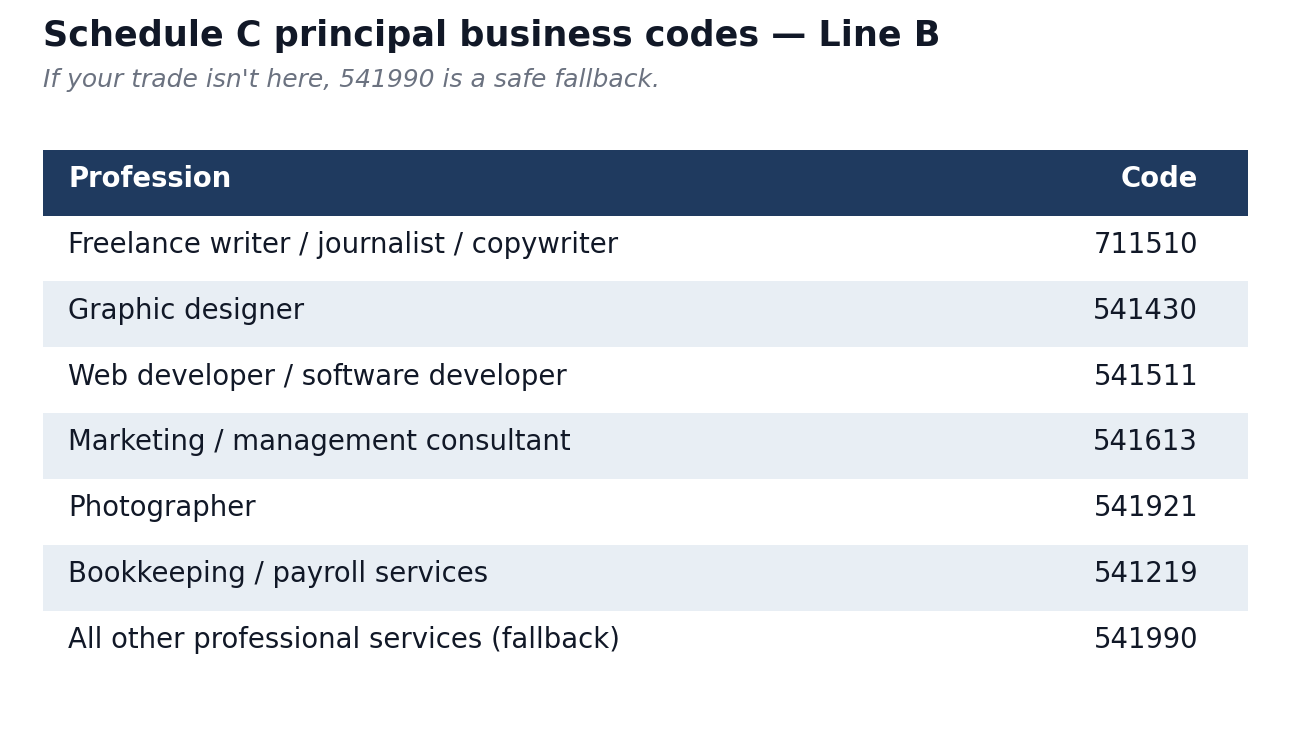
Line B, Principal business code: A six-digit NAICS code that tells the IRS what industry you’re in. They use it to compare your expense ratios against other businesses in the same category. Pick the wrong code and your deductions can look like outliers, which the IRS uses as one audit selection signal. Common codes for freelancers:
- 711510. Independent artists, writers, performers (Maya picks this).
- 541430. Graphic design services.
- 541511. Custom computer programming.
- 541613. Marketing consulting.
- 541810. Advertising agencies and copywriters working mainly in advertising.
- 541921. Photographers.
- 541990. All other professional services. Use this only if nothing else fits.
The full list is in the Schedule C instructions PDF on IRS.gov, currently starting on page C-17.
Line C, Business name: Blank. Maya invoices under her own name. If you have a registered DBA or LLC name, put it here.
Line D, EIN: Blank. Maya uses her SSN on her 1040. You can grab a free EIN at IRS.gov if you’d rather not give your SSN out on every W-9.
Line E, Business address: Same as her home address on the 1040, so she leaves it blank. If you have a separate office, list that address.
Line F, Accounting method: Cash. Pick this unless you have a specific reason not to. Cash means you record income when the money hits your account and expenses when you pay them. Accrual means you record income when you invoice. Cash matches how you actually live.
Line G, Material participation: Yes. You ran the business yourself.
Line H: Tick this only if 2025 was your first year in business.
Line I: Did you make payments that required filing 1099s? If you paid any contractor $600 or more for services in 2025, the answer is yes. Maya paid her editor $800, so she ticks Yes.
Line J: Did you actually file those 1099s? Yes (she filed one 1099-NEC for the editor by the January 31, 2026 deadline).
If you paid a contractor over $600 and forgot to issue a 1099-NEC, you’re already late. The IRS Information Return Penalty schedule charges $60 per 1099 if filed within 30 days of January 31, $130 if filed by August 1, and $340 after August 1. File the late 1099 as soon as possible to land in the lowest tier you still can. Don’t lie on Line J. The mismatch is what gets flagged.
Schedule C example: Part I (Income)
Part I gets you to your gross income. There are five lines. Most freelancers fill in two of them and skip the rest.
Line 1, Gross receipts or sales: Maya enters $68,000. This is every dollar that hit her accounts for work in 2025, whether or not a 1099 was issued. Three clients sent her 1099-NECs adding up to $42,000. The other $26,000 came from clients who paid her under the $600 threshold or just didn’t bother with the form. All of it goes on Line 1.
Line 2, Returns and allowances: $0. She didn’t refund any clients.
Line 3: Line 1 minus Line 2. $68,000.
Line 4, Cost of goods sold: $0. She sells writing, not products. Skip Part III entirely.
Line 5, Gross profit: Line 3 minus Line 4. $68,000.
Line 6, Other income: $0. This is for things like fuel tax credits or recovered bad debts. Interest from your business bank account does not go here. That goes on Form 1040 Line 2b.
Line 7, Gross income: Line 5 plus Line 6. $68,000.
The biggest mistake people make on Part I is reporting only what their 1099s show. The IRS already has those numbers. They want everything else too. If your total receipts come in higher than your 1099 totals, that’s normal. If they come in lower, you’ve got a problem. Took payments through Venmo, Zelle, or PayPal? Those count too. The 1099-K threshold for tax year 2025 is $2,500. Whether the platform reports your activity or not doesn’t change what you owe. For the latest threshold rules see our 2026 1099 rule changes guide.
1099 Schedule C: the Part II line map for service freelancers
Part II is where your tax bill shrinks. The form lists 19 expense categories on Lines 8 through 27, plus a catch-all on Line 27a. Putting the right thing on the wrong line doesn’t change your total deduction, but it can flag your return for review if a line looks unusual for your NAICS code.
Here’s the full Part II map. The “Use it?” column tells you which lines almost every service freelancer touches.
| Line | What it covers | Use it? | Common freelancer examples |
|---|---|---|---|
| 8 | Advertising | Often | Google Ads, Meta Ads, business cards, sponsored posts, podcast ads |
| 9 | Car and truck expenses | Sometimes | Mileage at $0.70/mile (2025) OR actual costs. Triggers Part IV. |
| 10 | Commissions and fees | Rarely | Sales commissions paid to a referrer; Upwork’s cut; Etsy fees |
| 11 | Contract labor | Sometimes | Subcontractors paid for client work. Triggers Lines I and J. |
| 12 | Depletion | No | Mining and timber only |
| 13 | Depreciation and Section 179 | Sometimes | Laptop, camera, equipment over $200 |
| 14 | Employee benefit programs | No | Only if you have W-2 employees |
| 15 | Insurance (other than health) | Sometimes | Professional liability (E&O), cyber, business equipment |
| 16a/16b | Interest (mortgage / other) | Rarely | Business loan or business credit card interest |
| 17 | Legal and professional services | Often | Tax prep, bookkeeper, lawyer for contract review |
| 18 | Office expense | Often | Paper, pens, postage, printer ink. NOT software. NOT home office. |
| 19 | Pension and profit-sharing plans | No | Only employer contributions for employees |
| 20a | Rent or lease (vehicles, equipment) | Sometimes | Leased camera, leased coworking equipment |
| 20b | Rent (other business property) | Sometimes | Coworking, studio. Not your home; that’s Line 30. |
| 21 | Repairs and maintenance | Rarely | Fixing equipment. Not capital improvements. |
| 22 | Supplies | Often | Materials consumed in your work |
| 23 | Taxes and licenses | Sometimes | Business license, state franchise tax, professional license renewals |
| 24a | Travel | Often | Flights, hotels, conference travel. 100% deductible. |
| 24b | Meals (50%) | Sometimes | Client and travel meals. 50% deductible. |
| 25 | Utilities | Sometimes | Business phone, business internet (only the business portion) |
| 26 | Wages | No | Only if you have W-2 employees |
| 27a | Other expenses (from Part V) | Yes | Software subscriptions, bank fees, payment processor fees |
| 27b | Energy efficient commercial buildings | No | New for 2025. Most freelancers skip. |
| 28 | Total expenses (before home office) | Auto | Sum of Lines 8 through 27b |
| 29 | Tentative profit | Auto | Line 7 minus Line 28 |
| 30 | Home office | Often | $5/sq ft up to 300 sq ft = $1,500 max, OR Form 8829 |
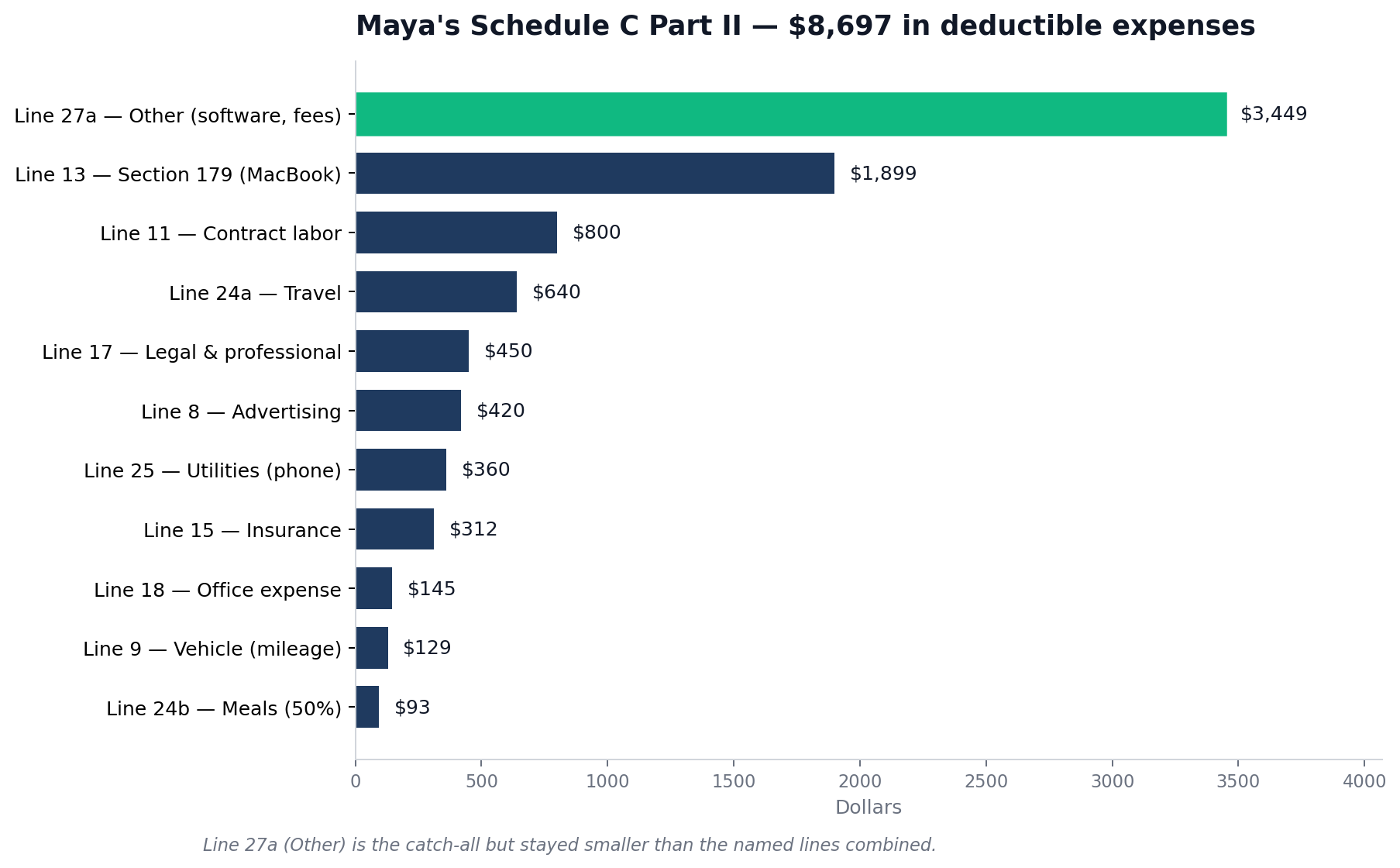
Here’s how Maya’s $8,697 in deductions break down:
| Line | Category | What Maya put here | Amount |
|---|---|---|---|
| 8 | Advertising | Domain, hosting, one LinkedIn promoted post | $420 |
| 9 | Car and truck expenses | 184 business miles × $0.70 | $129 |
| 11 | Contract labor | Editor (1099-NEC issued) | $800 |
| 13 | Depreciation / Section 179 | MacBook Pro, expensed in full | $1,899 |
| 15 | Insurance | Professional liability policy | $312 |
| 17 | Legal and professional services | CPA fee for prior-year return | $450 |
| 18 | Office expense | Paper, printer ink, pens | $145 |
| 24a | Travel | One conference (flight, hotel) | $640 |
| 24b | Meals (50%) | Conference and client meals: $186 × 50% | $93 |
| 25 | Utilities | Business portion of mobile phone | $360 |
| 27a | Other expenses (Part V) | Software, processing fees, training | $3,449 |
| 28 | Total expenses (before home office) | $8,697 |
Now the line-by-line explanations.
Line 8, Advertising
Anything you paid to find clients or promote yourself. Domain registration, web hosting, business cards, Facebook Ads, Google Ads, LinkedIn Premium if you use it for business. Maya’s $420 covers her domain renewal, a year of hosting, and one promoted LinkedIn post.
Line 9, Car and truck expenses
Two methods. Pick one and stick with it for the year.
- Standard mileage rate: 70 cents per business mile for 2025, up from 67 cents in 2024 (per IRS standard mileage rates). The 2026 rate goes up to 72.5 cents. Multiply business miles by the rate. Maya drove 184 business miles, so 184 × $0.70 = $129.
- Actual expense method: Add up gas, insurance, repairs, depreciation, then multiply by your business-use percentage.
If you put any number on Line 9, you also have to fill in Part IV on page 2 (date placed in service, total miles, business miles, written log). No log, no deduction. A free app like Stride keeps the log automatically. MileIQ also works but only the first 40 trips per month are free.
In the first year you use a vehicle for business, you can pick either method. After that, if you started with actual expenses, you can’t switch to standard mileage on that vehicle. If you started with standard, you’ve got flexibility. For leased vehicles, the method you choose applies for the full lease term.
Line 11, Contract labor
Payments to other freelancers and contractors who helped you do your work. Maya’s editor goes here. So would a virtual assistant, a subcontractor designer, or a transcriber.
Two rules. If you paid any contractor $600 or more in 2025, you owed them a 1099-NEC by January 31, 2026. And contract labor is different from Line 10 (Commissions and fees), which is for referral and platform fees.
Line 13, Depreciation and Section 179
This line is for equipment that lasts more than a year: laptops, cameras, monitors, office furniture, tablets. You have three paths:
- De minimis safe harbor ($2,500 or less per item). Expense it directly. Many freelancers put items under $2,500 in Part V as “Equipment under de minimis safe harbor,” or in Line 22 (Supplies) if it’s a smaller tool. No depreciation paperwork.
- Section 179. Take the full deduction in the year you bought it. Goes on Line 13. Requires Form 4562. The 2025 limit was raised to $2,500,000 under the OBBBA, well above what any solo freelancer needs.
- Bonus depreciation. The OBBBA brought back 100% bonus depreciation for qualified property placed in service after January 19, 2025. Most equipment can be fully expensed the year you buy it without using Section 179.
- Standard depreciation. Spread the deduction over several years (typically 5 years for computers).
Maya elected Section 179 on her $1,899 MacBook. She filed Form 4562 (Depreciation and Amortization) to report it. Most tax software handles 4562 automatically once you enter the asset.
Line 15, Insurance (other than health)
Professional liability (also called errors and omissions), general business liability, cyber liability. Maya pays $26 a month for a freelance writers’ E&O policy through Hiscox. Annual total: $312.
Your own health insurance does not go here. It belongs on Schedule 1, Line 17 of your 1040 as the self-employed health insurance deduction. That’s one of the most-missed deductions for full-time freelancers paying their own premiums.
Lines 16, 17, 18: interest, professional services, office expense
- Line 16 (Interest): Business loan interest, business credit card interest. Personal credit card interest doesn’t count. Maya doesn’t have any. $0.
- Line 17 (Legal and professional services): Accountant fees, lawyer fees, bookkeeping. Maya paid her CPA $450 to file her prior-year return.
- Line 18 (Office expense): Paper, pens, printer ink, postage. Tangible supplies that get used up. Maya’s adds up to $145.
Lines 24a and 24b: travel and meals
Travel away from home for business. Maya flew to a content marketing conference in Denver. The flight ($210), the hotel ($380 for two nights), and the airport parking ($50) all went on Line 24a, which adds up to $640.
Meals are 50% deductible. She spent $186 on food during the conference and on coffees with the two clients she met in person. Half of $186 is $93. That goes on Line 24b. The 100% restaurant meal deduction that applied briefly during the pandemic is gone. We’ve been back to 50% since 2023.
Line 25, Utilities
Business utilities outside of the home office. The most common entry for freelancers is the business portion of your mobile phone. Maya estimates 60% business use on a $50/month plan, so $30 × 12 = $360.
If you take the home office deduction, your home utilities (electricity, gas, water, home internet) don’t go on Line 25. They get baked into the home office calculation on Line 30. Putting them in both places is a flag.
Line 27a, Other expenses (Part V on page 2)
The catch-all. Anything that doesn’t fit Lines 8 through 26 goes here, itemised on Part V. For most service freelancers this ends up being the biggest line.
Maya’s Part V looks like this:
- Software subscriptions: Adobe Creative Cloud ($660), Grammarly Premium ($144), ChatGPT Plus ($240), Notion ($96). Total: $1,140.
- Stripe processing fees: $1,950 (about 2.9% of the $54,200 she ran through Stripe, plus per-transaction fees).
- Bank fees: $60 in monthly maintenance on her business checking account.
- Continuing education: A $299 course on technical writing.
Total Part V: $3,449. That number flows up to Line 27a.
People dump everything into “Other expenses” because it feels easier than figuring out the right line. The IRS sees a Line 27a bigger than Lines 8 through 26 combined and starts asking questions. Use the named categories first. Save Part V for things that genuinely have nowhere else to go. And be specific in the descriptions. “Software subscriptions” is fine. “Misc” is not.
The three questions every freelancer asks about Schedule C
These come up on r/tax and r/freelance every week. Quick answers.
Where do my Stripe and PayPal fees go? They don’t have a dedicated line. Itemize them in Part V as “Payment processing fees,” then they flow to Line 27a.
Where do my software subscriptions go? Adobe, Notion, Figma, Canva Pro, ChatGPT Plus, GitHub, Slack. None of these have a dedicated line either. They go in Part V as “Software subscriptions,” or itemized one by one. They do not go on Line 18 (Office expense). Line 18 is for physical office supplies.
Where does my phone bill go? If your phone is mixed personal and business use, only the business portion is deductible. Pick a defensible percentage. Then put it on Line 25 (Utilities) or Part V as “Cell phone, business portion.” Either is fine.
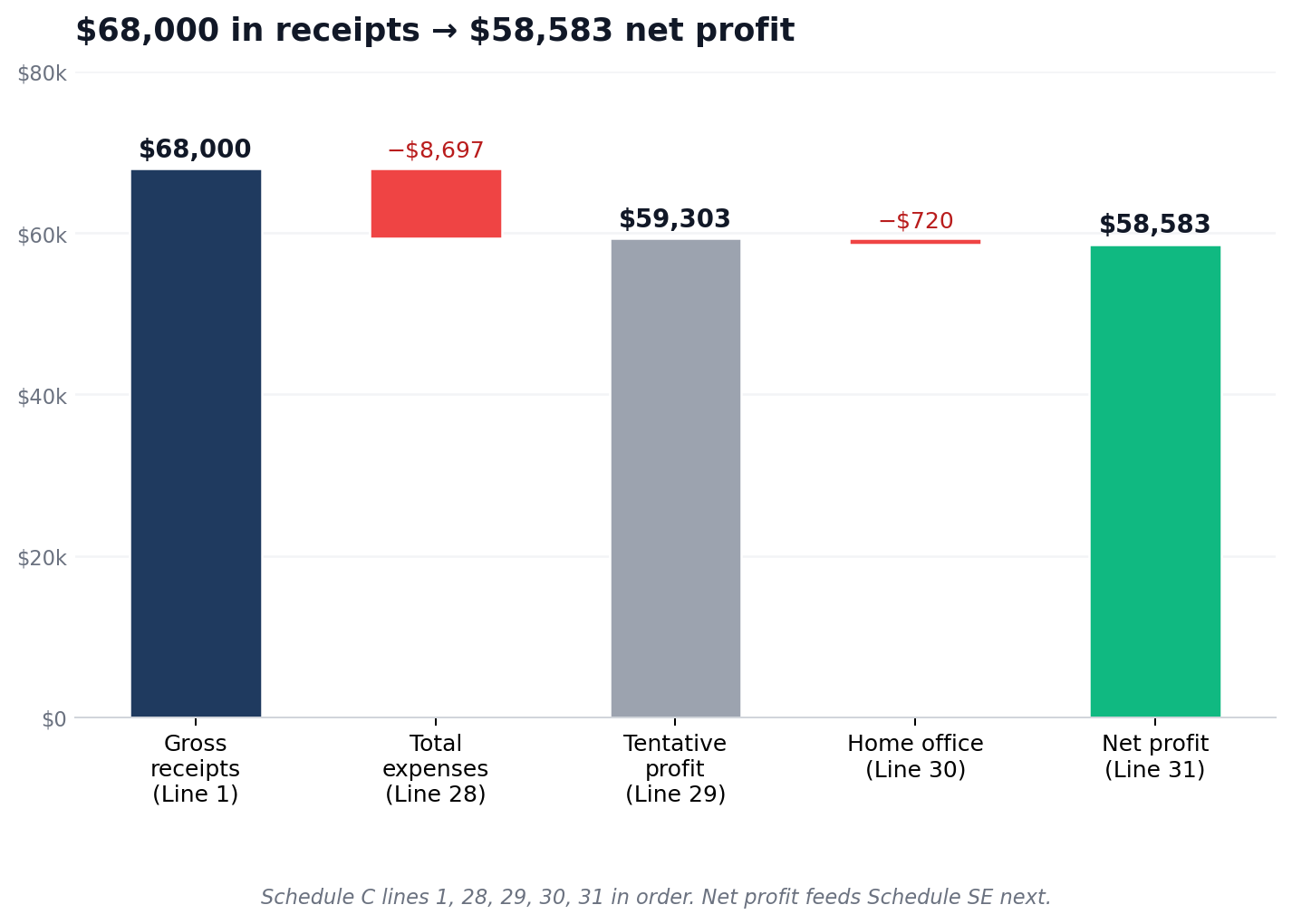
Lines 28, 29, 30, 31: the math that produces your net profit
You’ve done the hard work. The last four lines are arithmetic.
- Line 28, Total expenses: Add Lines 8 through 27a. Maya’s total: $8,697.
- Line 29, Tentative profit: Line 7 minus Line 28. $68,000 − $8,697 = $59,303.
- Line 30, Home office deduction: See below.
- Line 31, Net profit or loss: Line 29 minus Line 30.
Line 30: the home office deduction, simplified vs actual
To qualify for any home office deduction at all, the space has to be used regularly and exclusively for business and it must be your principal place of business. Maya’s spare bedroom is just her office, period, and she works from home full-time. She qualifies.
Two methods to calculate the deduction:
- Simplified method: $5 per square foot, up to 300 square feet. Maximum deduction $1,500. No paperwork. No depreciation recapture if you sell your home later. Maya’s office is 144 square feet: 144 × $5 = $720.
- Actual expense method: Calculate the percentage of your home used for business (square footage divided by total). Apply that percentage to rent or mortgage interest, utilities, insurance, repairs. Requires Form 8829 and good records. Often produces a bigger deduction in expensive housing markets.
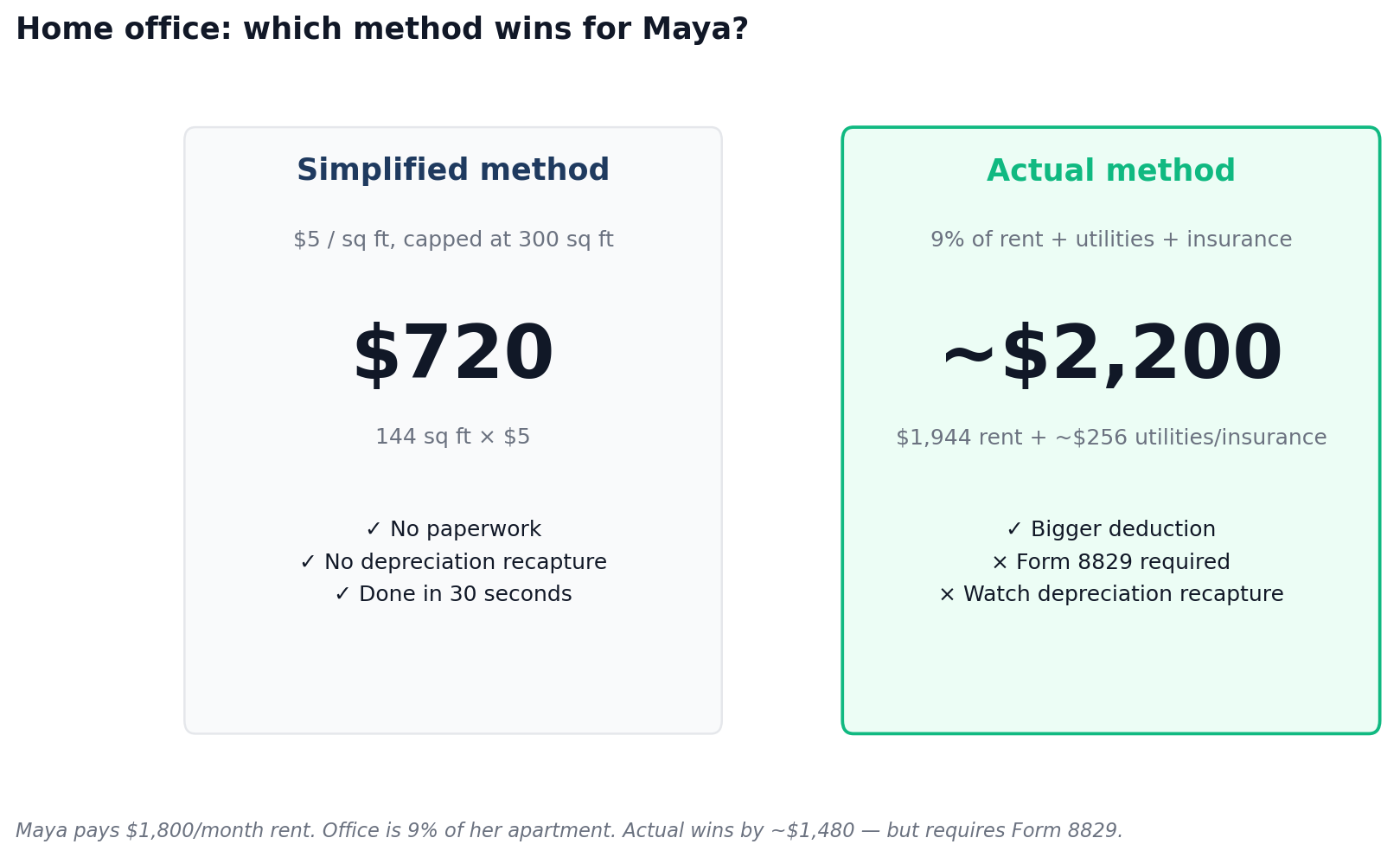
Maya’s monthly rent is $1,800 and her office takes up 9% of her apartment. The actual method would give her about $1,944 in rent alone, plus a portion of utilities and renter’s insurance. She runs both calculations every year and goes with the higher one. To keep this example clean we’ll use the simplified $720. Our home office deduction guide walks through both methods with the worksheets.
Three rules. The home office deduction is capped at your tentative profit (Line 29), so you can’t use it to create or deepen a loss. You can’t deduct the same utilities twice (Line 25 and Line 30). And the “exclusive use” rule is strict. A desk in the corner of your living room where you also watch Netflix doesn’t qualify.
Line 31: Maya’s net profit
Line 29 minus Line 30: $59,303 − $720 = $58,583.
This number does the most work in your tax return. It flows to Schedule 1 (then to your 1040 as taxable income), and it flows to Schedule SE to calculate self-employment tax.
Line 32: only matters if you had a loss
Negative Line 31? You check 32a (all investment is at risk) or 32b (some not at risk). Most freelancers check 32a.
Part III: skip it if you sell services
If you only sell services, leave Part III blank and put zero on Line 4. Lines 33 through 42 work out cost of goods sold for people who manufacture or resell physical products. Line 42 is the result, which carries back to Line 4. For freelance designers, writers, developers, consultants, photographers, marketers, video editors, and virtual assistants, Part III is empty.
Part IV: vehicle information (only if you used Line 9)
Put a number on Line 9 and you have to complete Part IV. The exception is if you’re filing Form 4562 for vehicle depreciation, in which case the vehicle info goes on Form 4562 instead.
- Line 43. Date you placed the vehicle in service for business.
- Line 44a. Total business miles for 2025.
- Line 44b. Commuting miles. Commuting is not deductible.
- Line 44c. Other (personal) miles.
- Line 45. Was the vehicle available for personal use? For most freelancers, yes.
- Line 46. Do you have another vehicle for personal use?
- Line 47a. Do you have evidence to support your deduction? Answer yes only if you actually do.
- Line 47b. Is the evidence written? A mileage log, a tracker app export, or calendar entries with addresses count as yes. Your memory does not.
Answer no on 47a and the deduction can be challenged on audit. Answer no on 47b and the deduction can be reduced or denied even with a reconstruction. A tracker app like MileIQ or the built-in tracker in QuickBooks Solopreneur produces the kind of written record the IRS expects.
Schedule SE: how Maya’s $58,583 net profit becomes $8,277 in self-employment tax
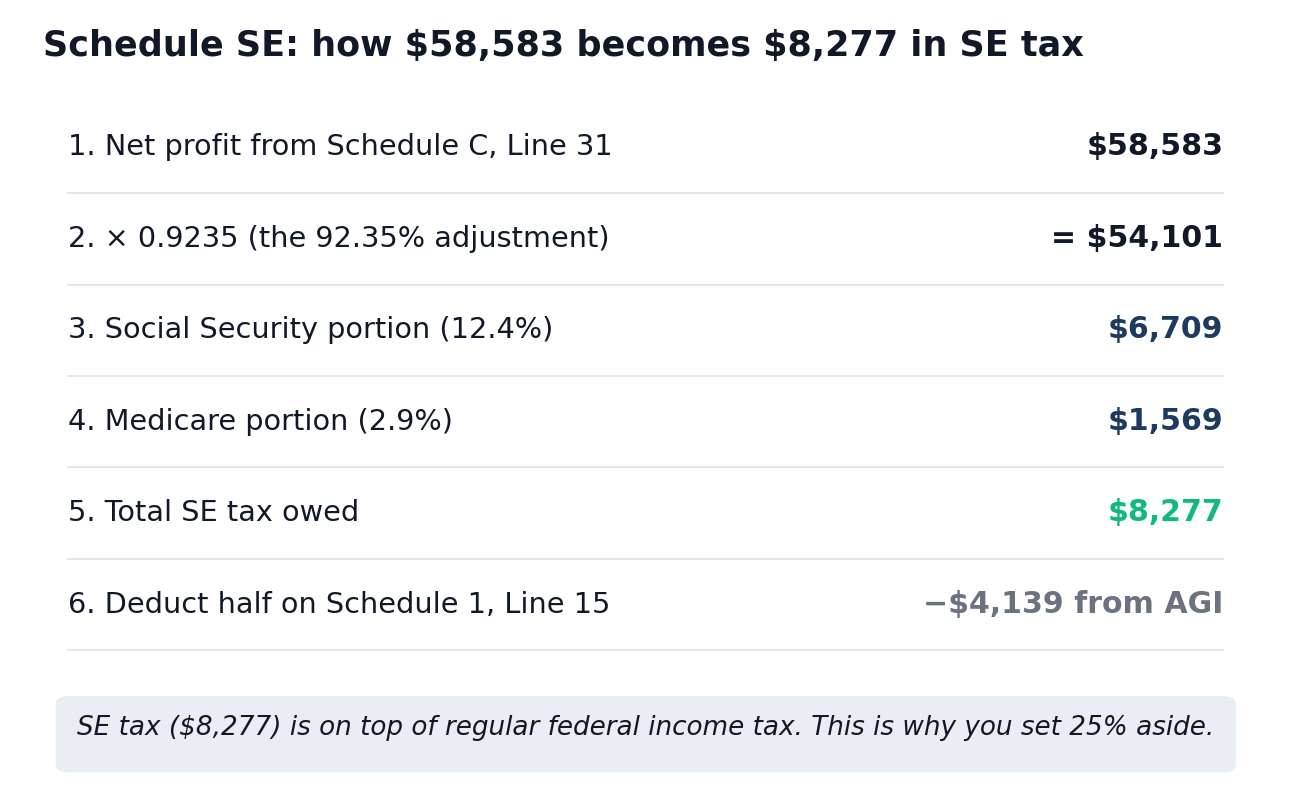
Schedule C tells you your profit. Schedule SE turns that profit into the bill nobody warns first-time freelancers about: 15.3% for Social Security and Medicare on top of regular income tax.
- 92.35% adjustment. Schedule SE multiplies your net profit by 0.9235 to mimic the FICA exclusion W-2 employees get. $58,583 × 0.9235 = $54,101.
- Social Security portion. 12.4% on the first $176,100 of combined wages and SE earnings (the 2025 wage base). $54,101 × 0.124 = $6,709.
- Medicare portion. 2.9% on all SE earnings, no cap. $54,101 × 0.029 = $1,569.
- Total SE tax. $6,709 + $1,569 = $8,277.
- Deduction for half. You can deduct 50% of your SE tax on Schedule 1, Line 15. That’s $4,139 off your adjusted gross income (not off your SE tax itself).
So Maya owes $8,277 in self-employment tax before federal income tax even enters the picture. On top of that, her $58,583 in net profit (minus the $4,139 SE deduction and her $15,000 standard deduction for single filers in 2025) puts her in the 22% federal bracket on the top portion of her income. That adds another $5,500 or so depending on credits. Total federal: close to $14,000 on $58,583 in net profit. Roughly 24% gone to the IRS, before state tax even shows up.
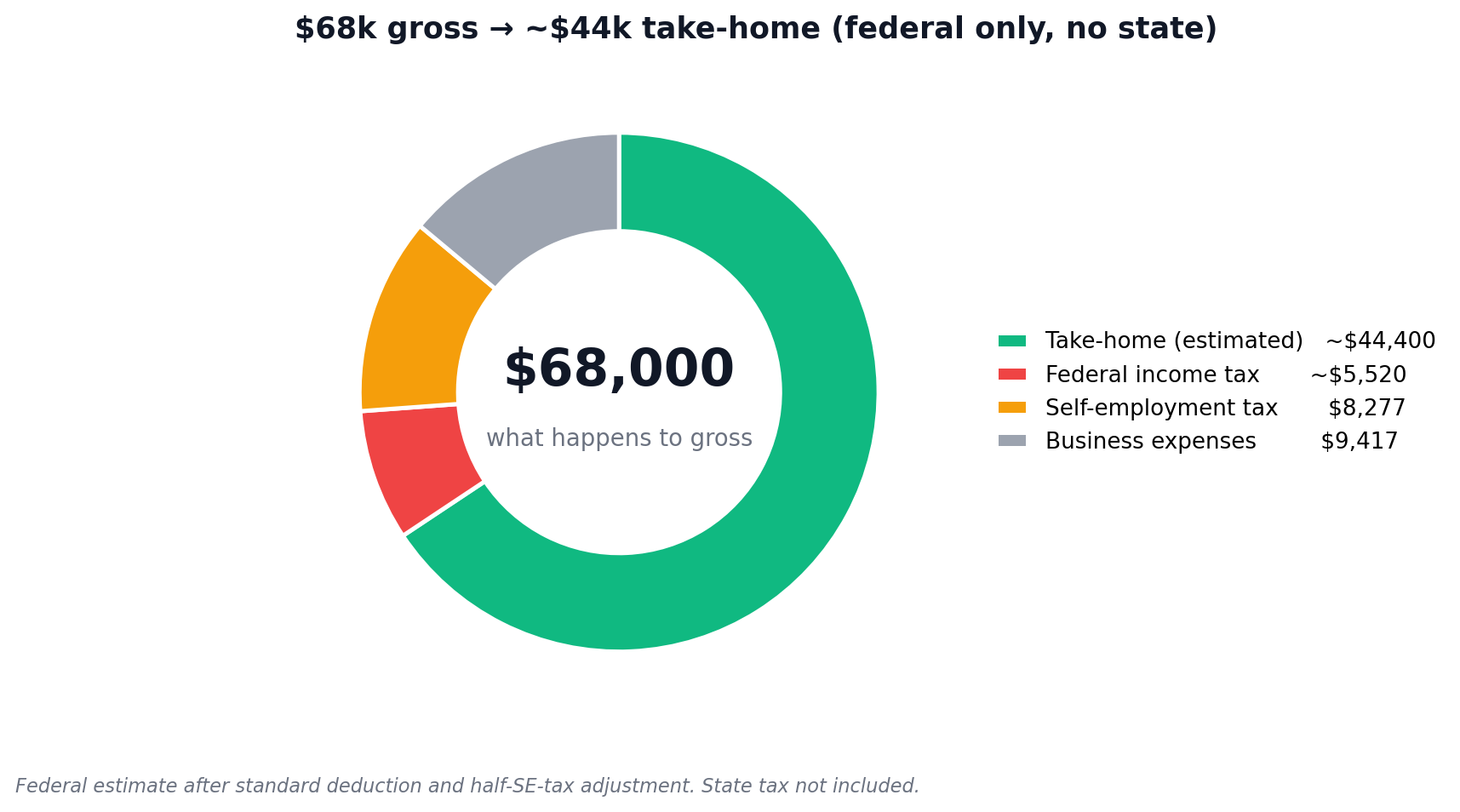
This is why quarterly estimated tax payments matter so much for freelancers, and why freelancers who guess at tax-aside percentages get burned. Setting aside 25% of net profit covers most of it for someone in Maya’s bracket. See our tax-aside calculator for your specific number.
The QBI deduction your Schedule C unlocks
One more thing your Line 31 net profit drives: the Qualified Business Income (QBI) deduction under Section 199A. If your taxable income is under the 2025 thresholds ($241,950 single / $483,900 joint for the full deduction; phase-in starts at $197,300 / $394,600), you can deduct up to 20% of your Schedule C net profit on Form 1040 before figuring federal income tax. This is separate from the half-SE-tax deduction and separate from your business expenses on Schedule C itself.
The OBBBA made this deduction permanent and adjusted the phase-in ranges. Tax software calculates it automatically once you finish Schedule C.
For Maya at $58,583 net profit, that’s potentially an $11,716 deduction (20% of $58,583) stripped off her taxable income before federal tax is applied. It’s the single biggest reason Schedule C is worth doing carefully. QBI rules get tricky for “specified service trades” (legal, health, consulting, financial services) above the income thresholds, so check the current rules at IRS.gov or run it through your tax software.
The five-minute Schedule C readiness check (run this before you open the form)
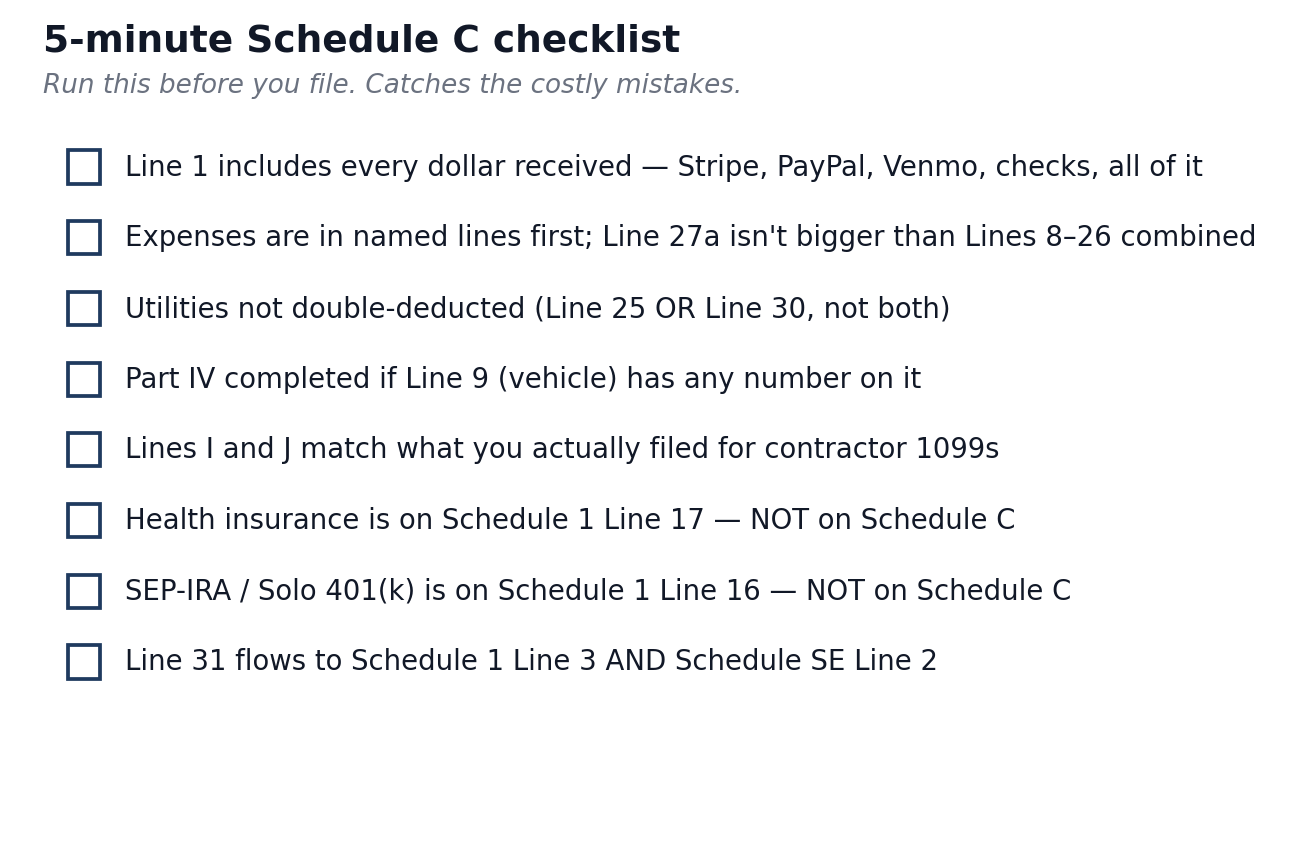
Answer yes to all of them and you’re ready. Hit a no, and fix the gap before you start.
- Do you have one number for total business income, including non-1099 payments? Bank statements, 1099s, and Stripe/PayPal reports reconciled.
- Do you have your expenses sorted into Schedule C buckets using the table above?
- Do you have a written mileage log if you’re claiming Line 9? App export, calendar with addresses, paper log; any of these.
- Do you know your home office square footage if you’re claiming Line 30?
- Did you pay any contractor $600 or more in 2025, and did you issue 1099-NECs?
- Do you have a NAICS code picked out for Line B?
- Did you buy equipment in 2025 that you want to expense via Section 179, bonus depreciation, or de minimis safe harbor?
- Have you stored receipts and supporting documents somewhere you can find them? The IRS recommends keeping records for at least 3 years from the filing date, longer if you under-reported by more than 25%. Most CPAs say 7 years to be safe.
Stuck on item 1 or item 2? The gap is bookkeeping, not the tax form. See our accounting software guide for freelancers for tools that produce a clean Schedule C-ready P&L.
A 5-minute checklist before you submit
Run this list before you hit submit. Five minutes. It catches most of the costly errors.
- Does Line 1 include every dollar received? Cross-check Stripe, PayPal, Venmo, bank deposits, and checks against your invoicing log.
- Did you put expenses in named lines first? A Line 27a (Other) larger than Lines 8 through 26 combined looks lazy. Move what fits to its real category.
- Did you double-deduct utilities? If Line 30 (home office) includes utilities, Line 25 should not.
- Did you complete Part IV? If Line 9 (vehicle) has any number on it, Part IV is required.
- Did you file the right 1099s? Lines I and J should match what you actually did.
- Did you put your own health insurance on Schedule C? Don’t. It goes on Schedule 1, Line 17.
- Did you put your own SEP-IRA or Solo 401(k) contributions on Schedule C? Don’t. Those go on Schedule 1, Line 16.
- Does Line 31 flow correctly to Schedule 1 (Line 3) and Schedule SE (Line 2)?
The four mistakes most likely to cost you money
Skipping Line 30. The home office deduction is the most common one freelancers leave on the table out of audit fear. If you have a dedicated workspace and you actually qualify, claim it. The simplified method removes the audit anxiety: a flat $5 per square foot, no records of utilities required, no depreciation recapture later. At 144 square feet that’s $720. At 300 it’s $1,500.
Reporting only 1099 income on Line 1. Every deposit counts. The IRS gets the 1099s the same time you do. If your reported income is below the sum of your 1099s, expect a CP2000 notice within 12 to 18 months. If your reported income is exactly equal to your 1099s and you took non-1099 payments, expect questions when those payments surface.
Mixing personal and business expenses. A coffee with a friend is not a business meal. The “business portion” of a phone bill is not 100% unless you have a second phone you only use for work. Pick a business-use ratio you can defend and apply it consistently. A separate business bank account for freelancers makes this much easier.
Forgetting Part IV when claiming mileage. If Line 9 has a number on it, the IRS expects to see Part IV completed: total miles for the year, business miles, written log confirmation. Without it, the deduction gets disallowed if you’re ever audited.
Four 2025 changes that catch people out
The 2025 Schedule C looks almost identical to 2024 on the surface. Underneath, the One Big Beautiful Bill Act (signed July 4, 2025) made real changes worth knowing.
- Standard mileage rate is 70 cents per mile, up from 67 cents in 2024. The 2026 rate is 72.5 cents. Make sure your tax software is using the right one.
- 100% bonus depreciation is back for qualified property placed in service after January 19, 2025. Equipment you bought late in the year can be fully expensed via bonus depreciation as an alternative to Section 179.
- Section 179 limit raised to $2,500,000, with phase-out starting at $4,000,000 in qualifying purchases. No solo freelancer hits that ceiling, but it confirms equipment expensing is wide open for 2025.
- Personal-use vehicle loan interest is now deductible. For 2025 through 2028, up to $10,000 of interest on a qualifying new US-assembled vehicle loan goes on the new Schedule 1-A. Phase-outs start at $100,000 MAGI single / $200,000 joint. Business-use vehicle interest stays where it was on Schedule C Line 16b. Don’t claim the same interest twice.
- Tip deduction on Schedule 1-A. Self-employed workers in IRS-listed tipped occupations can deduct up to $25,000 of qualified tips on Schedule 1-A for 2025 through 2028. Most knowledge-work freelancers won’t qualify. Creators or service providers receiving platform tips might.
Most tax software handles these automatically. Filling out the form by hand or using older software? Double check.
Tools that auto-generate Schedule C
Track expenses in a real bookkeeping tool all year and the tool can usually export a Schedule C-ready report or feed your tax software directly. The freelancer-focused options:
- FreshBooks. Exports a Profit and Loss report that maps cleanly to Schedule C lines. Strong if you also need invoicing in the same tool. We compared it head-to-head with Xero in our FreshBooks vs Xero 2026 review. Pricing starts at $21/month for Lite (verify current pricing on freshbooks.com).
- Keeper. Sorts expenses against Schedule C buckets automatically and connects to expert tax filing. Whether it’s worth $20/month depends on your transaction volume and how much you’d otherwise pay a CPA. Our full Keeper Tax review for 2026 goes through what it does well and where it falls short.
- FlyFin. Uses AI to scan transactions and assign Schedule C categories. User reviews are mixed, especially around the chatbot’s accuracy and the upgrade prompts. We covered the good and the bad in our honest FlyFin review.
- QuickBooks Solopreneur. Replaces the discontinued QuickBooks Self-Employed. Generates Schedule C-style reports.
Trying to decide between the two AI-first options? Our FlyFin vs Keeper Tax comparison is built from real user reviews on both sides. For the wider category comparison, see our AI bookkeeping for freelancers roundup.
The Schedule C expense tracker (free download)

Most freelancers who scramble in March do so because their expenses are scattered across three credit cards, two checking accounts, and a folder called “receipts maybe.” The fix is one spreadsheet with one row per expense and one column for each Schedule C line.
Drop your email in the form and I’ll send you the same spreadsheet Maya uses. It maps expenses to Schedule C line numbers, totals each line automatically, and flags the ones that need extra documentation (mileage, home office, contractor payments). Update it once a week and you can generate a tax-ready summary in five minutes next April.
Frequently Asked Questions
Do I need to file Schedule C if I made less than $400?
The $400 threshold is for Schedule SE, not Schedule C. If you had any business income at all, the IRS expects to see it on Schedule C. If your net profit comes in under $400, you skip Schedule SE (no self-employment tax owed), but the income still flows to your 1040 and counts for income tax. Filing a Schedule C with low profit is also useful if you have business losses you want to apply against W-2 income.
Do I need to file Schedule C if I made under $600?
Yes. The $600 threshold is the rule for whether your client has to send you a 1099-NEC. It is not a rule about whether your income is reportable. All business income is reportable, regardless of whether you got a tax form for it. If you had net self-employment earnings of $400 or more, you also file Schedule SE.
Do single-member LLCs file Schedule C?
Yes. By default, a single-member LLC is a “disregarded entity” for federal tax purposes, which means the IRS treats it the same as a sole proprietorship. You file Schedule C with your personal 1040, just like Maya. The only exception is if you’ve elected S-corp tax treatment by filing Form 2553. Then you file an 1120-S instead. For the break-even math on when that switch makes sense, see our LLC vs S-Corp for freelancers guide.
Do I file a separate Schedule C for each client or each business?
One Schedule C per business, not per client. If you do freelance writing and also run an Etsy shop, those are two different businesses and need two Schedule Cs. If you write for fifteen different clients but it’s all one business activity, it’s one Schedule C with all that income consolidated on Line 1.
What’s the difference between a 1099 and Schedule C?
A 1099-NEC is a form your client sends you (and the IRS) reporting how much they paid you. Schedule C is the form you file reporting your total business income (which usually includes more than just 1099 amounts) and your business expenses. You receive 1099s. You file Schedule C.
What’s the principal business code for a freelance writer?
711510 (Independent Artists, Writers, and Performers). It also covers freelance journalists, copywriters, technical writers, and content creators. Graphic designers use 541430. Web developers use 541511. Marketing consultants use 541613. Photographers use 541921. The full list is in the Schedule C instructions PDF on IRS.gov.
Can I file Schedule C without a separate business bank account?
Yes. The IRS doesn’t require a separate business bank account for sole proprietors. Skip it and everything gets harder. Mixing personal and business in one account means you’re either sorting transactions for hours at tax time or paying a bookkeeper to do it. With a single-member LLC, mixing accounts can also weaken the liability protection of the LLC structure. See our best bank accounts for freelancers guide for free options.
Can I deduct my health insurance on Schedule C?
No. Self-employed health insurance for yourself and your family is deducted on Schedule 1, Line 17 of your 1040, not on Schedule C. It reduces your AGI but not your self-employment tax. Premiums you pay for employees do go on Schedule C, on Line 14 (Employee benefit programs).
Where do my SEP-IRA or Solo 401(k) contributions go?
Schedule 1, Line 16. Not on Schedule C. Your retirement contributions reduce your taxable income but not your self-employment tax. Line 19 on Schedule C is only for contributions to plans for your employees.
How much should I have set aside for the tax I’ll owe on my Schedule C profit?
Most freelancers under $100k in net profit should set aside 25 to 30 percent of every payment they receive. That covers federal income tax (10 to 24 percent depending on bracket), self-employment tax (15.3 percent up to the Social Security wage base), and a buffer for state tax. People who set aside 20 percent often end up short by a few thousand dollars in April. See our tax-aside calculator for the actual math by income level.
What if my expenses exceed my income?
You report a net loss on Line 31 (a negative number). Check Line 32a if all your investment is at risk, which is true for almost every solo freelancer. The loss can offset other income on your 1040, including a spouse’s W-2 wages. The home office deduction (Line 30) can’t create or increase a loss. And if your activity shows losses year after year, the IRS may classify it as a hobby. The general guideline is profit in three of the last five years.
Does Schedule C trigger the QBI deduction?
Your Schedule C net profit feeds into the Qualified Business Income deduction on Form 8995 or 8995-A. For 2025, freelancers under $241,950 single / $483,900 joint in taxable income can generally deduct up to 20% of their qualified business income. Maya’s $58,583 net profit potentially qualifies her for an $11,716 QBI deduction, which reduces her income tax (though not her self-employment tax). QBI rules get more complex for specified service trades above the thresholds.
Should I use tax software or hire a CPA for Schedule C?
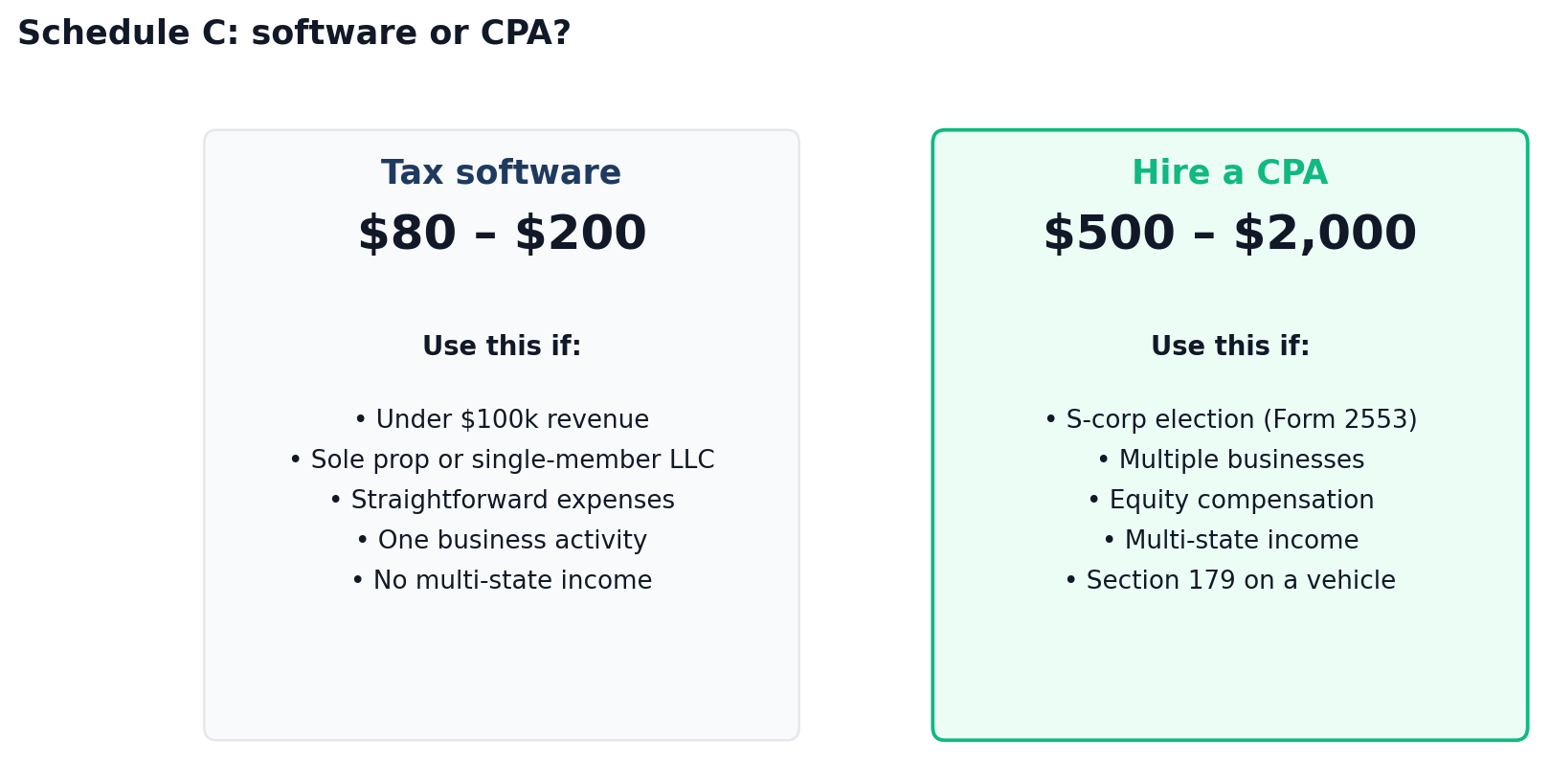
For most freelancers under $100,000 in revenue with straightforward expenses, decent tax software handles Schedule C well. FreshBooks, QuickBooks Solopreneur, FreeTaxUSA, TurboTax Self-Employed all walk you through the lines. Expect to pay $80 to $200. A CPA makes sense if you have an LLC with S-corp election, multiple businesses, equity compensation, multi-state income, or anything involving Section 179 on a vehicle. Expect $500 to $2,000.
When is Schedule C due?
April 15, 2026 for tax year 2025. Request a six-month automatic extension via Form 4868 and the filing deadline pushes to October 15, 2026. The extension is a filing extension, not a payment extension. Any tax you owe is still due April 15, 2026. Late payment triggers interest and penalties from that date.
What’s the most common Schedule C mistake?
Underreporting Line 1 income because the freelancer only added up the 1099s they received and forgot the cash, Stripe, PayPal, or Venmo payments that didn’t generate a 1099. The IRS automated matching system catches gaps between the 1099-NEC and 1099-K data it receives and what you report on Line 1. Match or beat the 1099 totals on Line 1, always.
This article is for informational purposes only and is not tax or legal advice. Tax law changes; figures used here reflect 2025 tax-year rules and the 2026 mileage rate as published by the IRS. Verify current numbers at IRS.gov before filing, and speak with a qualified CPA or enrolled agent for advice on your specific situation.
About the author
Gareth is an entrepreneur based in Dubai and the founder of AI Finance Tools for Freelancers. He’s not a CPA or a bookkeeper. He built this site because he couldn’t find honest, thorough reviews of AI finance tools written for freelancers. Every guide is researched from real user reviews, official IRS documentation, and expert sources.